1. บทนำ
Thank you for choosing the Generic Smart Multifunction Recliner Chair. This manual provides essential information for the safe assembly, operation, maintenance, and troubleshooting of your new recliner. Please read this manual thoroughly before use and retain it for future reference.

A blue upholstered recliner chair, featuring a plush design and a visible cable connection on the side, likely for a USB charging port or control.
2. คำแนะนำด้านความปลอดภัย
เพื่อให้การใช้งานปลอดภัยและป้องกันการบาดเจ็บหรือความเสียหาย โปรดปฏิบัติตามข้อควรปฏิบัติด้านความปลอดภัยดังต่อไปนี้:
- ห้ามเกินขีดจำกัดการรับน้ำหนักสูงสุดที่ 120 กก. (265 ปอนด์)
- ควรกันเด็กและสัตว์เลี้ยงให้ห่างจากส่วนที่เคลื่อนไหวได้ของเก้าอี้ปรับเอนได้
- Ensure adequate space around the chair for reclining to avoid obstruction or damage.
- Avoid placing liquids directly on the chair, especially near electrical components.
- ห้ามยืนบนเก้าอี้หรือใช้เก้าอี้เป็นบันได
- If the chair includes electrical components (e.g., USB port), ensure the power cord is not pinched or damaged. Disconnect from power when not in use or during cleaning.
- Do not attempt to disassemble or repair the chair yourself. Contact qualified personnel for service.
3. เนื้อหาบรรจุภัณฑ์
โปรดตรวจสอบให้แน่ใจว่ามีส่วนประกอบทั้งหมดอยู่ก่อนเริ่มประกอบ:
- Recliner Seat Base
- พนักพิง
- Armrests (if separate)
- Power Adapter (for USB port, if applicable)
- อุปกรณ์ประกอบ (สกรู แหวนรอง ประแจหกเหลี่ยม)
- คู่มือการใช้งาน
4. การติดตั้งและการประกอบ
Follow these steps to assemble your recliner chair:
- แกะส่วนประกอบ: นำชิ้นส่วนทั้งหมดออกจากบรรจุภัณฑ์อย่างระมัดระวัง วางชิ้นส่วนเหล่านั้นบนพื้นผิวที่นุ่มและสะอาดเพื่อป้องกันรอยขีดข่วน
- ติดพนักพิง: Align the metal brackets on the backrest with the receivers on the seat base. Slide the backrest down firmly until it locks into place. You may hear a click.
- Attach Armrests (if separate): If your model has separate armrests, attach them to the seat base using the provided hardware. Ensure all screws are tightened securely.
- เชื่อมต่อแหล่งจ่ายไฟ (ถ้ามี): If your chair includes a USB charging port or other electrical features, connect the power adapter to the chair's power input and then plug it into a wall outlet.
- การตรวจสอบขั้นสุดท้าย: ตรวจสอบให้แน่ใจว่าการเชื่อมต่อทั้งหมดแน่นหนาและเก้าอี้มีความมั่นคงก่อนใช้งาน
5. คู่มือการใช้งาน
5.1 ฟังก์ชั่นปรับเอน
This recliner features a manual reclining mechanism. To recline:
- หากต้องการเอนกาย: Lean back into the chair and push firmly on the backrest. The footrest will extend, and the backrest will recline.
- To Return Upright: Push down on the footrest with your legs while leaning forward. The footrest will retract, and the backrest will return to its upright position.
5.2 USB Charging Port (if applicable)
If your chair is equipped with a USB charging port:
- Locate the USB port, typically on the side of the chair.
- Plug your USB charging cable into the port to charge compatible devices.
- Ensure the chair is connected to a power source for the USB port to function.
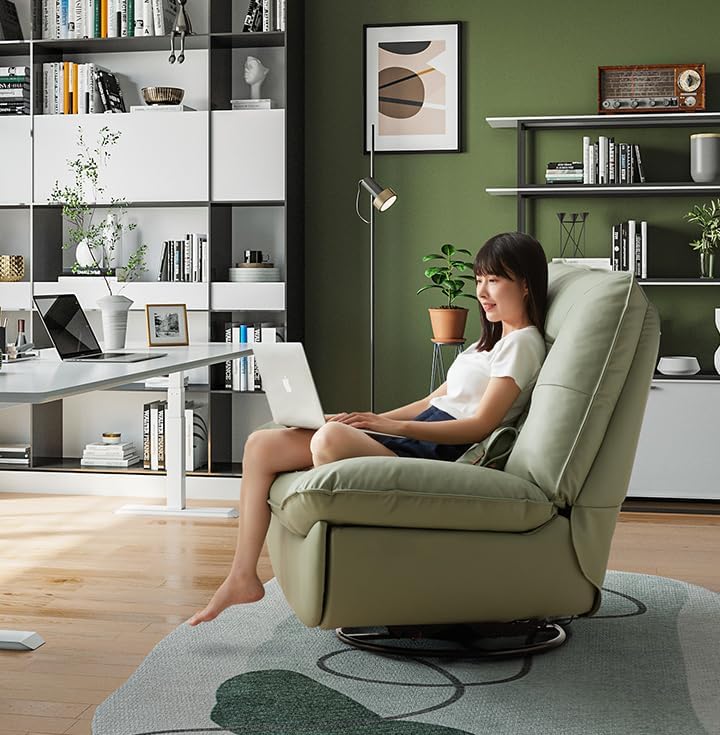
A person seated comfortably in the green recliner chair, using a laptop, highlighting the chair's ergonomic design suitable for work or leisure.

Two individuals relaxing together on the green recliner chair, showcasing its spaciousness and comfort for shared leisure.
6. การบำรุงรักษา
Proper care will extend the life and appearance of your recliner chair:
- การทำความสะอาด: For textile upholstery, vacuum regularly to remove dust and debris. For spills, blot immediately with a clean, dry cloth. For stubborn stains, use a mild fabric cleaner according to the product instructions, testing on an inconspicuous area first.
- กรอบ: ตรวจสอบน็อตและสกรูทั้งหมดเป็นระยะเพื่อให้แน่ใจว่าแน่นสนิท ขันให้แน่นอีกครั้งหากจำเป็น
- ชิ้นส่วนที่เคลื่อนไหว: The reclining mechanism is designed for smooth operation. Avoid forcing the mechanism. If it becomes stiff, a small amount of silicone-based lubricant can be applied to pivot points, avoiding contact with upholstery.
- หลีกเลี่ยงแสงแดดโดยตรง: Prolonged exposure to direct sunlight can cause fading of the upholstery.
7 การแก้ไขปัญหา
หากคุณพบปัญหาเกี่ยวกับเก้าอี้ปรับเอนได้ โปรดดูปัญหาและวิธีแก้ไขทั่วไปต่อไปนี้:
- เก้าอี้ปรับเอนไม่ราบรื่น:
- Check for any obstructions around or under the chair.
- ตรวจสอบให้แน่ใจว่าชิ้นส่วนประกอบทั้งหมดขันแน่นดีแล้ว
- Apply a small amount of silicone lubricant to the reclining mechanism's pivot points.
- USB port not charging:
- Verify that the chair's power adapter is securely plugged into both the chair and a working wall outlet.
- Test the USB port with a different device and cable to rule out device/cable issues.
- Check for any visible damage to the power cord or USB port.
- เก้าอี้โยกเยก:
- Ensure all assembly bolts and screws are tightened.
- Check that the chair is placed on a flat, even surface.
8. ข้อมูลจำเพาะ
| คุณสมบัติ | ข้อมูลจำเพาะ |
|---|---|
| ยี่ห้อ | ทั่วไป |
| ชื่อรุ่น | living-room-chairs |
| สี | สีน้ำเงินกรมท่า |
| วัสดุ | สิ่งทอ |
| ขนาดสินค้า (ลึก x กว้าง x สูง) | ลึก 43.3 นิ้ว x กว้าง 39.3 นิ้ว x สูง 39 นิ้ว |
| น้ำหนักสินค้า | 119 ปอนด์ |
| ความจุน้ำหนัก | 120 กก. / 265 ปอนด์ |

An infographic displaying the chair's dimensions and the recommended floor area for its placement, including examples for different room types like small apartments, study rooms, balconies, and game rooms.
9. การรับประกันและการสนับสนุน
For warranty information and customer support, please refer to the documentation provided at the time of purchase or contact your retailer directly. Keep your purchase receipt as proof of purchase.


