
1. บทนำ
This manual provides detailed instructions for the EBUYFIRE Smartwatch, model VC-T51F. Please read this manual carefully before using the device to ensure proper operation and to maximize its features. Keep this manual for future reference.
2. สินค้าหมดview
2.1 คุณสมบัติหลัก
- Bluetooth Calling: Make and receive calls directly from the watch.
- Health Monitoring: Continuous heart rate, SpO2 (blood oxygen), and sleep tracking. Includes alerts for very low/high heart rate.
- Activity Tracking: Over 100 multi-sport modes for various activities.
- Notifications: Synchronizes SMS and app messages (e.g., WhatsApp, Facebook).
- Customizable Watch Faces: Choose from over 100 watch faces.
- Voice Assistant: Integrated voice assistant functionality.
- Water Resistance: IP68 rating.
- Display: 1.38-inch full-touch screen.
- Battery: 280 mAh capacity, offering 5-7 days of typical use and over 20 days standby.
2.2 เนื้อหาบรรจุภัณฑ์
เมื่อเปิดบรรจุภัณฑ์ ตรวจสอบว่ามีสิ่งของครบทั้งหมด:
- EBUYFIRE Smartwatch (VC-T51F)
- สายชาร์จ
- คู่มือการใช้งาน
- Additional Strap (if included in your specific model variant)
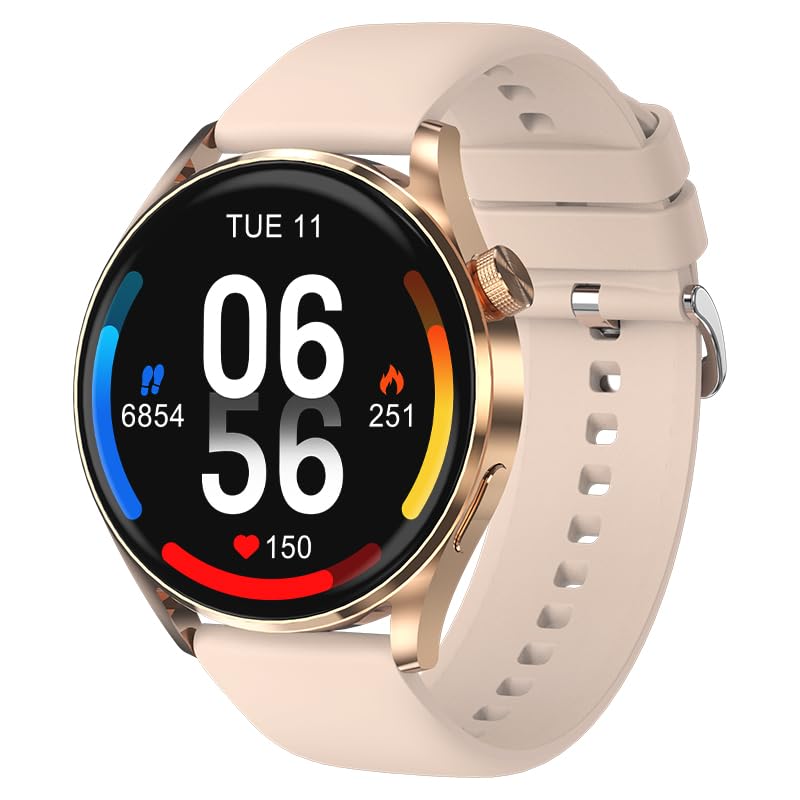
Image: EBUYFIRE Smartwatch VC-T51F. This image displays the smartwatch with its default strap, showcasing its round display and general design.
3. การตั้งค่า
3.1 การชาร์จสมาร์ทวอทช์
- เชื่อมต่อสายชาร์จแบบแม่เหล็กเข้ากับหน้าสัมผัสการชาร์จที่ด้านหลังของสมาร์ทวอทช์
- เสียบปลาย USB ของสายชาร์จเข้ากับอะแดปเตอร์แปลงไฟ USB มาตรฐาน (แนะนำ 5V/1A) หรือพอร์ต USB ของคอมพิวเตอร์
- หน้าจอของนาฬิกาจะแสดงไฟแสดงสถานะการชาร์จ โดยปกติการชาร์จเต็มจะใช้เวลาประมาณ 2 ชั่วโมง
ตรวจสอบให้แน่ใจว่าหน้าสัมผัสการชาร์จสะอาดและแห้งก่อนชาร์จเพื่อป้องกันการกัดกร่อน
3.2 การติดตั้งแอพ
The EBUYFIRE Smartwatch uses the กลอรี่ฟิต application for full functionality. You can download the app from:
- Apple App Store (สำหรับอุปกรณ์ iOS)
- Google Play Store (สำหรับอุปกรณ์ Android)
- Scan the QR code provided in the quick start guide (if available) or on the watch itself.
The app is compatible with Android 4.0+ and iOS 8.0+ devices.
3.3 การจับคู่อุปกรณ์
- ตรวจสอบให้แน่ใจว่าสมาร์ทวอทช์ของคุณชาร์จและเปิดอยู่
- เปิดใช้งานบลูทูธบนสมาร์ทโฟนของคุณ
- Open the Gloryfit app on your smartphone.
- ทำตามคำแนะนำในแอปเพื่อเพิ่มอุปกรณ์ใหม่ แอปจะค้นหาอุปกรณ์บลูทูธที่ใช้งานได้
- Select "VC-T51F" or a similar device name from the list to pair.
- ยืนยันคำขอจับคู่บนสมาร์ทโฟนและสมาร์ทวอทช์ของคุณหากได้รับแจ้ง
After successful pairing, the watch will synchronize data with the app, and you can customize settings.
4. คู่มือการใช้งาน
4.1 การนำทางพื้นฐาน
- ปัดขึ้น/ลง: นำทางผ่านเมนูและการแจ้งเตือน
- ปัดไปทางซ้าย/ขวา: เข้าถึงฟังก์ชันหรือวิดเจ็ตต่างๆ ได้อย่างรวดเร็ว
- แตะ: เลือกสินค้าหรือยืนยันการดำเนินการ
- ปุ่มด้านข้าง: กดเพื่อกลับไปยังหน้าจอหลักหรือปลุกหน้าจอ กดค้างไว้เพื่อดูตัวเลือกการปิดเครื่อง
การโทรบลูทูธ 4.2
Once paired, the smartwatch can make and receive calls:
- โทรออก: Access the dial pad or contact list on the watch. You can synchronize up to 100 contacts via the Gloryfit app.
- การรับสาย: เมื่อมีสายเรียกเข้า นาฬิกาจะแสดงหมายเลขผู้โทร แตะไอคอนสีเขียวเพื่อรับสาย หรือไอคอนสีแดงเพื่อปฏิเสธสาย
The watch features a built-in microphone and Hi-Fi speaker for clear communication.
4.3 การแจ้งเตือน
To receive SMS and app notifications (e.g., WhatsApp, Facebook, Instagram):
- Ensure the watch is connected to your smartphone via Bluetooth.
- Open the Gloryfit app and navigate to the "Notifications" or "Message Push" settings.
- Enable notifications for the desired applications.
- Grant necessary permissions to the Gloryfit app on your smartphone for notification access.
Notifications will appear on the watch screen, and you can swipe to view พวกเขา.
4.4 การตรวจติดตามสุขภาพ
- อัตราการเต้นของหัวใจ: นาฬิกาจะตรวจสอบอัตราการเต้นของหัวใจของคุณอย่างต่อเนื่อง View real-time data on the watch or detailed trends in the Gloryfit app. Alerts for very low or high heart rates can be set in the app.
- SpO2 (ออกซิเจนในเลือด): Measure your blood oxygen levels. Follow on-screen instructions for accurate readings.
- การติดตามการนอนหลับ: นาฬิกาจะติดตามรูปแบบการนอนหลับของคุณโดยอัตโนมัติ รวมถึงการนอนหลับลึก การนอนหลับตื้น และเวลาตื่นนอนview your sleep analysis in the Gloryfit app.
หมายเหตุ: อุปกรณ์นี้ไม่ใช่เครื่องมือแพทย์ ข้อมูลด้านสุขภาพใช้เพื่อการอ้างอิงเท่านั้น และไม่ควรนำไปใช้ในการวินิจฉัยหรือรักษาทางการแพทย์
โหมดกีฬา 4.5 โหมด
The smartwatch supports over 100 multi-sport modes, including running, cycling, walking, and more. To use a sports mode:
- Navigate to the "Sports" or "Workout" menu on the watch.
- เลือกกิจกรรมที่คุณต้องการ
- Tap to start the activity. The watch will record data such as duration, distance, heart rate, and calories burned.
- Tap to pause or long-press to end the activity.
Detailed workout summaries are available in the Gloryfit app.
4.6 ฟังก์ชั่นอื่น ๆ
- การควบคุมเพลง: ควบคุมการเล่นเพลงบนสมาร์ทโฟนของคุณ (เล่น หยุดชั่วคราว ข้ามเพลง)
- รีโมทกล้อง: ใช้สมาร์ทวอทช์เป็นรีโมทชัตเตอร์สำหรับกล้องสมาร์ทโฟนของคุณ
- พยากรณ์อากาศ: View สภาพอากาศปัจจุบันและพยากรณ์อากาศ (ต้องซิงค์ข้อมูลกับแอป)
- นาฬิกาปลุก: Set alarms via the Gloryfit app.
- นาฬิกาจับเวลา/จับเวลา: ฟังก์ชันการบอกเวลาพื้นฐาน
- ค้นหาหมายเลขโทรศัพท์: ค้นหาสมาร์ทโฟนที่เชื่อมต่ออยู่โดยการทำให้สมาร์ทโฟนส่งเสียงดัง
- ผู้ช่วยเสียง: Activate your smartphone's voice assistant directly from the watch.
5. การบำรุงรักษา
5.1 การทำความสะอาด
- เช็ดหน้าจอและตัวเรือนนาฬิกาด้วยผ้าที่ไม่เป็นขุยและนุ่ม
- สำหรับคราบฝังแน่นdampชุบผ้าให้เปียกหมาดๆ หลีกเลี่ยงการใช้สารเคมีรุนแรงหรือวัสดุที่มีฤทธิ์กัดกร่อน
- ทำความสะอาดจุดเชื่อมต่อการชาร์จเป็นประจำเพื่อให้แน่ใจว่าการชาร์จเป็นไปอย่างถูกต้อง
5.2 ความต้านทานน้ำ (IP68)
The EBUYFIRE Smartwatch is IP68 water-resistant, meaning it is protected against dust ingress and can withstand immersion in water up to 1.5 meters for up to 30 minutes. It is suitable for daily use, such as hand washing, rain, and light swimming.
Important: Avoid using the watch in hot water, saunas, or steam rooms, as steam can penetrate the seals and cause damage. Do not press buttons underwater.
6 การแก้ไขปัญหา
- นาฬิกาไม่เปิด: ตรวจสอบให้แน่ใจว่านาฬิกาชาร์จเต็มแล้ว เสียบนาฬิกาเข้ากับเครื่องชาร์จอย่างน้อย 10 นาที
- ไม่สามารถจับคู่กับสมาร์ทโฟนได้:
- ตรวจสอบให้แน่ใจว่าได้เปิดใช้งาน Bluetooth บนสมาร์ทโฟนของคุณแล้ว
- ตรวจสอบให้แน่ใจว่านาฬิกาอยู่ในระยะบลูทูธ (โดยทั่วไปคือ 10 เมตร)
- รีสตาร์ททั้งนาฬิกาและสมาร์ทโฟนของคุณ
- Clear Bluetooth cache on your phone (if applicable) or try unpairing and re-pairing.
- ไม่ได้รับการแจ้งเตือน:
- Check if notifications are enabled in the Gloryfit app for specific applications.
- Ensure the Gloryfit app has all necessary notification permissions on your smartphone.
- Verify that the watch is connected to the app.
- ข้อมูลสุขภาพที่ไม่ถูกต้อง: ตรวจสอบให้แน่ใจว่านาฬิกากระชับพอดีกับข้อมือ ไม่แน่นหรือหลวมเกินไป และรักษาความสะอาดของเซ็นเซอร์
- อายุการใช้งานแบตเตอรี่สั้น: Reduce screen brightness, disable unnecessary features, or check for background app activity.
If issues persist, consult the Gloryfit app's help section or contact EBUYFIRE customer support.
7. ข้อมูลจำเพาะ
| คุณสมบัติ | รายละเอียด |
|---|---|
| ชื่อรุ่น | VC-T51F |
| ยี่ห้อ | อีบายไฟร์ |
| ขนาดหน้าจอ | 1.38 นิ้ว |
| ระบบปฏิบัติการ | แอนดรอยด์ (ใช้งานได้กับ Android 4.0 ขึ้นไป และ iOS 8.0 ขึ้นไป) |
| การเชื่อมต่อ | บลูทูธ BT5.2 |
| ความต้านทานต่อน้ำ | IP68 |
| ความจุของแบตเตอรี่ | ลิเธียมโพลิเมอร์ 280 mAh |
| อายุการใช้งานแบตเตอรี่ | 5-7 days (typical use), >20 days (standby) |
| เวลาในการชาร์จ | ประมาณ 2 ชั่วโมง |
| ชื่อแอป | กลอรี่ฟิต |
| คุณสมบัติพิเศษ | Calendar, Notifications, Calorie Tracking, GPS (integrated) |
| วัสดุผลิตภัณฑ์ | Zinc alloy middle frame, plastic back case |
8. การรับประกันและการสนับสนุน
For warranty information, please refer to the documentation included with your purchase or contact your retailer. EBUYFIRE products typically come with a limited warranty covering manufacturing defects.
For technical support, troubleshooting assistance, or inquiries about your EBUYFIRE Smartwatch, please visit the official EBUYFIRE website or contact their customer service department. Contact details are usually available on the product packaging or the official webเว็บไซต์.