
C IDEA CM822
คู่มือผู้ใช้แท็บเล็ต Android อัจฉริยะ C IDEA CM822 ขนาด 8 นิ้ว
รุ่น : CM822
การแนะนำ
Thank you for choosing the C IDEA CM822 8-inch Smart Android Tablet. This manual provides essential information for setting up, operating, and maintaining your device. Please read it carefully to ensure optimal performance and longevity of your tablet.
ข้อมูลด้านความปลอดภัย
- อย่าให้แท็บเล็ตถูกอุณหภูมิที่สูงหรือต่ำเกินไป แสงแดดโดยตรง หรือความชื้นสูง
- ควรหลีกเลี่ยงการทำแท็บเล็ตตกหรือกระแทกอย่างรุนแรง
- ใช้ที่ชาร์จและอุปกรณ์เสริมที่ได้รับการรับรองจากผู้ผลิตเท่านั้น
- อย่าพยายามถอดประกอบหรือซ่อมแซมแท็บเล็ตด้วยตนเอง โปรดติดต่อช่างผู้ชำนาญการ
- เก็บแท็บเล็ตให้ห่างจากน้ำและของเหลวอื่นๆ
- ทิ้งแท็บเล็ตและแบตเตอรี่อย่างมีความรับผิดชอบตามกฎระเบียบท้องถิ่น
เนื้อหาแพ็คเกจ
กรุณาทำเครื่องหมายในช่องสำหรับรายการต่อไปนี้:
- C IDEA CM822 Tablet
- อะแดปเตอร์แปลงไฟ
- สายชาร์จ USB
- คู่มือการใช้งาน (เอกสารนี้)
- Note: Additional accessories such as a stylus or protective case may be included depending on the specific package.
ภาพ: The C IDEA CM822 tablet shown with its standard accessories including a charger, USB cable, and documentation. Other items like a stylus and drawing kit may be part of a bundle.
การจัดวางอุปกรณ์
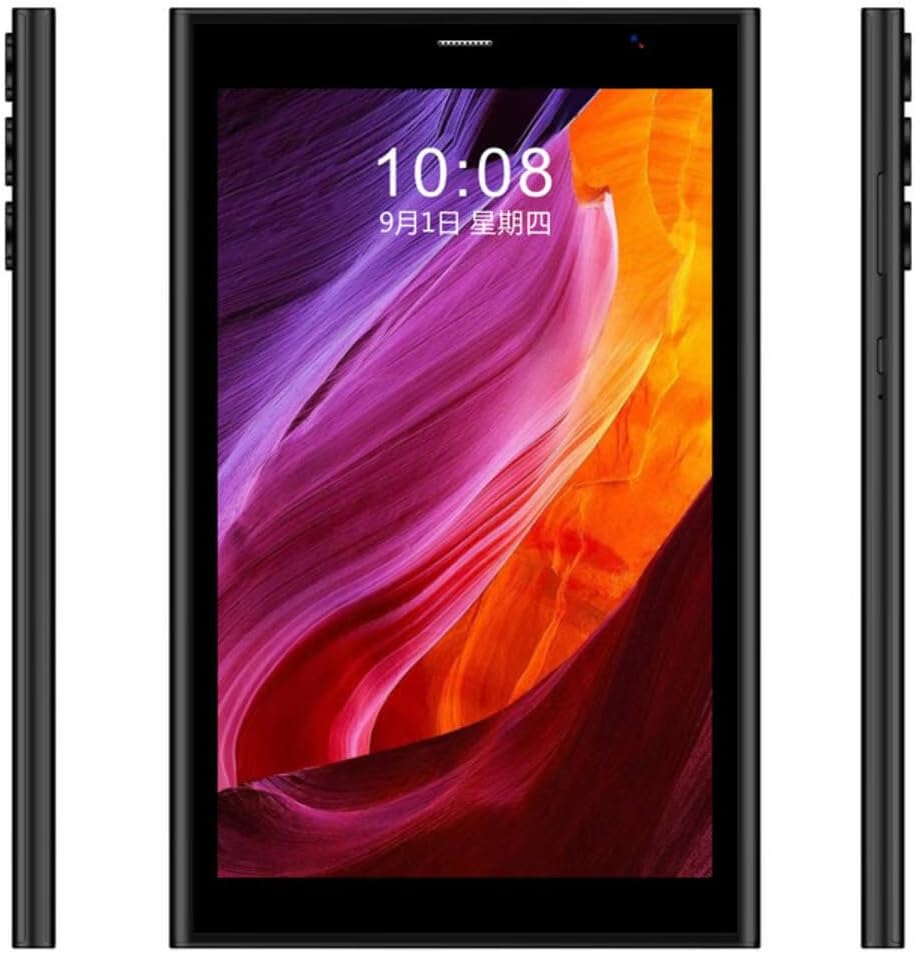
Familiarize yourself with the physical features of your C IDEA CM822 tablet.

ภาพ: ด้านหน้า view of the C IDEA CM822 tablet displaying the screen, and a rear view showing the multi-lens camera module and branding.

ภาพ: ด้านโปรfile of the C IDEA CM822 tablet, illustrating the placement of physical buttons (such as power and volume) and various ports.
- กล้องหน้า: Located above the screen, used for video calls and selfies.
- แสดง: 8-inch IPS Touch Screen LCD.
- ปุ่มเปิด/ปิด: Typically on the side, used to turn the tablet on/off or wake/sleep the screen.
- ปุ่มปรับระดับเสียง: Usually adjacent to the power button, for adjusting audio levels.
- กล้องหลัง: Located on the back, used for taking photos and videos.
- พอร์ต USB: สำหรับการชาร์จและถ่ายโอนข้อมูล
- ช่องใส่ซิมการ์ด/การ์ด SD: For inserting SIM cards for cellular connectivity and a microSD card for expandable storage.
การตั้งค่า
1. การชาร์จแท็บเล็ต
- Connect the USB charging cable to the tablet's USB port.
- เสียบปลายอีกด้านของสาย USB เข้ากับอะแดปเตอร์จ่ายไฟ
- เสียบอะแดปเตอร์ไฟฟ้าเข้ากับเต้ารับไฟฟ้าที่ผนัง
- โปรดปล่อยให้แท็บเล็ตชาร์จจนเต็มก่อนใช้งานครั้งแรก ตัวแสดงสถานะแบตเตอรี่บนหน้าจอจะแสดงสถานะการชาร์จ
2. การใส่ซิมและการ์ด SD
The CM822 supports Dual SIM and expandable storage via an SD card.
- Locate the SIM/SD card slot on the side of the tablet.
- ใช้เครื่องมือถอดซิมการ์ดที่ให้มา (ถ้ามี) เพื่อเปิดถาดใส่ซิมการ์ด
- Carefully place your SIM card(s) and/or microSD card into the designated slots on the tray. Ensure correct orientation.
- ค่อยๆ ดันถาดกลับเข้าไปในแท็บเล็ตจนกระทั่งล็อคเข้าที่
3. การเปิดเครื่องครั้งแรกและการตั้งค่า
- Press and hold the Power button until the C IDEA logo appears on the screen.
- Follow the on-screen prompts to complete the initial setup, which includes selecting your language, connecting to a Wi-Fi network, and signing in with your Google account.
การใช้งานแท็บเล็ต
การนำทางพื้นฐาน
- แตะ: สัมผัสหน้าจอหนึ่งครั้งเพื่อเลือกรายการหรือเปิดแอปพลิเคชัน
- แตะค้างไว้: Press and hold an item to access contextual menus or move icons.
- ปัด: ลากนิ้วของคุณบนหน้าจอเพื่อเลื่อนดูหน้าต่างๆ หรือรายการต่างๆ
- หยิก: ใช้สองนิ้วเพื่อซูมเข้าหรือออกจากรูปภาพและ web หน้า
การเชื่อมต่อกับเครือข่าย
- ไวไฟ : ไปที่ การตั้งค่า > เครือข่ายและอินเทอร์เน็ต > Wi-Fiเปิด Wi-Fi และเลือกเครือข่ายที่คุณต้องการ ป้อนรหัสผ่านหากระบบถาม
- บลูทูธ: ไปที่ การตั้งค่า > อุปกรณ์ที่เชื่อมต่อ > บลูทูธ. เปิดบลูทูธและจับคู่กับอุปกรณ์ที่มีอยู่
- โทรศัพท์มือถือ (5G): Ensure your SIM card is correctly inserted. Go to การตั้งค่า > เครือข่ายและอินเทอร์เน็ต > เครือข่ายมือถือ to configure data settings.
การใช้กล้อง
แท็บเล็ตนี้มีกล้องหน้า 5 ล้านพิกเซลและกล้องหลัง 8 ล้านพิกเซล
- เปิดแอปพลิเคชันกล้องจากหน้าจอหลักหรือลิ้นชักแอป
- แตะไอคอนกล้องเพื่อสลับระหว่างกล้องหน้าและกล้องหลัง
- แตะปุ่มชัตเตอร์เพื่อถ่ายภาพหรือเริ่ม/หยุดการบันทึกวิดีโอ
การปลดล็อคด้วยใบหน้า
The CM822 supports Face Unlock for convenient security.
- ไปที่ การตั้งค่า > ความปลอดภัยและความเป็นส่วนตัว > ปลดล็อกอุปกรณ์ > ปลดล็อกด้วยใบหน้า.
- ปฏิบัติตามคำแนะนำบนหน้าจอเพื่อลงทะเบียนใบหน้าของคุณ
- Ensure good lighting conditions when using Face Unlock.
การซ่อมบำรุง
- การทำความสะอาด: Use a soft, lint-free cloth to clean the screen and body of the tablet. Avoid abrasive materials or chemical cleaners.
- การอัปเดตซอฟต์แวร์: Regularly check for system updates via การตั้งค่า > ระบบ > อัปเดตระบบ to ensure your tablet has the latest features and security patches.
- การดูแลแบตเตอรี่ To prolong battery life, avoid fully discharging the battery frequently. Charge the tablet when the battery level is low.
- การจัดการพื้นที่เก็บข้อมูล: ล้างสิ่งที่ไม่จำเป็นออกเป็นระยะๆ fileและแอปต่างๆ เพื่อรักษาประสิทธิภาพการทำงานให้เหมาะสมที่สุด
การแก้ไขปัญหา
| ปัญหา | วิธีแก้ปัญหาที่เป็นไปได้ |
|---|---|
| แท็บเล็ตไม่เปิด | ตรวจสอบให้แน่ใจว่าแบตเตอรี่ชาร์จเต็มแล้ว เสียบที่ชาร์จและรอสักครู่ก่อนลองเปิดเครื่องอีกครั้ง |
| หน้าจอไม่ตอบสนอง | Restart the tablet by pressing and holding the Power button for about 10-15 seconds. If unresponsive, force restart by holding Power and Volume Down buttons simultaneously (method may vary). |
| ไม่สามารถเชื่อมต่อ Wi-Fi ได้ | ตรวจสอบว่าเปิดใช้งาน Wi-Fi ในการตั้งค่าแล้วหรือไม่ ตรวจสอบให้แน่ใจว่ารหัสผ่านถูกต้อง รีสตาร์ทเราเตอร์ Wi-Fi และแท็บเล็ตของคุณ |
| แอปขัดข้องหรือทำงานช้า | Close background applications. Clear app cache (Settings > Apps > [App Name] > Storage & cache > Clear cache). Restart the tablet. |
| Face Unlock is not working. | Ensure you are in a well-lit environment. Re-register your face in the security settings. Clean the front camera lens. |
ข้อมูลจำเพาะ
| คุณสมบัติ | รายละเอียด |
|---|---|
| ยี่ห้อ | C IDEA |
| แบบอย่าง | CM822 |
| ระบบปฏิบัติการ | แอนดรอยด์ |
| ขนาดหน้าจอ | 8 นิ้ว |
| ความละเอียดหน้าจอ | 1920 x 1080 พิกเซล |
| แรม | 8GB |
| การจัดเก็บข้อมูลภายใน | 256GB |
| กล้องหน้า | 5 MP |
| กล้องหลัง | 8 MP |
| การเชื่อมต่อเครือข่าย | 5G, Wi-Fi (802.11ac), Bluetooth, Cellular |
| คุณสมบัติพิเศษ | Dual SIM, IPS Touch Screen LCD, Face Unlock |
| ยี่ห้อโปรเซสเซอร์ | มีเดียเทค |
| ยี่ห้อชิปเซ็ตกราฟิก | แขน |
การรับประกันและการสนับสนุน
For warranty information and technical support, please refer to the warranty card included in your package or contact your retailer. Keep your proof of purchase for warranty claims.
Ask a question about this manual
Ask about setup, troubleshooting, compatibility, parts, safety, or missing instructions. Manuals+ will review the question and use this page’s manual context to help answer it.