
1. บทนำ
This manual provides comprehensive instructions for the setup, operation, maintenance, and troubleshooting of your EDJO Ergonomic Wireless Keyboard. Designed for comfort and efficiency, this keyboard features a split layout, cushioned wrist rest, and versatile connectivity options to enhance your typing experience across multiple devices.
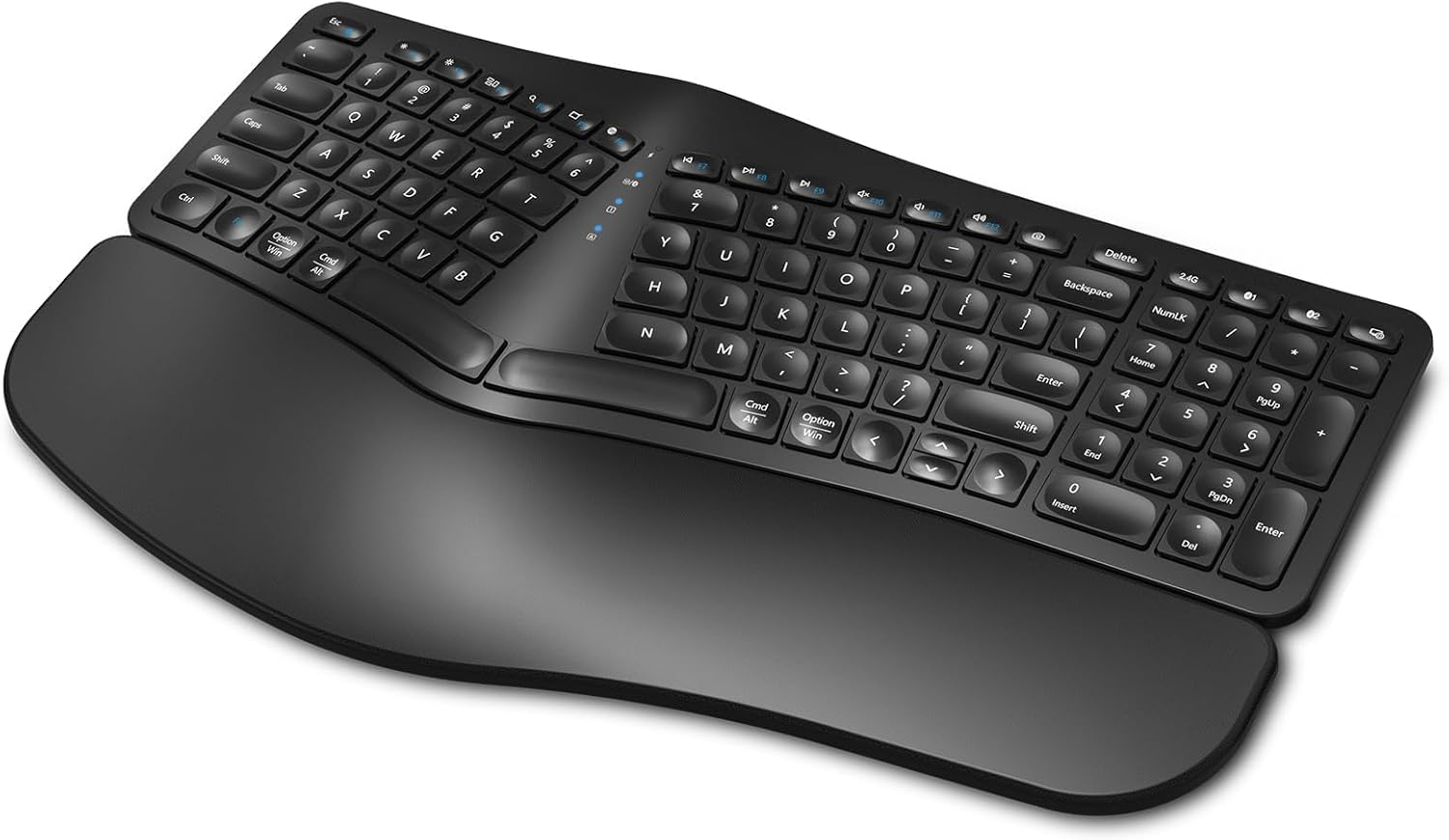
Figure 1: EDJO Ergonomic Wireless Keyboard
2. เนื้อหาบรรจุภัณฑ์
ตรวจสอบว่ามีรายการทั้งหมดอยู่ในแพ็คเกจ:
- EDJO Ergonomic Wireless Keyboard
- สายชาร์จ USB-C
- 2.4G USB Wireless Receiver (stored on the back of the keyboard)
- คู่มือการใช้งาน (เอกสารนี้)
3. สินค้าหมดview
The EDJO Ergonomic Wireless Keyboard is engineered for user comfort and multi-device functionality. Key features include:
- การออกแบบแยกส่วนตามหลักสรีรศาสตร์: A curved layout and split key zones promote a natural hand and wrist posture, reducing strain during extended use.
- ที่รองข้อมือแบบนุ่ม: An integrated soft pillow palm rest provides support, minimizing wrist flexion.
- การเชื่อมต่อไร้สายแบบคู่: Seamlessly switch between 2.4G wireless (via USB receiver) and two Bluetooth channels (BT1, BT2) for up to three devices.
- แบตเตอรี่แบบชาร์จไฟได้: Built-in 500mAh battery, rechargeable via USB-C, offering extended usage time.
- พิมพ์เงียบ: Scissor switches and drop-like keycaps ensure a silent and responsive typing experience.
- ปุ่มลัดมัลติมีเดีย: 12 dedicated hotkeys for quick access to common functions.
- Adjustable Stands: Four foldable stands allow for customizable keyboard tilt.
Video 1: EDJO Ergonomic Wireless Keyboard Overview
4. การตั้งค่า
4.1. การชาร์จคีย์บอร์ด
Before first use, it is recommended to fully charge the keyboard. Connect the provided USB-C charging cable to the charging port located on the top edge of the keyboard and to a USB power source. The charging indicator light will show the charging status.

Figure 2: USB-C Charging Port and Power Switch
4.2. การเชื่อมต่อไร้สาย 2.4G
For a stable and fast connection to your computer:
- Locate the 2.4G USB wireless receiver stored in the compartment on the back of the keyboard.
- เสียบตัวรับสัญญาณ USB เข้ากับพอร์ต USB ที่พร้อมใช้งานบนคอมพิวเตอร์ของคุณ
- Turn on the keyboard using the power switch on the top edge.
- Press the '2.4G' button on the keyboard. The corresponding indicator light will illuminate, confirming the connection.

Figure 3: USB Receiver Location and Adjustable Stands
4.3. Bluetooth Connection (BT1, BT2)
The keyboard supports two Bluetooth connections (BT1 and BT2) for multi-device pairing:
- เปิดแป้นพิมพ์โดยใช้สวิตช์เปิด/ปิด
- กดปุ่ม 'BT1' หรือ 'BT2' ค้างไว้ 3-5 วินาที จนกว่าไฟแสดงสถานะที่เกี่ยวข้องจะกะพริบเร็ว ซึ่งแสดงว่าเข้าสู่โหมดจับคู่แล้ว
- บนอุปกรณ์ของคุณ (พีซี แล็ปท็อป แท็บเล็ต สมาร์ทโฟน) เปิดใช้งานบลูทูธและค้นหาอุปกรณ์ที่ใช้งานได้
- Select 'K960' (or similar name) from the list of found devices to pair.
- Once paired, the indicator light will stop flashing and remain steadily lit.
- Repeat steps 2-5 to pair a second Bluetooth device using the other 'BT' button.
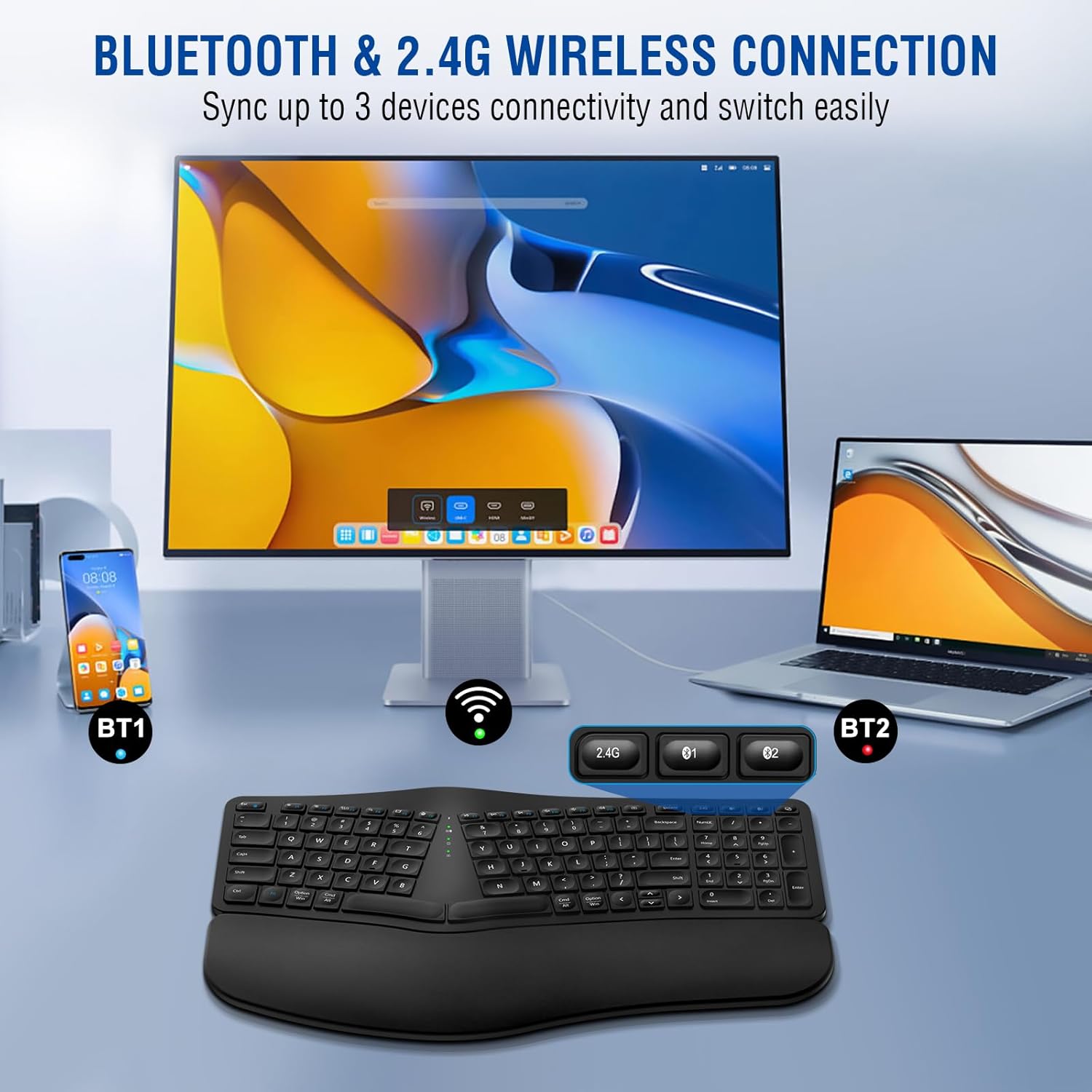
Figure 4: Multi-Device Connectivity via Bluetooth and 2.4G
5. การดำเนินการ
5.1. เปิด/ปิดเครื่อง
To turn the keyboard on or off, use the dedicated power switch located on the top edge of the keyboard (refer to Figure 2).
5.2 การสลับระหว่างอุปกรณ์
To switch between connected devices (2.4G, BT1, BT2), simply press the corresponding button ('2.4G', 'BT1', or 'BT2') on the keyboard. The keyboard will connect to the selected device within a few seconds.
5.3. ปุ่มลัดมัลติมีเดีย
The keyboard features 12 multimedia hotkeys (F1-F12) that provide quick access to various functions. These functions may vary slightly depending on your operating system. Common functions include:
- Volume Control (Mute, Down, Up)
- Media Playback (Play/Pause, Previous, Next)
- Web Browser, Email, Search
- ล็อคหน้าจอ

Figure 5: Silent Key Design with Scissor Switches
5.4. การปรับมุมของแป้นพิมพ์
The keyboard is equipped with four foldable stands on its underside. You can deploy these stands to adjust the tilt of the keyboard to your preferred ergonomic angle, promoting a more comfortable typing posture (refer to Figure 3).
6. การบำรุงรักษา
เพื่อให้คีย์บอร์ดของคุณใช้งานได้ยาวนานและทำงานได้อย่างมีประสิทธิภาพสูงสุด:
- การทำความสะอาด: ใช้ผ้าแห้งนุ่มๆ เช็ดทำความสะอาดพื้นผิวแป้นพิมพ์ สำหรับคราบสกปรกฝังแน่น ให้ใช้ผ้าชุบน้ำหมาดๆ เช็ดเบาๆamp cloth with mild soap can be used, ensuring no liquid enters the keycaps or internal components.
- พื้นที่จัดเก็บ: เก็บแป้นพิมพ์ไว้ในที่แห้งและเย็น หลีกเลี่ยงแสงแดดโดยตรงและอุณหภูมิที่สูงหรือต่ำเกินไป
- การดูแลแบตเตอรี่ Avoid fully discharging the battery frequently. Charge the keyboard when the low battery indicator appears.
7 การแก้ไขปัญหา
| ปัญหา | สาเหตุที่เป็นไปได้ | สารละลาย |
|---|---|---|
| แป้นพิมพ์ไม่ตอบสนอง | Low battery; Keyboard off; Incorrect connection mode; USB receiver not plugged in (2.4G) | Charge keyboard; Turn keyboard on; Select correct mode (2.4G, BT1, BT2); Plug in USB receiver |
| การจับคู่บลูทูธล้มเหลว | Keyboard not in pairing mode; Device Bluetooth off; Interference | Press and hold BT button until light flashes; Ensure device Bluetooth is on; Move closer to device, reduce interference |
| แป้นพิมพ์พิมพ์ไม่ถูกต้อง | Connection issue; Software conflict | Reconnect keyboard; Restart device; Test on another device |
| อายุการใช้งานแบตเตอรี่สั้น | Frequent use; Battery degradation | Ensure full charge; Keyboard enters sleep mode after 30 mins of inactivity to save power. Press any key to reactivate. |
8. ข้อมูลจำเพาะ
| คุณสมบัติ | รายละเอียด |
|---|---|
| แบบอย่าง | B0CNT6GP41 |
| การเชื่อมต่อ | 2.4G ไร้สาย, บลูทูธ (BT1, BT2) |
| ความจุของแบตเตอรี่ | ลิเธียมไออน 500mAh (รวมอยู่ด้วย) |
| พอร์ตชาร์จ | ยูเอสบี-ซี |
| ระยะการทำงาน | สูงถึง 10 เมตร (33 ฟุต) |
| เค้าโครงแป้นพิมพ์ | Ergonomic Split Design, Full-sized with Numeric Keypad |
| ประเภทกุญแจ | Scissor Switches, Drop-like Keycaps |
| ที่วางข้อมือ | Cushioned (Soft Synthetic Leather, High-density Foam, Memory Foam) |
| ความเข้ากันได้ | Windows, Mac, Android, iOS (Laptop, PC, Smartphone, Tablet, Television) |
| ขนาดสินค้า | 17.24 x 10.51 x 1.81 นิ้ว |
| น้ำหนักสินค้า | 2.86 ปอนด์ |
| ส่วนประกอบที่รวมอยู่ | สาย USB |

Figure 6: Cushioned Wrist Rest Construction

รูปที่ 7: ความเข้ากันได้ของอุปกรณ์ที่หลากหลาย
9. การรับประกันและการสนับสนุน
The EDJO Ergonomic Wireless Keyboard comes with a รับประกัน 12 เดือน from the date of purchase. For any issues or inquiries, please contact EDJO customer support via Amazon email. We are committed to providing lifetime support for our products.
For further assistance, please refer to the contact information provided with your purchase or on the official EDJO product page.