
คำแนะนำด้านความปลอดภัยที่สำคัญ
- อ่านคำแนะนำทั้งหมดอย่างละเอียดก่อนใช้ผลิตภัณฑ์
- เก็บคู่มือนี้ไว้เพื่อใช้อ้างอิงในอนาคต
- Do not expose the instrument to rain or moisture to prevent fire or electric shock.
- อย่าปิดกั้นช่องระบายอากาศใดๆ ติดตั้งตามคำแนะนำของผู้ผลิต
- ใช้เฉพาะอุปกรณ์เสริม/สิ่งที่แนบที่ผู้ผลิตกำหนดเท่านั้น
- ถอดปลั๊กเครื่องในระหว่างที่มีพายุฝนฟ้าคะนองหรือเมื่อไม่ได้ใช้งานเป็นเวลานาน
- ส่งต่อการบริการทั้งหมดไปยังบุคลากรบริการที่มีคุณสมบัติเหมาะสม
เนื้อหาแพ็คเกจ
ตรวจสอบว่าสินค้าทั้งหมดที่ระบุไว้ด้านล่างนี้รวมอยู่ในแพ็คเกจของคุณแล้ว หากมีสินค้าใดสูญหายหรือเสียหาย โปรดติดต่อฝ่ายสนับสนุนลูกค้า
- Starfavor SP-88S Digital Piano Keyboard
- Piano Stand (X-style)
- ซัสเทนเพดัล
- กระเป๋าใส่ของ
- หูฟัง
- ผู้ถือเพลง
- Book Clip
- Piano Key Stickers
- คู่มือการใช้งาน (เอกสารนี้)
- ผ้าเช็ดทำความสะอาด
- อะแดปเตอร์แปลงไฟ
- สาย USB

Image: The Starfavor SP-88S digital piano keyboard displayed with all its included accessories, such as the stand, sustain pedal, headphones, music holder, carrying bag, and power adapter.
คู่มือการติดตั้ง
1. การประกอบขาตั้ง
- Unfold the X-style piano stand to its desired height. Ensure the locking mechanism is securely engaged.
- Place the Starfavor SP-88S keyboard securely on top of the stand.
2. Connecting the Piano
- การเชื่อมต่อไฟฟ้า: Connect the power adapter to the DC IN port on the back of the keyboard and then plug it into a wall outlet.
- เหยียบคันเร่ง: Insert the sustain pedal cable into the 'Sustain Pedal Jack' on the rear panel.
- หูฟัง: For private practice, plug the included headphones into the 'Headphone Jack'.
- Music Holder: Insert the music holder into the designated slots on the top panel of the keyboard.

Image: The Starfavor SP-88S digital piano keyboard set up on its stand, with the music holder in place and various accessories laid out, illustrating a complete setup.
คำแนะนำการใช้งาน
1. การเปิด/ปิดเครื่อง
กดปุ่ม เปิด/ปิด button located on the control panel to power the keyboard on or off.
2. ปรับระดับเสียง
หมุน ปุ่มปรับระดับเสียง to increase or decrease the overall sound level.
3. Selecting Tones and Rhythms
- กดปุ่ม โทนเสียง button, then use the number keys or +/- buttons to select from 198 available timbres.
- กดปุ่ม จังหวะ button, then use the number keys or +/- buttons to select from 198 available rhythms.
4. Using Metronome
กดปุ่ม เครื่องเมตรอนอม button to activate the metronome. Press again to cycle through different time signatures or turn off.
5. การบันทึกและการเล่น
The keyboard features a recording function. Consult the detailed instructions in the included user manual for specific steps on how to record and play back your performances.
6. การเชื่อมต่อบลูทูธ
Activate Bluetooth on your external device (phone, tablet). On the keyboard, ensure Bluetooth is enabled (refer to the main manual for specific button presses). Select 'Starfavor SP-88S' from your device's Bluetooth list to pair. This allows you to play along with music from your device.
7. USB MIDI Functionality
Connect the keyboard to a computer or other MIDI-compatible device using the USB cable. The keyboard will function as a MIDI controller, allowing you to use music software for recording, composing, and learning.

ภาพ: ภาพระยะใกล้ view of the Starfavor SP-88S digital piano's control panel, showing the various buttons and display for functions like tone, rhythm, metronome, and power.
คุณสมบัติมากกว่าview
- คีย์แบบกึ่งถ่วงน้ำหนัก 88 คีย์: Provides a realistic playing feel similar to an acoustic piano.
- เสียงประสาน 128 โน้ต: Allows for complex musical passages without notes cutting off.
- 198 Timbres & 198 Rhythms: A wide selection of sounds and accompaniment styles.
- 80 เพลงสาธิต: Pre-loaded songs for listening and learning.
- ฟังก์ชั่นการบันทึก: จับและบันทึกview ผลงานของคุณ
- Metronome & Transpose: Essential tools for practice and performance.
- Bluetooth & USB MIDI: Versatile connectivity for modern music production and learning.
- การออกแบบพกพา: Lightweight (11 lbs) and slim (2.36 inches thick) for easy transport.
- แบตเตอรี่แบบชาร์จไฟได้: Built-in lithium battery provides over 10 hours of playtime on a single charge.

Image: A person's hands playing the full-size 88 semi-weighted keys of the Starfavor SP-88S digital piano, demonstrating its realistic touch.
ตัวเลือกการเชื่อมต่อ
The Starfavor SP-88S offers a range of ports for various connections:
| ท่าเรือ | การทำงาน |
|---|---|
| แจ็คหูฟัง (3.5mm) | For connecting headphones for private practice. |
| แจ็ค Aux Out | สำหรับการเชื่อมต่อกับภายนอก ampเครื่องขยายเสียง หรือ ลำโพง |
| แจ็คไฟ (DC IN) | สำหรับการเชื่อมต่ออะแดปเตอร์ไฟฟ้า |
| แจ็คไมโครโฟน | สำหรับการเชื่อมต่อไมโครโฟน |
| แจ็ค MP3 | For connecting an external audio player. |
| Sustain Pedal Jack (Single) | For connecting a single sustain pedal. |
| แจ็คเหยียบสามชั้น | For connecting a triple pedal unit (if applicable). |
| MIDI Jack (USB MIDI) | For connecting to a computer or other MIDI devices. |
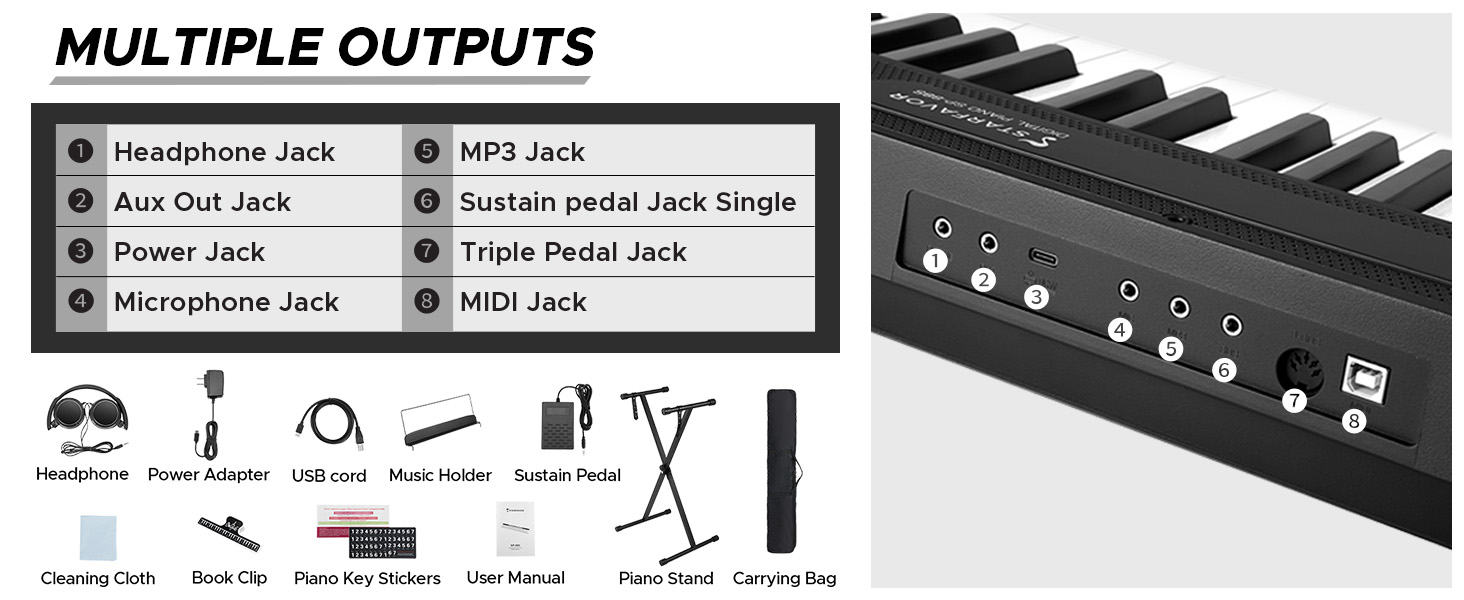
Image: A visual diagram illustrating the various input and output ports available on the Starfavor SP-88S digital piano, including headphone, Aux, power, microphone, MP3, sustain pedal, triple pedal, and MIDI jacks.
การซ่อมบำรุง
- การทำความสะอาด: Use the provided cleaning cloth or a soft, dry cloth to wipe the surface of the keyboard. Do not use abrasive cleaners, waxes, or solvents.
- พื้นที่จัดเก็บ: When not in use, store the keyboard in its carrying bag to protect it from dust and moisture. Avoid storing in direct sunlight or extreme temperatures.
- การดูแลแบตเตอรี่ For optimal battery life, fully charge the keyboard before its first use. If storing for an extended period, charge the battery periodically to prevent deep discharge.
การแก้ไขปัญหา
หากคุณพบปัญหาใดๆ โปรดดูตารางด้านล่างเพื่อดูปัญหาทั่วไปและวิธีแก้ไข
| ปัญหา | สาเหตุที่เป็นไปได้ | สารละลาย |
|---|---|---|
| ไม่มีเสียง | ระดับเสียงเบาเกินไป; ต่อหูฟังแล้ว; มีปัญหาเรื่องไฟเลี้ยง | Increase volume; disconnect headphones; check power adapter connection or battery charge. |
| กุญแจไม่ตอบสนอง | Keyboard not powered on; internal malfunction. | Ensure power is on; if problem persists, contact customer support. |
| บลูทูธไม่เชื่อมต่อ | Bluetooth not enabled on device/keyboard; device too far. | Ensure Bluetooth is active on both devices; move devices closer; try re-pairing. |
| คันเหยียบซัสเทนไม่ทำงาน | Pedal not connected properly; faulty pedal. | Ensure pedal is fully inserted into the correct jack; test with another pedal if available. |
ข้อมูลจำเพาะ
| คุณสมบัติ | รายละเอียด |
|---|---|
| ชื่อรุ่น | เอสพี-88เอส |
| จำนวนคีย์ | 88 |
| ประเภทกุญแจ | Full-size Semi-Weighted |
| โพลีโฟนี | 128-โน้ต |
| ทิมเบรส | 198 |
| จังหวะ | 198 |
| เพลงสาธิต | 80 |
| การเชื่อมต่อ | Bluetooth, USB MIDI, Headphone Jack, Aux Out, Microphone, MP3, Sustain Pedal, Triple Pedal |
| แหล่งพลังงาน | Battery Powered (Lithium Battery) / Power Adapter |
| อายุการใช้งานแบตเตอรี่ | ใช้งานได้นานกว่า 10 ชั่วโมงต่อการชาร์จหนึ่งครั้ง |
| น้ำหนักสินค้า | 15.4 ปอนด์ (7 กิโลกรัม) |
| ขนาดสินค้า | 55.31 x 14.96 x 4.53 นิ้ว |
| สี | สีดำ |
การรับประกันและการสนับสนุน
Starfavor products are designed for reliability and performance. This product comes with a standard manufacturer's warranty against defects in materials and workmanship. The specific terms and duration of your warranty may vary by region and purchase date.
For detailed warranty information, technical support, or service inquiries, please refer to the official Starfavor website or contact their customer service department directly. Please have your product model number (SP-88S) and proof of purchase ready when contacting support.
การสนับสนุนทางออนไลน์: เยี่ยมชม Starfavor Store on Amazon สำหรับข้อมูลผลิตภัณฑ์และทรัพยากรสนับสนุน