
DonosHome DH300
DonosHome DH300 OBD2 Auto Diagnostic Scanner User Manual
รุ่น: DH300
1. บทนำ
The DonosHome DH300 is an innovative, multi-function OBD2 code reader designed to be one of the most accurate and economical vehicle diagnostic tools available. It helps users easily determine the cause of the Check Engine Light (MIL) and provides comprehensive information on vehicle health and performance. This manual provides detailed instructions for the proper use and maintenance of your DH300 scanner.

Figure 1.1: DonosHome DH300 OBD2 Scanner and its retail packaging, highlighting key features.
2. ข้อควรระวังเพื่อความปลอดภัย
Please read this user manual carefully and follow the warnings and precautions below before use, to avoid the possibility of personal injury or damage to the vehicle and/or the device:
- Do not smoke, light matches, or cause sparks near the vehicle during operation.
- Do not come into contact with hot engine parts to avoid severe burns, especially when the engine is running.
- Do not use this tool while driving.
- Always wear appropriate eye protection when working on vehicles.
- Ensure the vehicle is in a well-ventilated area when running the engine.
3. เนื้อหาบรรจุภัณฑ์
เมื่อเปิดกล่อง โปรดตรวจสอบว่าสินค้าทั้งหมดที่ระบุไว้ด้านล่างครบถ้วนและอยู่ในสภาพดี:
- 1 x DonosHome DH300 OBD2 Scanner
- 1 x คู่มือผู้ใช้ (เอกสารนี้)
- 1 x กล่องบรรจุภัณฑ์

Figure 3.1: The package includes the OBD2 scanner, user manual, and package box.
4. คุณสมบัติของผลิตภัณฑ์
The DonosHome DH300 OBD2 scanner is equipped with a variety of features designed for comprehensive vehicle diagnostics:
- Check Engine Light (MIL) Management: Easily determine the cause, turn off the light, clear codes, and reset monitors.
- คำจำกัดความ DTC: Displays Diagnostic Trouble Code definitions directly on the screen.
- ตรึงข้อมูลเฟรม: View ภาพถ่ายแสดงสภาพรถขณะที่ตรวจพบรหัสข้อผิดพลาด
- สถานะความพร้อม I/M: Check monitor and I/M readiness status for emissions testing.
- รหัสที่รอดำเนินการ: Identify codes that have not yet triggered the MIL.
- Real-time PCM Data Stream: Read live data from the Powertrain Control Module.
- O2 Sensor Test Data: Display real-time O2 sensor test results.
- การสร้างกราฟข้อมูล: Visualize live data for easier analysis.
- การเล่นข้อมูล: Read, store, and playback real-time sensor data, DTC data, and freeze frame data.
- Test Modules: Perform present test modules.
- การดึงข้อมูลยานพาหนะ: Retrieve VIN (Vehicle Identification Number), CIN (Calibration Identification Number), and CVN (Calibration Verification Number).
- รองรับโปรโตคอล: รองรับ CAN (Controller Area Network) และโปรโตคอล OBD2 ปัจจุบันอื่นๆ ทั้งหมด
- ไลบรารี DTC ในตัว: Integrated OBD2 DTC lookup library for quick reference.
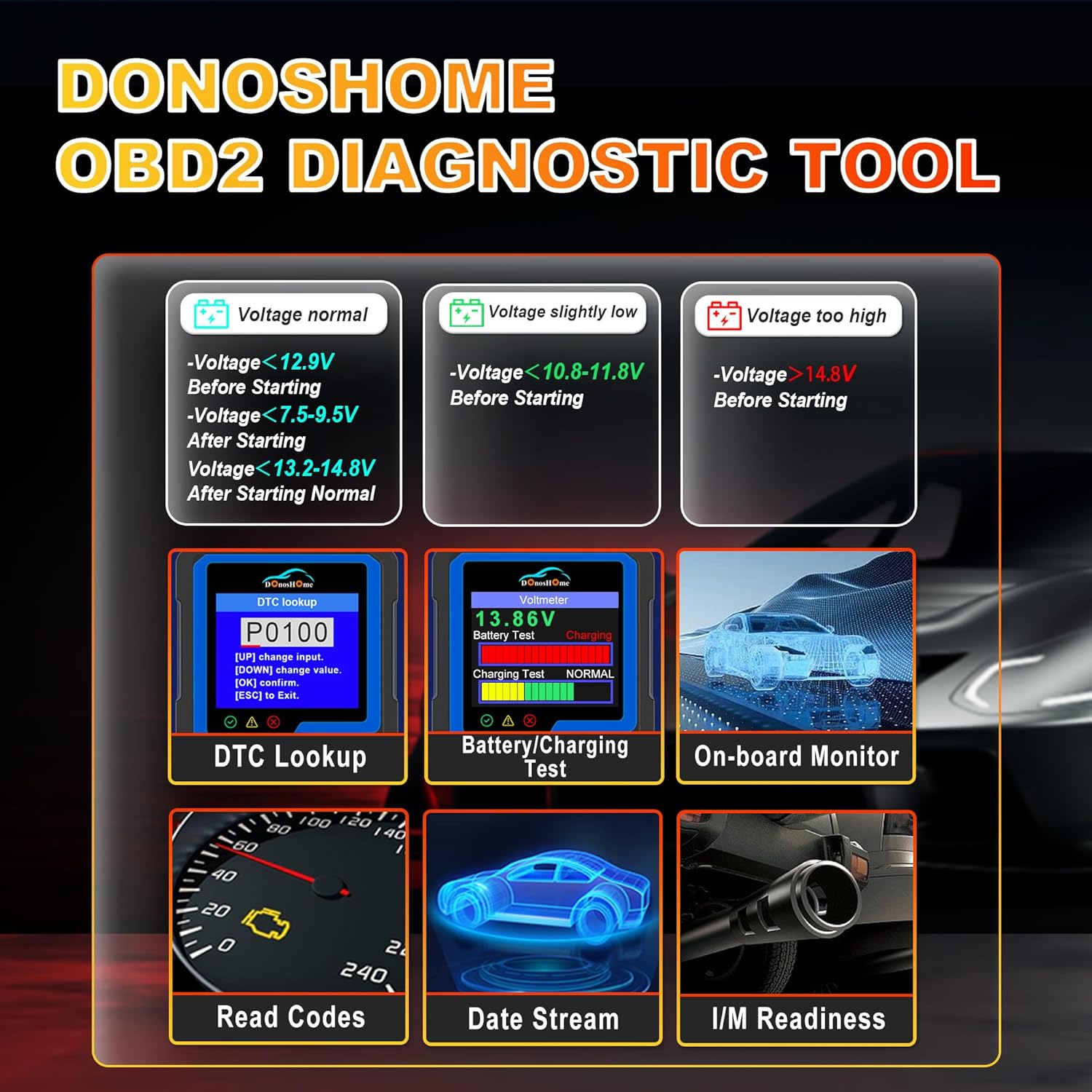
- Voltmeter Function: ทดสอบปริมาตรแบตเตอรี่tagระบบอิเล็กทรอนิกส์และระบบชาร์จไฟ
- Waveform Graphing: Starting waveform graph and real-time waveform graph.
- รองรับหลายภาษา: 10 built-in languages (English, German, Spanish, French, Italian, Dutch, Finnish, Polish, Portuguese, Russian).
- การออกแบบตามหลักสรีรศาสตร์: Color screen, plug-and-play operation, powered directly by the vehicle.
- ตัวบ่งชี้ความผิดพลาด: Red, yellow, and green LED indicators for quick fault status.

Figure 4.1: Key diagnostic functions of the DonosHome DH300.

Figure 4.2: Innovative design with LED indicators and multilingual support.

Figure 4.3: Multilingual interface and broad vehicle compatibility.
5. การตั้งค่าและการเชื่อมต่อ
The DH300 scanner is designed for simple plug-and-play operation. Follow these steps to connect the device to your vehicle:
- ค้นหาพอร์ต OBD2: พอร์ต OBD2 โดยทั่วไปจะอยู่ใต้แผงหน้าปัดด้านคนขับ มักอยู่ใกล้กับคอลัมน์พวงมาลัย หากหาไม่เจอ โปรดดูคู่มือการใช้งานรถของคุณ
- Connect the OBD2 Plug: Firmly insert the DH300's OBD2 connector into the vehicle's OBD2 port. The device will power on automatically.
- สตาร์ทเครื่องยนต์: Turn the vehicle's ignition to the "ON" position or start the engine. The scanner will establish communication with the vehicle's ECU.
- เริ่มการวินิจฉัย: Once connected and powered, the scanner is ready for use.
รูปที่ 5.1: ขั้นตอนการเชื่อมต่อแบบเสียบปลั๊กและใช้งานได้ง่าย
6. คู่มือการใช้งาน
The DH300 features a user-friendly interface with a color screen and five buttons: Up, Down, OK, ESC, and I/M. Navigate through menus using the Up/Down buttons, confirm selections with OK, and go back with ESC. The I/M button provides quick access to readiness status.
6.1. Reading and Clearing Trouble Codes (DTCs)
To read and clear Diagnostic Trouble Codes:
- จากเมนูหลัก เลือก "วินิจฉัย" และกด OK.
- Navigate to "Read Codes" and press OK. The scanner will display any stored, pending, or permanent codes.
- To clear codes, select "Erase Codes" from the diagnostic menu and press OK. Confirm the action when prompted. This will turn off the Check Engine Light.

Figure 6.1: DTC Lookup function and examples of error codes.
6.2. I/M Readiness Quick Start
The I/M Readiness function allows you to quickly check the status of emission-related monitors, which is crucial for smog tests.
- กดปุ่มเฉพาะ ฉัน button on the scanner for a quick check.
- Alternatively, navigate to "I/M Readiness" from the main menu.
- The screen will display the status of various monitors (e.g., MIL, MIS, FUE, CCM, CAT, HCAT, O2S, EVAP, AIR, HRT, EGR) indicating whether they are "OK" (completed), "X" (not completed), or "N/A" (not applicable).

Figure 6.2: I/M Readiness Quick Start screen.
6.3. Voltmeter and Battery Test
The DH300 includes a voltmeter function to test your vehicle's battery and charging system.
- From the main menu, select "Voltmeter" and press OK.
- The screen will display the current battery voltage and charging status (e.g., Normal, Charging).
- Interpret the results based on the provided guidelines:
- เล่มที่tage normal: >12.9V Before Starting, >13.2-14.8V After Starting.
- เล่มที่tage slightly low: <12.9V Before Starting, <13.2V After Starting.
- เล่มที่tagอีต่ำเกินไป: <10.8-11.8V Before Starting.
- เล่มที่tagสูงเกินไป: >14.8V After Starting.

Figure 6.3: Voltmeter and Battery Test interface.
6.4. สตรีมข้อมูลสด
View real-time sensor data from your vehicle's engine. This can help diagnose intermittent problems or verify repairs.
- From the main menu, select "Diagnose" and then "Live Data".
- The scanner will display various parameters such as engine RPM, vehicle speed, coolant temperature, O2 sensor readings, etc.
- Use the Up/Down buttons to scroll through the data. Some parameters can be graphed for better visualization.
6.5. Other Diagnostic Functions
The DH300 offers additional diagnostic capabilities:
- การทดสอบเซ็นเซอร์ O2: Access results of the oxygen sensor monitor tests.
- การทดสอบระบบ EVAP: เริ่มการทดสอบระบบควบคุมการปล่อยไอระเหย
- การทดสอบจอภาพออนบอร์ด: View results of on-board diagnostic monitoring tests for specific components/systems.
- ดึงข้อมูลหมายเลข VIN: Get vehicle information including VIN, CIN, and CVN.
- Review ประวัติศาสตร์: Access previously stored diagnostic data.
7. การบำรุงรักษา
To ensure the longevity and optimal performance of your DonosHome DH300 scanner:
- การทำความสะอาด: ใช้ผ้านุ่มและแห้งเช็ดทำความสะอาดภายนอกเครื่องสแกนเนอร์ ห้ามใช้น้ำยาทำความสะอาดที่มีฤทธิ์กัดกร่อนหรือตัวทำละลาย
- พื้นที่จัดเก็บ: เก็บอุปกรณ์ไว้ในสภาพแวดล้อมที่สะอาดและแห้ง หลีกเลี่ยงอุณหภูมิที่สูงและแสงแดดโดยตรง
- การดูแลสายเคเบิล: Avoid bending or crimping the OBD2 cable excessively. Always grasp the connector, not the cable, when plugging or unplugging.
- การอัปเดตซอฟต์แวร์: ตรวจสอบของผู้ผลิต website periodically for any available software updates to ensure compatibility with newer vehicles and improved functionality.
8 การแก้ไขปัญหา
If you encounter issues while using your DH300 scanner, refer to the following common problems and solutions:
| ปัญหา | สาเหตุที่เป็นไปได้ | สารละลาย |
|---|---|---|
| เครื่องสแกนเนอร์ไม่สามารถเปิดเครื่องได้ |
|
|
| ข้อความ "ข้อผิดพลาดลิงค์" หรือ "ข้อผิดพลาดในการสื่อสาร" |
|
|
| ไม่สามารถล้างโค้ดได้ |
|
|
9. ข้อมูลจำเพาะ
| คุณลักษณะ | รายละเอียด |
|---|---|
| ยี่ห้อ | โดโนสโฮม |
| แบบอย่าง | DH-300 |
| น้ำหนักสินค้า | 191 กรัม |
| ขนาดสินค้า (กว้าง x ยาว x สูง) | 8 x 5 x 15 ซม. |
| แหล่งพลังงาน | Corded Electric (Vehicle OBD2 port) |
| ขนาดหน้าจอ | 3.2 นิ้ว |
| ความละเอียดการแสดงผล | ขนาด 320x240 |
| โปรโตคอลที่รองรับ | CAN and all other current OBD2 protocols |
| ภาษาที่รองรับ | English, German, Spanish, French, Italian, Dutch, Finnish, Polish, Portuguese, Russian |
| ความเข้ากันได้ | American vehicles after 1996, European vehicles after 2003, Asian vehicles after 2008 |
10. การรับประกันและการสนับสนุน
DonosHome provides excellent after-sales service, including a รับประกัน 2 ปี and professional technical support for the DH300 OBD2 Auto Diagnostic Scanner.
For technical assistance, warranty claims, or any other inquiries, please contact DonosHome customer service. Refer to the contact information provided with your purchase or on the official DonosHome webเว็บไซต์.
Ask a question about this manual
Ask about setup, troubleshooting, compatibility, parts, safety, or missing instructions. Manuals+ will review the question and use this page’s manual context to help answer it.