
1. บทนำ
The TYLT Folio Trio is a versatile 3-in-1 magnetic foldable wireless charging station designed to power your iPhone (12 series and newer), AirPods, and Apple Watch simultaneously. Its compact, foldable design makes it ideal for travel and everyday use. This manual provides essential instructions for setup, operation, maintenance, and troubleshooting to ensure optimal performance of your device.
2. เนื้อหาบรรจุภัณฑ์
- TYLT Folio Trio 3-in-1 Wireless Charger
- สายชาร์จ USB-C เป็น USB-C
- คู่มือการใช้งาน (เอกสารนี้)
Note: An Apple Watch charging cable is required for Apple Watch charging and is not included in the package.
3. สินค้าหมดview
The TYLT Folio Trio features a unique foldable design with three distinct charging pads for your devices.

Figure 3.1: TYLT Folio Trio charger in its compact, folded state.

Figure 3.2: TYLT Folio Trio charger fully unfolded, showing the three charging pads.
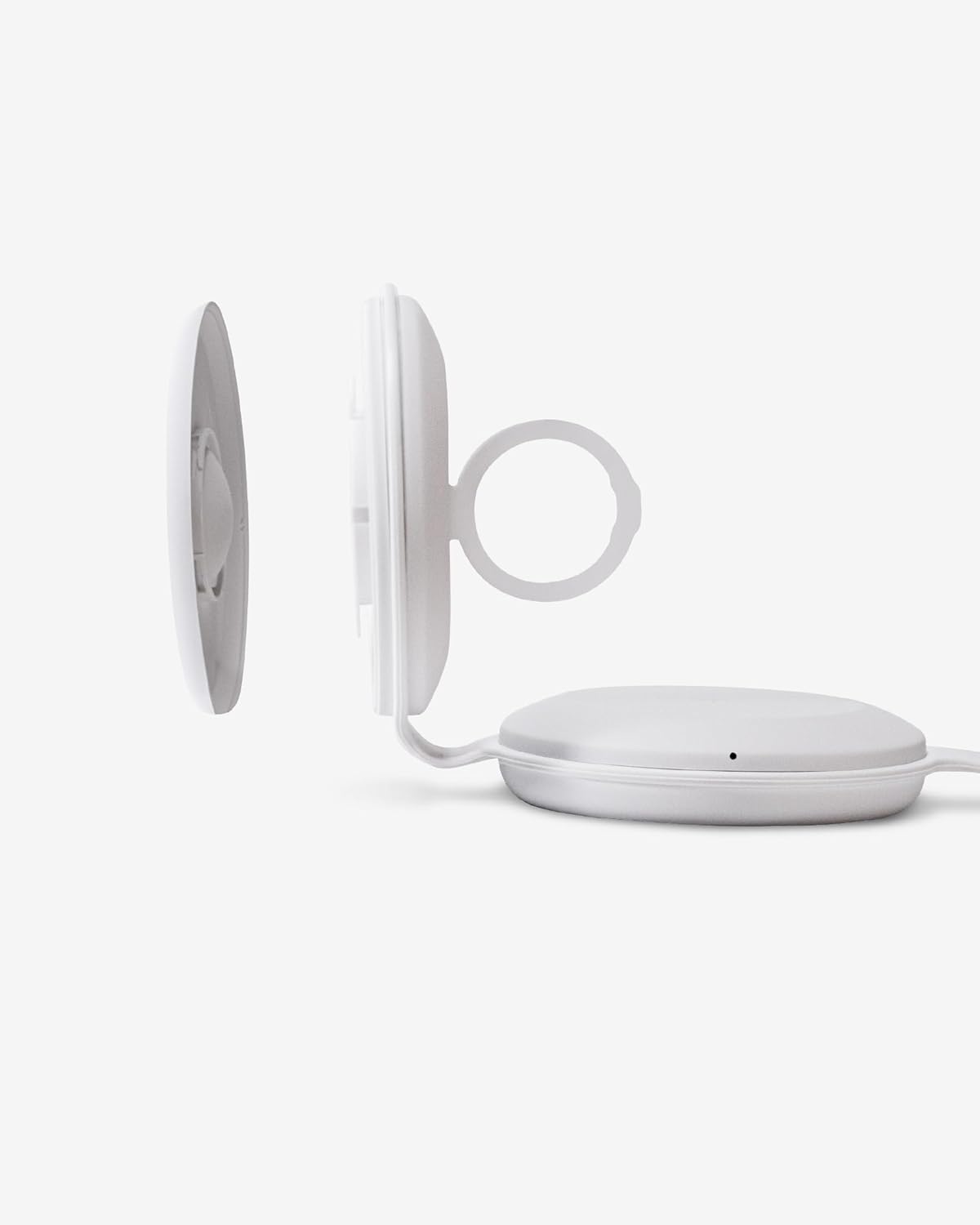
รูปที่ 3.3: ระยะใกล้ view of the Apple Watch charging module, detached to show the internal cable routing.

Figure 3.4: TYLT Folio Trio charger in use, simultaneously charging an iPhone, AirPods, and an Apple Watch.
4. คำแนะนำในการตั้งค่า
- การเชื่อมต่อไฟฟ้า: Connect the provided USB-C to USB-C cable to the charging port on the TYLT Folio Trio. Connect the other end of the cable to a compatible USB-C power adapter (not included) with a minimum output of 15W for optimal performance.
- Apple Watch Cable Installation:
- Gently detach the Apple Watch charging module from the main unit.
- Carefully route your own Apple Watch charging cable (not included) into the designated channel within the module.
- Ensure the charging puck is securely seated in the module and the cable is properly aligned to avoid damage.
- Reattach the Apple Watch charging module to the main unit.
This step is crucial for Apple Watch charging functionality as the necessary cable is user-supplied.
- กางเครื่องชาร์จออก: Unfold the TYLT Folio Trio to its desired configuration. It can be laid flat or used in a stand mode.
5. คู่มือการใช้งาน
Once the charger is powered on and unfolded, you can begin charging your devices.
- การชาร์จ iPhone: Place your MagSafe-compatible iPhone (iPhone 12 series or newer) onto the magnetic charging pad. The phone will snap into place, and charging will begin automatically. The LED indicator on the charger will illuminate to confirm charging.
- ชาร์จแอร์พอด: Place your AirPods (with wireless charging case) onto the designated wireless charging pad. Ensure the AirPods case is centered on the pad for effective charging. The LED indicator will confirm charging.
- การชาร์จ Apple Watch: Place your Apple Watch onto the installed Apple Watch charging puck. Ensure it is properly aligned. The LED indicator will confirm charging.
ไฟ LED แสดงสถานะ: The charger features LED indicators that provide status updates:
- สีขาวทึบ: กำลังชาร์จอุปกรณ์
- กระพริบสีขาว: Foreign object detected or device is not properly aligned. Remove the object or reposition the device.
- ปิด: No device detected or charging is complete.
6. การบำรุงรักษา
- การทำความสะอาด: Disconnect the charger from power before cleaning. Use a soft, dry cloth to wipe the surface. Avoid using abrasive cleaners, solvents, or harsh chemicals.
- พื้นที่จัดเก็บ: เมื่อไม่ได้ใช้งาน ให้พับเครื่องชาร์จให้มีขนาดกะทัดรัด และเก็บไว้ในที่แห้งและเย็น หลีกเลี่ยงแสงแดดโดยตรงและอุณหภูมิที่สูงหรือต่ำมาก
- การจัดการ: หลีกเลี่ยงการทำที่ชาร์จตกหรือการกระแทกอย่างรุนแรง ห้ามถอดประกอบหรือดัดแปลงอุปกรณ์ด้วยตนเอง
7 การแก้ไขปัญหา
- อุปกรณ์ไม่ชาร์จ:
- ตรวจสอบให้แน่ใจว่าเครื่องชาร์จเชื่อมต่อกับแหล่งจ่ายไฟอย่างถูกต้อง
- Verify that your device is compatible with wireless charging and is correctly aligned on the charging pad.
- ถอดเคสโทรศัพท์หนาๆ หรือวัตถุโลหะใดๆ ที่อาจขัดขวางการชาร์จออก
- Check the LED indicator for flashing white light, indicating a foreign object or misalignment.
- Apple Watch ชาร์จไฟไม่เข้า:
- Confirm that your own Apple Watch charging cable is correctly installed within the Apple Watch module as per Section 4.2.
- Ensure the Apple Watch is properly seated on its charging puck.
- Verify the Apple Watch cable itself is functional when used independently.
- การชาร์จช้า:
- Ensure you are using a power adapter with sufficient wattage (at least 15W recommended).
- Avoid using your device while it is charging, as this can slow down the process.
8. ข้อมูลจำเพาะ
| คุณสมบัติ | ข้อมูลจำเพาะ |
|---|---|
| หมายเลขรุ่น | QITRIOMSW-T |
| ขนาดสินค้า | 4 x 1.5 x 5 นิ้ว |
| น้ำหนักสินค้า | 10.6 ออนซ์ |
| วัดtage | 15 วัตต์ |
| Ampอีเรจ | 5 Amps |
| ตรงตามข้อกำหนด | Qi |
| อุปกรณ์ที่รองรับ | iPhone 12 series and newer (MagSafe), AirPods with wireless charging case, Apple Watch (with user-supplied cable) |
9. การรับประกันและการสนับสนุน
TYLT products are designed for reliability and performance. This product is covered by a limited manufacturer's warranty against defects in materials and workmanship. Please refer to the warranty card included with your purchase or visit the official TYLT webเว็บไซต์สำหรับข้อกำหนดและเงื่อนไขการรับประกันโดยละเอียด
For technical support, troubleshooting assistance, or warranty claims, please contact TYLT customer service through their official webเว็บไซต์หรือข้อมูลติดต่อที่ระบุไว้ในเอกสารผลิตภัณฑ์ของคุณ