การแนะนำ
ยินดีต้อนรับ
Thank you for choosing the Renimer BK11 Bluetooth 5.3 Wireless Earbuds. This manual provides detailed instructions for the proper setup, operation, and maintenance of your new earbuds. Please read this guide thoroughly before use to ensure optimal performance and longevity of your device.
เนื้อหาแพ็คเกจ
- Renimer BK11 Wireless Earbuds
- เคสชาร์จไฟ
- สายชาร์จ USB-C
- คู่มือการใช้งาน
- จุกหูฟัง S/M/L
สินค้าเกินview
แผนภาพหูฟังและเคสชาร์จ
Familiarize yourself with the components of your Renimer BK11 earbuds and charging case.

This image displays the Renimer BK11 wireless earbuds placed inside their charging case. The case features an LED display showing "100" and battery indicators, suggesting a full charge. The earbuds themselves have a sleek, dark design with a blue indicator light and a fingerprint-like icon on the touch control area. Model number BK11 and FCC ID are visible on the inside of the case.
การควบคุมแบบสัมผัส
The earbuds feature touch-sensitive controls for various functions. The exact touch areas are indicated by the fingerprint icon on each earbud.
- แตะเพียงครั้งเดียว: เล่น/หยุดเพลง, รับ/วางสายโทรศัพท์
- Double tap (Right earbud): เพลงถัดไป
- Double tap (Left earbud): เพลงก่อนหน้า.
- Triple tap (Right earbud): เพิ่มระดับเสียง
- Triple tap (Left earbud): ลดเสียงลง.
- กดค้าง (ประมาณ 2 วินาที): Activate voice assistant, Reject an incoming call.
การตั้งค่า
การชาร์จหูฟังเอียร์บัดและเคส
ก่อนใช้งานครั้งแรก โปรดชาร์จหูฟังและเคสชาร์จให้เต็ม เพื่อให้มั่นใจได้ว่าแบตเตอรี่จะใช้งานได้นานที่สุด

This image illustrates the Renimer BK11 charging case being charged via a USB-C cable. The case's LED display shows the battery level, indicating the charging status.
- Connect the provided USB-C cable to the charging port on the case and to a standard USB power adapter (not included).
- The LED display on the case will indicate the charging status and current battery percentage.
- การชาร์จเคสจนเต็มใช้เวลาประมาณ 1.5 ชั่วโมง
- The earbuds provide 6-8 hours of playtime on a single charge.
- The 350 mAh charging case provides multiple recharges, extending total playtime up to 40 hours.
จับคู่บลูทู ธ
Follow these steps to pair your Renimer BK11 earbuds with your device.
This image illustrates the Bluetooth pairing process, showing a smartphone's Bluetooth settings with "BK11" listed as an available device to connect to. The Renimer BK11 charging case and earbuds are also visible.
การจับคู่เบื้องต้น
- ตรวจสอบให้แน่ใจว่าได้ชาร์จหูฟังเอียร์บัดทั้งสองข้างแล้ว
- เปิดกล่องชาร์จ หูฟังจะเปิดอัตโนมัติและเข้าสู่โหมดจับคู่
- บนอุปกรณ์ของคุณ (สมาร์ทโฟน แท็บเล็ต คอมพิวเตอร์ ฯลฯ) เปิดใช้งานบลูทูธ
- ค้นหา "BK11" in the list of available Bluetooth devices and select it to connect.
- เมื่อเชื่อมต่อแล้ว จะมีเสียงแจ้งเตือนยืนยันการจับคู่สำเร็จ
การเชื่อมต่อใหม่อีกครั้ง
Once paired, the earbuds will automatically reconnect to the last paired device when taken out of the charging case, provided Bluetooth is enabled on the device and it is within range.
กำลังรีเซ็ตหูฟังเอียร์บัด
If you experience pairing issues or only one earbud is connecting, you can reset the earbuds:
- ใส่หูฟังเอียร์บัดทั้งสองกลับเข้าไปในกล่องชาร์จ
- Close the case lid and wait for approximately 5 seconds.
- Open the case lid again. The earbuds should re-synchronize and enter pairing mode.
- If issues persist, try forgetting "BK11" from your device's Bluetooth list and repeat the initial pairing process.
คำแนะนำการใช้งาน
การสวมหูฟัง
For optimal sound quality, comfort, and secure fit, choose the correct eartip size.

This image highlights the ergonomic design of the Renimer BK11 earbuds, showing how they fit securely in the ear. It also displays three sizes of soft silicone eartips (S/M/L) to ensure a comfortable and secure fit for different users.
- Select the eartips (S/M/L) that provide the best seal and comfort for your ears.
- Gently insert the earbuds into your ear canal and twist slightly to secure them in place.
ฟังก์ชั่นการโทร
The earbuds feature CVC8.0 noise reduction and 4 microphones (ENC Mic, Talk Mic) for clear phone calls, minimizing background noise.

This image details the noise-cancelling capabilities, showing the placement of ENC (Environmental Noise Cancellation) and Talk microphones on the earbuds. A graph demonstrates the reduction of noise frequencies "Before" and "After" processing, indicating clearer phone calls.
- รับ/วางสาย: แตะเพียงครั้งเดียวที่หูฟังข้างใดข้างหนึ่ง
- ปฏิเสธสาย: Long press either earbud for approximately 2 seconds.
การเล่นเพลง
Control your music directly from the earbuds.
- เล่น/หยุดชั่วคราว: แตะเพียงครั้งเดียวที่หูฟังข้างใดข้างหนึ่ง
- เพลงถัดไป: แตะที่หูฟังด้านขวาสองครั้ง
- แทร็กก่อนหน้า: แตะที่หูฟังด้านซ้ายสองครั้ง
- ปรับระดับเสียงขึ้น: แตะสามครั้งที่เอียร์บัดด้านขวา
- ลดเสียงลง: แตะสามครั้งที่หูฟังข้างซ้าย
คุณภาพเสียง
The Renimer BK11 earbuds feature 14.2mm drivers for excellent HiFi sound reproduction.
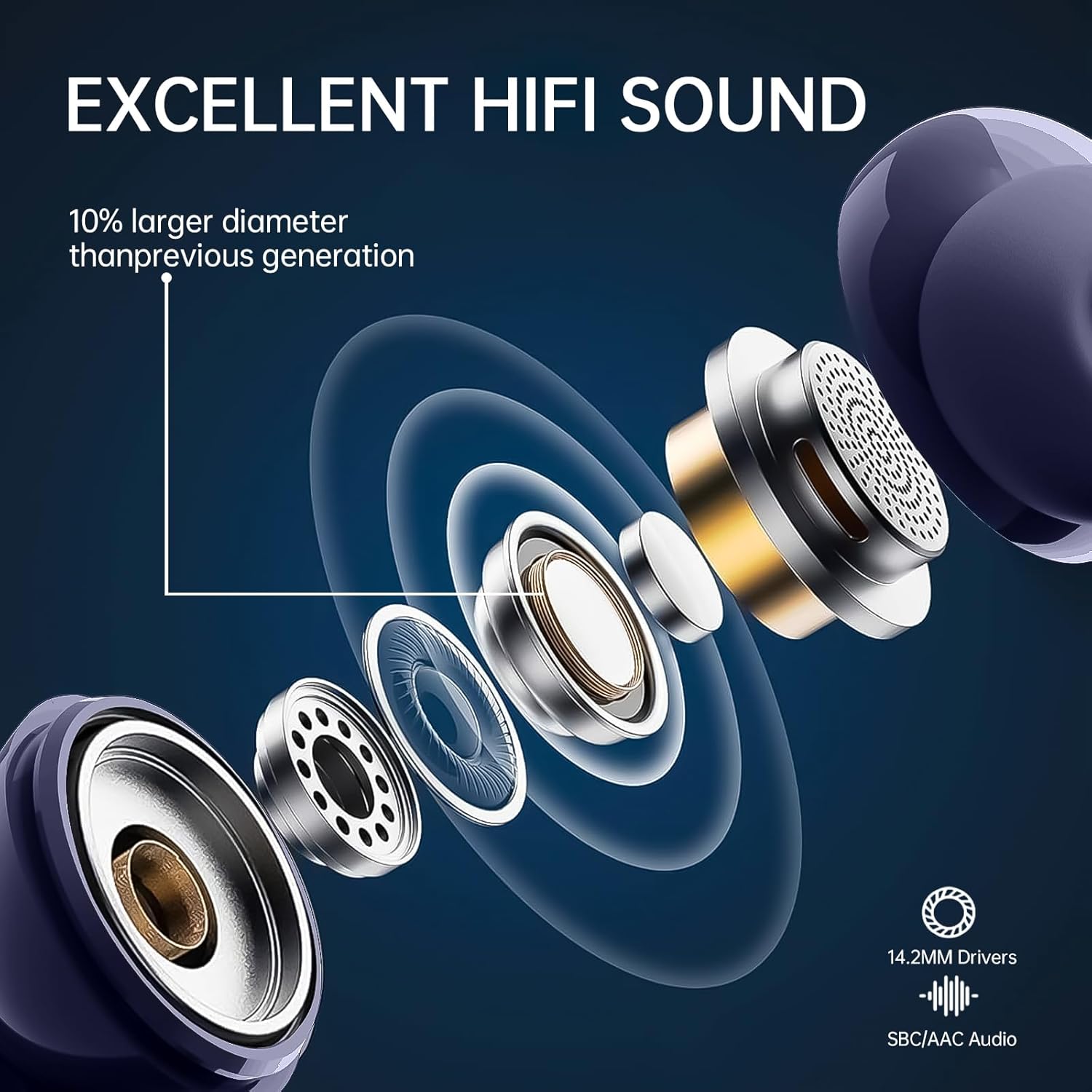
ภาพนี้แสดงข้อมูลภายใน view of the earbud's driver, highlighting its 14.2mm size and various components, indicating a focus on high-fidelity sound reproduction.
การซ่อมบำรุง
การทำความสะอาด
- ทำความสะอาดหูฟังและกล่องชาร์จเป็นประจำด้วยผ้าแห้งนุ่มที่ไม่เป็นขุย
- Do not use harsh chemicals, abrasive materials, or liquids directly on the earbuds or case.
- ค่อยๆ กำจัดขี้หูหรือเศษสิ่งสกปรกออกจากจุกหูและตาข่ายลำโพงโดยใช้แปรงขนนุ่มขนาดเล็กหรือสำลี
พื้นที่จัดเก็บ
- เมื่อไม่ได้ใช้งาน ควรเก็บหูฟังไว้ในกล่องชาร์จเสมอ เพื่อป้องกันหูฟังเสียหายและชาร์จไฟได้
- Store the device in a cool, dry place, away from extreme temperatures, direct sunlight, and humidity.
การแก้ไขปัญหา
ปัญหาทั่วไปและแนวทางแก้ไข
- หูฟังไม่จับคู่:
- ตรวจสอบให้แน่ใจว่าหูฟังทั้งสองข้างมีประจุไฟเพียงพอ
- Place them back in the case, close the lid, then reopen to re-initiate pairing mode.
- ปิดและเปิดบลูทูธของอุปกรณ์ของคุณอีกครั้ง
- Forget "BK11" from your device's Bluetooth list and attempt to re-pair.
- มีหูฟังเพียงข้างเดียวที่ใช้งานได้:
- ตรวจสอบให้แน่ใจว่าได้ชาร์จหูฟังเอียร์บัดทั้งสองข้างแล้ว
- Place both earbuds back in the charging case, close the lid, wait a few seconds, then open the lid again. This often resynchronizes them.
- If the issue persists, try resetting the earbuds as described in the "Resetting Earbuds" section.
- คุณภาพเสียงไม่ดี:
- Ensure the eartips are properly sealed in your ear canal. Try different eartip sizes.
- ทำความสะอาดเศษสิ่งสกปรกออกจากตาข่ายลำโพง
- Ensure the earbuds are within Bluetooth range (typically 10 meters) of your device and there are no significant obstructions.
- Check your device's audio settings and volume levels.
- ปัญหาการชาร์จ:
- ตรวจสอบให้แน่ใจว่าสาย USB-C เชื่อมต่อกับเคสชาร์จและแหล่งจ่ายไฟอย่างแน่นหนา
- ลองใช้สาย USB-C หรืออะแดปเตอร์ไฟอื่นเพื่อตัดปัญหาเรื่องสายเคเบิล/อะแดปเตอร์
- ทำความสะอาดหน้าสัมผัสการชาร์จบนหูฟังและภายในเคสด้วยสำลีแห้ง
If problems persist after attempting these solutions, please contact customer support for further assistance.
ข้อมูลจำเพาะ
ข้อมูลจำเพาะทางเทคนิค
| คุณสมบัติ | ข้อมูลจำเพาะ |
|---|---|
| แบบอย่าง | BK11 |
| เวอร์ชันบลูทูธ | 5.3 |
| ขนาดไดร์เวอร์ | 14.2 มม. |
| การลดเสียงรบกวน | CVC8.0, ENC |
| ไมโครโฟน | 4 (ENC Mic, Talk Mic) |
| ระดับการต้านทานน้ำ | IP7 |
| เวลาเล่นหูฟัง | 6-8 ชั่วโมง (ชาร์จครั้งเดียว) |
| ความจุของเคสชาร์จ | 350 มิลลิแอมป์ |
| เวลาเล่นทั้งหมด (รวมเคส) | นานถึง 40 ชั่วโมง |
| ระยะเวลาในการชาร์จ (เคส) | ประมาณ 1.5 ชั่วโมง |
| พอร์ตชาร์จ | ยูเอสบี-ซี |
| น้ำหนักเอียร์บัด | ประมาณ 3.9 กรัม (ต่อชิ้น) |
| ช่วงความถี่ | 20 เฮิรตซ์ - 20,000 เฮิรตซ์ |
| องค์ประกอบของแบตเตอรี่ | ลิเธียมโพลิเมอร์ |
| อุปกรณ์ที่รองรับ | Mobile phones, Computers, Smart speakers |
การรับประกันและการสนับสนุน
ข้อมูลการรับประกัน
Renimer products are designed for reliability and performance. For detailed warranty information, please refer to the warranty card included in your product packaging or visit the official Renimer website for the most up-to-date policy.
การสนับสนุนลูกค้า
If you have any questions, require technical assistance, or encounter any issues with your Renimer BK11 earbuds, please do not hesitate to contact our dedicated customer support team. Contact information can typically be found on the product packaging, the warranty card, or our official webเว็บไซต์.