
การแนะนำ
This manual provides essential information for setting up, operating, maintaining, and troubleshooting your Apple iPhone 15 (Renewed). Please read this guide thoroughly to ensure proper use and to maximize your device's capabilities.
As a renewed product, your iPhone 15 has been inspected and tested to function like new. Minor cosmetic imperfections may be present, which do not affect functionality. Refer to the 'Amazon Renewed conditions' section for details.

ภาพ: ด้านหน้าและด้านหลัง view ของ Apple iPhone 15 สีน้ำเงิน
1. การตั้งค่า
1.1 อะไรอยู่ในกล่อง
- Apple iPhone 15 (Renewed)
- สาย USB-C
1.2 การเปิดเครื่องครั้งแรก
- กดปุ่มค้างไว้ ปุ่มด้านข้าง จนกระทั่งโลโก้ Apple ปรากฏขึ้น
- ปฏิบัติตามคำแนะนำบนหน้าจอเพื่อเลือกภาษาและภูมิภาคของคุณ
1.3 การเปิดใช้งาน eSIM
The iPhone 15 uses an eSIM. Contact your wireless carrier to activate your service. You may be able to transfer your existing physical SIM to an eSIM during setup or by scanning a QR code provided by your carrier.
1.4 การถ่ายโอนข้อมูล
If you are upgrading from another iPhone, you can transfer your data wirelessly using Quick Start or by restoring from an iCloud or computer backup. For Android devices, use the 'Move to iOS' app during initial setup.
1.5 Face ID Setup
During setup, you will be prompted to configure Face ID for secure authentication. Follow the on-screen instructions to register your face.
2. การใช้งาน iPhone 15 ของคุณ
2.1 เกาะไดนามิก
The Dynamic Island displays alerts and Live Activities, allowing you to interact with them without interrupting your current task. Tap to expand or hold to access more options.
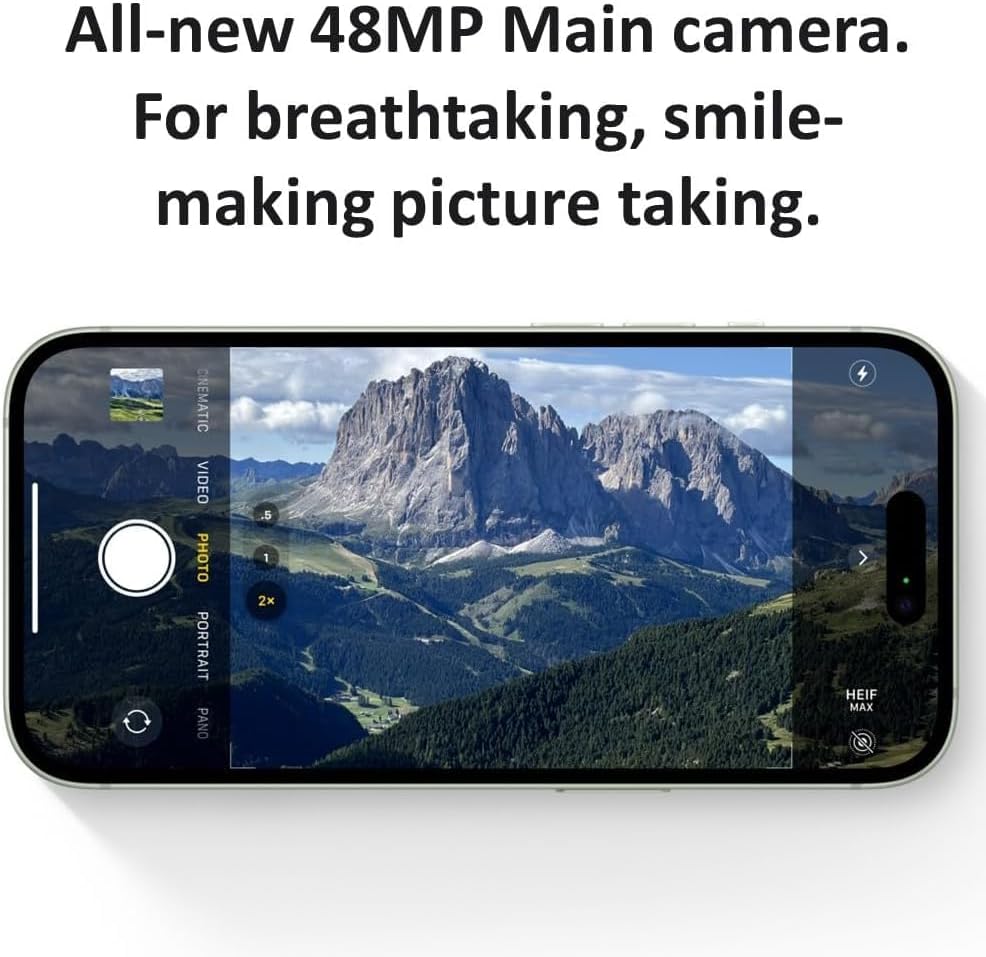
Image: The Dynamic Island displaying notifications and live activities.
2.2 ระบบกล้อง
Your iPhone 15 features an advanced dual-camera system with a 48MP Main camera and an Ultra Wide lens. It supports super-high-resolution photos (24MP and 48MP) and next-generation portraits with Focus and Depth Control.
- ถ่ายรูป: เปิดแอปกล้องแล้วแตะปุ่มชัตเตอร์
- โหมดการสลับ: Swipe left or right on the screen to select modes like Photo, Portrait, Video, etc.
- ซูม: Use pinch gestures or the 0.5x, 1x, 2x options on screen for optical zoom.
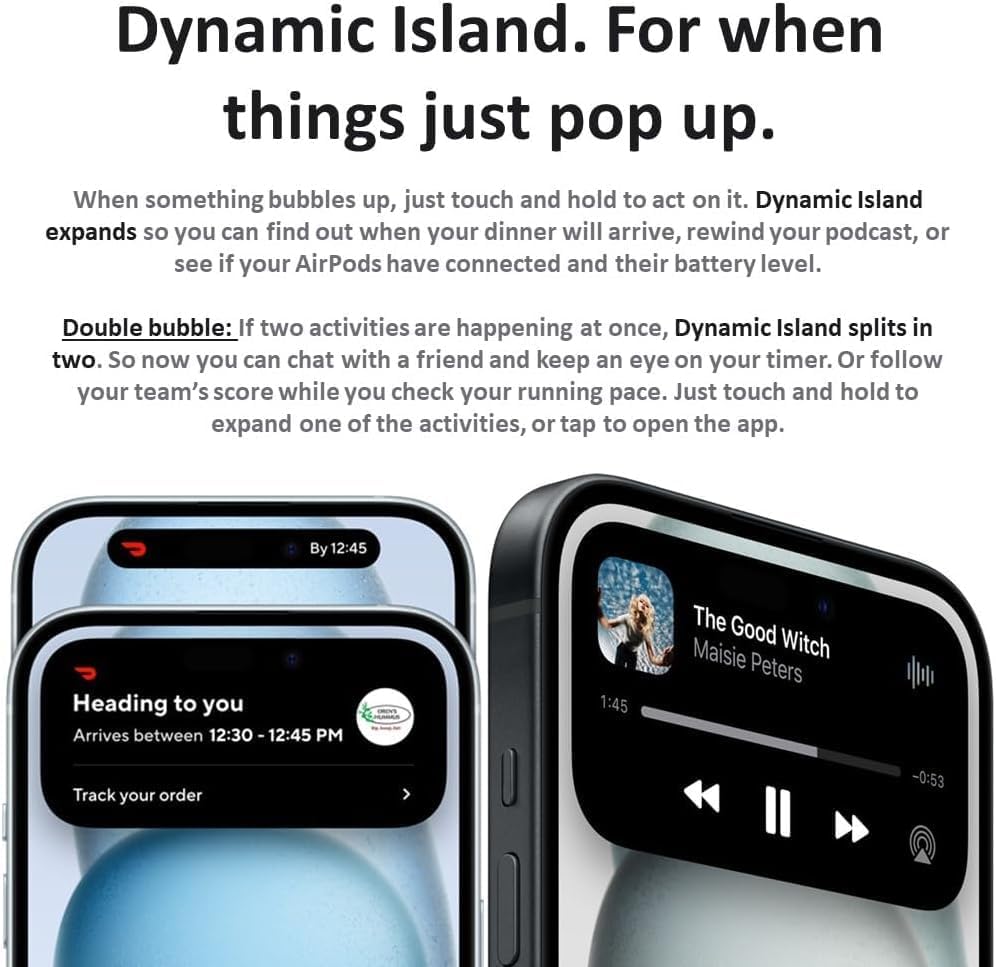
Image: The camera interface of the iPhone 15, showing various modes and zoom options.
2.3 การชาร์จ
The iPhone 15 uses a USB-C port for charging. Connect the provided USB-C cable to your iPhone and a compatible power adapter (sold separately) or computer.
- การชาร์จแบบมีสาย: Use the USB-C port at the bottom of the device.
- การชาร์จแบบไร้สาย: Place your iPhone face up on a compatible Qi-certified wireless charger.
2.4 คุณสมบัติฉุกเฉิน
- สัญญาณขอความช่วยเหลือฉุกเฉินผ่านดาวเทียม: In areas without cellular or Wi-Fi coverage, your iPhone can connect to a satellite to text emergency services.
- การตรวจจับการชน: ไอโฟนของคุณสามารถตรวจจับอุบัติเหตุทางรถยนต์ร้ายแรงและโทรแจ้งหน่วยบริการฉุกเฉินโดยอัตโนมัติหากคุณหมดสติ
- บริการช่วยเหลือฉุกเฉินริมถนนผ่านดาวเทียม: Similar to Emergency SOS, this feature allows you to contact roadside assistance in remote areas.
3. การบำรุงรักษา
3.1 การทำความสะอาดอุปกรณ์ของคุณ
To clean your iPhone, use a soft, lint-free cloth. Avoid abrasive materials, sprays, or harsh chemicals. Do not submerge your iPhone in cleaning solutions.
3.2 การอัปเดตซอฟต์แวร์
Keep your iPhone's software up to date to ensure optimal performance and security. Go to การตั้งค่า > ทั่วไป > อัปเดตซอฟต์แวร์ เพื่อตรวจสอบและติดตั้งการอัพเดทที่มีอยู่
3.3 การดูแลแบตเตอรี่
To prolong battery lifespan, avoid extreme temperatures. For long-term storage, charge the device to about 50% and power it off. Regular software updates often include battery optimizations.
3.4 เงื่อนไขผลิตภัณฑ์ที่ได้รับการต่ออายุ
Your renewed iPhone 15 has undergone a thorough inspection. While fully functional, it may exhibit minor cosmetic wear. For detailed information on renewed product conditions, please refer to the following image:

Image: Amazon Renewed conditions explaining 'Excellent', 'Good', and 'Acceptable' grades.
4 การแก้ไขปัญหา
4.1 อุปกรณ์ไม่ตอบสนอง
หาก iPhone ของคุณไม่ตอบสนอง ให้บังคับรีสตาร์ท:
- กดและปล่อยอย่างรวดเร็ว ปุ่มเพิ่มระดับเสียง.
- กดและปล่อยอย่างรวดเร็ว ปุ่มลดระดับเสียง.
- กดปุ่มค้างไว้ ปุ่มด้านข้าง จนกระทั่งโลโก้ Apple ปรากฏขึ้น
4.2 ปัญหาการเชื่อมต่อเครือข่าย
- เปิดและปิดโหมดเครื่องบิน (การตั้งค่า > โหมดเครื่องบิน).
- รีสตาร์ท iPhone ของคุณ
- Check with your carrier to ensure your eSIM is properly provisioned.
- รีเซ็ตการตั้งค่าเครือข่าย (การตั้งค่า > ทั่วไป > โอนหรือรีเซ็ต iPhone > รีเซ็ต > รีเซ็ตการตั้งค่าเครือข่าย).
4.3 รีเซ็ตเป็นค่าโรงงาน
As a last resort, you can erase all content and settings. This will return your iPhone to its factory state. Ensure you have backed up your data before proceeding.
ไปที่ การตั้งค่า > ทั่วไป > โอนหรือรีเซ็ต iPhone > ลบเนื้อหาและการตั้งค่าทั้งหมด.
5. ข้อมูลจำเพาะ
| คุณสมบัติ | รายละเอียด |
|---|---|
| ยี่ห้อ | แอปเปิล |
| ชื่อรุ่น | ไอโฟน15 |
| ระบบปฏิบัติการ | iOS17 ระบบปฏิบัติการ |
| รุ่นซีพียู | แอปเปิล A16 ไบโอนิค |
| หน่วยความจำแรม | 8GB |
| ความจุในการเก็บข้อมูล | 128GB |
| ขนาดหน้าจอ | 6.1 นิ้ว |
| ปณิธาน | 2556 x 1179 พิกเซล |
| กล้องหลัง | 48 MP |
| กล้องหน้า | 12 MP |
| ความจุของแบตเตอรี่ | 3349 มิลลิแอมป์ |
| ประเภทขั้วต่อ | USB ประเภท C |
| เทคโนโลยีเซลลูล่าร์ | 5G |
| ผู้ให้บริการระบบไร้สาย | ปลดล็อคสำหรับผู้ให้บริการทั้งหมด |
| การรักษาความปลอดภัยด้วยไบโอเมตริกซ์ | การจดจำใบหน้า |
6. ข้อมูลการรับประกัน
Your Apple iPhone 15 (Renewed) is covered by a 90 Day Amazon Renewed Warranty. This warranty provides a replacement or refund within 90 days of receipt if the product does not work as expected. For more details or to initiate a claim, please refer to the Amazon Renewed program terms and conditions or contact Amazon customer service.
7. การสนับสนุน
For additional assistance, troubleshooting, or detailed product information, please visit the official Apple Support website or the Amazon Renewed support pages.
- ฝ่ายสนับสนุนของ Apple: support.apple.com/iphone
- Amazon ต่ออายุการสนับสนุน: Refer to your Amazon order details for specific support contacts.


