
1. บทนำ
Thank you for choosing the ADE CK2310 Digital Radio Alarm Clock. This device offers precise timekeeping via DCF radio signal, dual alarm settings, temperature and humidity display, and a convenient backlight function. Its compact design makes it suitable for both home use and travel. Please read this manual carefully to ensure proper use and optimal performance of your new alarm clock.

Image 1.1: The ADE CK2310 Digital Radio Alarm Clock is designed for portability, making it an ideal travel companion.
2. ข้อมูลด้านความปลอดภัย
- เก็บอุปกรณ์ให้ห่างจากน้ำและความชื้นสูง
- อย่าให้อุปกรณ์สัมผัสกับอุณหภูมิที่สูงหรือถูกแสงแดดโดยตรง
- หลีกเลี่ยงการทำอุปกรณ์หล่นหรือกระแทกอย่างรุนแรง
- อย่าพยายามถอดประกอบหรือซ่อมแซมอุปกรณ์ด้วยตนเอง โปรดติดต่อเจ้าหน้าที่บริการที่มีคุณสมบัติเหมาะสม
- ทิ้งแบตเตอรี่ที่ใช้แล้วตามระเบียบข้อบังคับของท้องถิ่น
- เก็บแบตเตอรี่ให้พ้นจากมือเด็ก
3. เนื้อหาบรรจุภัณฑ์
กรุณาตรวจสอบเนื้อหาแพ็คเกจเมื่อแกะกล่อง:
- ADE CK2310 Digital Radio Alarm Clock
- แบตเตอรี่ AAA 2 ก้อน
- คู่มือการใช้งาน

Image 3.1: The package includes the ADE CK2310 alarm clock and two AAA batteries.
4. สินค้าหมดview
Familiarize yourself with the various components and display elements of your alarm clock.
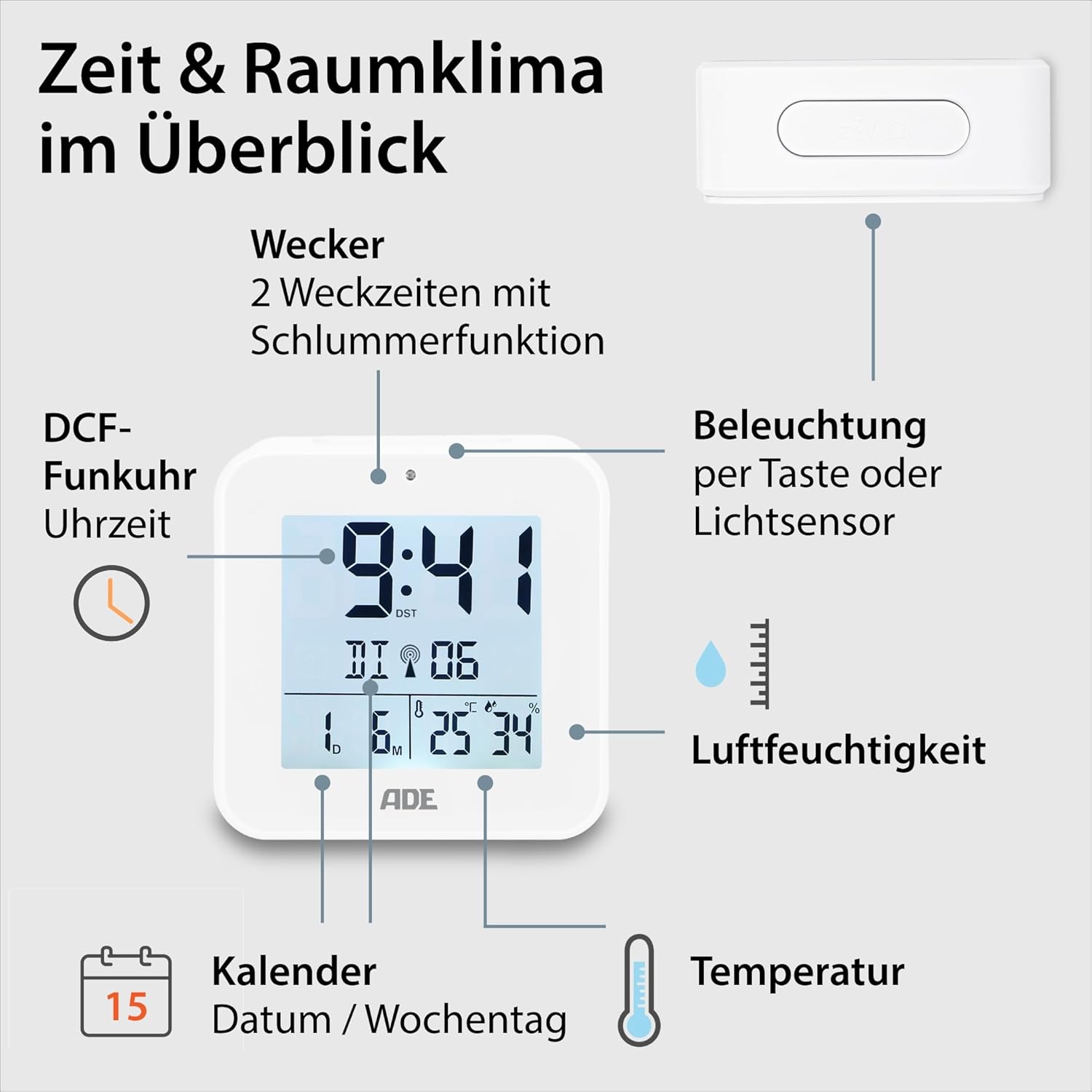
Image 4.1: Front display and key features of the ADE CK2310.
- การแสดงเวลา: Shows current time (hours, minutes).
- ตัวบ่งชี้สัญญาณ DCF: แสดงว่าได้รับสัญญาณเวลาจากวิทยุเรียบร้อยแล้ว
- สัญญาณเตือน: Shows if Alarm 1 or Alarm 2 is active.
- Date and Day of Week: Displays the current date and day.
- แสดงอุณหภูมิ: แสดงอุณหภูมิแวดล้อมในหน่วยเซลเซียสหรือฟาเรนไฮต์
- แสดงความชื้น: Shows ambient relative humidity.
- ปุ่มเลื่อน/ไฟ: Activates snooze during an alarm or backlight manually.
- ปุ่มฟังก์ชั่น: Buttons for setting time, alarms, and other functions (located on the back/side).
- เซ็นเซอร์แสง: Automatically activates backlight in dark environments.

ภาพที่ 4.2: ด้านหลัง view with controls and battery compartment.
The compact dimensions of the alarm clock are approximately 7.2 x 3.8 x 7.2 cm (width x depth x height).

Image 4.3: Dimensions of the ADE CK2310 alarm clock.
5. การตั้งค่า
5.1. การติดตั้งแบตเตอรี่
- Open the battery compartment cover on the back of the alarm clock (refer to Image 4.2).
- ใส่แบตเตอรี่ AAA สองก้อน โดยตรวจสอบให้แน่ใจว่าขั้วถูกต้อง (+ และ -)
- ปิดฝาช่องใส่แบตเตอรี่ให้แน่น
The alarm clock will power on automatically and begin searching for the DCF radio signal.
5.2. DCF Radio Signal Reception
Upon initial power-on or after battery replacement, the alarm clock will automatically attempt to receive the DCF radio time signal. This process can take several minutes. During reception, a signal icon may flash on the display. Once the signal is successfully received, the time will be set automatically, and the signal icon will appear steadily. For best reception, place the alarm clock near a window and away from electronic devices that may cause interference.
The DCF signal also ensures automatic adjustment for daylight saving time (summer/winter time).
5.3. การตั้งเวลาด้วยตนเอง (ไม่บังคับ)
หากไม่มีสัญญาณ DCF หรือคุณต้องการตั้งเวลาด้วยตนเอง:
- Press and hold the "SET" button (or equivalent, refer to specific button labels on your device) for a few seconds until the time display starts flashing.
- Use the "+" or "-" buttons to adjust the hours.
- Press "SET" again to confirm the hours and move to minutes.
- ใช้ปุ่ม "+" หรือ "-" เพื่อปรับนาที
- Press "SET" to confirm and exit manual setting mode.
- Repeat similar steps to set the date and year if necessary.
6. คู่มือการใช้งาน
6.1. การตั้งค่าสัญญาณเตือน (สัญญาณเตือน 1 และ สัญญาณเตือน 2)
The ADE CK2310 features two independent alarm times. This is useful for different wake-up times on weekdays and weekends.

Image 6.1: The alarm clock supports two independent alarm times.
- Press the "ALARM 1" or "ALARM 2" button (usually located on the side or back) once to display the current alarm time.
- Press and hold the respective "ALARM" button until the alarm time starts flashing.
- Use the "+" or "-" buttons to adjust the alarm hours.
- Press the "ALARM" button again to confirm hours and move to minutes.
- Use the "+" or "-" buttons to adjust the alarm minutes.
- Press the "ALARM" button to confirm and exit alarm setting mode.
- To activate or deactivate an alarm, use the dedicated ON/OFF switch for Alarm 1 and Alarm 2 (refer to Image 6.1 for typical switch location). An alarm icon will appear on the display when active.
6.2. ฟังก์ชั่นเลื่อนปลุก
When an alarm sounds, press the large "SNOOZE/LIGHT" button on top of the alarm clock. The alarm will pause for approximately 5 minutes and then sound again. To turn off the alarm completely, press any other button or let it ring for its full duration.
6.3. การแสดงอุณหภูมิและความชื้น
The alarm clock continuously displays the indoor temperature and relative humidity. You can switch between Celsius (°C) and Fahrenheit (°F) for temperature display by pressing a dedicated button (often labeled "°C/°F" or integrated with another setting button).
6.4. ฟังก์ชั่นไฟแบ็คไลท์
สามารถเปิดใช้งานไฟแบ็คไลท์ได้ 2 วิธี:
- การเปิดใช้งานด้วยตนเอง: Press the "SNOOZE/LIGHT" button on top. The backlight will illuminate for approximately 8 seconds.
- Automatic Activation (Light Sensor): Slide the "AUTO LIGHT" switch on the back of the device to the "ON" position (refer to Image 4.2). The built-in light sensor will detect low ambient light conditions and automatically activate a soft backlight, making the display visible in the dark. Slide the switch to "OFF" to disable this feature.
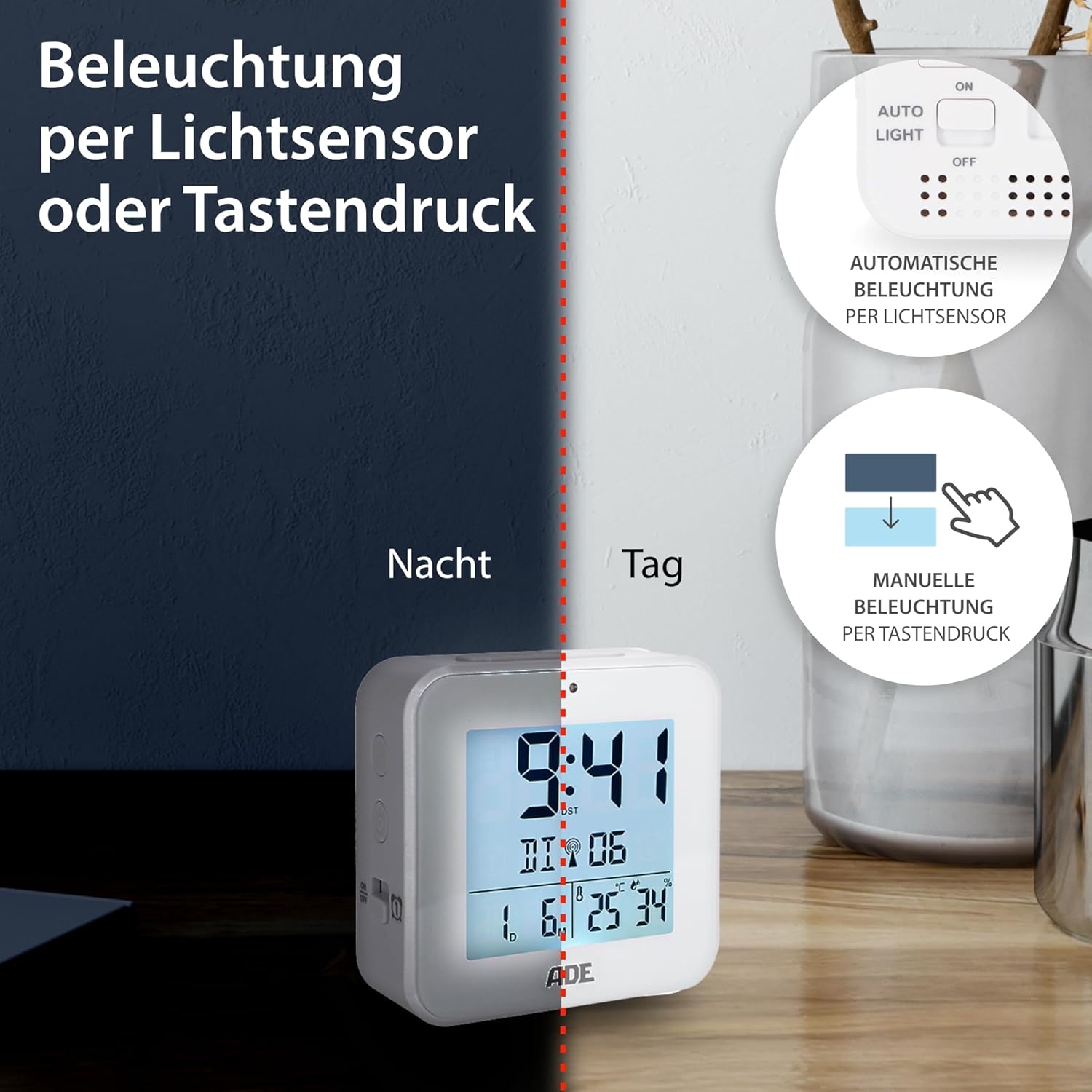
Image 6.2: Backlight can be activated manually or automatically via the light sensor.
7. การบำรุงรักษา
- การทำความสะอาด: เช็ดอุปกรณ์ด้วยผ้านุ่มและแห้ง ห้ามใช้น้ำยาทำความสะอาดที่มีฤทธิ์กัดกร่อนหรือตัวทำละลาย
- การเปลี่ยนแบตเตอรี่: When the display becomes dim or functions are erratic, replace both AAA batteries. Ensure correct polarity. If the device will not be used for an extended period, remove the batteries to prevent leakage.
8 การแก้ไขปัญหา
| ปัญหา | สาเหตุที่เป็นไปได้ | สารละลาย |
|---|---|---|
| จอแสดงผลว่างเปล่าหรือมืดลง | แบตเตอรี่เหลือน้อยหรือใส่ไม่ถูกต้อง | เปลี่ยนแบตเตอรี่ใหม่โดยตรวจสอบให้แน่ใจว่าใส่ขั้วถูกต้อง |
| เวลาไม่ถูกต้องหรือไม่ตั้งค่าโดยอัตโนมัติ | Poor DCF signal reception or interference. | Move the alarm clock to a location with better reception (e.g., near a window, away from electronics). Allow time for signal acquisition. Manually set the time if necessary. |
| สัญญาณเตือนภัยไม่ดัง | สัญญาณเตือนภัยไม่ได้เปิดใช้งานหรือตั้งค่าไม่ถูกต้อง | Ensure the alarm is switched "ON" and the alarm time is set correctly. Check for the alarm icon on the display. |
| ไฟแบ็คไลท์ไม่ทำงาน | AUTO LIGHT switch is OFF, or batteries are low. | Check if the "AUTO LIGHT" switch is in the "ON" position. Press the SNOOZE/LIGHT button manually. Replace batteries if needed. |
9. ข้อมูลจำเพาะ
- แบบอย่าง: ซีเค2310
- ขนาด : 8 x 3.81 x 8 cm (approx. W x D x H)
- น้ำหนัก: 100 กรัม
- แหล่งพลังงาน: แบตเตอรี่ AAA 2 ก้อน (รวมอยู่ด้วย)
- ประเภทจอภาพ: ดิจิตอล
- วัสดุ: พลาสติก ABS
- คุณสมบัติพิเศษ: DCF Radio Signal, 2 Alarm Times, Snooze Function, Temperature Display (°C/°F), Humidity Display, Calendar Display, Automatic Backlight (Light Sensor), Manual Backlight.
- การใช้งานในร่ม/กลางแจ้ง: ในร่ม
10. การรับประกันและการสนับสนุน
ADE products are manufactured with quality and reliability in mind. For information regarding warranty terms and conditions, please refer to the warranty card included with your purchase or visit the official ADE website. For technical support or service inquiries, please contact your retailer or the ADE customer service department.
ผู้ผลิต: เอดีอี


