
1. บทนำ
This manual provides instructions for the CLNCBJ RMT-JR01 remote control. This remote is designed as a direct replacement for various JVC TV models, offering immediate functionality without the need for programming or pairing. Please read this manual carefully to ensure proper use and to understand the features of your new remote control.

Image 1.1: The CLNCBJ RMT-JR01 remote control, a direct replacement for JVC TV models.
2. การตั้งค่า
2.1 การติดตั้งแบตเตอรี่
The RMT-JR01 remote control requires two (2) AA 1.5V alkaline batteries for operation. Batteries are not included with the remote control.
- ค้นหาช่องใส่แบตเตอรี่ที่ด้านหลังของรีโมทคอนโทรล
- เลื่อนฝาปิดช่องใส่แบตเตอรี่ลงด้านล่างเพื่อเปิด
- Insert two (2) AA 1.5V alkaline batteries, ensuring that the positive (+) and negative (-) terminals align correctly with the markings inside the compartment.
- เลื่อนฝาปิดช่องใส่แบตเตอรี่กลับเข้าที่จนกระทั่งล็อคเข้าที่อย่างแน่นหนา

Image 2.1: Proper insertion of AA batteries into the remote control's battery compartment.
2.2 การใช้งานเบื้องต้น
Once batteries are correctly installed, the CLNCBJ RMT-JR01 remote control is ready for immediate use. No programming or pairing is required. Point the remote control towards your JVC TV and begin operation.
3. คู่มือการใช้งาน
The RMT-JR01 remote control features a standard layout for easy navigation and control of your JVC TV. Below is a general overview of the key functions.

Image 3.1: Diagram illustrating the main buttons and their functions on the RMT-JR01 remote control.
- ปุ่มเพาเวอร์ (●):เปิดหรือปิดทีวี
- ปุ่มนอน: เปิดใช้งานฟังก์ชันตั้งเวลาปิดเครื่องอัตโนมัติของทีวี
- ปุ่มอินพุต: สลับไปมาระหว่างแหล่งสัญญาณเข้าที่มีอยู่ (HDMI, AV เป็นต้น)
- ปุ่มเมนู: เข้าถึงเมนูหลักของทีวี
- ปุ่มข้อมูล: แสดงข้อมูลเกี่ยวกับโปรแกรมหรือข้อมูลป้อนเข้าปัจจุบัน
- Navigation Keys (Up, Down, Left, Right) & OK Button: ใช้สำหรับเลื่อนดูเมนูและยืนยันการเลือก
- ปุ่มย้อนกลับ: กลับไปยังเมนูหรือหน้าจอก่อนหน้า
- เพิ่ม/ลดระดับเสียง (VOL +/-): Adjusts the TV's volume level.
- ปุ่มปิดเสียง: ปิดหรือเปิดเสียงทีวี
- เปลี่ยนช่องขึ้น/ลง (CH +/-): เปลี่ยนช่องทีวี
- ปุ่มตัวเลข (0-9): ป้อนหมายเลขช่องโดยตรง
- Media Playback Controls (Play, Pause, Stop, Rewind, Fast Forward): Control media playback if supported by the TV and source.
- Dedicated Input Buttons (HDMI, PC, TV, Video, Comp, Music): Directly select specific input sources.
For specific functions related to your JVC TV model, refer to your TV's original user manual.
4. การบำรุงรักษา
4.1 การทำความสะอาดรีโมทคอนโทรล
ในการทำความสะอาดรีโมทคอนโทรล ให้ใช้ผ้านุ่มและแห้ง สำหรับคราบสกปรกฝังแน่น ให้เช็ดเบาๆampชุบผ้าด้วยน้ำหรือน้ำยาทำความสะอาดอ่อนๆ ที่ไม่ทำให้เกิดรอยขีดข่วน หลีกเลี่ยงการใช้สารเคมีรุนแรง ตัวทำละลาย หรือวัสดุที่มีฤทธิ์กัดกร่อน เพราะอาจทำให้พื้นผิวหรือส่วนประกอบภายในของรีโมทเสียหายได้
4.2 การเปลี่ยนแบตเตอรี่
Replace batteries when the remote control's responsiveness decreases or if it stops functioning. Always replace both batteries at the same time with new AA 1.5V alkaline batteries. Do not mix old and new batteries, or different types of batteries, as this can lead to leakage or malfunction. Dispose of used batteries according to local regulations.
5 การแก้ไขปัญหา
If you experience issues with your CLNCBJ RMT-JR01 remote control, please refer to the following common solutions:
- รีโมตไม่ตอบสนอง:
- Ensure the remote has fresh AA 1.5V alkaline batteries installed correctly (check polarity).
- Verify there are no obstructions between the remote control and the TV's infrared sensor.
- Make sure you are within the effective operating range (up to 10 meters / 30 feet) and pointing the remote directly at the TV.
- Test the remote by pointing it at a smartphone camera; if you see a light flashing from the remote's IR emitter when pressing buttons, the remote is likely transmitting a signal.
- ปุ่มเฉพาะไม่ทำงาน:
- This remote is a direct replacement and should function identically to the original. If a specific button does not work, ensure your TV model supports that function.
- Clean the remote control, especially around the buttons, to ensure no debris is preventing proper contact.
- การดำเนินการเป็นระยะ:
- This could indicate low battery power. Replace both batteries with new ones.
- ตรวจสอบแหล่งกำเนิดแสงที่สว่างจ้า (เช่น แสงแดดโดยตรง แสงไฟฟลูออเรสเซนต์) ที่อาจรบกวนสัญญาณอินฟราเรด
หากปัญหายังคงมีอยู่หลังจากพยายามแก้ไขปัญหาเหล่านี้แล้ว โปรดติดต่อฝ่ายสนับสนุนลูกค้า
6. ข้อมูลจำเพาะ
| ชื่อรุ่น : | RMT-JR01 |
| ยี่ห้อ: | CLNCBJ |
| เทคโนโลยีการเชื่อมต่อ: | อินฟาเรด (IR) |
| อุปกรณ์ที่รองรับ: | Television (JVC TVs) |
| จำนวนแบตเตอรี่ที่ต้องการ: | แบตเตอรี่ AA 2 ก้อน |
| ระยะสูงสุด: | 10 เมตร (ประมาณ 30 ฟุต) |
| น้ำหนักสินค้า: | 0.19 ปอนด์ |
| ขนาด (ยาว x กว้าง x สูง): | ยาว 8.58 นิ้ว x กว้าง 2.55 นิ้ว x สูง 1.14 นิ้ว (217 มม. x 64.8 มม. x 29 มม.) |
| คุณสมบัติพิเศษ: | การออกแบบตามหลักสรีรศาสตร์ |
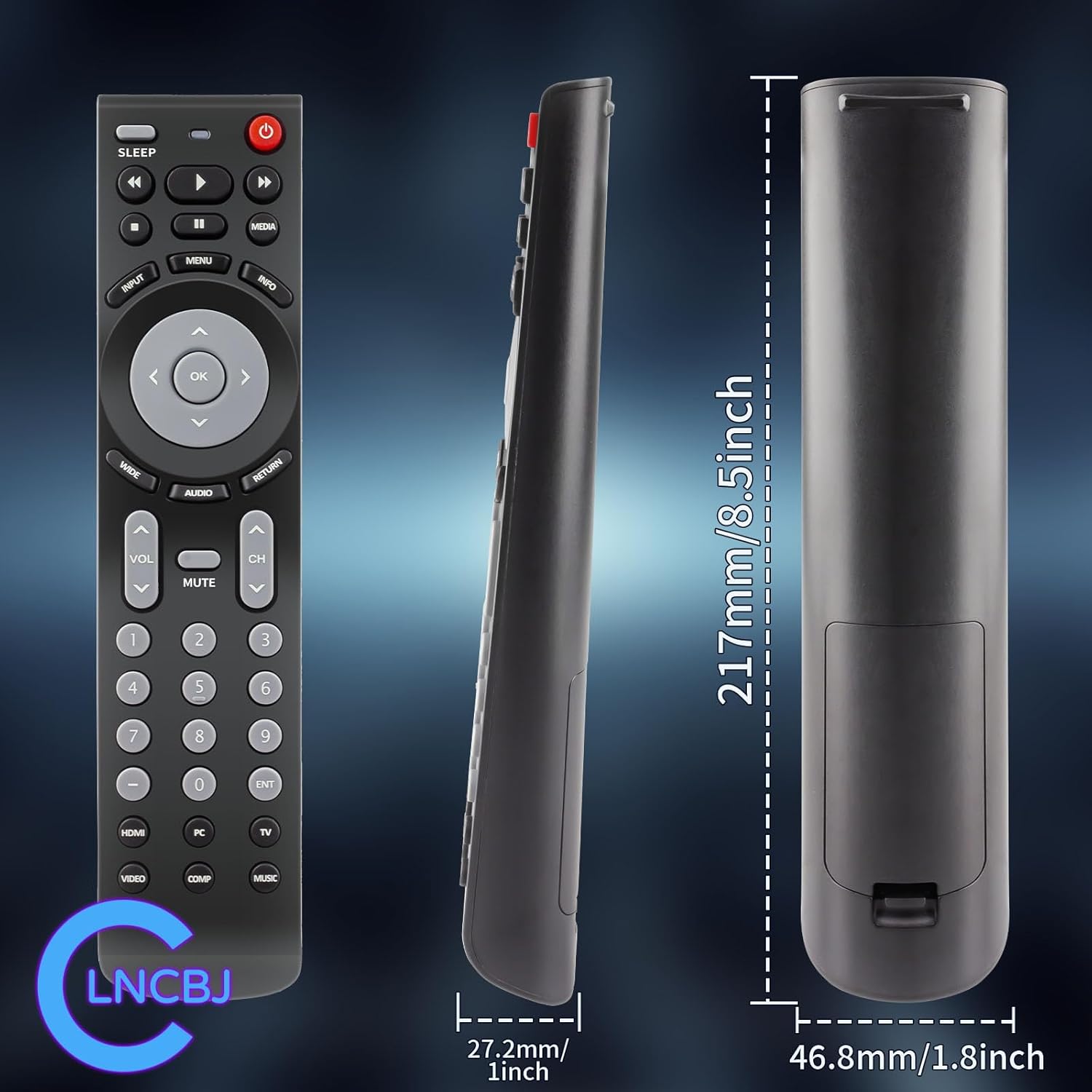
Image 6.1: Physical dimensions of the CLNCBJ RMT-JR01 remote control.
7. Compatible JVC TV Models
The CLNCBJ RMT-JR01 remote control is compatible with the following JVC TV models:
- บีซี50อาร์
- EM28T
- EM32FL
- EM32T
- EM32TS
- EM37T
- EM39FT
- EM39T
- EM55FT
- JLC32BC3000
- JLC32BC3002
- JLC37BC3000
- JLC37BC3002
- JLC42BC3000
- JLC42BC3002
- JLC47BC3000
- JLC47BC3002
- JLE32BC3001
- JLE37BC3001
- JLE42BC3001
- JLE42BC3500
- JLE47BC3001
- JLE47BC3500
This list is based on the provided product information. If your model is not listed but is a JVC TV, the remote may still be compatible as a direct replacement for the RMT-JR01 original remote.
8. การรับประกันและการสนับสนุน
8.1 นโยบายการคืนสินค้า
This product is subject to a 30-day return policy for refund or replacement, as per the retailer's terms and conditions.
8.2 การสนับสนุนลูกค้า
For any questions, concerns, or issues regarding your CLNCBJ RMT-JR01 remote control, please contact the seller directly through the platform where the purchase was made. Providing your order details will help expedite the support process.