
1. บทนำ
The tenlamp G1 Live Sound Card is an integrated audio mixer designed for live streaming, podcasting, recording, singing, and gaming. This equipment bundle includes the G1 audio console and two 3.5mm studio condenser microphones, providing a comprehensive solution for audio production. This manual provides detailed instructions for setting up, operating, maintaining, and troubleshooting your G1 system.
2. เนื้อหาบรรจุภัณฑ์
ก่อนดำเนินการต่อ โปรดตรวจสอบว่าสินค้าทั้งหมดมีอยู่ในแพ็คเกจของคุณ:
- เต็นamp คอนโซลเสียง G1
- 2 x 3.5mm Studio Condenser Microphones
- Microphone Stands and Pop Filters
- USB-C to USB-A Cable (for power and data)
- 3.5mm TRRS Audio Cables (for mobile device connection)
- คู่มือการใช้งาน
3. สินค้าหมดview
The tenlamp G1 audio console features multiple inputs and outputs, along with various controls for audio mixing and effects. Familiarize yourself with the layout before setup.

Image: The tenlamp G1 Live Sound Card and two condenser microphones set up for a two-person podcast, demonstrating a typical usage scenario.
3.1 แผงควบคุมด้านหน้า
- Mic VOL Fader: ปรับระดับเสียงอินพุตของไมโครโฟนที่เชื่อมต่ออยู่
- Music VOL Fader: ปรับระดับเสียงของเพลงประกอบที่ป้อนเข้ามา
- Monitor VOL Knob: Controls the volume of the monitoring headphones.
- Output VOL Knob: ควบคุมระดับเสียงเอาต์พุตหลัก
- Reverb Effect Fader: ปรับระดับความเข้มของเอฟเฟ็กต์เสียงสะท้อน
- เสียงแหลม/เบส EQ: Adjusts high and low frequencies for microphone input.
- Voice-change Buttons: Activates various voice modulation effects.
- Sound Pad Buttons: Triggers pre-loaded sound effects.
- Noise Reduction Buttons: Activates different levels of intelligent noise reduction.
3.2 การเชื่อมต่อแผงด้านหลัง

ภาพ: รายละเอียด view of the tenlamp G1 audio console's rear panel, showing various input and output ports including USB-C, Output, Music, Monitor, Headset, and Mic inputs.
- พอร์ต USB-C: For power supply, data transfer to computer, and digital audio I/O. Note: Does not support USB mic connection via this port.
- Output Ports (TRRS): Connects to mobile devices for live streaming or recording.
- อินพุตเพลง: Connects external audio sources (e.g., phone, tablet) for background music.
- ตรวจสอบเอาต์พุต: Connects monitoring headphones.
- อินพุตหูฟัง: Connects a headset with integrated microphone.
- Mic Inputs (3.5mm): Connects the included 3.5mm condenser microphones.
4. คู่มือการติดตั้ง
Follow these steps to set up your tenlamp G1 Live Sound Card for optimal performance.
- เชื่อมต่อไมโครโฟน: Insert the 3.5mm plugs of the condenser microphones into the designated ไมค์ input jacks on the rear panel of the G1 console. Secure microphones on their stands.
- Connect Monitoring Headphones: เสียบหูฟังของคุณเข้ากับ... เฝ้าสังเกต แจ็คเอาท์พุท
- เชื่อมต่อกับแหล่งจ่ายไฟ/คอมพิวเตอร์: เชื่อมต่อปลาย USB-C ของสายเคเบิลที่ให้มาเข้ากับ ยูเอสบี-ซี port on the G1 console and the USB-A end to your computer's USB port or a power adapter. The device will power on.
- Connect to Mobile Device (Optional): If live streaming or recording on a mobile device, use the TRRS audio cables to connect the เอาท์พุต ports on the G1 to your mobile device's headphone jack.
- Connect Music Source (Optional): If using external background music, connect your music device to the ดนตรี แจ็คอินพุต
5. คู่มือการใช้งาน
This section details how to use the various features of your tenlamp G1 Live Sound Card.
5.1 Basic Audio Mixing
- ปรับระดับเสียงไมโครโฟน: ใช้ Mic VOL fader to control the loudness of your voice.
- ปรับระดับเสียงเพลง: ใช้ มิวสิค วอลล์ fader to balance the background music with your voice.
- ตรวจสอบเสียงของคุณ: ปรับแต่ง Monitor VOL knob to set a comfortable listening level in your headphones.
- Control Output Volume: การ Output VOL knob controls the overall volume sent to your recording device or live stream.

Image: A close-up of the tenlamp G1 audio console, illustrating the various knobs and faders for fine-tuning audio parameters such as microphone volume, music volume, monitoring, output, reverb, treble/bass, and voice effects.
5.2 ลดเสียงรบกวน
The G1 features intelligent noise reduction to enhance audio clarity.
- กดปุ่มเฉพาะ การลดเสียงรบกวน buttons (e.g., "Denoise1", "Denoise2", "Denoise3") to activate different levels of noise cancellation. Experiment to find the best setting for your environment.

Image: The tenlamp G1 audio console displaying its noise reduction capabilities, with three distinct levels labeled "Cheer Denoise1", "Kiss Denoise2", and "Guffaw Denoise3" for clear and clean audio recording.
5.3 Special Streaming Features
Enhance your live streams and recordings with these integrated functions:
- Dodge (Auto Ducking): When activated, this feature automatically lowers background music volume when you speak into the microphone, making your voice clearer.
- ลบเสียงร้อง: This function attempts to remove the vocal track from accompaniment music, allowing you to sing over instrumental versions.
- ลูปแบ็ก: Enables recording of internal PC audio along with your microphone input via the USB-C connection.

Image: The tenlamp G1 audio console showcasing convenient features for streaming, including "Dodge" for auto-ducking microphone input, "Remove Vocals" to eliminate vocals from accompaniment, and "Loopback" for recording PC internal audio via USB-C.
5.4 Creating Atmosphere
Utilize the built-in effects to customize your audio environment:
- เครื่องเปลี่ยนเสียง: Select from 4 different voice modulation effects.
- โหมดเสียงก้อง: Choose from 5 preset reverb modes to add depth to your vocals.
- ปรับอัตโนมัติ: Apply 12-step auto-tune for pitch correction.
- แผ่นเสียง: Trigger various sound effects using the dedicated buttons.
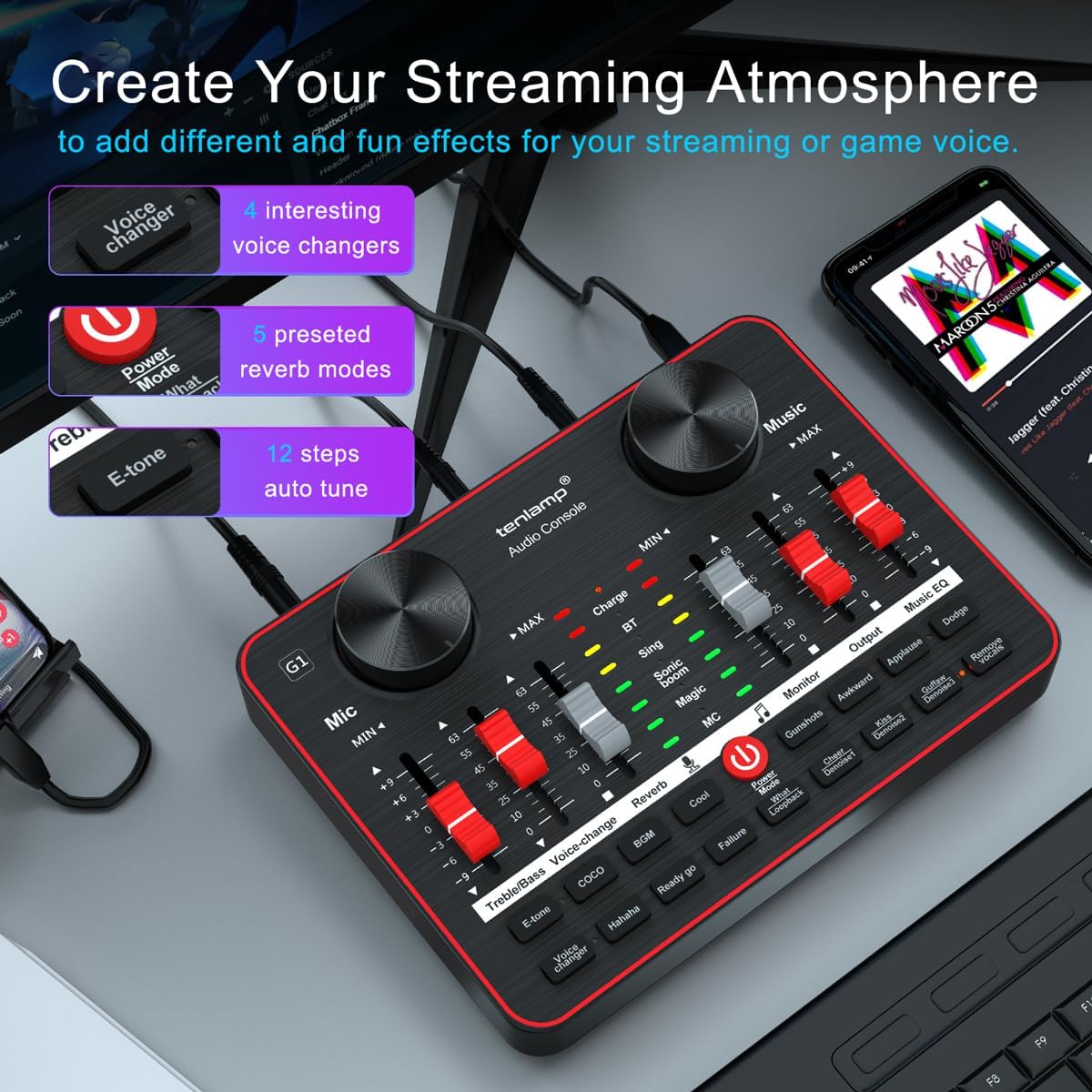
Image: The tenlamp G1 audio console highlighting features designed to create a streaming atmosphere, such as 4 interesting voice changers, 5 preset reverb modes, and 12 steps of auto-tune.
6. การบำรุงรักษา
Proper care ensures the longevity and performance of your tenlamp ระบบ G1.
- การทำความสะอาด: Use a soft, dry cloth to wipe the surface of the audio console and microphones. Avoid liquid cleaners or abrasive materials.
- พื้นที่จัดเก็บ: เก็บอุปกรณ์ไว้ในที่แห้งและเย็น หลีกเลี่ยงแสงแดดโดยตรงและอุณหภูมิที่สูงหรือต่ำเกินไปเมื่อไม่ได้ใช้งาน
- การจัดการสายเคเบิล: หลีกเลี่ยงการดัดหรือบีบสายเคเบิลมากเกินไปเพื่อป้องกันความเสียหาย
- การดูแลไมโครโฟน: Keep microphones dry and free from dust. Use pop filters to protect against moisture and plosives.
7 การแก้ไขปัญหา
หากคุณพบปัญหา โปรดดูปัญหาทั่วไปและวิธีแก้ไขต่อไปนี้:
| ปัญหา | สาเหตุที่เป็นไปได้ | สารละลาย |
|---|---|---|
| ไม่มีเสียงออก | Incorrect cable connection, low volume settings, device not powered on. | Check all cable connections. Ensure G1 is powered. Adjust Mic VOL, Music VOL, Monitor VOL, and Output VOL faders/knobs. Verify computer/mobile device audio settings. |
| ไมโครโฟนไม่ทำงาน | Microphone not properly connected, Mic VOL too low, faulty microphone. | Ensure microphone is securely plugged into the correct 3.5mm Mic input. Increase Mic VOL. Test with the second microphone to rule out a faulty unit. |
| คุณภาพเสียง/เสียงรบกวนไม่ดี | High gain, environmental noise, incorrect noise reduction setting. | Lower Mic VOL if distortion occurs. Activate or adjust noise reduction levels. Ensure proper microphone placement (e.g., close to mouth, away from noise sources). |
| คอมพิวเตอร์ไม่รู้จักอุปกรณ์นี้ | USB cable issue, driver problem (rare for plug-and-play), computer settings. | Try a different USB port or cable. Restart your computer. Check your computer's sound settings to ensure the G1 is selected as the input/output device. |
8. ข้อมูลจำเพาะ
Key technical specifications for the tenlamp G1 Live Sound Card:
- ยี่ห้อ: เต็นamp
- แบบอย่าง: G1
- จำนวนช่องสัญญาณ: 5
- เทคโนโลยีการเชื่อมต่อ: ยูเอสบี
- แหล่งพลังงาน: สายไฟ (ผ่าน USB)
- ประเภทตัวเชื่อมต่อเอาต์พุต: ทีอาร์เอส
- อินพุตเสียง: USB, XLR (via 3.5mm adapter for condenser mics)
9. การรับประกันและการสนับสนุน
For warranty information or technical support, please refer to the documentation included with your purchase or visit the official tenlamp website. You can also contact tenlamp customer service through their brand store on Amazon: