
1. บทนำ
The Rakstore XY-AP50H is a compact and versatile TPA3116D2 stereo digital amplifier board featuring Bluetooth 5.0 connectivity. It delivers 50W+50W output, making it suitable for various audio applications including home theater systems. This manual provides detailed instructions for setup, operation, and maintenance to ensure optimal performance and longevity of your device.
2. ข้อมูลด้านความปลอดภัย
- ตรวจสอบแหล่งจ่ายไฟ voltage is within the specified range of DC 5-27V. Using an incorrect voltage อาจทำให้อุปกรณ์เสียหายได้
- Always connect speakers and power supply before powering on the ampชีวิต.
- Avoid short-circuiting the speaker outputs or power input terminals.
- อย่าให้เครื่องอยู่ในที่ชื้น น้ำ หรืออุณหภูมิที่สูงหรือต่ำเกินไป
- เก็บอุปกรณ์ให้ห่างจากเด็ก
- โปรดตัดกระแสไฟก่อนทำการบำรุงรักษาหรือเชื่อมต่อใดๆ
3. คุณสมบัติของผลิตภัณฑ์
- กำลังขับสูง: 50W + 50W stereo output.
- การเชื่อมต่อบลูทูธ 5.0: Stable wireless audio transmission up to 15 meters (unobstructed).
- ฉบับกว้างtagอี ช่วง: Operates on DC 5-27V / 2A or above.
- อินพุตเสียงหลายช่อง: Supports Bluetooth, AUX, and USB Sound Card functions.
- กลไกการป้องกัน: Includes power supply reverse connection protection, short circuit protection, and self-recovery overheating protection.
- ความเข้ากันได้ของลำโพง: Adaptable for 10W-200W, 4Ω/8Ω speakers.
4. สินค้าหมดview และส่วนประกอบ
Familiarize yourself with the various components and connection points of the XY-AP50H ampกระดานลิเนียร์
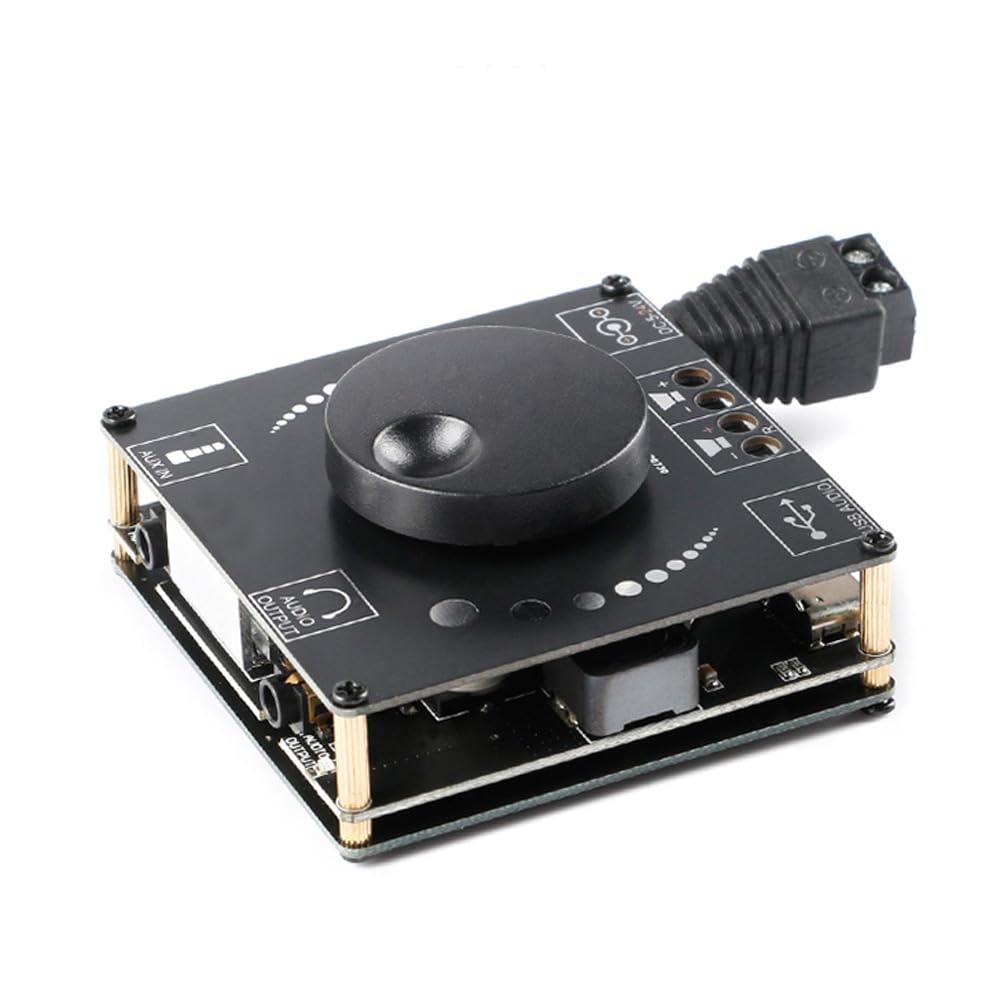
ภาพที่ 4.1: สูงสุด view of the XY-AP50H amplifier board, showing the main components including the volume knob, power input, speaker terminals, AUX input, and USB port.

ภาพที่ 4.2: ด้านล่าง view of the XY-AP50H amplifier board, indicating the USB Audio input, speaker outputs (SPKR, SPKL), and DC 5-24V power input.

ภาพที่ 4.3: Dimensions of the XY-AP50H amplifier board, measuring approximately 60mm by 60mm.
5. คำแนะนำในการตั้งค่า
5.1 การเชื่อมต่อสายไฟ
- ให้แน่ใจว่า amplifier is powered off and disconnected from any power source.
- Connect a DC 5-27V / 2A or above power adapter to the DC power input jack on the board. Observe polarity if using bare wires.
5.2 การเชื่อมต่อลำโพง
- Identify the left (SPKL) and right (SPKR) speaker output terminals on the board.
- Connect your passive speakers (10W-200W, 4Ω/8Ω) to the corresponding terminals. Ensure correct polarity (+ to + and - to -) for each speaker.
5.3 ตัวเลือกอินพุตเสียง
The XY-AP50H supports three audio input methods: Bluetooth, AUX, and USB Sound Card.
5.3.1 การเชื่อมต่อบลูทูธ
- เปิดเครื่อง ampกระดานลิเนียร์
- On your audio source device (e.g., smartphone, tablet), enable Bluetooth and search for available devices.
- Select "XY-AP50H" from the list to pair. A confirmation sound will indicate successful pairing.
5.3.2 ช่องต่ออินพุต AUX
- Connect a 3.5mm audio cable from your audio source device's headphone jack to the AUX input port on the ampกระดานลิเนียร์
- การ amplifier will automatically switch to AUX input mode when a cable is detected.
5.3.3 ฟังก์ชันการ์ดเสียง USB

ภาพที่ 5.1: Illustration of connecting the XY-AP50H to a computer via a data cable to utilize its USB sound card function, providing improved audio output quality.
- เชื่อมต่อ amplifier board to your computer using a USB data cable (Type-C to USB-A or Type-C to Type-C, depending on your computer's ports).
- Most computers will automatically recognize the amplifier as an external sound card.
- If prompted, select the XY-AP50H as the audio output device in your computer's sound settings.
- Open your computer's audio playback software to play music. The amplifier will output the audio.
6. คู่มือการใช้งาน
6.1 เปิด/ปิดเครื่อง
Connect or disconnect the DC power supply to power on or off the ampกระดานลิเนียร์
6.2 การควบคุมระดับเสียง
Rotate the potentiometer knob on the board clockwise to increase volume and counter-clockwise to decrease volume.
6.3 Input Mode Switching
การ amplifier automatically prioritizes inputs. Bluetooth is typically the default. Connecting an AUX cable will switch to AUX. Connecting via USB to a computer will activate the USB sound card mode.
7. ข้อมูลจำเพาะ
| คุณสมบัติ | ข้อมูลจำเพาะ |
|---|---|
| แบบอย่าง | XY-AP50H |
| Ampชิปลิฟายเออร์ | ส.ส.ท.3116D2 |
| เวอร์ชันบลูทูธ | BLE5.0 ภาษาไทย |
| กำลังขับ | 50W + 50W (Stereo) |
| ปริมาณอุปทานtage | DC 5-27V / 2A above |
| ระยะการส่งข้อมูล | 15 เมตร (ไม่มีสิ่งกีดขวาง) |
| จำนวนช่องสัญญาณ | ช่องสัญญาณซ้ายและขวาคู่ (สเตอริโอ) |
| ลำโพงที่ปรับให้เหมาะสม | 10W-200W, 4Ω/8Ω |
| กลไกการป้องกัน | Power supply reverse connection protection, short circuit protection, self-recovery overheating protection |
8 การแก้ไขปัญหา
- ไม่มีเสียง:
- Check power supply connection and ensure it meets DC 5-27V / 2A or above.
- Verify speaker connections are secure and correctly polarized.
- Ensure the correct audio input mode is selected (Bluetooth paired, AUX cable connected, or USB sound card active).
- ปรับปุ่มปรับระดับเสียงบน ampเครื่องขยายเสียงและอุปกรณ์แหล่งกำเนิดเสียงของคุณ
- เสียงผิดเพี้ยน:
- Reduce the volume from both the ampเครื่องขยายเสียงและแหล่งกำเนิดเสียง
- Check speaker impedance and power rating to ensure compatibility.
- Ensure power supply is stable and sufficient (at least 2A).
- การตัดการเชื่อมต่อบลูทูธ:
- Ensure the audio source device is within 15 meters of the amplifier and there are no major obstructions.
- ลองยกเลิกการจับคู่แล้วจับคู่อุปกรณ์ใหม่อีกครั้ง
- ตรวจสอบให้แน่ใจว่าไม่มีอุปกรณ์อื่นใดรบกวนสัญญาณบลูทูธ
- ความร้อนสูงเกินไป:
- จัดให้มีการระบายอากาศโดยรอบอย่างเพียงพอ ampกระดานลิเนียร์
- Reduce output volume or check speaker impedance. The board has self-recovery overheating protection, which may temporarily shut down output.
9. การบำรุงรักษา
- เก็บรักษาไว้ ampแผงวงจรขยายเสียงสะอาดและปราศจากฝุ่น ใช้ผ้าแห้งนุ่มๆ ในการทำความสะอาด
- Avoid placing the board in environments with high humidity or extreme temperatures.
- Do not attempt to disassemble or modify the board, as this may void any potential warranty and cause damage.
10. การรับประกันและการสนับสนุน
For warranty information and technical support, please refer to the seller's policies or contact Rakstore customer service directly. Keep your purchase receipt as proof of purchase.