
1. บทนำ
This manual provides detailed instructions for the installation, operation, and maintenance of your UNITOPSCI Double Din Apple CarPlay & Android Auto Car Stereo. Please read this manual thoroughly before using the product to ensure proper functionality and safety.
2. อะไรอยู่ในกล่อง
- 1 x เครื่องเสียงรถยนต์
- 1 x กล้องสำรอง
- 1 x Remote Control (Battery Not included)
- 1 x Steering Wheel Control (Battery Not included)
- สายไฟ 1 เส้น
- สายลำโพง 1 เส้น
- 1 x คู่มือผู้ใช้
- ไมโครโฟน 1 ตัว
3. คุณสมบัติหลัก
- Compatible with Apple CarPlay & Android Auto via USB cable connection.
- 7-inch HD Capacitive Touch Screen for clear visuals and smooth operation.
- Built-in Bluetooth 5.1 for hands-free calling and music streaming.
- วิทยุ FM พร้อมสถานีที่ตั้งค่าล่วงหน้าได้ 18 สถานี
- Mirror Link function for screen mirroring from smartphones (Android/iOS).
- Includes Backup Camera for safer parking.
- Supports Steering Wheel Control for convenient operation.
- EQ Sound settings (Classic, Pop, Rock, Flat, DSP).
- Multiple playback options: USB, AUX, TF Card input.
- 7 colorful backlight display options.
4. การตั้งค่าและการติดตั้ง
การติดตั้งอย่างถูกต้องเป็นสิ่งสำคัญอย่างยิ่งต่อประสิทธิภาพสูงสุด ขอแนะนำให้ติดตั้งโดยช่างผู้เชี่ยวชาญหากคุณไม่คุ้นเคยกับการเดินสายเครื่องเสียงรถยนต์
4.1 แผนภาพการเดินสายไฟทั่วไป
Refer to the following diagram for the general wiring connections of the car stereo. Ensure all connections are secure and correctly matched to your vehicle's wiring harness.

รูปที่ 1: แผนผังการเดินสายไฟทั่วไป
4.2 การเดินสายกล้องสำรอง
The included backup camera requires specific wiring for proper functionality. Connect the red power cable of the camera to the positive back battery supply and the black cable to the negative battery supply. The yellow video input port of the camera connects to the CAM IN port on the rear of the car radio. Locate the wire labeled "BACK" on the car radio's harness and connect it to the positive power supply (typically the reverse light trigger wire). This ensures the display automatically switches to the reversing image when the car is in reverse gear.

Figure 2: Backup Camera Wiring Diagram
5. คู่มือการใช้งาน
5.1 Apple CarPlay และ Android Auto
Connect your smartphone to the car stereo via a USB cable. The unit will automatically detect and launch Apple CarPlay or Android Auto, allowing you to access navigation, music, calls, and messages directly from the stereo's screen. Voice control functions are supported for hands-free operation.

รูปที่ 3: ส่วนต่อประสานผู้ใช้ CarPlay และ Android Auto
5.2 บลูทู ธ 5.1
Enable Bluetooth on your smartphone and search for available devices. Select the car stereo from the list to pair. Once connected, you can make and receive hands-free calls and stream audio directly to the stereo. The built-in microphone ensures clear call quality.

Figure 4: Bluetooth Hands-free Calls
5.3 วิทยุ FM
Access the FM radio function to listen to your favorite stations. The unit supports a radio range of FM 87.5-108.0MHZ and allows you to save up to 18 preset stations for quick access to news, sports, and music.

Figure 5: Stable FM Radio Operation
5.4 การเชื่อมโยงมิเรอร์
Utilize the Mirror Link function by connecting your smartphone via USB. This feature allows you to mirror your phone's screen content, including videos and navigation maps, directly onto the car stereo's display.

รูปที่ 6: ฟังก์ชันการทำงานของลิงก์มิเรอร์
5.5 EQ Sound Settings
Adjust the audio output to your preference using the built-in EQ sound settings. Choose from predefined modes like Classic, Pop, Rock, Flat, or customize your sound with DSP settings.

Figure 7: Digital Sound Effect Adjustment
5.6 ระบบควบคุมพวงมาลัย
Connect the steering wheel control wires to enable convenient control of the stereo directly from your steering wheel. This allows you to easily switch songs, adjust volume, and manage phone calls without taking your hands off the wheel.

รูปที่ 8: การตั้งค่าการควบคุมพวงมาลัย
5.7 USB/AUX/TF Card Playback
The unit supports multiple input sources for audio and video playback. Insert a USB drive, TF card, or connect an external device via the AUX input to enjoy your media files.
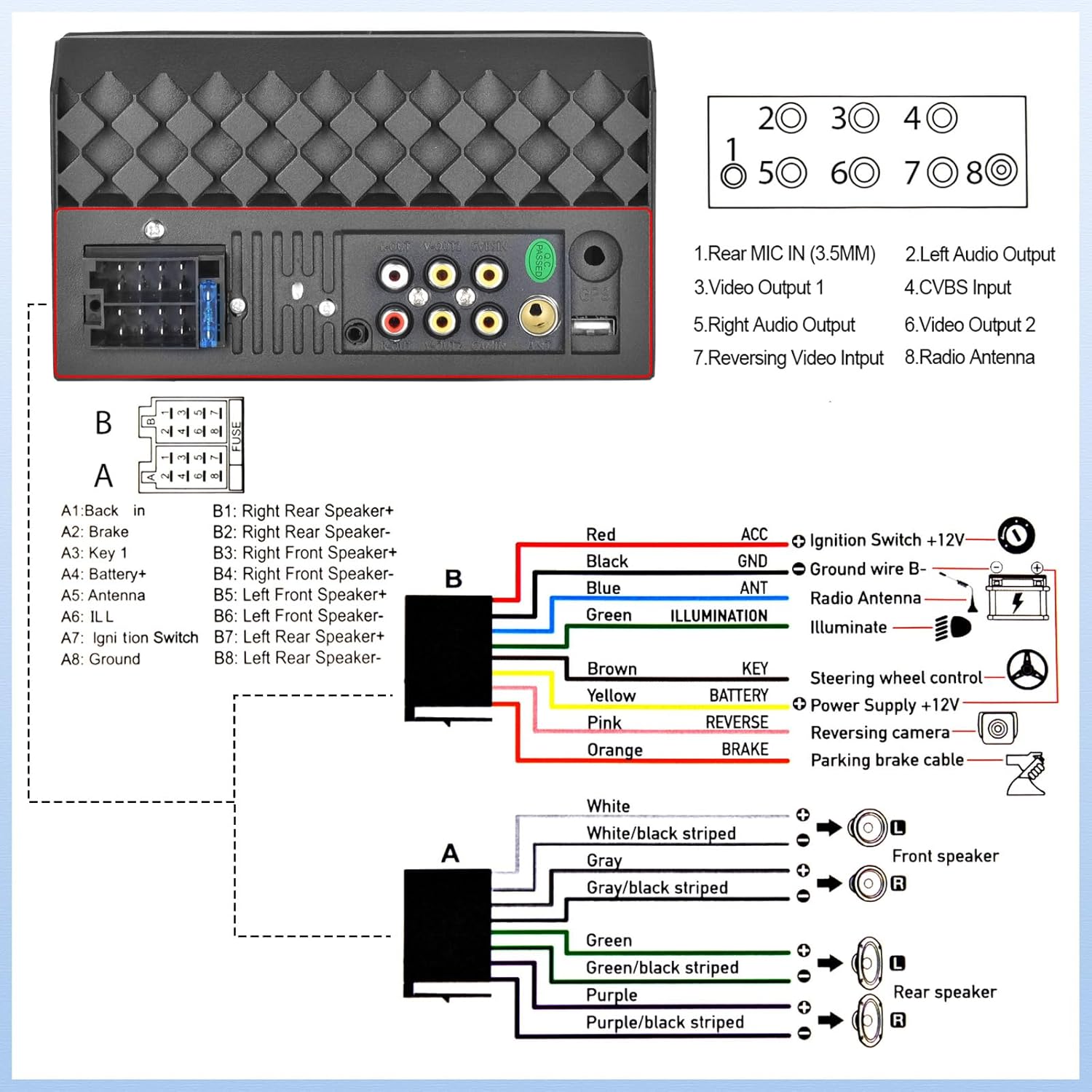
Figure 9: USB/AUX/TF Card Input
6. การบำรุงรักษา
เพื่อให้เครื่องเสียงในรถยนต์ของคุณมีอายุการใช้งานยาวนานและมีประสิทธิภาพเหมาะสมที่สุด โปรดปฏิบัติตามคำแนะนำในการบำรุงรักษาดังต่อไปนี้:
- รักษาหน้าจอให้สะอาดด้วยผ้านุ่มที่ไม่เป็นขุย หลีกเลี่ยงการใช้น้ำยาทำความสะอาดที่มีฤทธิ์กัดกร่อน
- ตรวจสอบให้แน่ใจว่ามีการระบายอากาศที่เหมาะสมรอบๆ ตัวเครื่องเพื่อป้องกันความร้อนสูงเกินไป
- หลีกเลี่ยงการวางเครื่องไว้ในที่ที่มีอุณหภูมิสูงหรือแสงแดดโดยตรงเป็นเวลานาน
- Regularly check wiring connections for looseness or corrosion.
7 การแก้ไขปัญหา
หากคุณประสบปัญหาเกี่ยวกับเครื่องเสียงในรถยนต์ โปรดดูปัญหาทั่วไปและวิธีแก้ไขต่อไปนี้:
- ไม่มีไฟฟ้า: Check all power connections, including the ACC (ignition switch) and B+ (battery) wires. Ensure the fuse is not blown.
- ไม่มีเสียง: Verify speaker connections are secure and correctly polarized. Check the volume level and EQ settings.
- ปัญหาการเชื่อมต่อบลูทูธ: ตรวจสอบให้แน่ใจว่าได้เปิดใช้งานบลูทูธทั้งบนเครื่องเสียงและโทรศัพท์ของคุณแล้ว ลองยกเลิกการจับคู่และจับคู่ใหม่อีกครั้ง
- กล้องสำรองไม่แสดง: If the camera is powered on but the head unit does not switch to the reversing image, check the trigger wire for the backup camera connection. Ensure it is correctly connected to a positive power supply that activates when reverse gear is engaged.
- หน้าจอสัมผัสไม่ตอบสนอง: Try resetting the unit (refer to the main unit for a small reset button, if available, or disconnect power briefly).
8. ข้อมูลจำเพาะ
| คุณสมบัติ | ข้อมูลจำเพาะ |
|---|---|
| ขนาดสินค้า | 2.48 x 7 x 4 นิ้ว |
| น้ำหนักสินค้า | 1.1 ปอนด์ |
| หมายเลขรุ่นสินค้า | L2 |
| เทคโนโลยีการเชื่อมต่อ | บลูทูธ, อุปกรณ์เสริม, USB |
| ประเภทตัวควบคุม | แอนดรอยด์ |
| คุณสมบัติพิเศษ | Touchscreen, Backup Camera Input, Android Auto, Built-In Bluetooth, Apple CarPlay |
| อุปกรณ์ที่รองรับ | สมาร์ทโฟน |
| ประเภทขั้วต่อ | ยูเอสบี 2.0 |
| โหมดเอาต์พุตเสียง | โมโน |
| การกำหนดค่าช่องเสียงรอบทิศทาง | 4.0 |
| การเข้ารหัสวิดีโอ | เอช.264, เอช.265 |
| ผู้ผลิต | ยูนิทอปสซี |
| ประเทศต้นกำเนิด | จีน |
9. การรับประกันและการสนับสนุน
UNITOPSCI is committed to providing high-quality products and satisfactory services. Your product comes with the following support:
- Replacement Available within 24 Months
- 60-days No Worry to Return
- Lifetime After-Sales Consult and Technical Support
- ตอบกลับรวดเร็วภายใน 16 ชั่วโมง
หากมีข้อสงสัยหรือต้องการความช่วยเหลือด้านเทคนิค โปรดติดต่อเราได้ที่: UNITOPSCI@126.com