
1. บทนำ
This user manual provides detailed instructions for the setup, operation, and maintenance of your BL Android TV Box 11.0. Designed for an enhanced home entertainment experience, this device transforms your television into a smart hub, offering access to a wide range of streaming content, applications, and multimedia features. Please read this manual carefully before using the product to ensure optimal performance and longevity.
2. เนื้อหาบรรจุภัณฑ์
โปรดตรวจสอบว่ารายการทั้งหมดที่ระบุไว้ด้านล่างมีอยู่ในแพ็คเกจของคุณหรือไม่:
- Android TV Box (1 unit)
- รีโมทคอนโทรล (1 ยูนิต)
- อะแดปเตอร์แปลงไฟ (1 ชิ้น)
- สาย HDMI (1 ชิ้น)
- คู่มือผู้ใช้ (1 หน่วย)

Image: All components included in the BL Android TV Box 11.0 package.
3. การตั้งค่า
Follow these steps to set up your BL Android TV Box:
- เชื่อมต่อสาย HDMI: Insert one end of the HDMI cable into the HDMI OUT port on the TV Box and the other end into an available HDMI input on your television.
- เชื่อมต่ออะแดปเตอร์ไฟฟ้า: Plug the power adapter into the DC IN port on the TV Box, then plug the other end into a power outlet.
- เชื่อมต่อกับเครือข่าย: Once powered on, connect the TV Box to your network. You can use either Wi-Fi (2.4G/5G Dual Band) or an Ethernet cable for a wired connection. Navigate to 'Settings' > 'Network' to configure your connection.
- ตั้งค่าเริ่มต้น: Follow the on-screen prompts to complete the initial setup, including language selection, time zone, and Google account login.
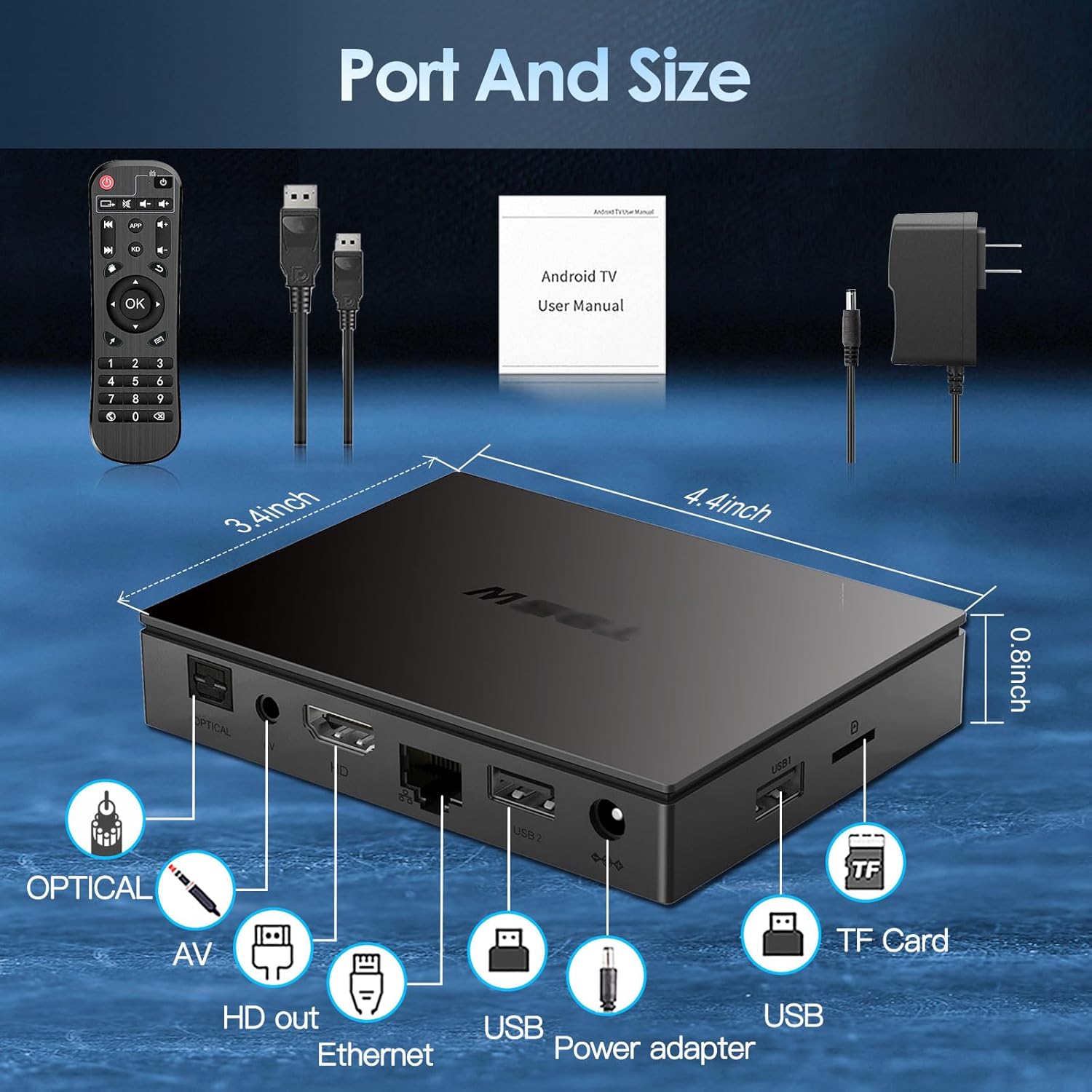
Image: Visual guide for connecting the BL Android TV Box to your television and power.
4. คู่มือการใช้งาน
Once set up, you can begin using your BL Android TV Box to access various features:
- การนำทาง: Use the included remote control to navigate through the Android 11.0 interface. The directional pad and 'OK' button are used for selection, while 'Back' and 'Home' buttons provide quick navigation.
- การเข้าถึงแอป: The home screen displays pre-installed applications like YouTube, Netflix, Google Play Store, and Chrome. You can download additional apps from the Google Play Store.
- การเล่นสื่อ: เล่นสื่อท้องถิ่น files from USB drives or TF cards connected to the TV Box. The device supports various video and audio formats.
- มิเรอร์หน้าจอ: Utilize the wireless screen mirroring function to cast content from your smartphone or tablet to your TV. This feature supports Airplay, DLNA, and Miracast protocols.

Image: The user interface of the Android 11.0 operating system on the TV Box.

Image: Demonstration of wireless screen mirroring from mobile devices to the TV.
5. คุณสมบัติ
The BL Android TV Box 11.0 is equipped with advanced features for a superior entertainment experience:
- Powerful Amlogic S905W2 CPU: Powered by a Quad-Core Cortex-A35 processor, ensuring smooth performance, efficient image processing, and broad app compatibility.
- Ultra-High Definition Viewการลง: Supports 4K HDR10+ technology and the latest AV1 encoding, delivering realistic visuals, efficient video compression, and enhanced picture quality.
- Dual-Band Wi-Fi & Bluetooth 5.0: Features 2.4G/5G dual-band Wi-Fi for stable and fast wireless connectivity, and Bluetooth 5.0 for connecting peripherals like headphones, speakers, keyboards, and gamepads.
- มิเรอร์หน้าจอไร้สาย: Allows you to mirror content from your mobile devices to your TV, facilitating easy sharing of photos and videos.

ภาพ: เหนือview of the Amlogic S905W2 processor.
Image: Highlighting 4K HDR10+ video decoding capabilities.

Image: Connectivity options including Dual Wi-Fi and Bluetooth 5.0.
6. การบำรุงรักษา
To ensure the longevity and optimal performance of your BL Android TV Box, follow these maintenance guidelines:
- การทำความสะอาด: ใช้ผ้าแห้งเนื้อนุ่มเช็ดทำความสะอาดภายนอกของอุปกรณ์ หลีกเลี่ยงการใช้น้ำยาทำความสะอาดหรือวัสดุที่มีฤทธิ์กัดกร่อน
- การระบายอากาศ : Ensure the TV Box is placed in a well-ventilated area to prevent overheating. Do not block the ventilation openings.
- การอัปเดตซอฟต์แวร์: Periodically check for system updates in the 'Settings' menu to ensure you have the latest features and security patches.
- ปิดเครื่องอย่างถูกต้อง: ควรปิดเครื่องอย่างถูกต้องทุกครั้งก่อนถอดปลั๊กเพื่อป้องกันข้อมูลเสียหาย
7 การแก้ไขปัญหา
If you encounter issues with your BL Android TV Box, refer to the following common troubleshooting steps:
- ไม่มีไฟฟ้า: ตรวจสอบให้แน่ใจว่าได้เสียบอะแดปเตอร์แปลงไฟเข้ากับกล่องทีวีและเต้ารับไฟฟ้าที่ใช้งานได้สนิทแล้ว หากจำเป็นให้ลองเสียบกับเต้ารับอื่นดู
- ไม่มีภาพ/สัญญาณ: Verify that the HDMI cable is correctly connected to both the TV Box and your television. Ensure your TV is set to the correct HDMI input source.
- ไม่มีการเชื่อมต่อ Wi-Fi: Check your router and ensure it is working correctly. Re-enter your Wi-Fi password in the TV Box settings. If issues persist, try restarting both the TV Box and your router.
- รีโมทคอนโทรลไม่ตอบสนอง: ตรวจสอบแบตเตอรี่ในรีโมทคอนโทรลและเปลี่ยนแบตเตอรี่หากจำเป็น ตรวจสอบให้แน่ใจว่าไม่มีสิ่งกีดขวางระหว่างรีโมทและกล่องทีวี
- แอปค้าง/ขัดข้อง: Try clearing the cache of the problematic app in 'Settings' > 'Apps'. If the issue persists, uninstall and reinstall the app.
- ประสิทธิภาพการทำงานช้า: Close unused applications running in the background. Consider performing a factory reset if performance issues are severe and persistent (Note: This will erase all data and settings).
8. ข้อมูลจำเพาะ
| คุณสมบัติ | ข้อมูลจำเพาะ |
|---|---|
| หมายเลขรุ่น | BL-Android-TV-Box-11.0 |
| ระบบปฏิบัติการ | แอนดรอยด์ 11.0 |
| ซีพียู | Amlogic S905W2 Quad-Core Cortex-A35 |
| แรม | 4GB |
| รอม | 32GB |
| เอาท์พุตวิดีโอ | 4Kx2K@60fps (HDMI 2.1) |
| การถอดรหัสวิดีโอ | AV1, HDR10+, H.265, H.264, etc. |
| การเชื่อมต่อ Wi-Fi | 2.4G/5G Dual-Band Wi-Fi |
| บลูทูธ | บลูทูธ 5.0 |
| อีเธอร์เน็ต | 10/100ม. |
| พอร์ต | HDMI 2.1*1, USB 2.0*2, Optical, AV, Ethernet, TF Card Slot, Power Adapter Port |
| ขนาด | 11.2L x 8.6W x 2.1H ซม |

Image: Port layout and dimensions of the BL Android TV Box.
9. การรับประกันและการสนับสนุน
Your BL Android TV Box 11.0 comes with a standard manufacturer's warranty. For specific warranty terms and conditions, please refer to the documentation provided with your purchase or contact the seller directly. If you require technical assistance or have questions not covered in this manual, please reach out to the customer support team of the brand BL. Contact information can typically be found on the product packaging or the brand's official webเว็บไซต์.