
1. บทนำ
The Black Shark Lucifer T7 TWS Gaming Earbuds (Model: BS-T7) are designed to provide an immersive audio experience for both gaming and music. Featuring advanced Bluetooth 5.3 technology, these earbuds offer lightning-fast transmission speeds and low latency, ensuring a responsive and stable connection. With 10mm drivers for powerful bass, Environmental Noise Cancellation (ENC) for clear calls, and smart touch controls, the Lucifer T7 earbuds are built for performance and convenience. They also boast IPX5 water resistance and dynamic lighting effects, enhancing your overall user experience.

Figure 1: Black Shark Lucifer T7 TWS Gaming Earbuds in their open charging case.
2. อะไรอยู่ในกล่อง
กรุณาตรวจสอบสิ่งของภายในบรรจุภัณฑ์เมื่อแกะกล่องเพื่อให้แน่ใจว่ามีสินค้าครบทั้งหมด:
- Black Shark Lucifer T7 TWS Gaming Earbuds (Left and Right)
- เคสชาร์จแบบไร้สาย
- คู่มือการใช้งาน (เอกสารนี้)
- แผ่นรองหูฟัง (หลายขนาด)
- Charging Cable (USB-C) - (Assumed, not explicitly listed but standard for TWS earbuds)

Figure 2: Black Shark Lucifer T7 TWS Gaming Earbuds and their charging case.
3. การตั้งค่า
3.1 การชาร์จหูฟังและเคส
ก่อนใช้งานครั้งแรก ควรชาร์จหูฟังและเคสชาร์จให้เต็ม
- ใส่หูฟังลงในกล่องชาร์จ ตรวจสอบให้แน่ใจว่าหูฟังอยู่ในช่องที่ถูกต้อง
- เชื่อมต่อกล่องชาร์จเข้ากับแหล่งจ่ายไฟโดยใช้สาย USB-C ที่ให้มา
- The LED indicators on the case will illuminate to show charging status. A full charge is indicated when all LEDs are solid.
หูฟังไร้สายรุ่นนี้สามารถใช้งานได้นานสูงสุดถึง 23 ชั่วโมงเมื่อใช้ร่วมกับเคสชาร์จ
3.2 การจับคู่กับอุปกรณ์
หูฟังไร้สายรุ่นนี้ใช้เทคโนโลยี Bluetooth 5.3 เพื่อการเชื่อมต่อที่เสถียรและมีประสิทธิภาพ
- เปิดกล่องชาร์จ หูฟังจะเข้าสู่โหมดจับคู่โดยอัตโนมัติ ซึ่งจะแสดงด้วยไฟ LED กะพริบบนหูฟัง
- บนอุปกรณ์ของคุณ (สมาร์ทโฟน แท็บเล็ต แล็ปท็อป ฯลฯ) ไปที่การตั้งค่าบลูทูธ
- ค้นหา available devices and select "Black Shark Lucifer T7" from the list.
- Once connected, the earbud LEDs will stop flashing.
- หากการจับคู่ล้มเหลว ให้ปิดเคส รอสองสามวินาที แล้วทำซ้ำขั้นตอนอีกครั้ง
3.3 การติดตั้งหูฟัง
For optimal sound quality and comfort, choose the ear cushions that best fit your ears. Gently insert the earbuds into your ear canal and twist slightly to secure them.
4. คู่มือการใช้งาน
4.1 เปิด/ปิดเครื่อง
- เปิดเครื่อง: เปิดกล่องชาร์จ หูฟังจะเปิดโดยอัตโนมัติ
- หมดแรง: ใส่หูฟังกลับเข้าไปในกล่องชาร์จและปิดฝา หูฟังจะปิดโดยอัตโนมัติและเริ่มชาร์จ
4.2 การควบคุมแบบสัมผัสอัจฉริยะ
The Black Shark Lucifer T7 earbuds feature intuitive touch controls on each earbud. The specific functions are as follows:
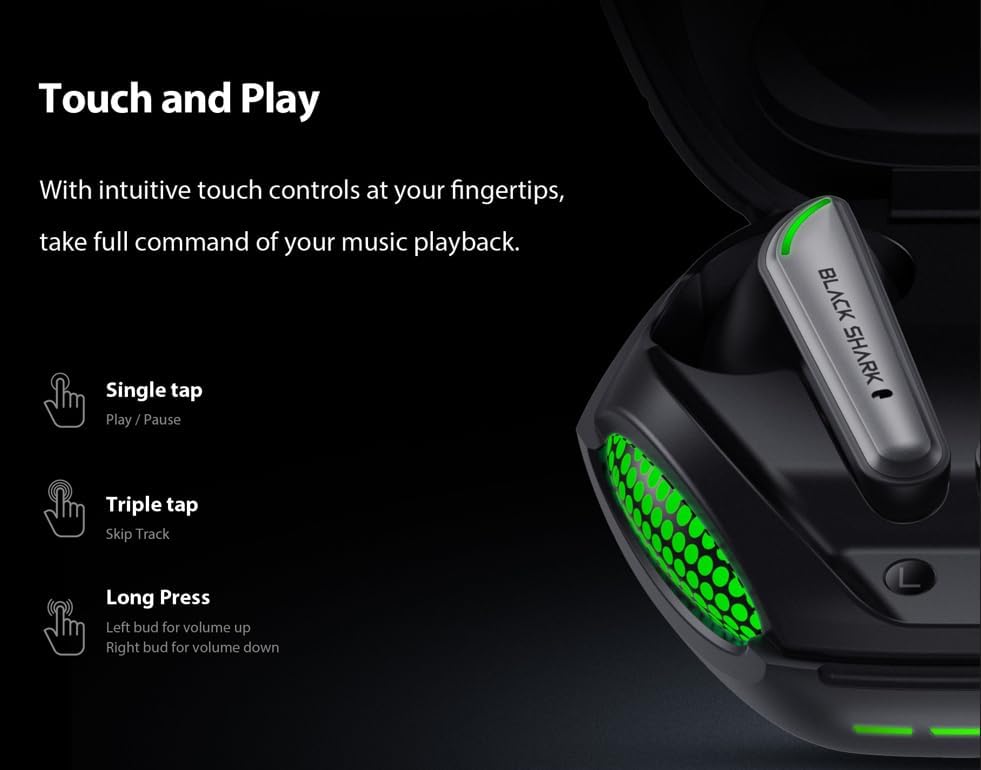
Figure 3: Smart Touch Controls Overview.
- แตะครั้งเดียว: เล่น/หยุดเพลง
- แตะสามครั้ง: ข้ามไปยังแทร็กถัดไป
- กดยาว (หูฟังซ้าย): เพิ่มระดับเสียง.
- กดยาว (หูฟังขวา): ลดระดับเสียง.
- การรับ / วางสาย: แตะที่หูฟังข้างใดข้างหนึ่งเพียงครั้งเดียว
- การปฏิเสธการโทร: กดที่หูฟังข้างใดข้างหนึ่งค้างไว้
- การเปิดใช้งานผู้ช่วยเสียง: แตะสองครั้งที่หูฟังข้างใดข้างหนึ่ง
4.3 Game and Music Dual Mode
The earbuds support a dual mode for optimized audio performance in both gaming and music listening. Switch between modes by performing a specific touch gesture (e.g., quadruple tap or specific long press combination). Refer to the quick start guide included in your package for the exact gesture to toggle between game mode (low latency) and music mode (high-fidelity audio).
4.4 การตัดเสียงรบกวนจากสภาพแวดล้อม (ENC) สำหรับการโทร
The built-in ENC technology helps reduce background noise during calls, ensuring your voice is clear and distinct to the person on the other end. This feature is automatically active during phone calls.

Figure 4: Environmental Noise Cancellation for clear communication.
5. การบำรุงรักษา
5.1 การทำความสะอาด
- ทำความสะอาดหูฟังเป็นประจำ โดยเฉพาะจุกหูฟังและหน้าสัมผัสสำหรับชาร์จ ด้วยผ้าแห้งนุ่มที่ไม่เป็นขุย
- ห้ามใช้สารทำความสะอาดที่มีฤทธิ์กัดกร่อน แอลกอฮอล์ หรือตัวทำละลายเคมี
- ตรวจสอบให้แน่ใจว่าไม่มีความชื้นเข้าไปในช่องเปิดใดๆ
5.2 ความต้านทานน้ำ (IPX5)
The Black Shark Lucifer T7 earbuds are rated IPX5 water resistant, meaning they can withstand low-pressure water jets from any direction. This makes them suitable for workouts and light rain. However, they are not designed for swimming or submersion in water. Do not charge the earbuds if they are wet.
5.3 พื้นที่จัดเก็บ
เมื่อไม่ใช้งาน ให้เก็บหูฟังไว้ในกล่องชาร์จเพื่อป้องกันและรักษาระดับพลังงาน เก็บกล่องไว้ในที่แห้งและเย็น หลีกเลี่ยงอุณหภูมิที่สูงหรือต่ำเกินไป
6 การแก้ไขปัญหา
6.1 หูฟังไม่จับคู่
- ตรวจสอบให้แน่ใจว่าได้ชาร์จหูฟังเอียร์บัดทั้งสองข้างแล้ว
- Place both earbuds back into the charging case, close the lid, and then open it again to re-enter pairing mode.
- ปิดและเปิดบลูทูธของอุปกรณ์ของคุณ
- Forget "Black Shark Lucifer T7" from your device's Bluetooth list and try pairing again.
- ตรวจสอบให้แน่ใจว่าหูฟังอยู่ในระยะการใช้งานไร้สาย 10 เมตรจากอุปกรณ์ของคุณ
6.2 ไม่มีเสียงหรือเสียงเบา
- Check the volume level on both your device and the earbuds (using long press controls).
- ตรวจสอบให้แน่ใจว่าหูฟังเชื่อมต่อกับอุปกรณ์ของคุณอย่างถูกต้อง
- ทำความสะอาดสิ่งสกปรกที่ติดอยู่บริเวณลำโพงและจุกหูฟังออกให้หมด
- ลองเล่นเสียงจากแอปพลิเคชันหรืออุปกรณ์อื่น
6.3 ปัญหาการชาร์จ
- ตรวจสอบว่าสายชาร์จเชื่อมต่อกับเคสและแหล่งจ่ายไฟอย่างแน่นหนาแล้ว
- ลองใช้สาย USB-C และอะแดปเตอร์ไฟอื่น
- ตรวจสอบให้แน่ใจว่าขั้วชาร์จบนหูฟังและภายในเคสสะอาดและไม่มีสิ่งกีดขวาง
- If the earbuds are wet, dry them completely before attempting to charge.
6.4 การควบคุมแบบสัมผัสไม่ตอบสนอง
- ให้แน่ใจว่านิ้วของคุณสะอาดและแห้งเมื่อใช้ระบบควบคุมแบบสัมผัส
- Try restarting the earbuds by placing them in the case and closing the lid for a few seconds.
7. ข้อมูลจำเพาะ
| ชื่อรุ่น | แบล็คชาร์ค ลูซิเฟอร์ T7 |
| หมายเลขรุ่น | บีเอส-ที7 |
| การเชื่อมต่อ | บลูทูธ 5.3 |
| ช่วงสาย | สูงถึง 10 เมตร (33 ฟุต) |
| ไดร์เวอร์เสียง | ไดรเวอร์ไดนามิกขนาด 10 มม. |
| เวลาแฝงของเสียง | 65 มิลลิวินาที |
| การควบคุมเสียงรบกวน | ระบบตัดเสียงรบกวนจากสิ่งแวดล้อม (ENC) สำหรับการโทร |
| ความต้านทานต่อน้ำ | IPX5 |
| Playtime (Total with Case) | นานถึง 23 ชั่วโมง |
| วิธีการควบคุม | สัมผัส |
| มิติ (กรณี) | ขนาด 3.5 x 3.5 x 1.54 นิ้ว (โดยประมาณ) |
| น้ำหนัก | 4.16 ออนซ์ (โดยประมาณ) |
| วัสดุ | พลาสติก |
| อุปกรณ์ที่รองรับ | Cellphones, Gaming Consoles, Laptops, Tablets, iPhone |

Figure 5: Key features of the Black Shark Lucifer T7.
8. สินค้าหมดview วีดีโอ
ชมวิดีโออย่างเป็นทางการนี้เพื่อดูภาพรวมview of the Black Shark Lucifer T7 Gaming Earbuds, highlighting their design and key functionalities.
วิดีโอ 1: จบอย่างเป็นทางการแล้วview of the Black Shark Lucifer T7 Gaming Earbuds.
9. การรับประกันและการสนับสนุน
For detailed warranty information and customer support, please refer to the official Black Shark webหรือติดต่อฝ่ายบริการลูกค้าโดยตรง เก็บใบเสร็จรับเงินไว้เพื่อใช้ในการเคลมประกัน
ผู้ผลิต: ฉลามดำ
ร้านค้าแบรนด์: ร้าน Black Shark บน Amazon