
eppfun AK3046G
คู่มือผู้ใช้ eppfun AK3046G Pro Bluetooth 5.3 Audio Adapter
Model: AK3046G Pro
1. บทนำ
The eppfun AK3046G Pro is a versatile Bluetooth 5.3 audio adapter designed to add wireless audio capabilities to various devices. It functions as both a Bluetooth transmitter (TX mode) and a Bluetooth receiver (RX mode), allowing you to stream audio wirelessly to or from non-Bluetooth devices. This manual provides detailed instructions for setup, operation, and maintenance.
เนื้อหาแพ็คเกจ
- eppfun AK3046G Pro Bluetooth 5.3 Audio Adapter
- สายสัญญาณเสียง AUX 3.5 มม.
- สายชาร์จ USB-C
- สายสัญญาณเสียงแบบออปติคอล (TOSLINK)
- สายสัญญาณเสียงโคแอกเซียล
- คู่มือการใช้งาน (เอกสารนี้)
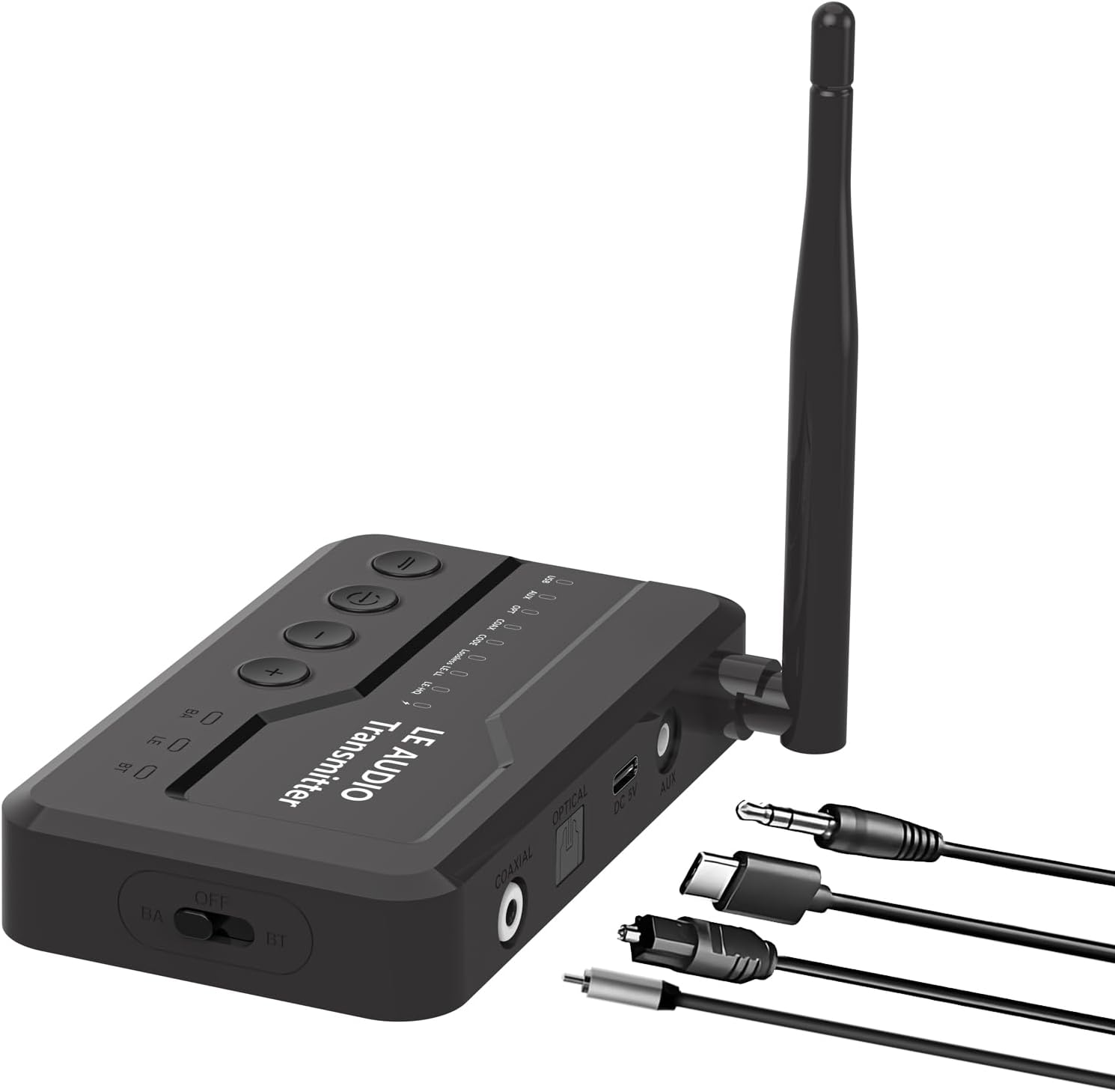
Image 1.1: The eppfun AK3046G Pro Bluetooth 5.3 Audio Adapter shown with its detachable antenna and various included cables: 3.5mm AUX, USB-C charging, optical, and coaxial. The adapter features control buttons on top and input/output ports on the side.
2. คุณสมบัติหลัก
- เทคโนโลยีบลูทูธ 5.3: Ensures stable connection and fast transmission.
- ฟังก์ชั่น 2-in-1: ทำงานได้ทั้งในโหมดส่งสัญญาณบลูทูธ (TX) และรับสัญญาณบลูทูธ (RX)
- หน้าจอแสดงผลแอลอีดี: Shows Bluetooth connection status, volume, battery level, and working mode.
- CVC8.0 Noise Cancellation & DSP: Reduces background noise for clear call quality.
- ไมโครโฟนในตัว: Enables hands-free calling in RX mode.
- ช่องรับ/ส่งสัญญาณเสียงหลายช่อง: Supports 3.5mm AUX, Optical, and Coaxial connections.
- ปุ่มควบคุมที่สะดวกสบาย: Easy management of music playback, calls, and volume.
- การชาร์จไมโคร USB: Efficient charging with included cable.
3. การตั้งค่าและการเชื่อมต่อ
3.1 อุปกรณ์เกินview
Familiarize yourself with the device's ports and controls:
- แผงด้านบน: Power button, Play/Pause, Volume Up (+), Volume Down (-).
- แผงด้านหน้า: จอแสดงผล LED
- แผงด้านข้าง: OFF/BA/BT switch (Power/Bypass/Bluetooth mode), Optical IN/OUT, Coaxial IN/OUT, DC 5V (Micro USB charging), AUX IN/OUT.
- เสาอากาศ: Detachable for improved signal.
ภาพที่ 3.1: รายละเอียด view of the eppfun AK3046G Pro, highlighting the control buttons (Power, Play/Pause, Volume Up, Volume Down) on the top surface, the LED display, and the various ports on the side including Optical, Coaxial, DC 5V (Micro USB), and AUX. The OFF/BA/BT switch is also visible.
3.2 การชาร์จอุปกรณ์
- Connect the Micro USB charging cable to the DC 5V port on the adapter.
- Connect the other end of the USB cable to a 5V USB power source (e.g., car charger, wall adapter, computer USB port).
- หน้าจอ LED จะแสดงสถานะการชาร์จ การชาร์จเต็มใช้เวลาประมาณ 35 นาที
3.3 การตั้งค่าโหมดรับสัญญาณ (RX)
Use RX mode to receive audio from a Bluetooth-enabled device (e.g., smartphone) and output it to a non-Bluetooth audio system (e.g., car stereo, wired headphones, home stereo).
- สลับไปที่โหมด RX: Slide the switch on the side of the adapter to the "BT" position.
- เชื่อมต่อกับระบบเสียง:
- For 3.5mm AUX: Connect one end of the 3.5mm AUX cable to the adapter's AUX port and the other end to your audio system's AUX input.
- For Optical: Connect the optical cable to the adapter's OPTICAL port and your audio system's optical input.
- For Coaxial: Connect the coaxial cable to the adapter's COAXIAL port and your audio system's coaxial input.
- เปิดเครื่อง: Press and hold the power button on the top panel until the LED display illuminates.
- การจับคู่: The adapter will automatically enter pairing mode (indicated on the LED display). On your Bluetooth-enabled device (e.g., smartphone), search for "eppfun AK3046G Pro" in the Bluetooth settings and select it to pair.
- การเล่นเสียง: Once paired, play audio on your Bluetooth device, and it will stream wirelessly to your connected audio system.
3.4 การตั้งค่าโหมดส่งสัญญาณ (TX)
Use TX mode to transmit audio from a non-Bluetooth audio source (e.g., TV, PC, MP3 player) to a Bluetooth-enabled audio device (e.g., Bluetooth headphones, Bluetooth speaker).
- สลับไปที่โหมด TX: Slide the switch on the side of the adapter to the "BT" position.
- เชื่อมต่อกับแหล่งเสียง:
- For 3.5mm AUX: Connect one end of the 3.5mm AUX cable to the adapter's AUX port and the other end to your audio source's audio output (e.g., headphone jack).
- For Optical: Connect the optical cable to the adapter's OPTICAL port and your audio source's optical output.
- For Coaxial: Connect the coaxial cable to the adapter's COAXIAL port and your audio source's coaxial output.
- เปิดเครื่อง: Press and hold the power button on the top panel until the LED display illuminates.
- การจับคู่: Ensure your Bluetooth headphones or speaker are in pairing mode. The adapter will automatically search for and connect to nearby Bluetooth audio devices. The LED display will show the connection status.
- การเล่นเสียง: Once connected, play audio from your non-Bluetooth source, and it will transmit wirelessly to your Bluetooth audio device.
4. การดำเนินการ
4.1 เปิด/ปิดเครื่อง
- เปิดเครื่อง: กดปุ่มเปิดปิดค้างไว้ประมาณ 3 วินาที
- หมดแรง: กดปุ่มเปิดปิดค้างไว้ประมาณ 3 วินาที
4.2 Music Control (RX Mode)
- เล่น/หยุดชั่วคราว: กดปุ่มเล่น/หยุดชั่วคราวหนึ่งครั้ง
- ปรับระดับเสียงขึ้น: กดปุ่ม "+"
- ลดเสียงลง: กดปุ่ม "-"
- เพลงถัดไป: กดปุ่ม "+" ค้างไว้
- แทร็กก่อนหน้า: กดปุ่ม "-" ค้างไว้
4.3 Call Control (RX Mode)
When connected to a smartphone in RX mode:
- รับสาย: กดปุ่มเล่น/หยุดชั่วคราวหนึ่งครั้ง
- วางสาย: กดปุ่มเล่น/หยุดชั่วคราวหนึ่งครั้งระหว่างการโทร
- ปฏิเสธสาย: กดปุ่ม Play/Pause ค้างไว้ 2 วินาที
- โทรซ้ำหมายเลขล่าสุด: กดปุ่มเล่น/หยุดชั่วคราวสองครั้ง
4.4 ไฟ LED แสดงสถานะ
The LED display provides real-time information:
- สถานะการเชื่อมต่อบลูทูธ: Indicates if a device is connected or in pairing mode.
- ระดับเสียง: Shows the current audio volume.
- ระดับแบตเตอรี่: แสดงประจุแบตเตอรี่ที่เหลืออยู่
- โหมดการทำงาน: Indicates whether the device is in RX (Receiver) or TX (Transmitter) mode.
- ตัวแปลงสัญญาณเสียง: May display the active audio codec (e.g., SBC, aptX).
5. การบำรุงรักษาและการดูแล
- การชาร์จ: Charge the device fully before first use. Recharge when the battery indicator is low. Avoid overcharging for extended periods.
- การทำความสะอาด: ใช้ผ้านุ่มและแห้งเช็ดทำความสะอาดอุปกรณ์ ห้ามใช้น้ำยาทำความสะอาดหรือตัวทำละลาย
- พื้นที่จัดเก็บ: เก็บอุปกรณ์ไว้ในที่แห้งและเย็น หลีกเลี่ยงแสงแดดโดยตรงและอุณหภูมิที่สูงหรือต่ำเกินไป
- การสัมผัสน้ำ: อุปกรณ์นี้ไม่กันน้ำ หลีกเลี่ยงการสัมผัสกับน้ำหรือความชื้น
6 การแก้ไขปัญหา
6.1 อุปกรณ์ไม่เปิดเครื่อง
- Ensure the device is fully charged. Connect it to a power source using the Micro USB cable and try again.
6.2 ไม่สามารถจับคู่กับอุปกรณ์บลูทูธได้
- Ensure the adapter is in the correct mode (RX for receiving, TX for transmitting) and the side switch is set to "BT".
- Make sure the adapter is in pairing mode (LED display will indicate).
- Place the adapter and the target Bluetooth device close to each other.
- Turn off and on the Bluetooth function on your pairing device.
- ล้างรายการจับคู่บลูทูธบนอุปกรณ์ของคุณและลองจับคู่ใหม่อีกครั้ง
6.3 ไม่มีเสียงหรือเสียงเบา
- Check all cable connections (AUX, Optical, Coaxial) are secure and correctly inserted.
- Ensure the volume on both the adapter and the connected audio device/source is turned up.
- Verify that the correct input/output source is selected on your audio system (e.g., AUX input on car stereo).
- Confirm the adapter is successfully paired and connected.
6.4 Poor Audio Quality or Disconnections
- ลดระยะห่างระหว่างอะแดปเตอร์กับอุปกรณ์บลูทูธที่เชื่อมต่ออยู่
- Remove any obstacles (walls, large objects) that may interfere with the Bluetooth signal.
- หลีกเลี่ยงการรบกวนทางแม่เหล็กไฟฟ้าที่รุนแรงจากอุปกรณ์อิเล็กทรอนิกส์อื่นๆ
- ตรวจสอบให้แน่ใจว่าอะแดปเตอร์ชาร์จเต็มแล้ว
7. ข้อมูลจำเพาะ
| ชื่อรุ่น | AK3046G Pro |
| เวอร์ชันบลูทูธ | 5.3 |
| ฮาร์ดแวร์อินเตอร์เฟซ | บลูทูธ, ยูเอสบี |
| อุปกรณ์ที่รองรับ | Car Stereo System, Headphone, Home Stereo System, Smartphone, Speaker |
| คุณสมบัติพิเศษ | Built-In Microphone, LED Display |
| อินพุตเสียง | 3.5mm AUX, Optical, Coaxial |
| เอาท์พุตเสียง | 3.5mm AUX, Optical, Coaxial, Bluetooth |
| แหล่งพลังงาน | Battery Powered (Lithium-Polymer) |
| พอร์ตชาร์จ | ไมโคร USB (DC 5V) |
| เวลาทำงานของโหมด RX | ประมาณ 7.5 ชั่วโมง |
| เวลาทำงานของโหมด TX | ประมาณ 5 ชั่วโมง |
| เวลาในการชาร์จ | ประมาณ 35 นาที |
| น้ำหนัก | 0.1 กิโลกรัม |
| ขนาด | 12 x 9 x 1 ซม. (ขนาดบรรจุภัณฑ์) |
8. การรับประกันและการสนับสนุน
eppfun products are designed and manufactured to the highest quality standards. For information regarding warranty coverage, technical support, or customer service, please refer to the official eppfun webหรือติดต่อตัวแทนจำหน่ายในพื้นที่ของคุณ โปรดเก็บหลักฐานการซื้อไว้เพื่อใช้ในการเรียกร้องการรับประกัน
หากต้องการความช่วยเหลือเพิ่มเติม โปรดไปที่: www.eppfun.com
Ask a question about this manual
Ask about setup, troubleshooting, compatibility, parts, safety, or missing instructions. Manuals+ will review the question and use this page’s manual context to help answer it.