
YOCAN 5144030072
คู่มือผู้ใช้แบตเตอรี่ YOCAN Verve 510
Model: 5144030072 | Brand: YOCAN
การแนะนำ
The YOCAN Verve 510 Battery is a compact and discreet vaporizer designed for use with 510 standard cartridges, including full glass cartridges. Its stealth design ensures the cartridge is not visible from the outside, offering a sleek and portable vaping experience. This manual provides essential information on the product's features, setup, operation, maintenance, and safety precautions.
คุณสมบัติหลัก
- ความจุแบตเตอรี่: แบตเตอรี่ 450mAh ใช้งานได้ยาวนานขึ้น
- 510 Standard Compatibility: Designed for 510 threaded cartridges, including full glass types.
- Stealth Design: Fully conceals the 510 cartridge for discretion.
- โครงสร้างทนทาน: Made from lightweight and robust aluminum alloy.
- ปรับระดับเสียงได้tage: Three voltage settings (2.6V, 3.2V, 3.8V) for customized vaping.
- ฟังก์ชันการอุ่นเครื่องล่วงหน้า: 10-second preheat mode to prepare viscous liquids.
- Auto-Puff Activation: Inhale directly from the mouthpiece to activate.
- การเชื่อมต่อแม่เหล็ก: Strong magnetic connection for easy cartridge installation.
- การชาร์จ USB Type-C: Convenient and fast charging (cable not included).
- ขนาดกระทัดรัด: Palm-sized for optimal portability.
เนื้อหาแพ็คเกจ
- YOCAN Verve 510 Battery Device
- คู่มือการใช้งาน (เอกสารนี้)
- Manufacturer's Warranty Card (YOCAN)
- กล่องบรรจุภัณฑ์
Note: A 510 standard cartridge and USB Type-C charging cable are not included and must be purchased separately.
ข้อมูลจำเพาะ
| ข้อมูลจำเพาะ | รายละเอียด |
|---|---|
| ยี่ห้อ | YOCAN (KUSH JP) |
| หมายเลขรุ่น | 5144030072 |
| ความจุของแบตเตอรี่ | 450mAh |
| เล่มที่tage การตั้งค่า | 2.6V (Blue), 3.2V (Green), 3.8V (Red) |
| ขนาด (ยาว x กว้าง x ลึก) | 90.5mm x 40.3mm x 20.49mm (approx. 2.6 x 2.6 x 10.75 cm) |
| น้ำหนัก | 45กรัม |
| วัสดุตัวเครื่อง | โลหะผสมอลูมิเนียม |
| พอร์ตชาร์จ | ยูเอสบี ไทป์ ซี |
| วิธีการเปิดใช้งาน | Auto-puff (draw-activated) / Button-activated |
การตั้งค่า
Attaching a 510 Cartridge
- ถอดฝาครอบออก: Gently remove the top cover of the battery device.
- Connect Cartridge: Screw your 510 standard cartridge clockwise onto the battery body until secure.
- ติดฝาครอบกลับเข้าที่: Place the cover back onto the device. The cartridge will now be concealed.
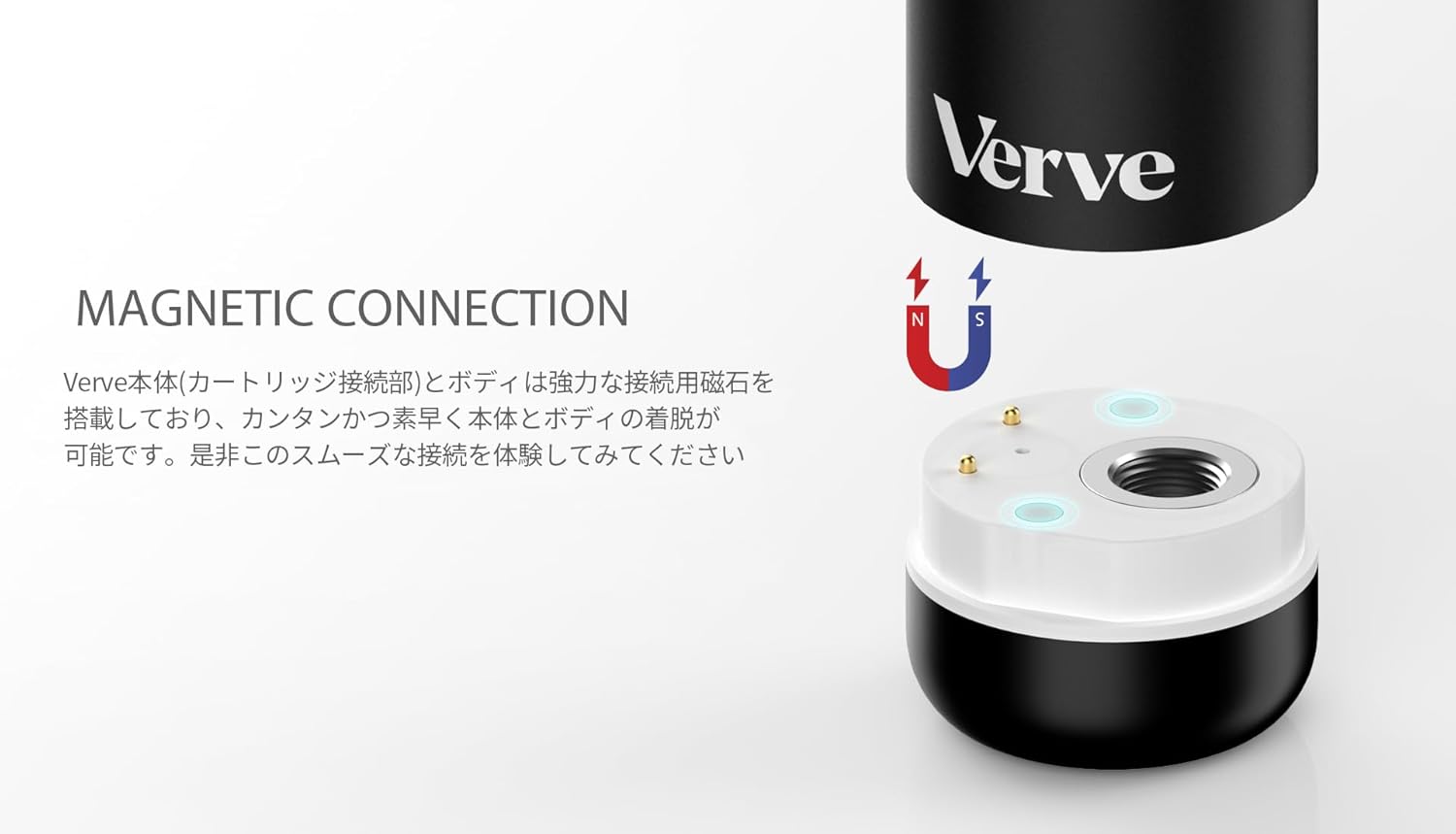
Figure 1: Magnetic Connection. The Verve battery features a strong magnetic connection for easy and secure attachment of 510 cartridges. This image illustrates the connection points between the battery and the cartridge.

รูปที่ 2: ส่วนประกอบของอุปกรณ์ This diagram labels the key parts of the YOCAN Verve device, including the mouthpiece, aluminum alloy body, 450mAh battery, magnetic connection, and USB Type-C charging port.
คำแนะนำการใช้งาน
เปิด/ปิดเครื่อง
- หากต้องการเปิดเครื่อง ON or ปิด, quickly tap the button 5 times.
ฟังก์ชั่นการอุ่นล่วงหน้า
- To activate the 10-second preheating function, quickly tap the button 2 times. This is ideal for thicker liquids.
- To stop preheating prematurely, tap the button 1 time while preheating is active.

Figure 3: 10-Second Preheat. This image highlights the 10-second preheating function of the YOCAN Verve, which helps prepare viscous liquids for optimal vaporization.
เล่มที่tagการปรับแต่ง
- To cycle through the voltage settings, quickly tap the button 3 times.
- The LED indicator will change color to show the current voltage:
- สีฟ้า: 2.6โวลต์
- สีเขียว: 3.2โวลต์
- สีแดง: 3.8โวลต์

Figure 4: 3 Voltage Levels. This graphic demonstrates the three adjustable voltage settings of the YOCAN Verve, allowing users to customize their vaping experience. The corresponding LED colors (Blue, Green, Red) indicate the selected voltage.
Vaping (Auto-Puff)
- Once the device is on and a cartridge is attached, simply inhale from the mouthpiece to activate the auto-puff function and begin vaping.
- The device also supports button-activated vaping if preferred.
การชาร์จไฟ
The YOCAN Verve battery is charged via a USB Type-C port located on the device. Connect a USB Type-C cable (not included) to the port and plug the other end into a suitable power source (e.g., computer USB port, wall adapter). The device will indicate charging status via its LED light.
การซ่อมบำรุง
To ensure optimal performance and longevity of your YOCAN Verve battery, follow these general maintenance guidelines:
- การทำความสะอาดปกติ: Periodically wipe the device with a dry, soft cloth to remove any dust or residue. Ensure the cartridge connection area is clean.
- หลีกเลี่ยงของเหลว: อย่าจุ่มอุปกรณ์ลงในน้ำหรือปล่อยให้มีความชื้นมากเกินไป
- การจัดเก็บที่เหมาะสม: เก็บอุปกรณ์ไว้ในที่แห้งและเย็น หลีกเลี่ยงแสงแดดโดยตรงและอุณหภูมิที่สูงหรือต่ำเกินไป
- จัดการด้วยความระมัดระวัง: หลีกเลี่ยงการทำอุปกรณ์หล่นหรือกระแทกอย่างรุนแรง
การแก้ไขปัญหา
| ปัญหา | สาเหตุที่เป็นไปได้ | สารละลาย |
|---|---|---|
| อุปกรณ์ไม่เปิด | Low battery; Incorrect power-on sequence | Charge the device; Tap the button 5 times quickly to power ON. |
| ไม่มีการผลิตไอระเหย | Cartridge not properly connected; Low battery; Cartridge empty; Preheating needed for viscous liquid | Ensure cartridge is securely attached; Charge the device; Replace cartridge; Activate preheating (2 taps). |
| Device heats up excessively | Overuse; Internal malfunction | Immediately turn off the power (5 taps) and discontinue use. Contact customer support if problem persists. |
| เล่มที่tagการปรับแต่งไม่ทำงาน | ลำดับปุ่มไม่ถูกต้อง | Tap the button 3 times quickly to cycle through voltagการตั้งค่าอี |
ข้อควรระวังเพื่อความปลอดภัย
- This product is intended for use with 510 standard cartridges only. It cannot be used as a standalone device.
- Do not use the device if it is damaged, wet, or shows any signs of malfunction.
- Store the device out of reach of children and pets.
- If the device becomes excessively hot during use or charging, immediately turn off the power and discontinue use.
- อย่าพยายามถอดประกอบหรือดัดแปลงอุปกรณ์
- Use only appropriate charging methods and cables.
การรับประกันและการสนับสนุน
Your YOCAN Verve 510 Battery comes with a manufacturer's warranty. Please refer to the included warranty card for details regarding coverage, terms, and conditions. For technical support, troubleshooting assistance, or warranty claims, please contact YOCAN customer service or the retailer where you purchased the product.
ผู้ผลิต: โยแคน
รูปภาพสินค้า


Ask a question about this manual
Ask about setup, troubleshooting, compatibility, parts, safety, or missing instructions. Manuals+ will review the question and use this page’s manual context to help answer it.