
LEMNOI SG7
LEMNOI SG7 Educational Day/Night Alarm Clock for Children - User Manual
รุ่น : SG7
การแนะนำ
This manual provides detailed instructions for the setup, operation, and maintenance of your LEMNOI SG7 Educational Day/Night Alarm Clock. Please read it thoroughly to ensure proper use and to maximize the product's features.
ข้อมูลด้านความปลอดภัย
- เก็บอุปกรณ์ให้ห่างจากน้ำและความชื้น
- ห้ามสัมผัสกับอุณหภูมิที่สูงหรือต่ำเกินไป
- ใช้สาย USB-C ที่ให้มาเท่านั้นสำหรับการชาร์จ
- เก็บให้พ้นมือเด็กเล็กเพื่อป้องกันอันตรายจากการสำลักชิ้นส่วนเล็กๆ
- อย่าพยายามถอดประกอบหรือซ่อมแซมอุปกรณ์ด้วยตนเอง หากมีปัญหาเกิดขึ้น โปรดติดต่อฝ่ายสนับสนุนลูกค้า
เนื้อหาแพ็คเกจ
กรุณาตรวจสอบแพ็คเกจสำหรับรายการต่อไปนี้:
- LEMNOI SG7 Educational Day/Night Alarm Clock
- สายชาร์จ USB-C
- คู่มือการใช้งาน
สินค้าเกินview
The LEMNOI SG7 is designed to assist children with sleep training and morning routines. It features:
- Day/Night Educational Icons: Green sun for wake-up, blue moon for sleep.
- ไฟกลางคืน LED 5 สี: ปรับความสว่างได้
- 7 Musical Alarm Options: Gentle wake-up sounds.
- Dual Alarms & Snooze Function: Customizable for weekdays and weekends.
- Digital Display with Temperature Monitor: 12/24 hour format, F/C conversion.
- Touch/Sound Activated Screen: หน้าจอจะปิดลงหลังจากไม่ได้ใช้งาน 20 วินาที
- แบตเตอรี่ลิเธียม 2000mAh ในตัว: USB-C rechargeable.

ด้านหน้า view of the LEMNOI SG7 alarm clock, displaying time, temperature, and day/night icons.
การตั้งค่า
1. การชาร์จครั้งแรก
Before first use, fully charge the alarm clock. Connect the provided USB-C cable to the charging port on the back of the device and plug it into a compatible USB power adapter (not included).
- ไฟแสดงสถานะการชาร์จจะสว่างขึ้นขณะทำการชาร์จ
- โดยทั่วไปการชาร์จเต็มจะใช้เวลาประมาณ 3 ชั่วโมง
- The battery icon on the display will show charging status.
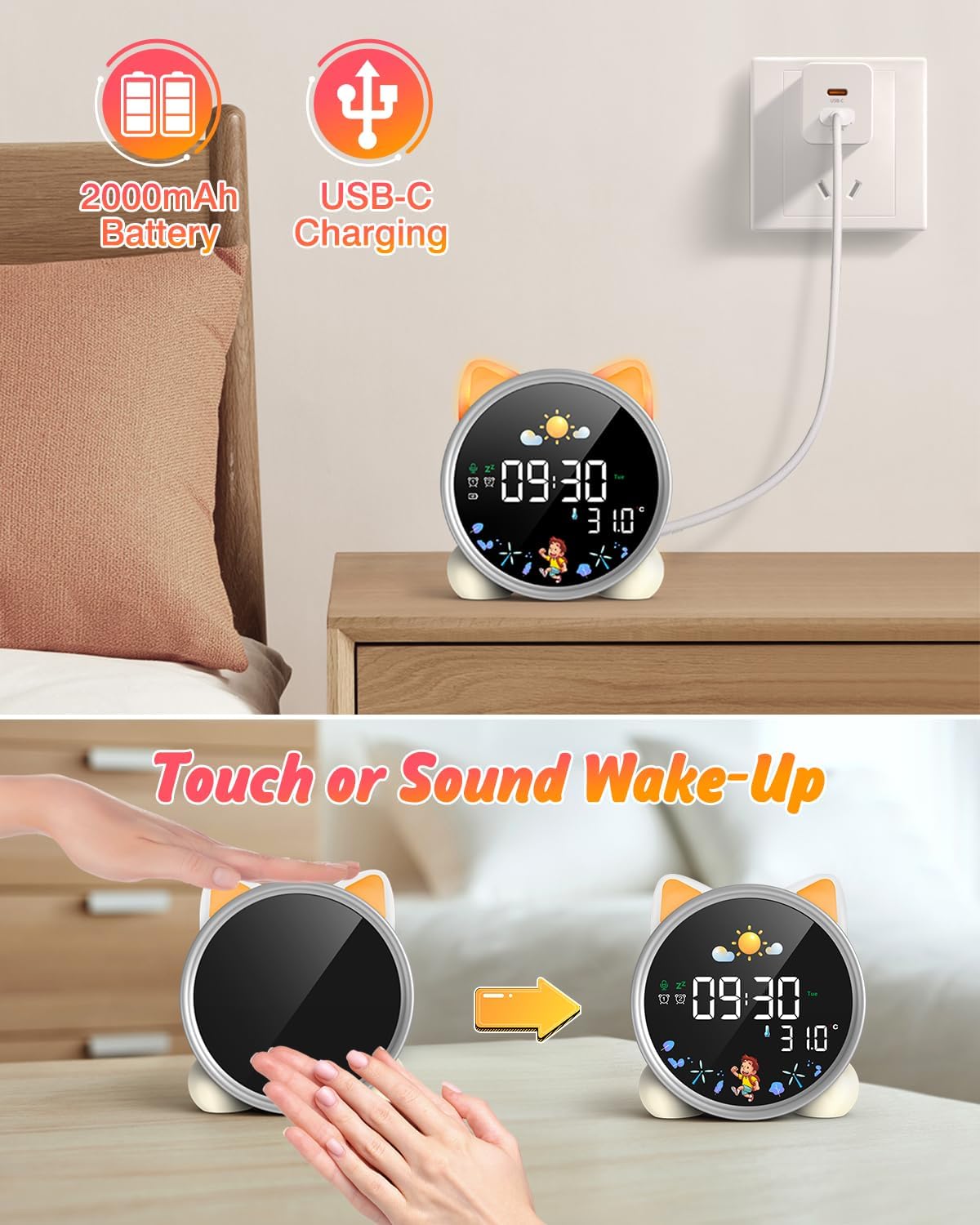
The alarm clock being charged via its USB-C port.
2. เปิด/ปิดเครื่อง
The device powers on automatically when connected to power. To manually power on/off or wake the screen:
- ปลุกหน้าจอ: Tap the device or make a sound near it. The screen will illuminate for 20 seconds.
- เปิด/ปิดเครื่อง: The device is designed to be always on for alarm functions.
Activating the screen by tapping the device.
คำแนะนำการใช้งาน
1. การตั้งเวลาและวันที่
The alarm clock supports 12/24 hour format and displays the day of the week. Specific buttons for setting are not detailed in the provided text, but typically involve a "Set" or "Mode" button.
- Refer to the physical manual for exact button functions (e.g., "SET" button).
- กดปุ่ม "SET" ค้างไว้เพื่อเข้าสู่โหมดตั้งเวลา
- Use "+" and "-" buttons to adjust hours, minutes, and other settings.
- Press "SET" again to confirm each setting and move to the next.
2. Day/Night Educational Mode
This feature uses color-changing lights and icons to signal wake-up and sleep times.
- ตื่นนอน: Green light and sun icon appear to indicate it's time to wake up.
- นอน: Blue light and moon icon appear to indicate it's time to sleep.

Day/Night mode with green sun for wake-up and blue moon for sleep.
3. Dual Alarms and Snooze Function
Set two independent alarms for different routines.
- การตั้งค่าการเตือน: The dual alarms can be customized for any day from Monday to Sunday. Consult the full manual for specific steps to set Alarm 1 and Alarm 2.
- ปิดเสียงเตือนชั่วคราว: When an alarm sounds, press the "SNOOZE" button on top for an additional 9 minutes of sleep. This can be repeated up to 3 times.

Illustration of the snooze function and dual alarm capability.
4. Night Light (5 Colors & Brightness Levels)
The alarm clock functions as a night light with 5 color options and adjustable brightness.
- ตัวเลือกสี: Yellow, Blue, Purple, White, and Gradient.
- ความสว่าง: 3 levels of brightness (0%, 30%, 70%, 100%) for the screen display. The night light itself also has adjustable brightness.
- Refer to the physical manual for instructions on cycling through colors and adjusting brightness.

The 5 available night light colors and screen brightness options.
5. Music and Sound Machine
The alarm clock offers 7 musical options for a gentle wake-up or soothing sleep environment.
- 7 musical options are available.
- Refer to the physical manual for instructions on selecting and setting music.

The 7 sound options available for the alarm clock.
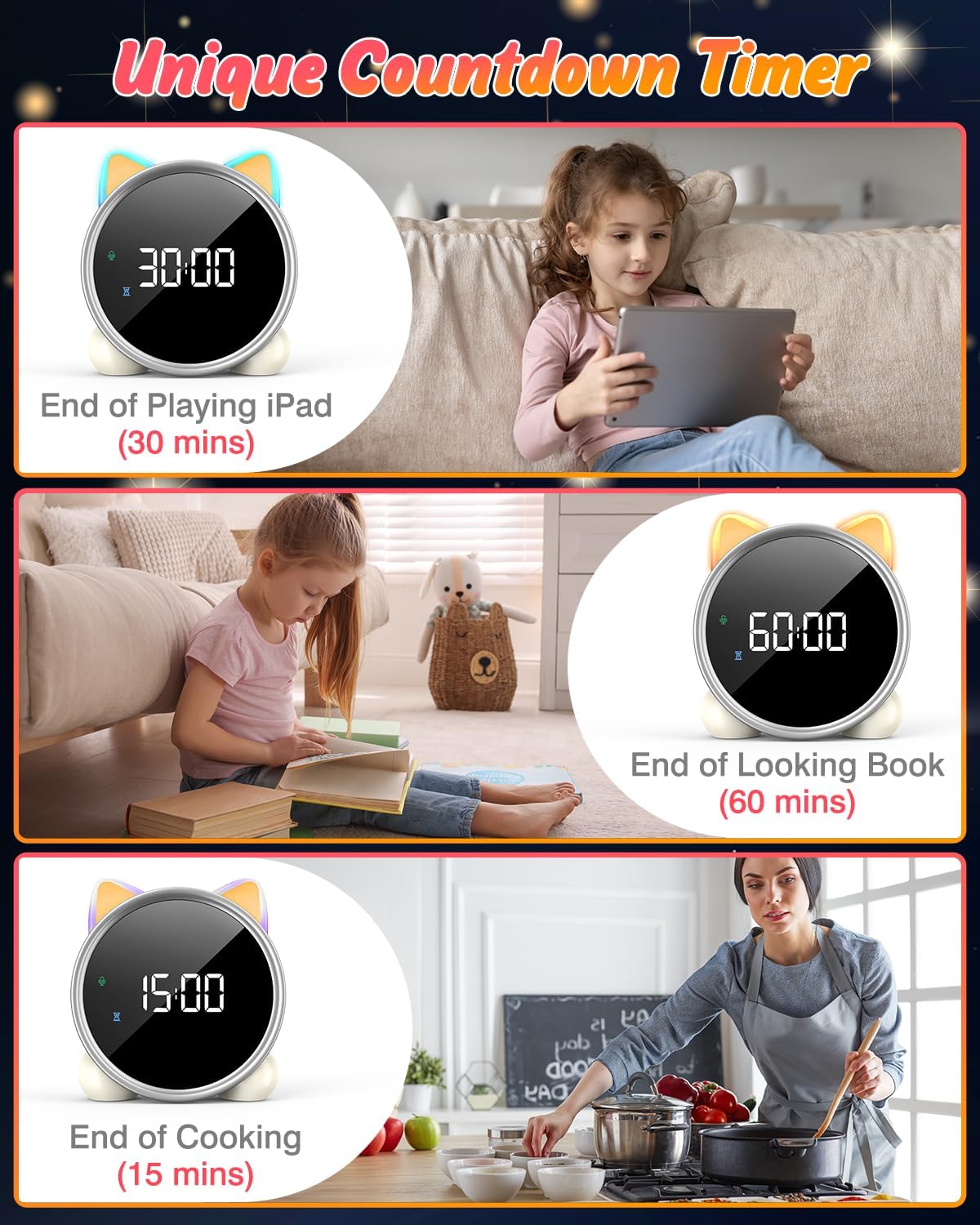
6. ตัวจับเวลาถอยหลัง
A unique countdown timer feature can be used for various activities.
- Useful for managing screen time, reading sessions, or cooking.
- Refer to the physical manual for instructions on setting the countdown timer.
Examples of the countdown timer in use for various activities.
7. การแสดงอุณหภูมิ
The alarm clock displays the ambient temperature and supports both Celsius and Fahrenheit units.
- Supports F/C temperature conversion.
- Refer to the physical manual for instructions on switching between units.
8. Screen Activation (Touch/Sound)
The screen can be activated by touch or sound and will automatically turn off after a period of inactivity to save power.
- Tap the device or make a sound to wake the screen.
- The screen will turn off after 20 seconds of no interaction.
การซ่อมบำรุง
- การทำความสะอาด: เช็ดอุปกรณ์ด้วยผ้านุ่มและแห้ง ห้ามใช้น้ำยาทำความสะอาดที่มีฤทธิ์กัดกร่อนหรือตัวทำละลาย
- พื้นที่จัดเก็บ: เก็บไว้ในที่แห้งและเย็นเมื่อไม่ได้ใช้งานเป็นเวลานาน
- การดูแลแบตเตอรี่ เพื่อยืดอายุการใช้งานแบตเตอรี่ ควรหลีกเลี่ยงการปล่อยให้แบตเตอรี่หมดจนเกลี้ยงบ่อยๆ ชาร์จแบตเตอรี่เมื่อไฟแสดงสถานะแบตเตอรี่เหลือน้อยปรากฏขึ้น
การแก้ไขปัญหา
| ปัญหา | สาเหตุที่เป็นไปได้ | สารละลาย |
|---|---|---|
| หน้าจอไม่เปิดใช้งาน | แบตเตอรี่ต่ำหรืออุปกรณ์ปิดอยู่ | Charge the device using the USB-C cable. Tap the device or make a sound to activate the screen. |
| แบตเตอรี่หมดเร็วมาก | Night light mode consumes more power. | It is recommended to keep the device plugged in when using night light mode for extended periods. Ensure the screen brightness is not set too high if battery life is a concern. |
| มีปัญหาในการตั้งเวลา/นาฬิกาปลุก | Incorrect button sequence or unfamiliarity with controls. | Refer to the "Operating Instructions" section and the detailed physical manual for precise button functions and sequences. |
| Screen remains on constantly. | Possible setting error or malfunction. | Ensure the screen auto-off feature is enabled (if applicable, check manual). If the issue persists, try a soft reset (if available, check manual) or contact customer support. |
ข้อมูลจำเพาะ
- ยี่ห้อ: LEMNOI
- หมายเลขรุ่น: เอสจี7
- สี: ดอกกุหลาบ
- ขนาดสินค้า (กว้าง x ยาว x สูง) : 13.1 x 3.81 x 14.5 ซม.
- วัสดุ: พลาสติก
- คุณสมบัติ: Adjustable brightness, Snooze function
- น้ำหนักสินค้า: 265 กรัม
- ประเภทจอภาพ: ดิจิตอล
- แหล่งพลังงาน: Battery Powered (Built-in 2000mAh Lithium Battery, USB-C charging)
- ประเภทห้อง: ห้องนอน
- รูปร่าง: แมว
- ใช้ในร่ม/กลางแจ้ง: ในร่ม
การรับประกันและการสนับสนุน
For warranty information or technical support, please refer to the contact details provided with your purchase or visit the official LEMNOI webไซต์ เก็บหลักฐานการซื้อของคุณไว้เพื่อใช้ในกรณีเรียกร้องการรับประกัน
Ask a question about this manual
Ask about setup, troubleshooting, compatibility, parts, safety, or missing instructions. Manuals+ will review the question and use this page’s manual context to help answer it.