
1. บทนำ
Welcome to the Numark Party Mix MKII DJ Controller Set. This comprehensive bundle includes the Party Mix MKII DJ controller with a built-in audio interface, M-Audio BX3 3.5" Studio Monitor Speakers, and DJ Headphones. Designed for both aspiring and experienced DJs, this set provides all the essential tools for mixing, monitoring, and performing. This manual will guide you through the setup, operation, and maintenance of your new DJ equipment.

Image 1: The complete Numark Party Mix MKII DJ Controller Set, including the controller, studio monitors, and headphones.
2. อะไรอยู่ในกล่อง
Your Numark Party Mix MKII DJ Controller Set package should contain the following items:
- Numark Party Mix MKII DJ Controller
- M-Audio BX3 3.5" Studio Monitor Speakers (Pair)
- หูฟังดีเจ
- สาย USB
- การ์ดดาวน์โหลดซอฟต์แวร์ (สำหรับ Serato DJ Lite)
- Power Adapter for Speakers
- Audio Cables for Speakers
- คู่มือการเริ่มต้นอย่างรวดเร็ว
- คู่มือความปลอดภัยและการรับประกัน
3. การตั้งค่า
3.1 Connecting the DJ Controller
- Connect the included USB cable from the Party Mix MKII controller to an available USB port on your computer (Mac or PC).
- Install the Serato DJ Lite software using the provided download card or by visiting the official Serato webเว็บไซต์.
- Launch Serato DJ Lite. The software should automatically detect your Party Mix MKII controller.
3.2 Connecting the Studio Monitor Speakers
- Connect the included audio cables from the main output of the Party Mix MKII controller to the input jacks on your M-Audio BX3 Studio Monitor Speakers. The BX3 speakers support 1/4-inch, 1/8-inch, and RCA inputs.
- Connect the power adapter to the active speaker and plug it into a power outlet.
- Connect the passive speaker to the active speaker using the provided speaker cable.
- เปิดลำโพง

Image 2: M-Audio BX3 Studio Monitor Speakers connected in a typical music production environment.
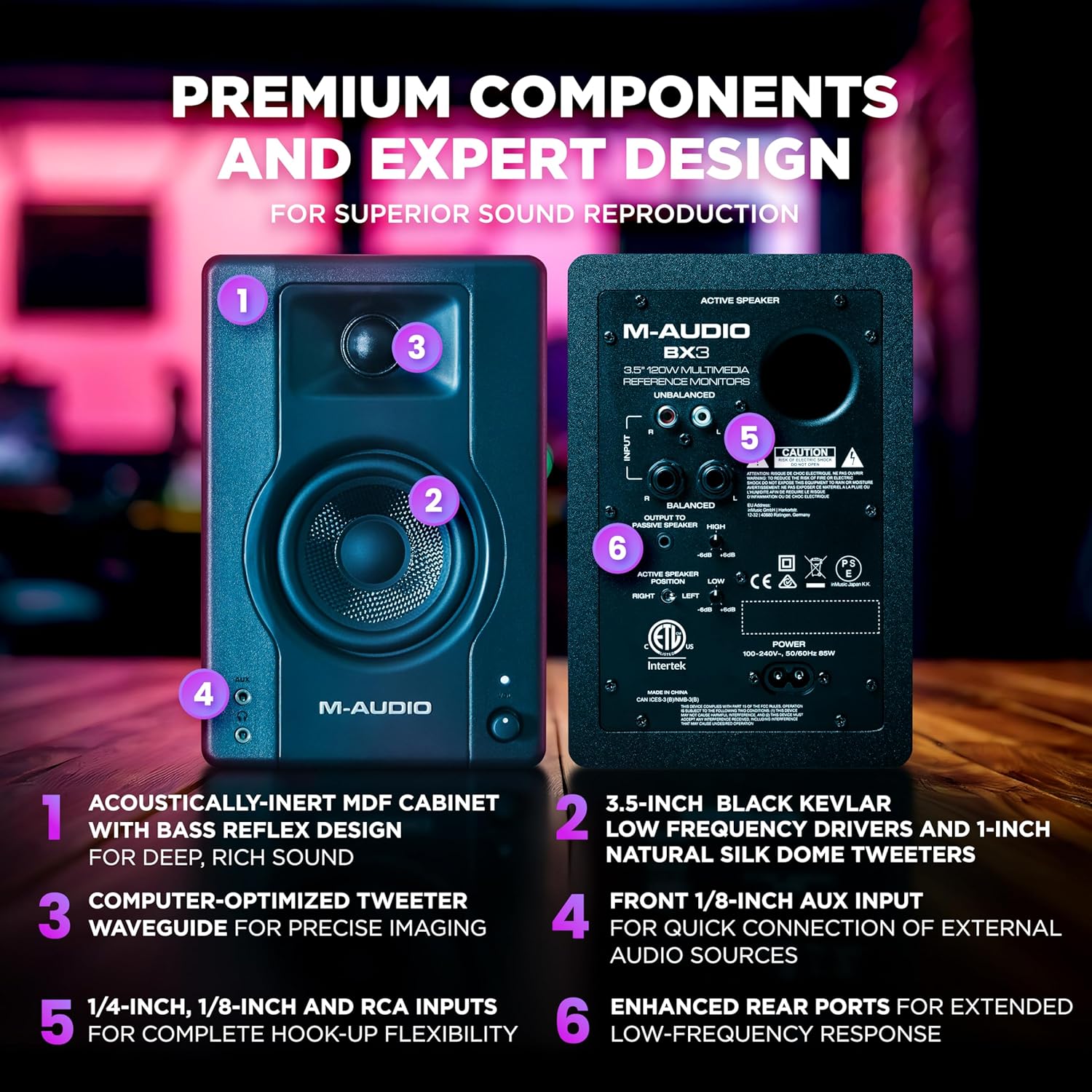
ภาพที่ 3: รายละเอียด view of the rear panel of the M-Audio BX3 speakers, highlighting various input options and power connection.
3.3 Connecting the DJ Headphones
Plug your DJ Headphones into the headphone jack located on the front or side of the Party Mix MKII controller. This allows for cueing tracks before playing them live.

Image 4: Close-up of the Numark DJ Headphones, featuring a coiled cable for flexibility.
4. คู่มือการใช้งาน
4.1 การควบคุมมากกว่าview
The Party Mix MKII features a user-friendly layout with two DJ decks, a central mixer section, and performance pads. Familiarize yourself with the controls:

Image 5: Labeled diagram of the Party Mix MKII DJ Controller, indicating the position and function of key controls such as jog wheels, EQ knobs, pitch sliders, and performance pads.
- ล้อหมุน: Large, touch-sensitive wheels for scratching and track navigation.
- ปุ่ม EQ: Adjust bass and treble for each deck.
- ตัวเลื่อนปรับระดับเสียง: Control the tempo of your tracks.
- แผ่นประสิทธิภาพ: Trigger hot cues, loops, samples, and effects.
- Sync, Play/Pause & Cue Buttons: Essential transport controls for each deck.
- เรียกดูลูกบิด: Navigate your music library in Serato DJ Lite.
- Load Buttons: Load selected tracks to Deck 1 or Deck 2.
- Headphone Cue Buttons: Listen to a track in your headphones before playing it live.
4.2 Mixing Tracks
- Load a track to Deck 1 and another to Deck 2 using the Browse knob and Load buttons.
- Use the Headphone Cue buttons to listen to the track on the inactive deck in your headphones.
- Adjust the tempo of the tracks using the Pitch Sliders and the Sync button to match their BPMs.
- Use the crossfader and individual channel faders to blend between the two tracks.
- Experiment with the EQ knobs to shape the sound of each track during your mix.
4.3 เอฟเฟกต์แสง
The Party Mix MKII features built-in LED lighting that syncs to your DJ mix, creating an immersive party atmosphere. A conveniently located mode switch allows you to cycle between 5 different lighting modes.

Image 6: Close-up of the Party Mix MKII DJ Controller showing the multi-coloured LED lights in action, synchronized with the music.
5. การบำรุงรักษา
5.1 การทำความสะอาด
- ถอดปลั๊กไฟก่อนทำความสะอาดทุกครั้ง
- Use a soft, dry cloth to wipe down the surfaces of the controller, speakers, and headphones.
- หลีกเลี่ยงการใช้สารทำความสะอาดที่มีฤทธิ์กัดกร่อน ตัวทำละลาย หรือสารเคมีรุนแรง เพราะอาจทำให้พื้นผิวเสียหายได้
- For jog wheels and faders, use a soft brush or compressed air to remove dust and debris.
5.2 พื้นที่จัดเก็บ
Store your DJ equipment in a cool, dry place away from direct sunlight, extreme temperatures, and excessive humidity. When transporting, use appropriate cases to protect the equipment from physical damage.
6 การแก้ไขปัญหา
6.1 ไม่มีเสียงออก
- Ensure all cables (USB, audio, power) are securely connected.
- Check the volume levels on the controller, speakers, and your computer.
- Verify that the correct audio output device is selected in your computer's sound settings and within Serato DJ Lite.
- Make sure the speakers are powered on and their volume is turned up.
6.2 Controller Not Recognized by Software
- Ensure the USB cable is connected directly to your computer, not through a USB hub.
- รีสตาร์ทคอมพิวเตอร์และโปรแกรม Serato DJ Lite
- Check for any available driver updates for your Party Mix MKII controller on the Numark webเว็บไซต์.
- Confirm that Serato DJ Lite is the correct version and is compatible with your operating system.
6.3 ไฟ LED ไม่ทำงาน
- Ensure the controller is powered on and connected to your computer.
- Check the lighting mode switch on the controller to ensure it's not set to "off" or a very dim mode.
7. ข้อมูลจำเพาะ
7.1 Numark Party Mix MKII DJ Controller
- ยี่ห้อ: Numark
- ชื่อรุ่น : ปาร์ตี้มิกซ์ MKII
- เทคโนโลยีการเชื่อมต่อ: ยูเอสบี
- คุณสมบัติพิเศษ: Backlit, Compact, Lightweight, Built-in LED DJ light show
- ประเภทการควบคุม: ดีเจคอนโทรลเลอร์
- อินเทอร์เฟซฮาร์ดแวร์: ยูเอสบี
- ซอฟต์แวร์ที่รองรับ: เซราโต ดีเจ ไลท์
- อุปกรณ์ที่รองรับ: USB-compatible computers and devices, including iOS and macOS systems
- ปริมาณช่องมิกเซอร์: 2
- ประเภทวัสดุ : พลาสติก, ยาง
7.2 M-Audio BX3 3.5" Studio Monitor Speakers
- กำลังขับ: 120 วัตต์
- วูฟเฟอร์: 3.5-inch Black Kevlar
- ทวีตเตอร์: 1-inch Natural Silk Dome
- คณะรัฐมนตรี: Acoustically-inert MDF with Bass Reflex Design
- ข้อมูลอินพุต: 1/4-inch, 1/8-inch, and RCA
7.3 DJ Headphones
- ขนาดไดร์เวอร์: 40 mm Neodymium magnet drivers
- การควบคุมเสียงรบกวน: Sound Isolation (soft padded ear cushions)
- ออกแบบ: Swivel cup closed-back design