
1. บทนำ
The AVATTO TRV10 is a smart thermostat radiator valve designed to provide intelligent control over your home heating system. Utilizing Zigbee technology, it integrates seamlessly with Tuya-compatible smart home platforms, allowing for precise temperature management, scheduling, and remote control via a smartphone application. This manual provides detailed instructions for the installation, operation, and maintenance of your TRV10 device.
2. สินค้าหมดview
The AVATTO TRV10 features a compact design with an integrated display for local temperature readings and settings. It is powered by batteries and communicates wirelessly with a Zigbee gateway.
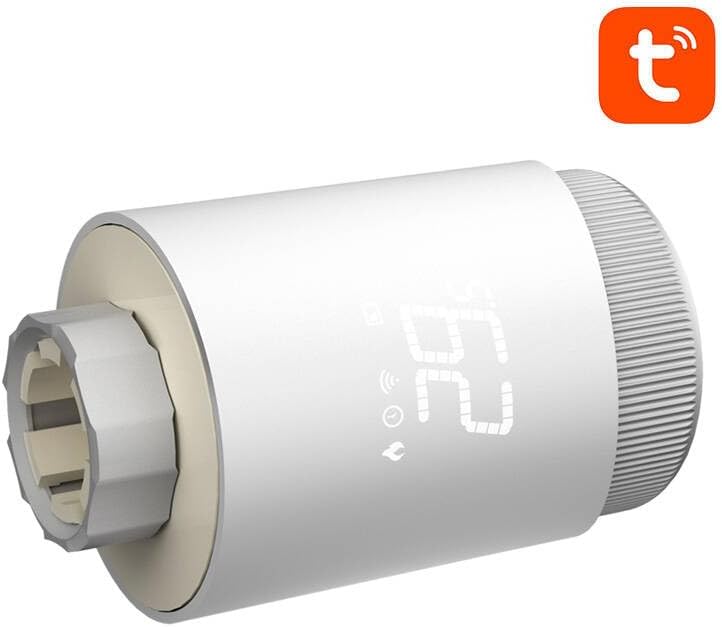
รูปที่ 2.1: ด้านหน้า view of the AVATTO TRV10 Smart Thermostat Radiator Valve, showing the digital display and control knob.

รูปที่ 2.2: ด้านข้าง view of the AVATTO TRV10 Smart Thermostat Radiator Valve, illustrating the connection point for the radiator valve.
ส่วนประกอบหลัก:
- จอแสดงผลดิจิตอล: แสดงอุณหภูมิปัจจุบัน โหมด และสถานะแบตเตอรี่
- ปุ่มควบคุม: ใช้สำหรับการปรับอุณหภูมิด้วยตนเองและการนำทางเมนู
- ตัวเชื่อมต่อวาล์ว: Attaches to the radiator valve body.
- ช่องใส่แบตเตอรี่: เป็นที่อยู่ของแหล่งพลังงาน
3. เนื้อหาบรรจุภัณฑ์
กรุณาตรวจสอบสิ่งของภายในกล่องเมื่อแกะกล่อง หากมีสินค้าใดสูญหายหรือเสียหาย โปรดติดต่อตัวแทนจำหน่ายของคุณ
- วาล์วควบคุมอุณหภูมิหม้อน้ำอัจฉริยะ AVATTO TRV10
- คู่มือการใช้งาน (เอกสารนี้)
- Adapter rings (various sizes for compatibility with different radiator valves)
- AA Batteries (may or may not be included, check packaging)
4. ข้อมูลจำเพาะ
| คุณสมบัติ | รายละเอียด |
|---|---|
| หมายเลขรุ่น | ทีอาร์วี10 |
| ยี่ห้อ | อาวัตโต้ |
| การเชื่อมต่อ | ซิกบี |
| ความเข้ากันได้ | แอป Tuya Smart / Smart Life |
| แหล่งจ่ายไฟ | AA Batteries (typically 2x AA) |
| ช่วงอุณหภูมิ | 5°C - 30°C (ปรับได้) |
| ความแม่นยำของอุณหภูมิ | ±0.5 องศาเซลเซียส |
| การเชื่อมต่อวาล์ว | M30x1.5 (with various adapters) |
5. การตั้งค่าและการติดตั้ง
5.1 การติดตั้งแบตเตอรี่
- Twist and remove the battery cover from the top or back of the TRV10 unit.
- ใส่แบตเตอรี่ AA ที่จำเป็น โดยตรวจสอบให้แน่ใจว่าขั้วถูกต้อง (+/-)
- Replace the battery cover securely. The display should light up.
5.2 การติดตั้งบนวาล์วหม้อน้ำ
- Identify your existing radiator valve type.
- Select the appropriate adapter ring from the package that matches your valve.
- Screw the adapter ring onto your radiator valve body.
- Align the TRV10 unit with the adapter ring and screw it on until it is hand-tight. Do not overtighten.
- The TRV10 will perform an initial calibration cycle.
5.3 Pairing with Zigbee Gateway and Tuya App
- Ensure you have a compatible Zigbee gateway connected to your home network and the Tuya Smart or Smart Life app installed on your smartphone.
- Open the Tuya Smart / Smart Life app and navigate to add a new device.
- Follow the app's instructions to put your Zigbee gateway into pairing mode.
- On the TRV10 device, press and hold the control knob for approximately 5-8 seconds until the Zigbee icon on the display starts flashing. This indicates pairing mode.
- The app should discover the TRV10. Select it to complete the pairing process.
- Once paired, the Zigbee icon on the TRV10 display will stop flashing and remain solid.
- You can now control and configure the TRV10 via the Tuya app.
6. คู่มือการใช้งาน
6.1 การปรับอุณหภูมิด้วยตนเอง
- Rotate the control knob clockwise to increase the target temperature.
- Rotate the control knob counter-clockwise to decrease the target temperature.
- The new target temperature will be displayed temporarily and then the display will revert to the current room temperature.
การควบคุมแอพ 6.2 ตัว
Once paired with the Tuya Smart / Smart Life app, you can access advanced control features:
- Remote Temperature Setting: Adjust the target temperature from anywhere.
- การกำหนดตารางเวลา: สร้างตารางการทำความร้อนแบบกำหนดเองสำหรับวันและเวลาต่างๆ
- การเลือกโหมด: Switch between various operating modes (e.g., Auto, Manual, Holiday, Boost).
- การล็อคเด็ก: Prevent unauthorized manual adjustments on the device.
- เปิดหน้าต่างการตรวจจับ: Automatically turns off heating if a sudden temperature drop is detected.
6.3 โหมดการทำงาน
- โหมดอัตโนมัติ:
- The TRV10 follows the programmed schedule set in the app.
- โหมดแมนนวล:
- The TRV10 maintains a constant temperature set manually, overriding the schedule.
- โหมดวันหยุด:
- Maintains a low, energy-saving temperature for a specified duration when you are away.
- โหมดบูสต์:
- Quickly heats the room to a high temperature for a short period.
7. การบำรุงรักษา
7.1 การเปลี่ยนแบตเตอรี่
When the battery icon on the display flashes or the device stops responding, it's time to replace the batteries.
- Remove the TRV10 unit from the radiator valve by unscrewing it.
- ถอดฝาครอบแบตเตอรี่ออก
- Replace the old batteries with new AA batteries, ensuring correct polarity.
- Reattach the battery cover and remount the TRV10 onto the radiator valve. The device will recalibrate.
7.2 การทำความสะอาด
Wipe the exterior of the TRV10 with a soft, dry cloth. Do not use abrasive cleaners or allow water to enter the device.
8 การแก้ไขปัญหา
| ปัญหา | สาเหตุที่เป็นไปได้ | สารละลาย |
|---|---|---|
| เครื่องเปิดไม่ติด | แบตเตอรี่หมดหรือใส่ไม่ถูกต้อง | ตรวจสอบขั้วแบตเตอรี่และเปลี่ยนแบตเตอรี่ใหม่ |
| Cannot pair with Zigbee gateway. | TRV10 not in pairing mode; Gateway not in pairing mode; Too far from gateway. | Ensure both devices are in pairing mode. Move TRV10 closer to the gateway. Check gateway status. |
| หม้อน้ำไม่ร้อน/เย็นอย่างที่คาดหวัง | Valve stuck; Incorrect temperature setting; TRV10 not fully calibrated. | Manually check the radiator valve. Verify temperature settings in the app. Re-mount the TRV10 to trigger recalibration. |
| แอปแสดงว่าอุปกรณ์ออฟไลน์ | Zigbee gateway offline; TRV10 battery low; Poor Zigbee signal. | Check gateway's internet connection. Replace TRV10 batteries. Consider a Zigbee repeater if signal is weak. |
9. การรับประกันและการสนับสนุน
The AVATTO TRV10 Smart Thermostat Radiator Valve comes with a standard manufacturer's warranty. Please refer to the warranty card included with your purchase or contact your retailer for specific warranty terms and conditions.
For technical support, troubleshooting assistance, or inquiries regarding your device, please contact AVATTO customer service or your local distributor. Contact information can typically be found on the product packaging or the official AVATTO webเว็บไซต์.