
สดี-508
SDRD SD-508 Wireless Bluetooth Karaoke Speaker User Manual
รุ่น: SD-508
การแนะนำ
ขอบคุณสำหรับการซื้อasing the SDRD SD-508 Wireless Bluetooth Karaoke Speaker. This portable karaoke machine is designed to provide high-quality audio and an enjoyable karaoke experience with its integrated speaker and two wireless microphones. Featuring Bluetooth 5.0 connectivity, a long-lasting rechargeable battery, and versatile input options, the SD-508 is perfect for music playback and vocal performances anywhere.
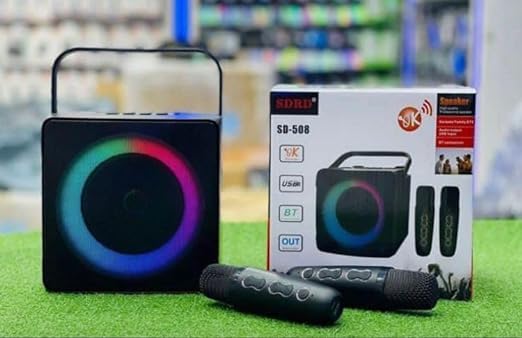
Image: The SDRD SD-508 speaker, its retail box, and two wireless microphones. The speaker features a colorful LED ring around its front grille.
ข้อมูลด้านความปลอดภัย
- อย่าให้เครื่องโดนน้ำหรือความชื้นมากเกินไป
- หลีกเลี่ยงอุณหภูมิที่สูงหรือต่ำเกินไป
- ห้ามถอดประกอบหรือพยายามซ่อมแซมอุปกรณ์ด้วยตนเอง โปรดติดต่อช่างผู้ชำนาญการ
- ใช้เฉพาะปริมาณการชาร์จที่ระบุเท่านั้นtage (5V) เพื่อป้องกันความเสียหาย
- เก็บให้พ้นจากมือเด็ก
เนื้อหาแพ็คเกจ
กรุณาตรวจสอบแพ็คเกจสำหรับรายการต่อไปนี้:
- SDRD SD-508 Wireless Bluetooth Karaoke Speaker (1 unit)
- ไมโครโฟนไร้สาย (2 ชุด)
- สายชาร์จ (1 เส้น)
- สายสัญญาณเสียง (1 หน่วย)
- คู่มือการใช้งาน (เอกสารนี้)
สินค้าเกินview
The SDRD SD-508 features a compact design with intuitive controls and multiple connectivity options, making it highly portable.
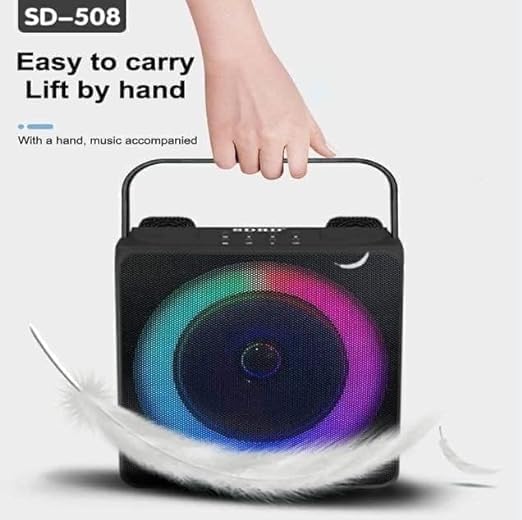
Image: A hand lifting the SDRD SD-508 speaker by its integrated handle, emphasizing its lightweight and portable design for easy transport.
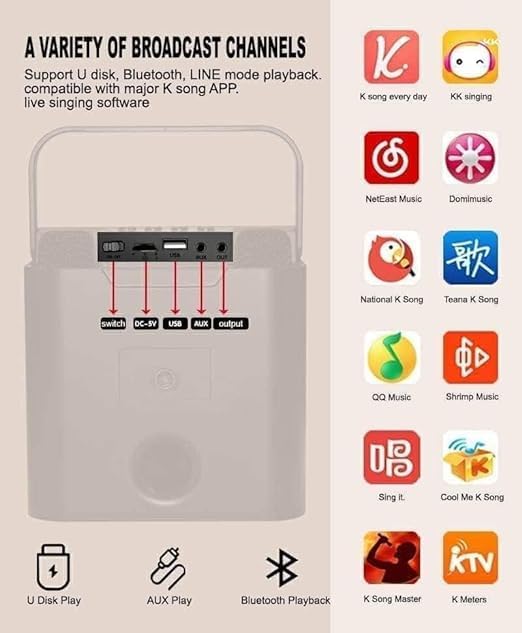
ภาพ: รายละเอียด view of the speaker's rear panel, highlighting the power switch, DC-5V charging port, USB port, AUX input, and AUX output. Red arrows point to each port for clarity.
การควบคุมและพอร์ต:
- สวิตช์ไฟ: เปิด/ปิดลำโพง
- ช่องเสียบชาร์จ DC-5V: สำหรับชาร์จแบตเตอรี่ภายในลำโพง
- พอร์ต USB: สำหรับการเล่นไฟล์จากแฟลชไดรฟ์ (U-disk)
- อินพุต AUX: Connect external audio devices via 3.5mm audio cable.
- เอาต์พุต AUX: Connect to other audio systems.
- ปุ่มปรับระดับเสียงไมโครโฟน: Adjust microphone volume (on microphones).
- Speaker Volume Controls: Adjust main speaker volume (on speaker).
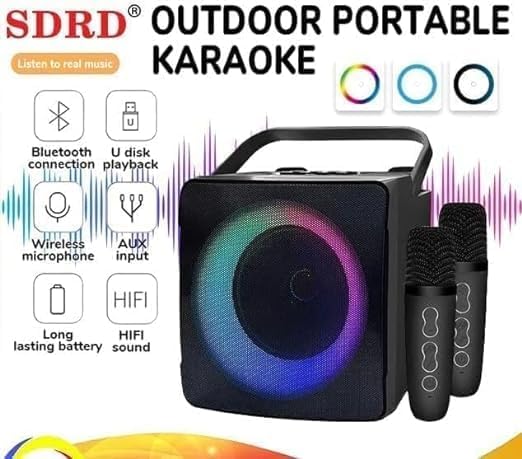
Image: The SDRD SD-508 speaker with two microphones, accompanied by icons illustrating its key features: Bluetooth connectivity, U-disk playback, wireless microphone support, AUX input, long-lasting battery, and HIFI sound quality.
การตั้งค่า
1. การชาร์จลำโพง:
- Connect the provided charging cable to the DC-5V port on the speaker.
- ต่อปลายอีกด้านของสายเคเบิลเข้ากับอะแดปเตอร์แปลงไฟ USB 5V (ไม่ได้รวมอยู่ในชุด)
- The charging indicator will illuminate. Allow 2-3 hours for a full charge.
- A full charge provides approximately 3-5 hours of continuous use.
2. Charging the Microphones:
The wireless microphones are typically powered by internal rechargeable batteries or standard AA/AAA batteries. Refer to the microphone's specific instructions for charging or battery replacement.
3. การเปิดเครื่องครั้งแรก:
Flip the power switch on the speaker to the "ON" position. The speaker will power on and indicate its current mode.
คำแนะนำการใช้งาน
1. การเชื่อมต่อบลูทูธ:

Image: The SDRD SD-508 speaker with two microphones, illustrating its Bluetooth 5.0 compatibility across Android, Windows, and iOS devices. The image emphasizes a 10-meter wireless connection range.
- Ensure the speaker is powered on and in Bluetooth mode (it usually defaults to this or announces "Bluetooth Mode").
- บนสมาร์ทโฟน แท็บเล็ต หรือคอมพิวเตอร์ของคุณ ให้เปิดใช้งานบลูทูธ แล้วค้นหาอุปกรณ์ที่ใช้งานได้
- Select "SD-508" from the list of devices.
- Once connected, the speaker will confirm the connection, and you can play audio from your device.
- The Bluetooth connection range is approximately 10 meters.
2. U-Disk Playback:
- Insert a USB flash drive (U-disk) containing MP3 audio fileเข้าสู่พอร์ต USB บนลำโพง
- The speaker will automatically switch to U-disk mode and begin playing music.
- Use the speaker's controls to navigate tracks (if available).
3. ช่องต่อ AUX:
- Connect one end of the provided audio cable to the AUX input port on the speaker.
- ต่อปลายอีกด้านหนึ่งเข้ากับช่องเสียบหูฟังหรือช่องสัญญาณเสียงออกของอุปกรณ์ภายนอกของคุณ (เช่น เครื่องเล่น MP3, คอมพิวเตอร์)
- The speaker will switch to AUX mode, and audio from your device will play through the speaker.
4. การใช้ไมโครโฟนไร้สาย:
- Ensure the microphones are charged and powered on. They should automatically pair with the speaker.
- Adjust the microphone volume using the controls on the microphone itself.
- For karaoke, play music via Bluetooth, U-disk, or AUX, and sing along through the microphones.
- The speaker has dedicated slots to store the microphones when not in use, preventing loss or damage.
5. Karaoke Functionality:
The SD-508 supports various karaoke applications and platforms. You can use popular K-song apps on your connected device (phone, tablet) and output the audio to the speaker while using the wireless microphones for vocals.
Image: The SDRD SD-508 speaker's rear panel with input/output ports, alongside a grid of popular karaoke application icons, indicating compatibility with various K-song apps for live singing software.
การซ่อมบำรุง
- การทำความสะอาด: ใช้ผ้านุ่มและแห้งเช็ดทำความสะอาดลำโพงและไมโครโฟน ห้ามใช้น้ำยาทำความสะอาดหรือสารละลายที่มีฤทธิ์กัดกร่อน
- พื้นที่จัดเก็บ: เก็บอุปกรณ์ไว้ในที่แห้งและเย็น หลีกเลี่ยงแสงแดดโดยตรงและอุณหภูมิที่สูงหรือต่ำเกินไป
- การดูแลแบตเตอรี่ To prolong battery life, charge the speaker regularly, even if not in frequent use. Avoid fully discharging the battery for extended periods.
- การจัดเก็บไมโครโฟน: Utilize the designated microphone placements on the speaker to securely store the microphones when not in use, preventing damage or loss.
การแก้ไขปัญหา
| ปัญหา | สาเหตุที่เป็นไปได้ | สารละลาย |
|---|---|---|
| ไม่มีไฟฟ้า | แบตเตอรี่หมด | ชาร์จลำโพงให้เต็ม |
| ไม่มีเสียงออกจากลำโพง | ระดับเสียงต่ำเกินไป; โหมดไม่ถูกต้อง; อุปกรณ์ไม่ได้เชื่อมต่อ | Increase volume; ensure correct input mode (Bluetooth, AUX, USB); re-pair Bluetooth device. |
| ไมโครโฟนไม่ทำงาน | Microphones not powered on or charged; out of range. | Ensure microphones are charged and turned on. Keep them within range of the speaker. |
| การเชื่อมต่อบลูทูธไม่เสถียร | Too far from speaker; interference. | Move device closer to the speaker; avoid obstacles or other wireless devices. |
ข้อมูลจำเพาะ

Image: A detailed specification table for the SDRD SD-508, including product name, Bluetooth version, speaker power, battery size, charging mode, material, microphone charging time, package size, and main functions. It also lists available colors (Black, White, Gold).
| คุณสมบัติ | รายละเอียด |
|---|---|
| ชื่อสินค้า | สดี-508 |
| เวอร์ชันบลูทูธ | บลูทูธ 5.0 |
| กำลังขับของลำโพง | 10วัตต์ |
| ขนาดแบตเตอรี่ | 3.7V / 2400 mAh (Speaker) |
| โหมดการชาร์จ | Charger (5V-2A) |
| วัสดุ | พลาสติก ABS |
| เวลาในการชาร์จไมโครโฟน | 1-2 ชั่วโมง |
| ระยะเวลาการทำงาน | 2-3 hours (Microphone), 3-5 hours (Speaker) |
| ระยะทางบลูทู ธ | 10 เมตร |
| ระยะไมโครโฟน | 10 เมตร |
| ขนาดสินค้า | 10 x 12 x 10 ซม. |
| น้ำหนัก | 1.3 กก. |
| ส่วนประกอบที่รวมอยู่ | Speaker, 2 Wireless Microphones, Data Cable, Audio Cable, Manual |
| ฟังก์ชั่นหลัก | Bluetooth, Line-in, U-disk, K Song mode |
การรับประกันและการสนับสนุน
This product comes with a standard manufacturer's warranty. Please retain your purchase receipt for warranty claims. For technical support, troubleshooting assistance, or warranty inquiries, please contact your retailer or the manufacturer's customer service.
For more information, you may visit the official product page or contact the seller through the platform where you purchased the item.
Ask a question about this manual
Ask about setup, troubleshooting, compatibility, parts, safety, or missing instructions. Manuals+ will review the question and use this page’s manual context to help answer it.