
1. บทนำ
This manual provides detailed instructions for the installation, operation, maintenance, and troubleshooting of the Fydun ZL-7901A Incubator Controller. This device is designed for precise and automatic control of temperature and humidity in various incubation environments, ensuring optimal conditions for successful hatching.
2. สินค้าหมดview
The Fydun ZL-7901A is a high-precision digital incubator controller capable of managing both temperature and humidity. It features a clear display and intuitive controls for easy programming and monitoring.
คุณสมบัติหลัก:
- การควบคุมที่แม่นยำ: High-accuracy temperature and humidity regulation for stable incubator environments.
- มีคุณสมบัติป้องกันการรบกวนสูง: Designed for reliable operation in various conditions.
- High Stability and Accuracy: Ensures consistent performance for critical incubation processes.
- การประยุกต์ใช้ที่กว้าง: Suitable for a variety of eggs including chicken, duck, goose, pigeon, quail, parrot, and peacock.
- การทำงานอัตโนมัติ: Fully automatic control reduces manual intervention.
ส่วนประกอบ:

รูปที่ 2.1: ด้านหน้า view of the Fydun ZL-7901A Incubator Controller, showing the display and control buttons.

รูปที่ 2.2: The ZL-7901A controller packaged with its temperature and humidity sensors and connecting cables.

รูปที่ 2.3: The ZL-7901A controller shown in an incubator environment, demonstrating its application for egg incubation.
3. ข้อมูลด้านความปลอดภัย
- อ่านคำแนะนำทั้งหมดอย่างละเอียดก่อนการติดตั้งและใช้งาน
- ตรวจสอบแหล่งจ่ายไฟ voltage matches the controller's requirements (100V-240V).
- ควรให้ผู้เชี่ยวชาญที่มีคุณสมบัติเหมาะสมเป็นผู้ดำเนินการเดินสายไฟทั้งหมด เพื่อป้องกันอันตรายจากไฟฟ้า
- อย่าให้ตัวควบคุมโดนน้ำหรือความชื้นมากเกินไป
- เก็บอุปกรณ์ให้ห่างจากวัสดุไวไฟ
- ตัดการเชื่อมต่อไฟฟ้าก่อนดำเนินการบำรุงรักษาหรือเปลี่ยนสายไฟใดๆ
- อุปกรณ์นี้ไม่ใช่ของเล่น เก็บให้พ้นมือเด็ก
4. การตั้งค่าและการติดตั้ง
4.1 การติดตั้งคอนโทรลเลอร์
The ZL-7901A controller is designed for panel mounting. Ensure a secure and stable location within your incubator setup.

รูปที่ 4.1: ด้านข้าง view illustrating the mounting bracket for panel installation.
4.2 การเชื่อมต่อสายไฟ
Carefully connect the power supply, sensors, and output devices (heater, humidifier, fan, egg turner) to the appropriate terminals on the back of the controller. Refer to the wiring diagram provided with your product for specific connections. Ensure all connections are tight and secure.

รูปที่ 4.2: หลัง view of the controller, showing the terminal blocks for electrical connections.
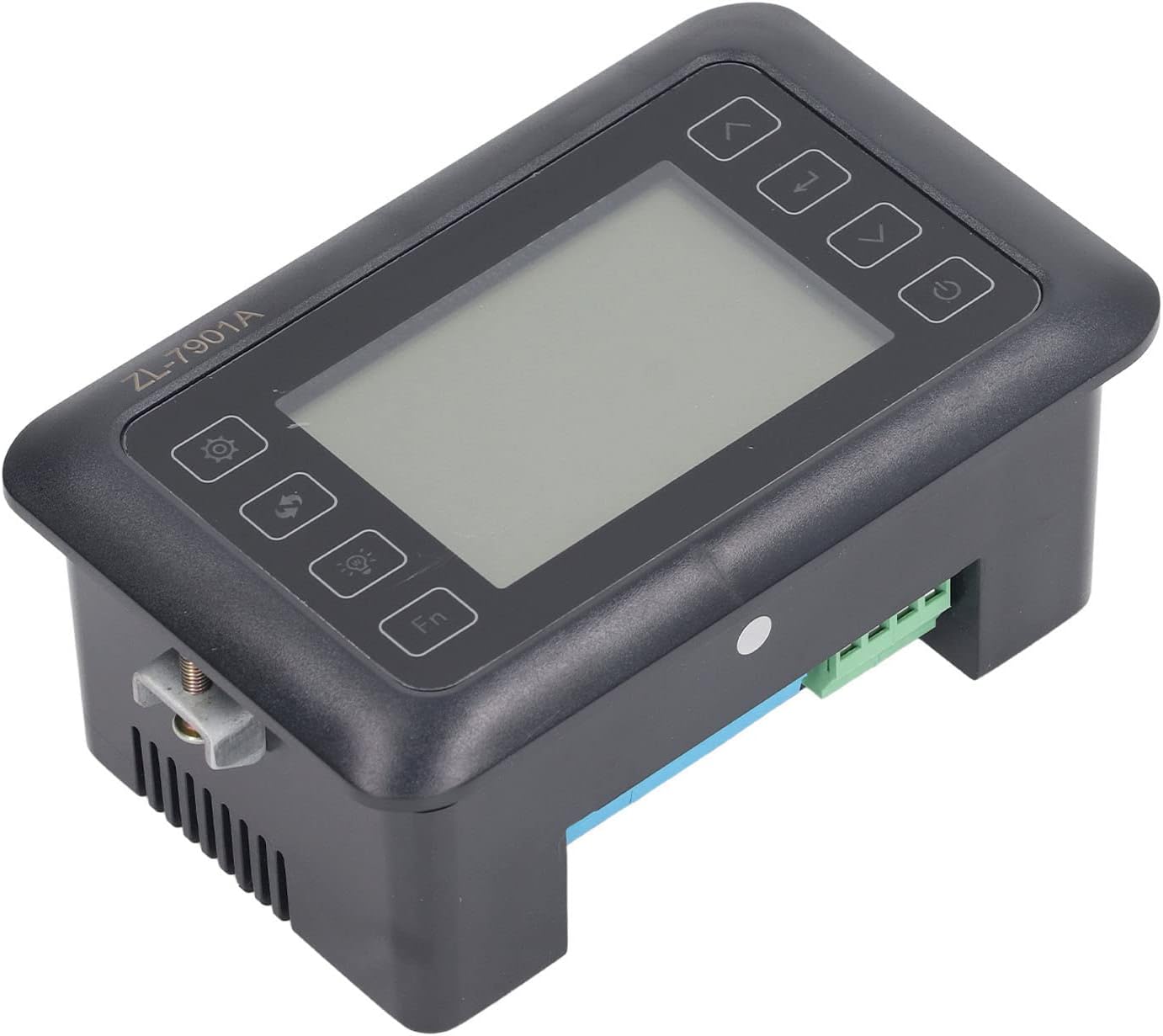
รูปที่ 4.3: มุม view highlighting the various connection points on the controller's side.
After all connections are made, double-check them for correctness before applying power.
5. คู่มือการใช้งาน
5.1 เปิด/ปิดเครื่อง
กดปุ่ม ปุ่มเปิดปิด to turn the controller on or off. The display will illuminate upon power-on. The power button is located on the right side of the controller's front panel.
5.2 แสดงผลเกินview
The main display shows the current temperature and humidity readings. Additional indicators may show the status of heating, humidifying, and turning functions.
5.3 การตั้งค่าพารามิเตอร์
- กดปุ่ม ปุ่มตั้งค่า (gear icon) to enter the parameter setting mode. This button is on the left side of the controller's front panel.
- ใช้ Up (ลูกศรขึ้น) และ ลง (down arrow) buttons to navigate through different parameters (e.g., target temperature, target humidity, egg turning interval). These buttons are on the right side of the controller's front panel.
- กดปุ่ม ปุ่มเข้าสู่ (return arrow icon) to select a parameter for editing. This button is on the right side of the controller's front panel.
- ใช้ Up และ ลง ปุ่มเพื่อปรับค่า
- กดปุ่ม ปุ่มเข้าสู่ อีกครั้งเพื่อยืนยันค่าใหม่
- Repeat for all desired parameters.
- ออกจากโหมดการตั้งค่าโดยการกดปุ่ม ปุ่มตั้งค่า อีกครั้งหรือรอจนหมดเวลา
บันทึก: Consult the full product manual (if provided separately) for a complete list of parameters and their functions.
5.4 ปุ่มฟังก์ชั่น
- ปุ่มไฟ (light bulb icon): Controls the internal light of the incubator (if connected). This button is on the left side of the controller's front panel.
- ปุ่ม Fn: Activates special functions or enters advanced settings. Refer to the detailed manual for specific Fn button operations. This button is on the left side of the controller's front panel.
6. การบำรุงรักษา
6.1 การทำความสะอาด
- Ensure the controller is powered off and disconnected from the power source before cleaning.
- Wipe the exterior of the controller with a soft, dry cloth.
- ห้ามใช้สารทำความสะอาดที่มีฤทธิ์กัดกร่อน สารละลาย หรือแช่เครื่องในน้ำ
- Keep the sensor probes clean and free from debris to ensure accurate readings.
6.2 การดูแลรักษาเซ็นเซอร์
Handle the temperature and humidity sensors with care. Avoid bending or damaging the cables. If readings appear inaccurate, gently clean the sensor tips. Do not attempt to disassemble the sensors.
7 การแก้ไขปัญหา
| ปัญหา | สาเหตุที่เป็นไปได้ | สารละลาย |
|---|---|---|
| คอนโทรลเลอร์เปิดไม่ติด | ไม่มีไฟเลี้ยง; การเชื่อมต่อหลวม; สายไฟชำรุด | Check power outlet; ensure all connections are secure; test power cable. |
| การอ่านอุณหภูมิ/ความชื้นไม่แม่นยำ | Sensor dirty or damaged; sensor not properly placed; calibration needed. | Clean sensor; reposition sensor away from direct airflow/heat; refer to advanced settings for calibration (if available). |
| Heater/Humidifier not activating. | Output device not connected; setpoint not reached; faulty output device. | Verify wiring connections; check setpoint values; test heater/humidifier independently. |
| จอแสดงผลแสดงรหัสข้อผิดพลาด | Sensor fault; internal error. | Note the error code and consult the full product manual or contact support. |
8. ข้อมูลจำเพาะ
| คุณสมบัติ | รายละเอียด |
|---|---|
| แบบอย่าง | ZL-7901A |
| ยี่ห้อ | ฟิดูน |
| อินพุต Voltage | กระแสสลับ 100V-240V |
| ประเภทการควบคุม | Fully Automatic Digital Temperature and Humidity Control |
| ความแม่นยำ | High precision for both temperature and humidity |
| แอปพลิเคชัน | Incubators for various poultry and bird eggs |
| การติดตั้ง | แผงยึด |
9. การรับประกันและการสนับสนุน
Fydun is committed to providing quality products and excellent customer service. If you encounter any issues or have questions regarding your ZL-7901A Incubator Controller, please contact our customer service team.
For support, please refer to the contact information provided with your purchase or visit the official Fydun store on Amazon: Fydun Amazon Store.
Our professional customer service team is ready to assist you promptly.