
1. บทนำ
The BTMETER BT-1600APP is a high-precision digital infrared thermometer gun designed for non-contact temperature measurement in various industrial applications. It features a wide temperature range, dual laser pointers for accurate targeting, multiple measurement modes, and Bluetooth connectivity for data logging and remote monitoring via a mobile application. This manual provides essential information for safe and effective use of the device.
2. ข้อมูลด้านความปลอดภัย
WARNING: This device is not intended for human temperature measurement.
- อย่าส่องเลเซอร์ไปที่ดวงตาโดยตรง หรือส่องไปกระทบกับพื้นผิวสะท้อนแสงโดยอ้อม
- Exercise caution when measuring high-temperature surfaces. The device measures surface temperature, and objects may remain hot long after the measurement.
- Do not use the device in environments with explosive gas, vapor, or dust.
- เก็บอุปกรณ์ให้ห่างจากสนามแม่เหล็กไฟฟ้าที่มีความแรง
- โปรดตรวจสอบให้แน่ใจว่าได้ติดตั้งแบตเตอรี่อย่างถูกต้องก่อนใช้งาน
3. เนื้อหาบรรจุภัณฑ์
ตรวจสอบว่ามีรายการทั้งหมดอยู่ในแพ็คเกจ:
- Digital Thermometer Gun (BT-1600APP)
- สายชาร์จ USB
- ไขควงขนาดเล็ก (สำหรับช่องใส่แบตเตอรี่)
- กระเป๋าใส่อุปกรณ์พกพา
- คู่มือการใช้งาน

รูปที่ 3.1: สิ่งของในบรรจุภัณฑ์
4. สินค้าหมดview และคุณสมบัติ
The BT-1600APP thermometer is designed for precision and ease of use in demanding environments.
- Precise and Rapid Response: Measures temperatures from -50℃ to 1600℃ (-58℉ to 2912℉) with an accuracy of ±4℃/7.2℉ or ±(2% of reading +2℃/3.6℉) and a response time under 0.25 seconds.
- อัตราส่วนระยะทางต่อจุด 30:1: Allows accurate measurement of high temperatures from a safe distance using dual infrared laser pointers.
- ปรับ Emissivity: Features 0.1 to 1.0 adjustable emissivity for accurate readings on various surface types.
- Multifaceted Measurement Modes: Includes REC (Record), MAX (Maximum), MIN (Minimum), DIF (Difference), AVG (Average), HAL (High Alarm), and LAL (Low Alarm).
- การบันทึกและส่งออกข้อมูล: Built-in Bluetooth module for mobile phone/tablet connectivity, remote control, monitoring, and data export in TXT format.
- การออกแบบที่เป็นมิตรต่อผู้ใช้: Backlit screen, dual laser with on/off function, sensitive touchscreen buttons, Celsius/Fahrenheit switching, and USB rechargeable.

Figure 4.1: Key Features of the BT-1600APP

Figure 4.2: Distance-to-Spot Ratio (30:1)
5. การตั้งค่า
5.1 การเชื่อมต่อแบตเตอรี่
Before first use, connect the internal rechargeable battery:
- Unscrew the battery cover using the provided screwdriver.
- Connect the battery line to the designated port inside the compartment.
- Tighten the battery cover securely.

Figure 5.1: Battery Connection Steps
5.2 การชาร์จอุปกรณ์
The device is USB rechargeable. Connect the provided USB charging cable to the device's USB-C port and a suitable USB power source.
วิดีโอ 5.1: จบview of the BTMETER Digital Infrared Thermometer Gun BT-1600APP, demonstrating its features and charging process.
6. คู่มือการใช้งาน
6.1 การวัดอุณหภูมิขั้นพื้นฐาน
To take a temperature reading, press the 'TEST' button. Briefly pressing it will take a single reading, while holding it down will continuously scan the temperature. The measured temperature will be displayed on the backlit LCD screen.
6.2 ฟังก์ชันปุ่ม
The device features sensitive touchscreen buttons for various functions:
- ปุ่มเลเซอร์พอยเตอร์: Toggles the dual laser pointers on/off for precise targeting.
- ปุ่มโหมด: Selects different measurement modes (REC, MAX, MIN, DIF, AVG, HAL, LAL).
- E/Flash Button: Adjusts emissivity settings or activates the flashlight function.
- ปุ่มทดสอบ: เริ่มการวัดอุณหภูมิ
- T/DN Button: Switches between Celsius (℃) and Fahrenheit (℉) temperature units.
- ปุ่มขึ้น: เปิดใช้งานไฟแบ็คไลท์สำหรับจอ LCD
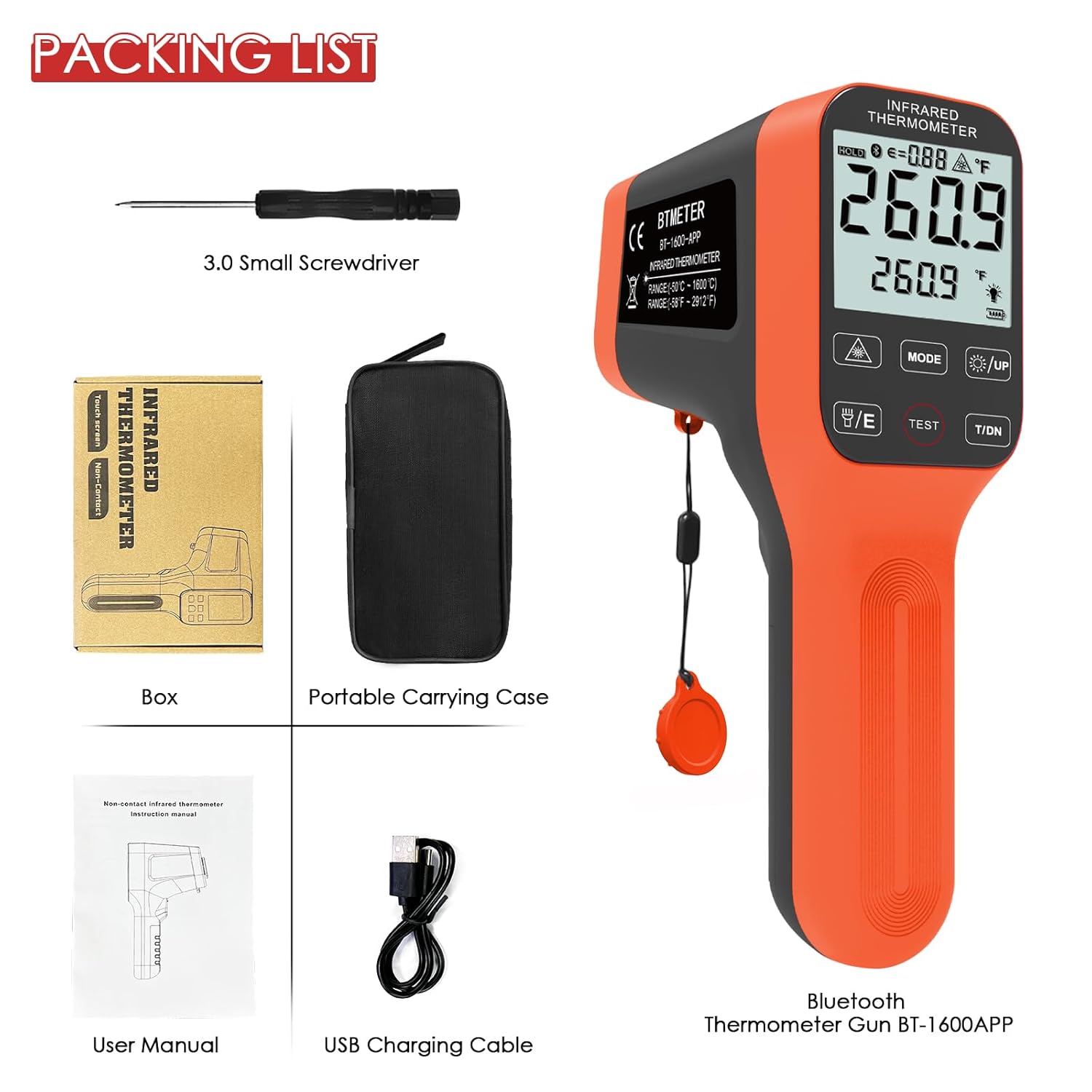
Figure 6.1: Device Buttons and Functions
7. โหมดการวัด
The BT-1600APP offers several measurement modes for comprehensive temperature analysis:
- สูงสุด/นาที: Measures and displays the maximum and minimum temperatures detected during a scan.
- เฉลี่ย: Calculates and displays the average temperature.
- ความแตกต่าง: Shows the difference between the maximum and minimum temperatures.
- HAL (High Temperature Alarm): Alerts the user if the measured temperature exceeds a preset high limit.
- LAL (Low Temperature Alarm): Alerts the user if the measured temperature falls below a preset low limit.
- REC (บันทึก): Stores temperature readings, supporting up to 12 sets of data.
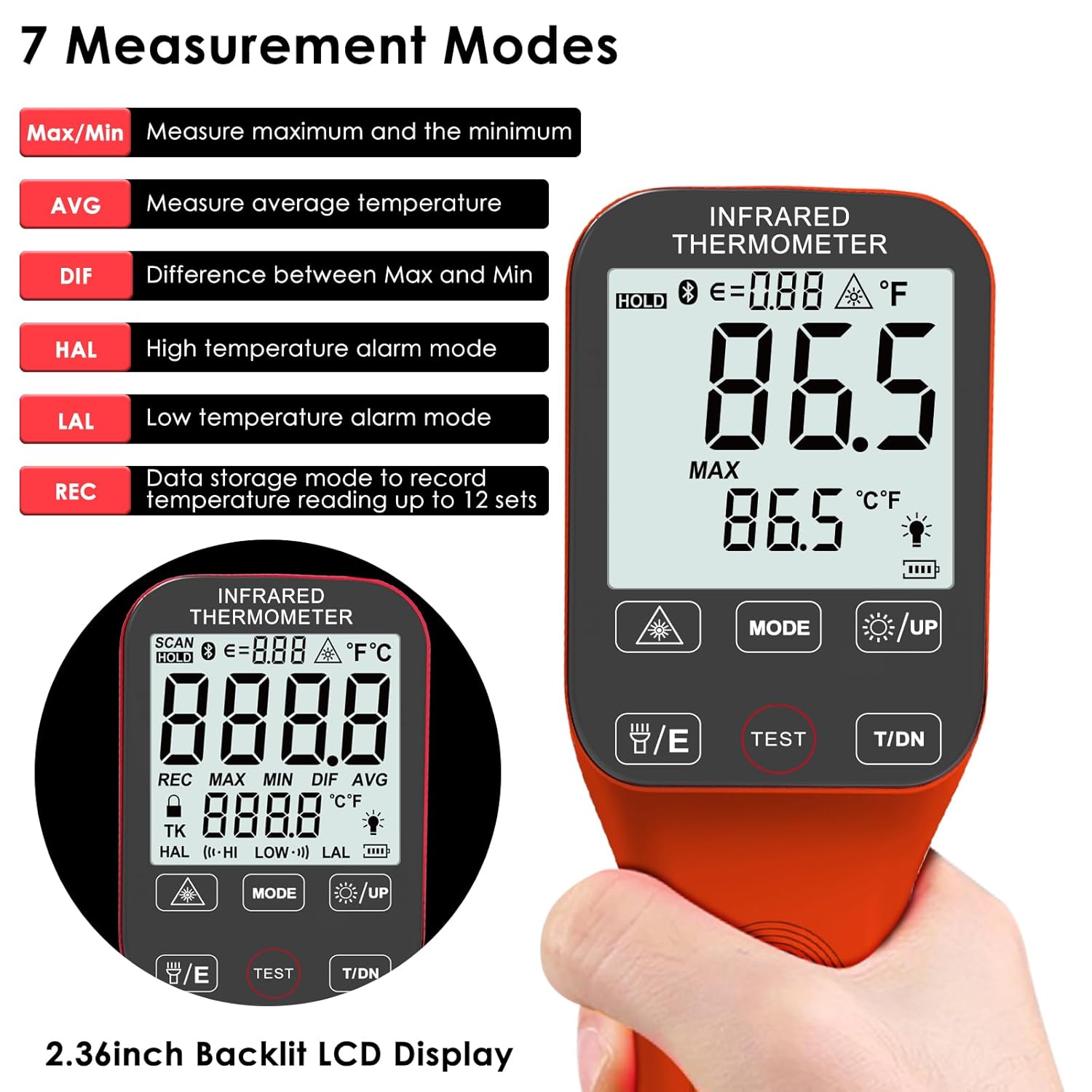
Figure 7.1: Seven Measurement Modes
8 การปรับค่าการแผ่รังสีความร้อน
Emissivity (ε) is a crucial factor for accurate infrared temperature measurement. The BT-1600APP allows adjustment from 0.1 to 1.0 to match the surface being measured. Different materials have different emissivities (e.g., oil: 0.94, asphalt: 0.9, water: 0.96). Adjusting this setting ensures higher accuracy.

Figure 8.1: Emissivity Adjustment Exampเลส
9. Bluetooth Connectivity and Data Logging
The BT-1600APP includes a Bluetooth module for connecting to a mobile phone or tablet. This allows for remote control, real-time monitoring, and data export in TXT format. Download the companion app (refer to the user manual for app details and QR code) to utilize these features.

Figure 9.1: Bluetooth Connectivity and App Interface
10. การบำรุงรักษา
To ensure the longevity and accuracy of your BTMETER BT-1600APP thermometer:
- เช็ดอุปกรณ์ให้สะอาดด้วยผ้าเนื้อนุ่มamp ผ้า ห้ามใช้สารทำความสะอาดที่มีฤทธิ์กัดกร่อนหรือตัวทำละลาย
- Keep the lens clean and free from dust or debris. Use a soft brush or compressed air for cleaning.
- Store the device in its portable carrying case when not in use to protect it from damage.
- Ensure the battery is charged regularly, especially if not used frequently, to prevent deep discharge.
11 การแก้ไขปัญหา
If you encounter issues with your BT-1600APP thermometer, consider the following:
- อุปกรณ์ไม่เปิดเครื่อง: Ensure the internal battery is properly connected and charged. Connect the USB charging cable and allow it to charge for at least 30 minutes.
- การอ่านค่าที่ไม่ถูกต้อง: Verify the emissivity setting matches the material being measured. Ensure the target is within the optimal distance-to-spot ratio. Check for obstructions or damage to the lens.
- แบตเตอรี่หมดเร็ว: The device may have internal leakage causing faster battery drain when not in use. Ensure the device is fully charged before each use, especially if it has been stored for a period.
- ปัญหาการเชื่อมต่อบลูทูธ: Ensure Bluetooth is enabled on your mobile device and the thermometer. Restart both devices and try pairing again. Refer to the app's instructions for specific pairing steps.
- อุปกรณ์ปิดตัวเองโดยไม่คาดคิด: The device has an automatic shutdown function. If it shuts off too quickly, check the automatic shutdown time settings in the mobile app.
12. ข้อมูลจำเพาะ
| คุณสมบัติ | ข้อมูลจำเพาะ |
|---|---|
| ยี่ห้อ | บีทีมิเตอร์ |
| ชื่อรุ่น | BT-1600แอป |
| คุณสมบัติพิเศษ | ไม่ต้องสัมผัส |
| สี | ส้ม |
| ประเภทจอภาพ | ดิจิตอล |
| เทคโนโลยีการเชื่อมต่อ | บลูทูธ |
| แหล่งพลังงาน | ใช้แบตเตอรี่ (ชาร์จ USB ได้) |
| ช่วงการวัด | -50 ℃ถึง 1600 ℃ (-58 ℉ถึง 2912 ℉) |
| ความแม่นยำ | ±4℃/7.2℉ or ±(2% of reading +2℃/3.6℉) |
| เวลาตอบสนอง | 0.25 วินาที |
| อัตราส่วนระยะทางต่อจุด | 30:1 น. |
| emissivity | ปรับได้ตั้งแต่ 0.1 ถึง 1.0 |
| น้ำหนักสินค้า | 8.1 ออนซ์ |
| ความยาวสินค้า | 7 นิ้ว |
| การใช้งานภายใน/ภายนอกอาคาร | ในร่ม |
| ส่วนประกอบที่รวมอยู่ | Digital Thermometer Gun |
13. การรับประกันและการสนับสนุน
The BTMETER BT-1600APP Digital Infrared Thermometer Gun comes with a 365-day quality warranty and lifetime technical support. For assistance, please refer to the contact information provided in your product packaging or visit the official BTMETER webเว็บไซต์.