
การแนะนำ
ขอบคุณสำหรับการซื้อasing the Funistree Cell Phone Stand with Wireless Bluetooth Speaker. This device combines a versatile phone stand with a high-quality Bluetooth speaker and a white noise machine, designed to enhance your audio and viewing experience. Please read this manual carefully before use to ensure proper operation and to maximize the product's lifespan.
สินค้าเกินview
The Funistree H77 is a multi-functional device featuring a detachable phone stand and a wireless Bluetooth speaker. Its innovative design allows for independent use of the speaker and the stand, or combined for an integrated entertainment solution.
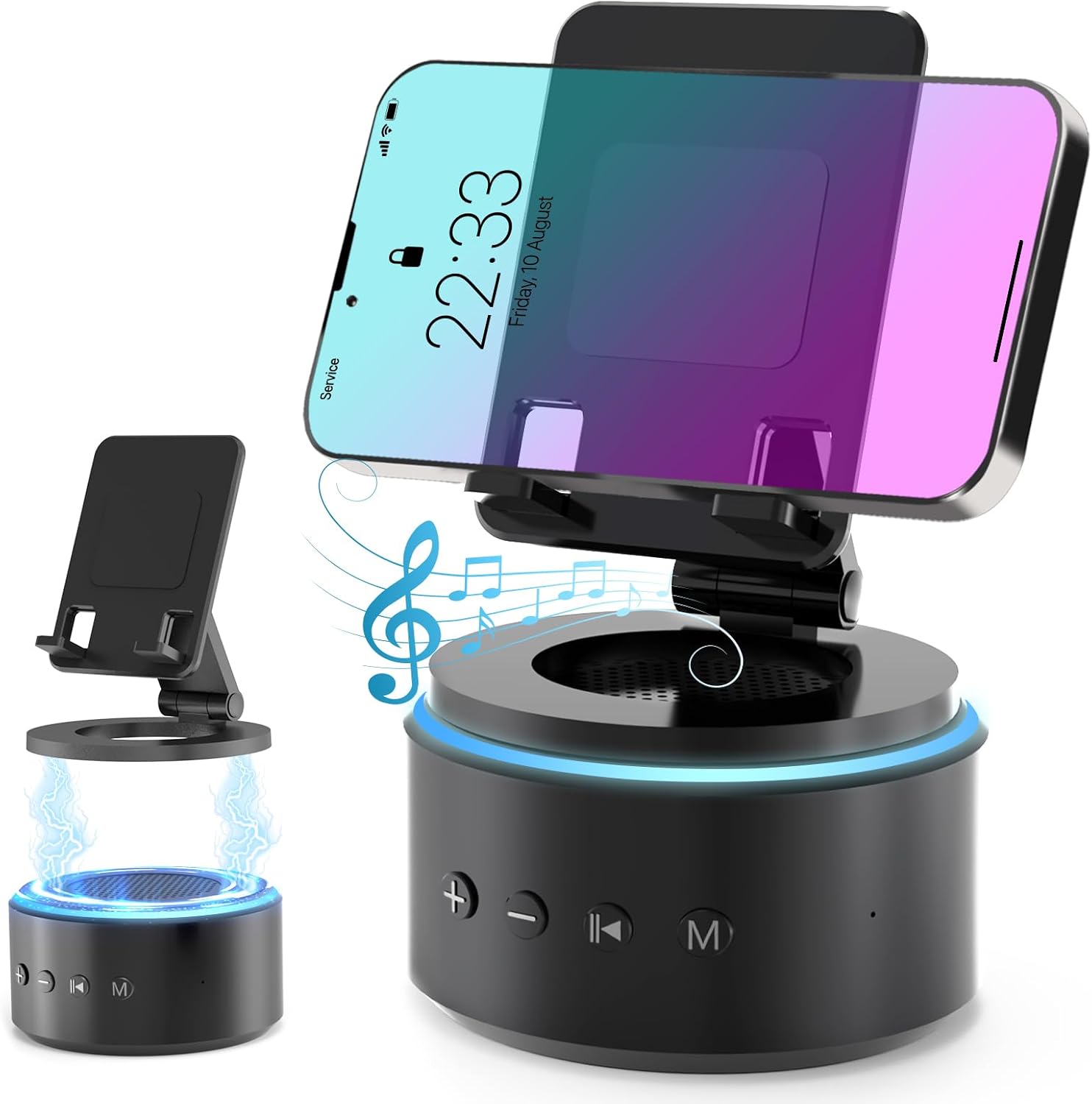
Image: The Funistree H77 device, illustrating its 2-in-1 design with the phone stand attached to the speaker base and also shown detached.
คุณสมบัติหลัก:
- 2-in-1 Detachable Design: The phone stand magnetically connects to the Bluetooth speaker, allowing for combined or separate use.
- Adjustable & Portable Stand: เสนอได้หลายรายการ viewing angles and includes a hanging design for easy portability.
- เสียงสเตอริโอ HD: Equipped with a dual stereo system for enhanced bass, clear highs, and balanced midrange.
- เครื่องสร้างเสียงขาว: Features 10 soothing white noise sounds with an auto-off timer (15, 30, or 60 minutes).
- ฐานที่มั่นคง: Anti-slip silicone pads ensure device stability.
- อายุการใช้งานแบตเตอรี่ยาวนาน: Optimized 1800 mAh battery for extended use.
เนื้อหาแพ็คเกจ
กรุณาตรวจสอบแพ็คเกจสำหรับรายการต่อไปนี้:
- Funistree Cell Phone Stand with Wireless Bluetooth Speaker (Model H77)
- สายชาร์จ USB
- คู่มือการใช้งาน
Note: Contents may vary slightly. If any items are missing or damaged, please contact customer support.
การตั้งค่า
การชาร์จอุปกรณ์:
- Locate the charging port on the speaker base.
- Connect the provided USB charging cable to the speaker.
- เสียบปลายอีกด้านหนึ่งของสาย USB เข้ากับอะแดปเตอร์ไฟ USB ที่ใช้งานร่วมกันได้ (ไม่รวมอยู่ด้วย) หรือพอร์ต USB ของคอมพิวเตอร์
- ไฟแสดงสถานะการชาร์จจะสว่างขึ้น เมื่อชาร์จเต็มแล้ว ไฟอาจเปลี่ยนสีหรือดับลง
Initial charge time is approximately 2-3 hours.
Assembling the Phone Stand and Speaker:
The phone stand and speaker connect magnetically.
- Align the magnetic base of the phone stand with the top surface of the speaker.
- The magnets will snap the two components together securely.
- To detach, simply pull the phone stand upwards from the speaker base.

ภาพ: ระยะใกล้ view demonstrating the magnetic connection between the phone stand and the speaker base.
คำแนะนำการใช้งาน
เปิด/ปิดเครื่อง:
- To power on, press and hold the Power button (usually marked with a power symbol) on the speaker base for a few seconds until you hear an audible prompt or see an indicator light.
- หากต้องการปิดเครื่อง ให้กดปุ่มเปิด/ปิดค้างไว้สักสองสามวินาที
การจับคู่บลูทู ธ :
- Ensure the speaker is powered on and in pairing mode (indicated by a flashing LED light, usually blue). If not, briefly press the Bluetooth button (if available) or power cycle the device.
- บนอุปกรณ์พกพาของคุณ (สมาร์ทโฟน แท็บเล็ต ฯลฯ) ไปที่การตั้งค่าบลูทูธ
- ค้นหา available devices. The speaker will appear as "H77" or "Funistree H77".
- Select the speaker from the list to pair. Once paired, you will hear a confirmation sound, and the LED light will become solid.
- ตอนนี้คุณสามารถเล่นเสียงจากอุปกรณ์ของคุณผ่านลำโพงได้

Image: The Funistree H77 in use, with a smartphone mounted on the stand, playing music, and a laptop nearby, illustrating its versatile functionality.
White Noise Function:
The speaker includes 10 built-in white noise sounds to aid relaxation or concentration.
- Press the 'M' (Mode) button to cycle through the white noise sounds.
- To set a timer for the white noise, press the Timer button (if available) or refer to the specific button layout on your device. The available timer settings are 15, 30, or 60 minutes. The device will automatically turn off after the selected duration.

Image: Visual representation of the 10 white noise options (Ocean, Wind, Rain, Bird, Heartbeat, Campfire, Thunderstorm, Brook, Fan, Piano) and timer settings, with a person sleeping, indicating the relaxation benefits.
การปรับระดับเสียงและการเล่น:
- ปรับระดับเสียงขึ้น: กดปุ่ม '+'
- ลดเสียงลง: กดปุ่ม '-'
- เล่น/หยุดชั่วคราว: Press the Play/Pause button (usually marked with a triangle/two vertical bars).
- เพลงถัดไป: Press the '>>|' button.
- แทร็กก่อนหน้า: Press the '|<<' button.
การใช้ที่วางโทรศัพท์:
The phone stand is adjustable to provide optimal viewมุมการเอียง
- Place your smartphone or tablet securely on the stand's cradle.
- Adjust the angle of the stand by gently pushing or pulling the articulated arm to your desired viewตำแหน่งการวางตำแหน่ง
- The stand features anti-slip silicone pads to prevent your device from sliding.

ภาพ: รายละเอียด view highlighting the adjustable angle mechanism and the anti-slip silicone pads on the phone stand and base for secure device placement.
ความสามารถในการพกพา:
The speaker can be carried easily using its integrated hanging design.

Image: A woman outdoors, holding the Funistree speaker by its hanging rope, demonstrating its portability for outdoor activities.
การซ่อมบำรุง
- การทำความสะอาด: Use a soft, dry cloth to wipe the surface of the device. Do not use abrasive cleaners, alcohol, or chemical solvents, as these may damage the finish.
- พื้นที่จัดเก็บ: เมื่อไม่ได้ใช้งานเป็นเวลานาน ควรเก็บอุปกรณ์ไว้ในที่แห้งและเย็น หลีกเลี่ยงแสงแดดโดยตรงและอุณหภูมิที่สูงหรือต่ำเกินไป
- การดูแลแบตเตอรี่ เพื่อยืดอายุการใช้งานแบตเตอรี่ ควรหลีกเลี่ยงการคายประจุแบตเตอรี่จนหมดบ่อยๆ ควรชาร์จอุปกรณ์เป็นประจำ แม้ว่าจะไม่ได้ใช้งานอยู่ก็ตาม
- หลีกเลี่ยงน้ำ: This device is not waterproof. Keep it away from water, moisture, and excessive humidity.
- จัดการด้วยความระมัดระวัง: หลีกเลี่ยงการทำอุปกรณ์หล่นหรือกระแทกอย่างรุนแรง
การแก้ไขปัญหา
| ปัญหา | สาเหตุที่เป็นไปได้ | สารละลาย |
|---|---|---|
| อุปกรณ์ไม่เปิดเครื่อง | แบตเตอรี่อ่อน | ชาร์จอุปกรณ์ให้เต็ม |
| ไม่สามารถจับคู่ผ่านบลูทูธได้ | Speaker not in pairing mode; Bluetooth disabled on source device; device too far. | Ensure speaker is in pairing mode. Enable Bluetooth on your device. Move devices closer (within 10 meters). Forget previous pairings and try again. |
| ไม่มีเสียงหรือเสียงเบา | Volume too low on speaker or source device; device not properly paired. | Increase volume on both speaker and source device. Re-pair the device. |
| White noise function not working. | เลือกโหมดไม่ถูกต้อง | Press the 'M' (Mode) button to cycle to the white noise function. |
| ที่วางโทรศัพท์ไม่มั่นคง | Device not placed correctly; surface is uneven. | Ensure phone is centered on the cradle. Place the stand on a flat, stable surface. |
If the problem persists, please contact Funistree customer support.
ข้อมูลจำเพาะ
| หมายเลขรุ่น | H77 |
| ขนาดสินค้า | 4.53 x 4.13 x 4.37 นิ้ว |
| น้ำหนักสินค้า | 15.8 ออนซ์ |
| ประเภทแบตเตอรี่ | แบตเตอรี่ลิเธียมไอออน 1 ก้อน (รวมอยู่ด้วย) |
| ความจุของแบตเตอรี่ | 1800 มิลลิแอมป์ |
| การเชื่อมต่อ | บลูทูธ |
| เสียงสีขาว | 10 types (Ocean, Wind, Rain, Bird, Heartbeat, Campfire, Thunderstorm, Brook, Fan, Piano) |
| การตั้งเวลา | 15, 30, 60 นาที |
| อุปกรณ์ที่รองรับ | Smartphones, Tablets (iPhone, Galaxy, LG, iPad, Samsung Tab, Sony, etc.) |
ข้อมูลด้านความปลอดภัย
- ห้ามถอดประกอบ ซ่อมแซม หรือดัดแปลงอุปกรณ์ การกระทำดังกล่าวอาจทำให้เกิดความเสียหาย ไฟฟ้าช็อต หรือไฟไหม้ได้
- Keep the device away from heat sources, direct sunlight, and high temperatures.
- อย่าให้อุปกรณ์โดนน้ำหรือของเหลวอื่นๆ
- ห้ามใช้งานอุปกรณ์ในสภาพแวดล้อมที่มีการรบกวนทางแม่เหล็กไฟฟ้าอย่างรุนแรง
- เก็บให้พ้นจากมือเด็กและสัตว์เลี้ยง
- โปรดทิ้งอุปกรณ์และแบตเตอรี่อย่างถูกวิธีตามระเบียบข้อบังคับท้องถิ่น ห้ามทิ้งรวมกับขยะในครัวเรือน
การรับประกันและการสนับสนุน
Funistree products are designed and manufactured to the highest quality standards. For warranty information and customer support, please refer to the warranty card included with your purchase or visit the official Funistree website. If you encounter any issues or have questions regarding your product, please contact our customer service team.
หากต้องการความช่วยเหลือเพิ่มเติม โปรดไปที่: Funistree Official Store on Amazon