
Cuifati Cuifati7b3fxose1g-12
Cuifati TWS B11 Language Translation Earbuds User Manual
Model: Cuifati7b3fxose1g-12
แบรนด์: คุยฟาติ
การแนะนำ
The Cuifati TWS B11 Language Translation Earbuds are advanced wireless headphones designed for seamless real-time communication across language barriers. Featuring Bluetooth 5.3 connectivity, these earbuds support translation for 74 languages and 70 accents, offering high accuracy and low latency. This manual provides detailed instructions for setup, operation, maintenance, and troubleshooting to ensure optimal performance of your device.

Image: The TWS B11 Language Translation Earbuds and their charging case.
คุณสมบัติหลัก
- Multilingual Translation: Supports 74 languages and 70 accents, covering over 90% of the global population, with up to 97% accuracy using four leading translation engines.
- การแปลแบบเรียลไทม์: Interprets almost simultaneously with a low latency of 0.5 seconds, supported by 15 global servers.
- Four Translation Modes: Includes Touch Mode, External Mode (Speaker Mode), Free Talk Mode, and Offline Mode to suit various communication scenarios.
- ประสิทธิภาพแบตเตอรี่ที่แข็งแกร่ง: Each earbud features a 40 mAh battery, providing 4 hours of continuous operation. The 350 mAh charging case extends usage, offering up to 120 hours of standby time.
- การออกแบบตามหลักสรีรศาสตร์: Designed to conform to the human ear shape for a compact and comfortable fit, ensuring no discomfort during prolonged use.
- การลดเสียงรบกวน: High-precision noise reduction for clear audio quality.

ภาพ: เหนือview of the B11 Translator Earbuds' functional generalization, highlighting features like simultaneous interpretation, premium sound quality, 144 online translation languages, and long-lasting battery.

Image: Illustration of the high-precision noise reduction feature, showing how it enhances audio quality.

Image: Demonstrates the ergonomic design of the earbuds, ensuring a comfortable and secure fit for most users.
การตั้งค่า
การชาร์จหูฟังเอียร์บัดและเคส
Before first use, fully charge the earbuds and the charging case. The charging case has a built-in 350 mAh lithium-ion battery, and each earbud has a 40 mAh lithium-ion battery.
- ใส่หูฟังเอียร์บัดทั้งสองข้างลงในกล่องชาร์จ
- Connect the charging case to a power source using a compatible USB cable (not specified, assume standard USB-C or Micro-USB).
- The digital display on the charging case will indicate the charging status. Ensure both earbuds and the case are fully charged before use.
จับคู่กับอุปกรณ์ของคุณ
The earbuds use Bluetooth V5.3 for stable and efficient connection.
- Ensure the earbuds are charged and taken out of the charging case. They should automatically enter pairing mode.
- On your smartphone or tablet, go to Bluetooth settings and turn Bluetooth on.
- ค้นหา available devices. The earbuds should appear as "TWS B11" or similar.
- Select the earbuds to pair. Once connected, you will hear an audio prompt.
Installing the Companion Application
To utilize the translation features, you will need to download and install the dedicated companion application on your smartphone. Refer to the QR code in the product packaging or search for "TWS B11 Translator" (or similar) in your device's app store (Google Play Store for Android, Apple App Store for iOS).
- ดาวน์โหลดและติดตั้งแอปพลิเคชัน
- Open the application and follow the on-screen instructions to connect your earbuds to the app. This usually involves confirming the Bluetooth connection.
โหมดการทำงาน
The TWS B11 earbuds offer four distinct translation modes to cater to various communication needs:
1. โหมดสัมผัส
Ideal for close conversations, such as with acquaintances or friends. Two people each wear an earbud, and translation occurs in real-time by touching the earbud.
- Each person wears one earbud.
- Tap the earbud to speak, and the translation will be heard by the other person.

Image: The app interface displaying the four translation modes, with a focus on Touch Mode.
2. Speaker Mode (External Mode)
Suitable for situations where one person wears the earbuds and the other person speaks into the smartphone. This mode is convenient for interacting with strangers or in situations where sharing earbuds is not practical.
- One person wears the earbuds.
- The other person speaks into the smartphone's microphone.
- The translation is played through the earbuds for the wearer and through the phone's speaker for the other person.
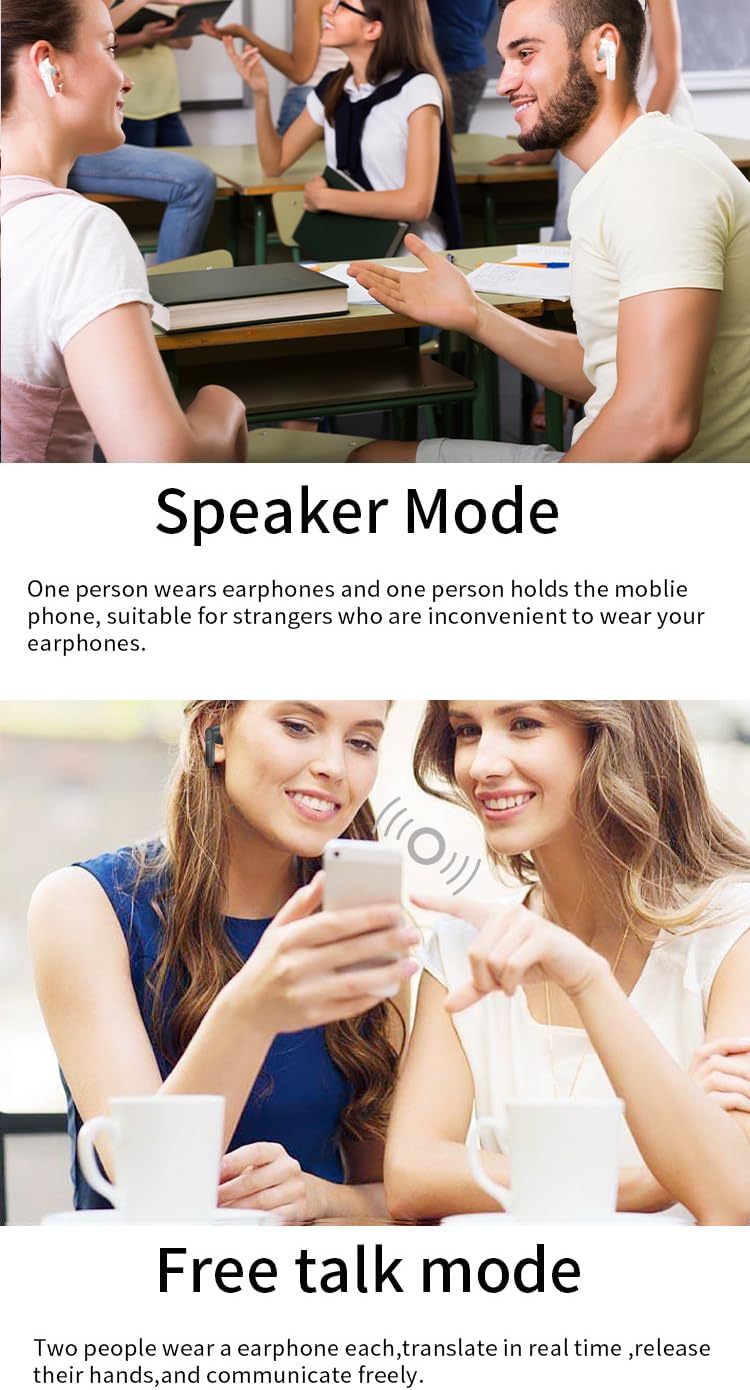
Image: Depiction of Speaker Mode in use, where one person wears the earbuds and another speaks into a phone.
3. โหมดสนทนาฟรี
Designed for natural, flowing conversations. Both participants wear an earbud, and the system automatically translates speech in real-time without the need for manual input, allowing for hands-free communication.
- Both participants wear an earbud.
- Speak naturally; the earbuds will automatically detect and translate speech.

Image: Free Talk Mode in action, enabling natural, hands-free conversation between two people.
4. โหมดออฟไลน์
Allows translation without an internet connection. This mode supports real-time offline voice translation for specific languages, making it ideal for travel or areas with limited connectivity.
- Ensure the required offline language packs are downloaded via the companion app when connected to the internet.
- Activate Offline Mode in the app.
- Speak as usual; translation will occur without network access.
- Supported offline languages include Chinese, English, Japanese, Korean, Russian, German, French, and Spanish.

Image: Demonstrates the Offline Mode, allowing translation without an internet connection for supported languages.
ข้อมูลจำเพาะ
| คุณสมบัติ | รายละเอียด |
|---|---|
| หมายเลขรุ่น | Cuifati7b3fxose1g-12 |
| ยี่ห้อ | กุยฟาติ |
| ประเภทแบตเตอรี่เอียร์บัด | Built-in 40 mAh Lithium-ion Battery x 2 |
| ประเภทแบตเตอรี่เคสชาร์จ | Built-in 350 mAh Lithium-ion Battery |
| เวอร์ชันบลูทูธ | วี5.3 |
| ระยะการส่งข้อมูล | สูงถึง 32.8 ฟุต (10 เมตร) |
| ภาษาที่รองรับ | 74 Languages, 70 Accents (Total 144 variations) |
| ความแม่นยำในการแปล | สูงสุดถึง 97% |
| ความล่าช้าในการแปล | 0.5 วินาที |
| Earbud Continuous Use Time | 4 ชั่วโมง (ชาร์จเต็ม) |
| เวลาสแตนด์บาย | 120 ชั่วโมง |
| สี | สีขาว |
| วัสดุ | เอบีเอส |
Image: A comprehensive list of the 74 languages and 70 accents supported by the earbuds.

Image: Visual representation of the earbuds' high translation accuracy and low latency.
การซ่อมบำรุง
Proper maintenance ensures the longevity and optimal performance of your TWS B11 earbuds.
- การทำความสะอาด: ควรทำความสะอาดหูฟังและกล่องชาร์จเป็นประจำด้วยผ้าแห้งเนื้อนุ่มที่ไม่เป็นขุย ห้ามใช้สารทำความสะอาดที่มีฤทธิ์กัดกร่อน แอลกอฮอล์ หรือตัวทำละลายเคมี
- เคล็ดลับหู: ถอดจุกหูออกเป็นระยะและทำความสะอาดด้วยamp ผ้า ให้แน่ใจว่าแห้งสนิทก่อนติดกลับเข้าที่
- หน้าสัมผัสการชาร์จ: Gently wipe the charging contacts on both the earbuds and inside the case to ensure a good connection.
- พื้นที่จัดเก็บ: เมื่อไม่ใช้งาน ให้เก็บหูฟังไว้ในกล่องชาร์จเพื่อป้องกันฝุ่นและความเสียหาย เก็บในที่แห้งและเย็น หลีกเลี่ยงแสงแดดโดยตรงและอุณหภูมิที่สูงหรือต่ำเกินไป
- การสัมผัสน้ำ: หูฟังนี้ไม่กันน้ำ หลีกเลี่ยงการสัมผัสกับน้ำ เหงื่อ หรือความชื้นสูง
การแก้ไขปัญหา
If you encounter issues with your TWS B11 earbuds, refer to the following common solutions:
| ปัญหา | สาเหตุที่เป็นไปได้ / วิธีแก้ไข |
|---|---|
| หูฟังเอียร์บัดไม่จับคู่ |
|
| ไม่มีเสียงออกจากหูฟัง |
|
| การแปลไม่ทำงาน |
|
| คุณภาพเสียงไม่ดี / มีเสียงรบกวน |
|
| หูฟังเอียร์บัดไม่ชาร์จ |
|
การรับประกันและการสนับสนุน
การรับประกันของผู้ผลิต
The Cuifati TWS B11 Language Translation Earbuds come with a รับประกัน 1 ปีสำหรับข้อบกพร่องจากผู้ผลิตการรับประกันนี้ครอบคลุมถึงข้อบกพร่องในวัสดุและฝีมือการผลิตภายใต้การใช้งานปกติ ไม่ครอบคลุมถึงความเสียหายที่เกิดจากการใช้งานผิดวิธี อุบัติเหตุ การดัดแปลงโดยไม่ได้รับอนุญาต หรือการสึกหรอตามปกติ
โปรดเก็บหลักฐานการซื้อของคุณไว้เพื่อเรียกร้องการรับประกัน
การสนับสนุนลูกค้า
For technical assistance, warranty claims, or any other inquiries regarding your Cuifati TWS B11 earbuds, please contact Cuifati customer support. Refer to the product packaging or the official Cuifati webเว็บไซต์สำหรับข้อมูลการติดต่อ
When contacting support, please have your product model number (Cuifati7b3fxose1g-12) and purchase details ready.
Ask a question about this manual
Ask about setup, troubleshooting, compatibility, parts, safety, or missing instructions. Manuals+ will review the question and use this page’s manual context to help answer it.