
1. บทนำ
This manual provides detailed instructions for the proper use, setup, and maintenance of your Yealink W59R Ruggedized DECT Handset. Please read this manual thoroughly before operating the device to ensure optimal performance and safety. The Yealink W59R is designed for environments requiring a durable and reliable communication solution.
2. สินค้าหมดview
The Yealink W59R is a professional ruggedized DECT handset built to withstand challenging environments. It features an IP67 rating for dust, splash, and water resistance, along with integrated Bluetooth and a vibration alarm. This handset is fully compatible with the Yealink W80 Multi-Cell System, enabling seamless roaming and call handover.
คุณสมบัติหลัก:
- ระดับ IP67: Shock, dust, and water resistant for reliable operation in harsh conditions.
- เพิ่มความทนทาน: Tough rubberized surface protects against drops, slips, and scratches.
- การเคลื่อนที่อย่างราบรื่น: Compatible with Yealink W80 Multi-Cell System for extensive coverage.
- การเชื่อมต่อบลูทูธ: Allows use with Bluetooth headsets for hands-free communication.
- สัญญาณเตือนการสั่นสะเทือน: Ensures calls are not missed in noisy environments.
- Optimal HD Audio: Features FNR (Flexible Noise Reduction), full duplex, and Opus codec for clear sound.
- Comprehensive Alarm Functions: Includes push-button, no-movement, man-down, and running alarms for occupational safety.
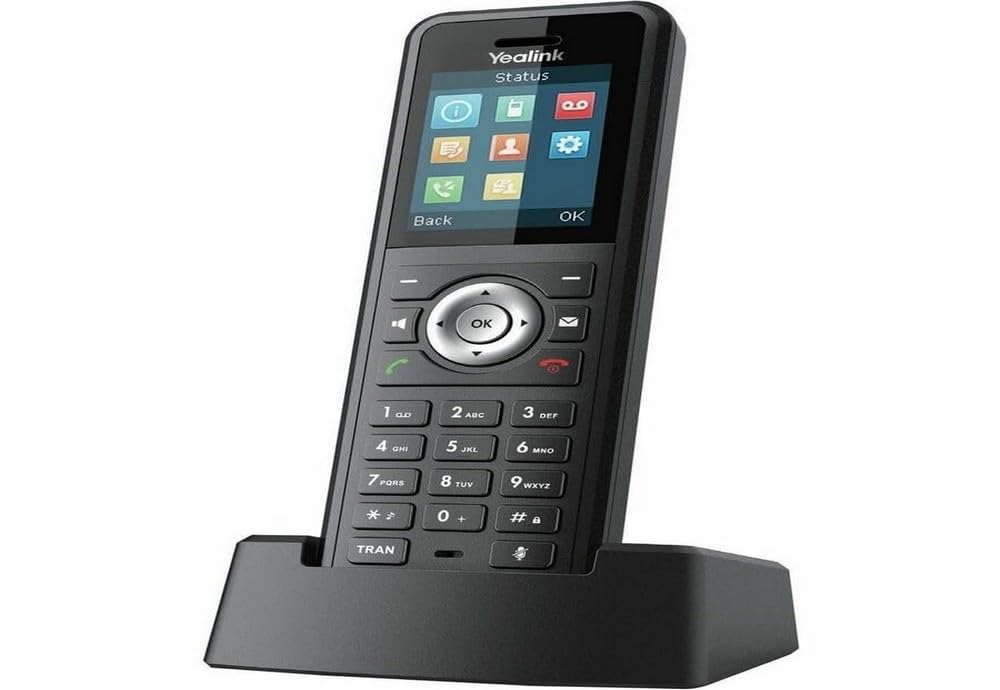
Figure 2.1: Yealink W59R Ruggedized DECT Handset. This image displays the front view of the handset, highlighting its robust design.
3. การตั้งค่า
3.1. เนื้อหาบรรจุภัณฑ์
ก่อนดำเนินการต่อ โปรดตรวจสอบให้แน่ใจว่ามีรายการทั้งหมดอยู่ในบรรจุภัณฑ์:
- Yealink W59R โทรศัพท์มือถือ DECT ที่ทนทาน
- แท่นชาร์จ
- แบตเตอรี่แบบชาร์จไฟได้
- อะแดปเตอร์แปลงไฟ
- ปกตกแต่ง
- คู่มือเริ่มต้นอย่างรวดเร็ว
3.2. การติดตั้งแบตเตอรี่
- ค้นหาฝาปิดช่องใส่แบตเตอรี่ที่ด้านหลังของโทรศัพท์มือถือ
- ถอดฝาครอบออกอย่างระมัดระวัง
- ใส่แบตเตอรี่แบบชาร์จได้ โดยตรวจสอบให้แน่ใจว่าขั้วสัมผัสตรงกัน
- Replace the battery compartment cover and secure it firmly to maintain the IP67 rating.
3.3. การชาร์จเครื่อง
- เชื่อมต่ออะแดปเตอร์จ่ายไฟเข้ากับแท่นชาร์จ
- เสียบอะแดปเตอร์ไฟฟ้าเข้ากับเต้ารับไฟฟ้าที่ผนัง
- Place the handset into the charging cradle. The charging indicator on the handset will illuminate.
- ควรชาร์จโทรศัพท์มือถืออย่างน้อย 4 ชั่วโมงก่อนใช้งานครั้งแรก
3.4. การลงทะเบียนโทรศัพท์มือถือ
The W59R handset must be registered to a Yealink DECT base station (e.g., W80 Multi-Cell System) to function. Refer to your DECT base station's manual for specific registration procedures. Generally, this involves:
- ตั้งค่าสถานีฐาน DECT ให้อยู่ในโหมดลงทะเบียน
- On the W59R handset, navigate to the registration menu (typically เมนู > การตั้งค่า > การลงทะเบียน > ลงทะเบียนโทรศัพท์มือถือ).
- Select the desired base and enter the system PIN (default is 0000).
- เมื่อลงทะเบียนสำเร็จ โทรศัพท์จะแสดงข้อความยืนยัน
4. คู่มือการใช้งาน
4.1. ฟังก์ชันการโทรพื้นฐาน
- การโทร: กรอกเบอร์โทรศัพท์แล้วกดปุ่ม เรียก สำคัญ.
- รับสาย: กดปุ่ม เรียก key when the handset rings.
- การวางสาย: กดปุ่ม วางสาย สำคัญ.
- การปรับระดับเสียง: Use the navigation keys during a call to adjust the earpiece volume.
4.2. การใช้บลูทูธ
The W59R supports Bluetooth for connecting wireless headsets. To pair a Bluetooth device:
- Enable Bluetooth on your headset and set it to pairing mode.
- On the W59R, navigate to Menu > Settings > Bluetooth.
- เปิดใช้งานบลูทูธ On และเลือก Paired Devices > Add Device.
- Select your headset from the list of available devices and enter the PIN if prompted (usually 0000 or 1234).
4.3. ฟังก์ชั่นปลุก
The W59R includes several alarm features designed to enhance user safety in hazardous environments. These alarms can be configured by an administrator.
- Push-Button Alarm: Activates an emergency alert when a dedicated button is pressed.
- No-Movement Alarm: Triggers an alert if the handset detects no movement for a configurable period.
- สัญญาณเตือนคนล้ม: Activates if the handset detects a sudden change in orientation, indicating a fall.
- Running Alarm: Can be configured to alert if the user is running or moving rapidly beyond a set threshold.

Figure 4.1: Detail of the Yealink W59R handset, showing a button that can be configured for alarm functions.
5. การบำรุงรักษา
5.1. การทำความสะอาด
To maintain the handset's IP67 rating and overall performance:
- Wipe the handset with a soft, damp ผ้า.
- ห้ามใช้สารเคมีรุนแรง น้ำยาทำความสะอาด หรือสารซักฟอกชนิดเข้มข้น
- Ensure all port covers are securely closed after cleaning to maintain water and dust resistance.
5.2. การดูแลแบตเตอรี่
- หลีกเลี่ยงการให้แบตเตอรี่สัมผัสกับอุณหภูมิที่สูงเกินไป
- Charge the battery regularly to prolong its lifespan.
- If the handset will not be used for an extended period, fully charge the battery before storage.
6 การแก้ไขปัญหา
This section addresses common issues you may encounter with your W59R handset.
| ปัญหา | สาเหตุที่เป็นไปได้ | สารละลาย |
|---|---|---|
| โทรศัพท์มือถือเปิดไม่ติด | ยังไม่ได้ติดตั้งแบตเตอรี่หรือแบตเตอรี่ยังไม่ได้คายประจุ | ตรวจสอบให้แน่ใจว่าแบตเตอรี่ได้รับการติดตั้งอย่างถูกต้องและชาร์จจนเต็ม |
| Cannot register handset to base. | Base station not in registration mode; incorrect PIN. | Verify base station is in registration mode. Check the PIN. Ensure handset is within range. |
| ไม่มีสัญญาณโทรศัพท์หรือไม่สามารถโทรออกได้ | Handset not registered; network issue. | Confirm handset is registered. Check network connection of the base station. |
| คุณภาพเสียงไม่ดี | Interference; handset out of range. | Move closer to the base station. Avoid sources of interference (e.g., microwaves, Wi-Fi routers). |
If the problem persists after attempting these solutions, please contact Yealink technical support.
7. ข้อมูลจำเพาะ
| คุณสมบัติ | รายละเอียด |
|---|---|
| ยี่ห้อ | Yealink |
| หมายเลขรุ่น | W59R |
| สี | สีดำ |
| ประเภทโทรศัพท์ | ไร้สาย |
| แหล่งพลังงาน | ใช้พลังงานจากแบตเตอรี่ |
| ขนาดรายการ (ยาว x กว้าง x สูง) | 7.6 x 4.4 x 3.7 นิ้ว |
| น้ำหนักสินค้า | 14.4 ออนซ์ |
| อุปกรณ์ที่รองรับ | Yealink W80 Multi-Cell System, Bluetooth devices |
| เทคโนโลยี DECT | CAT-iq2.0 (not compatible with third-party DECT devices) |
| ระดับการป้องกันน้ำและฝุ่น (IP) | IP67 (Shock, dust, and water resistant) |
| ความจุในการบันทึก | 30 Minutes (Answering System Type: Digital) |
| ยูพีซี | 841885104410 |
8. การรับประกันและการสนับสนุน
ข้อมูลการรับประกัน: The product specifications indicate that warranty information is not available. Please refer to your purchase documentation or contact your vendor for specific warranty details.
การสนับสนุนด้านเทคนิค: For technical assistance, troubleshooting beyond this manual, or inquiries regarding your Yealink W59R, please contact Yealink customer support or visit the official Yealink webเว็บไซต์สำหรับทรัพยากรสนับสนุน


