
Topyond F270
Topyond F270 WiFi Endoscope Camera User Manual
รุ่น : F270
1. บทนำ
This manual provides detailed instructions for the safe and effective use of your Topyond F270 WiFi Endoscope Camera. Please read this manual thoroughly before operating the device and retain it for future reference.
The Topyond F270 is a portable WiFi endoscope camera designed for industrial inspection. It features a 1080P resolution camera with 8 adjustable LED lights, an 8mm lens, and IP67 waterproof rating for the lens, making it suitable for various inspection tasks, including those in damp หรือสภาพแวดล้อมที่จมอยู่ใต้น้ำ
2. ข้อมูลด้านความปลอดภัย
โปรดปฏิบัติตามข้อควรระวังด้านความปลอดภัยต่อไปนี้เพื่อป้องกันการบาดเจ็บหรือความเสียหายต่ออุปกรณ์:
- Do not attempt to disassemble or modify the device. Unauthorized modifications can lead to malfunction and void the warranty.
- ควรเก็บอุปกรณ์ให้ห่างจากอุณหภูมิที่สูงจัด แสงแดดโดยตรง และของเหลวที่มีฤทธิ์กัดกร่อน
- ตรวจสอบให้แน่ใจว่าพอร์ตชาร์จแห้งสนิทก่อนเชื่อมต่อสายชาร์จ USB
- The lens is IP67 waterproof; however, the main control unit is not. Do not submerge the control unit in water.
- โปรดใช้เฉพาะสายชาร์จที่ให้มาหรือที่ชาร์จ 5V/1A ที่ได้รับการรับรองเท่านั้น
- This device is intended for inspection purposes only and should not be used for medical or personal examination.
3. เนื้อหาบรรจุภัณฑ์
ตรวจสอบว่ามีรายการทั้งหมดอยู่ในแพ็คเกจ:
- WiFi Endoscope Camera (10-meter cable)
- สายชาร์จ USB
- การติดแม่เหล็ก
- ติดกระจก
- สิ่งที่แนบมากับตะขอ
- Replacement Buckles (2x)

รูปที่ 3.1: Included accessories with the Topyond F270 WiFi Endoscope Camera.
4. สินค้าหมดview
Familiarize yourself with the components of your endoscope camera.

รูปที่ 4.1: Topyond F270 WiFi Endoscope Camera connected to a smartphone.

รูปที่ 4.2: Control unit with labeled buttons and charging interface.
- 1. Adjust the light button: Controls the brightness of the 8 LED lights on the camera.
- 2. Turn on/off button: เปิดหรือปิดอุปกรณ์
- 3. Taking pictures button: บันทึกภาพนิ่ง
- 4. อินเทอร์เฟซการชาร์จ: พอร์ต Micro USB สำหรับชาร์จแบตเตอรี่ภายใน
- 5. Signal indicator: Displays WiFi connection status and battery level.
5. การตั้งค่า
5.1 การชาร์จอุปกรณ์
Before first use, fully charge the endoscope camera. Connect the provided USB charging cable to the charging interface (4) on the control unit and to a 5V/1A USB power adapter (not included). The signal indicator (5) will show charging status.
The internal 1800mAh lithium battery provides approximately 4 hours of working time on a full charge.
5.2 ดาวน์โหลดและติดตั้งแอพ
ถึง view the camera feed and control the device, you need to download the companion application on your smartphone or tablet.
- Scan the QR code provided in the product packaging or search for the recommended app (e.g., "WiFi View" or similar, specific app name not provided in product data) in your device's app store (Google Play Store for Android, Apple App Store for iOS).
- ดาวน์โหลดและติดตั้งแอปพลิเคชัน
5.3 การเชื่อมต่อผ่าน WiFi
Follow these steps to establish a WiFi connection between the endoscope and your smart device:
- Press and hold the "Turn on/off" button (2) on the control unit to power on the endoscope. The signal indicator (5) will illuminate.
- On your smartphone or tablet, go to your WiFi settings.
- Locate and connect to the WiFi network named "YPC_XXXXXX" or similar (the exact name will be on the device or in the app instructions). No password is typically required for this direct connection.
- Once connected, open the installed endoscope application. The camera feed should now be visible on your device's screen.

รูปที่ 5.1: Wireless connection setup for the endoscope camera.
6. คู่มือการใช้งาน
6.1 เปิด/ปิดเครื่อง
Press and hold the "Turn on/off" button (2) for a few seconds to power the device on or off.
6.2 การปรับความสว่าง LED
Press the "Adjust the light button" (1) repeatedly to cycle through different brightness levels for the 8 LED lights on the camera head. This helps illuminate dark inspection areas.
6.3 การถ่ายภาพและวิดีโอ
ในขณะที่ viewing the live feed in the app:
- To take a photo, press the "Taking pictures" button (3) on the control unit or use the corresponding button within the app.
- To record video, use the video recording function within the app.
Captured images and videos will be saved directly to your smartphone or tablet's gallery.
6.4 การใช้สิ่งที่แนบมา
The endoscope comes with several attachments for specialized tasks:
- แม่เหล็ก: Useful for retrieving small metallic objects from hard-to-reach places.
- กระจกเงา: ให้บริการด้านข้าง view for inspecting walls of pipes or other confined spaces.
- ตะขอ: Can be used to retrieve small non-metallic items.
To attach, carefully slide the desired accessory onto the camera head until it is securely in place. Ensure the accessory does not obstruct the camera lens or LED lights.
6.5 ใบสมัครเช่นampเลส
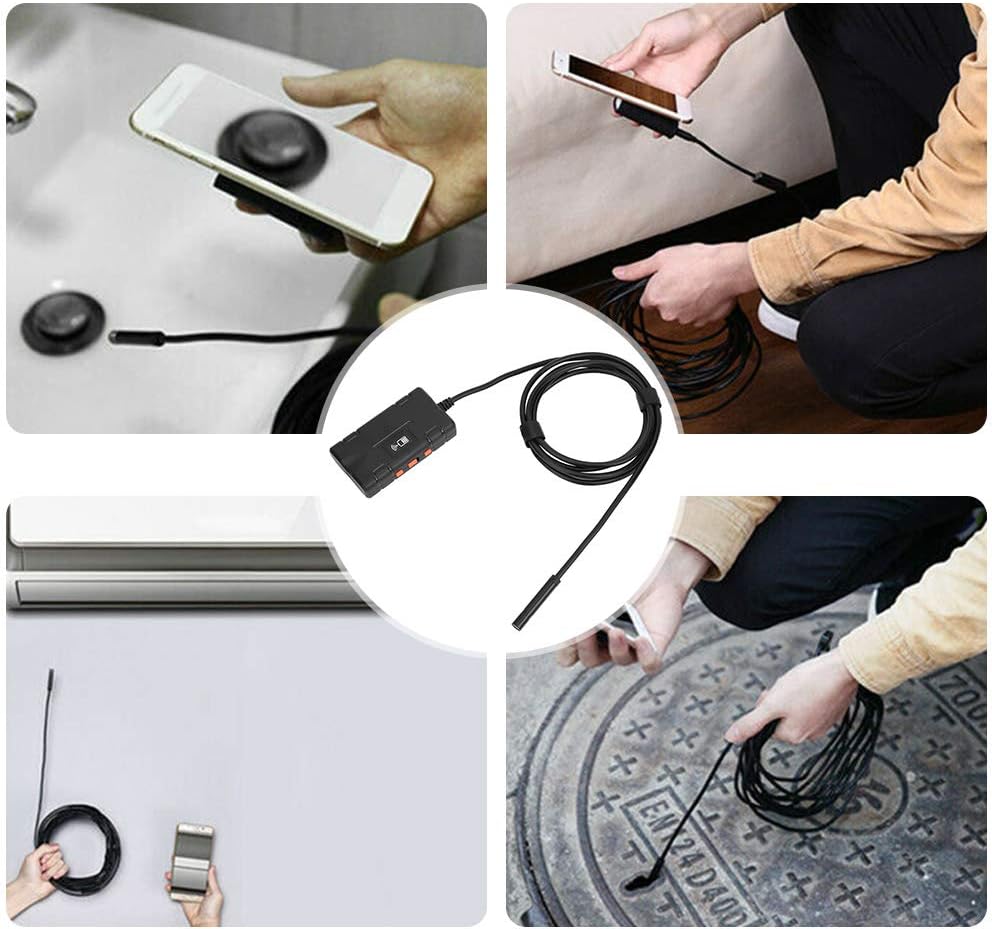
รูปที่ 6.1: Various uses for the Topyond F270 endoscope camera.

รูปที่ 6.2: Examples of endoscope use in household inspections.
7. การบำรุงรักษา
- การทำความสะอาดเลนส์: After use, especially in dirty or wet environments, gently wipe the camera lens with a soft, dry cloth. For stubborn dirt, a slightly damp cloth can be used, followed by drying. Do not use abrasive cleaners or solvents.
- พื้นที่จัดเก็บ: Store the endoscope camera in a cool, dry place, away from direct sunlight and extreme temperatures. Coil the cable neatly to prevent kinks or damage.
- การดูแลแบตเตอรี่ เพื่อยืดอายุการใช้งานแบตเตอรี่ ควรหลีกเลี่ยงการปล่อยให้แบตเตอรี่หมดเกลี้ยงบ่อยๆ หากเก็บรักษาไว้เป็นเวลานาน ควรชาร์จแบตเตอรี่ให้ได้ประมาณ 50% ทุกๆ สองสามเดือน
8 การแก้ไขปัญหา
| ปัญหา | สาเหตุที่เป็นไปได้ | สารละลาย |
|---|---|---|
| No image on screen / App not connecting |
|
|
| ภาพมืดหรือไม่ชัดเจน |
|
|
| อุปกรณ์ไม่ชาร์จ |
|
|
9. ข้อมูลจำเพาะ
| แบบอย่าง | เอฟ270 |
| เส้นผ่านศูนย์กลางเลนส์ | 8มม. |
| ความละเอียดของกล้อง | 1280x1080 (2.0MP) |
| แหล่งกำเนิดแสงของกล้อง | ไฟ LED ปรับได้ 8 ดวง |
| Waterproof Rating (Lens) | IP67 |
| ระยะโฟกัส | 5ซม. ~ ∞ |
| Viewอิงแองเกิล | 70 องศา |
| แบตเตอรี่ | แบตเตอรี่ลิเธียม 1800mAh |
| เวลาทำการ | ประมาณ 4 ชั่วโมง |
| กำลังไฟเข้า | DC 5V 500 mAh / 1A |
| อุณหภูมิในการทำงาน | 0-45°C (32-113°F) |
| รูปแบบภาพถ่าย | MJPEG |
| รูปแบบวิดีโอ | เอ็มพี 4 |
| ความยาวสายเคเบิล | 10 เมตร (32.8 ฟุต) |
| น้ำหนักสินค้า | 0.23 กิโลกรัม (8.1 ออนซ์) |
10. การรับประกันและการสนับสนุน
Topyond products are designed for reliability and performance. For warranty information and technical support, please refer to the contact details provided with your purchase or visit the official Topyond webไซต์ โปรดเก็บใบเสร็จรับเงินไว้เป็นหลักฐานการซื้อ
Ask a question about this manual
Ask about setup, troubleshooting, compatibility, parts, safety, or missing instructions. Manuals+ will review the question and use this page’s manual context to help answer it.