1. สินค้าหมดview
The Generic Road Star 70200 is a versatile car audio player designed to enhance your in-car entertainment experience. It features multiple connectivity options including USB, AUX, and Bluetooth, allowing you to play music from various sources. The unit also includes an FM radio tuner and comes with a remote control for ease of use.

ภาพที่ 1.1: ด้านหน้า view of the Road Star 70200 Car Stereo, showing the display, control knob, and various buttons for media playback and mode selection.
2. เนื้อหาบรรจุภัณฑ์
กรุณาทำเครื่องหมายในช่องสำหรับรายการต่อไปนี้:
- Road Star 70200 Car Stereo Unit
- รีโมทคอนโทรล
- ชุดสายไฟ
- คู่มือการใช้งาน (เอกสารนี้)
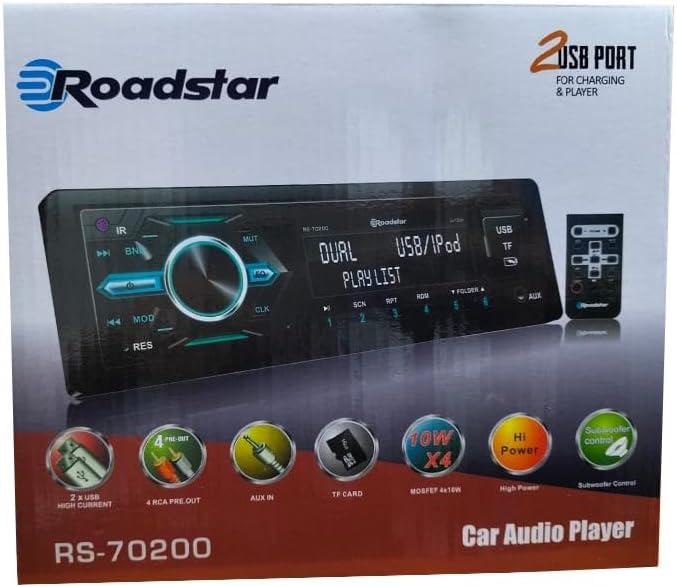
ภาพที่ 2.1: The retail packaging for the Road Star 70200 Car Stereo, illustrating the unit and its key features.

ภาพที่ 2.2: The included remote control, featuring buttons for volume, mode, track navigation, and power.
3. การติดตั้งและการตั้งค่า
3.1. แผนภาพการเดินสายไฟ
Before installation, ensure the vehicle's battery is disconnected to prevent electrical shorts. Connect the wiring harness according to the diagram provided with your vehicle's wiring. Pay close attention to power, ground, speaker, and accessory wire connections.

ภาพที่ 3.1: หลัง view of the Road Star 70200 Car Stereo, displaying the heat sink, wiring harness connector, and RCA output jacks.
3.2. การติดตั้ง
Insert the car stereo into the dashboard opening. Secure it using the mounting sleeve and brackets provided. Ensure the unit is firmly in place to prevent movement during driving. Reconnect the vehicle's battery once installation is complete.
4. คู่มือการใช้งาน
4.1. การควบคุมพื้นฐาน
- ปุ่มเปิด/ปิด: กดเพื่อเปิด/ปิดเครื่อง
- ปุ่มปรับระดับเสียง: หมุนเพื่อปรับระดับเสียง กดเพื่อเข้าถึงการตั้งค่าเสียง (เบส, เสียงแหลม, สมดุล, เฟเดอร์, อีควอไลเซอร์)
- ปุ่มโหมด: Press to cycle through available sources: FM Radio, USB, AUX, Bluetooth.
- ปุ่ม BAND: In FM mode, press to switch between FM1, FM2, FM3 bands.
- ปุ่ม EQ: Press to cycle through preset equalizer settings.
- ปุ่มปิดเสียง: Press to mute/unmute audio.
4.2. USB/Memory Card Playback
Insert a USB drive or TF (MicroSD) card into the respective port. The unit will automatically switch to USB/Card mode and begin playing compatible audio fileNS. ใช้ เพลงก่อนหน้า/ถัดไป ปุ่มสำหรับเลื่อนดูแทร็กและ โฟลเดอร์ขึ้น/ลง buttons to browse directories.
4.3. การจับคู่บลูทู ธ
- ตรวจสอบให้แน่ใจว่าอุปกรณ์มือถือของคุณเปิดใช้งานบลูทูธแล้ว
- On the car stereo, press the โหมด button until 'BT' or 'Bluetooth' is displayed.
- On your mobile device, search for available Bluetooth devices. Select 'Road Star 70200' (or similar name) from the list.
- เมื่อจับคู่เสร็จแล้ว คุณสามารถสตรีมเสียงจากอุปกรณ์ของคุณไปยังเครื่องเสียงรถยนต์ได้
4.4. การใช้งานวิทยุ FM
กดปุ่ม โหมด button to select FM radio. Press the วงดนตรี button to select FM1, FM2, or FM3. Press and hold the เพลงก่อนหน้า/ถัดไป buttons to automatically scan for and save strong stations. Briefly press these buttons to manually tune or select saved stations.
4.5. อินพุต AUX
Connect an external audio device (e.g., smartphone, MP3 player) to the 3.5mm AUX input jack on the front panel using an audio cable. Press the โหมด button until 'AUX' is displayed. Audio from the connected device will now play through the car stereo.
4.6. การตั้งค่าเสียง
กดปุ่ม ปุ่มปรับระดับเสียง to cycle through audio settings such as Bass, Treble, Balance (left/right), and Fader (front/rear). Rotate the knob to adjust the selected setting. Press the EQ button to choose from preset equalizer modes (e.g., Pop, Rock, Classic, Flat).
5. การบำรุงรักษาและการดูแล
- การทำความสะอาด: ใช้ผ้าแห้งเนื้อนุ่มเช็ดทำความสะอาดแผงด้านหน้าของเครื่อง ห้ามใช้สารทำความสะอาดที่มีฤทธิ์กัดกร่อนหรือตัวทำละลาย
- อุณหภูมิ: หลีกเลี่ยงการวางเครื่องไว้ในที่ที่มีอุณหภูมิสูงหรือแสงแดดโดยตรงเป็นเวลานาน
- ความชื้น: เก็บอุปกรณ์ให้แห้ง ความชื้นอาจทำให้ส่วนประกอบภายในเสียหายได้
- การเปลี่ยนฟิวส์: If the unit does not power on, check the fuse located at the rear of the unit. Replace it with a fuse of the same rating if blown.
6. คำแนะนำการแก้ไขปัญหา
- ไม่มีไฟฟ้า:
- ตรวจสอบการเชื่อมต่อสายไฟทั้งหมด (ไฟเลี้ยงคงที่ 12V, ไฟเลี้ยงอุปกรณ์เสริม 12V, สายดิน)
- ตรวจสอบว่าฟิวส์ของรถยนต์และฟิวส์อินไลน์ของอุปกรณ์ยังอยู่ในสภาพสมบูรณ์
- ไม่มีเสียง:
- ตรวจสอบให้แน่ใจว่าไม่ได้ปิดเสียงหรือตั้งค่าระดับเสียงไว้ที่ระดับต่ำสุด
- ตรวจสอบการเชื่อมต่อสายลำโพงว่าขั้วถูกต้องและแน่นสนิทหรือไม่
- ยืนยันว่าเลือกแหล่งเสียงที่ถูกต้อง
- บลูทูธไม่เชื่อมต่อ:
- Ensure the car stereo is in Bluetooth mode.
- Make sure Bluetooth is enabled on your mobile device and it is discoverable.
- ลองยกเลิกการจับคู่แล้วจับคู่อุปกรณ์ใหม่อีกครั้ง
- USB/Memory Card Not Playing:
- Ensure the USB drive or memory card is formatted correctly (FAT32 is commonly supported).
- ตรวจสอบว่าเสียง files อยู่ในรูปแบบที่เข้ากันได้ (เช่น MP3)
- Try a different USB drive or memory card.
7. ข้อมูลจำเพาะทางเทคนิค
| คุณสมบัติ | ข้อมูลจำเพาะ |
|---|---|
| ชื่อยี่ห้อ | ทั่วไป |
| หมายเลขรุ่น | 70200 |
| เทคโนโลยีการเชื่อมต่อ | พอร์ต USB, บลูทูธ, ช่องเสียบแจ็ค 3.5 มม. |
| คุณสมบัติพิเศษ | FM Radio, USB Connectivity |
| อุปกรณ์ที่รองรับ | สมาร์ทโฟน แท็บเล็ต คอมพิวเตอร์ส่วนบุคคล |
| โหมดเอาต์พุตเสียง | ล้อมรอบ |
| กำลังขับ | 50 Watts (per channel, 4 channels) |
| จำนวนช่องสัญญาณ | 4 |
| ประเภทเอาต์พุตเสียง | ลำโพง |
| การสื่อสารแบบไร้สาย | บลูทูธ |
| ประเภทการติดตั้ง | Tabletop (referring to the unit's form factor, typically dashboard mounted) |
8. ข้อมูลการรับประกันและการสนับสนุน
This product is covered by a standard manufacturer's warranty. Please refer to the warranty card included in your package for specific terms and conditions, including the warranty period and coverage details. For technical support, troubleshooting assistance, or warranty claims, please contact the retailer or the manufacturer's customer service department. Keep your purchase receipt as proof of purchase.


