1. บทนำ
This manual provides essential instructions for the installation, operation, and maintenance of your Camux Bullet HD 2.5 MP CCTV Camera. Designed for outdoor surveillance, this camera offers high-definition video capture, night vision, and motion detection capabilities. Please read this manual thoroughly before installation and use to ensure proper functionality and safety.
2. ข้อมูลด้านความปลอดภัย
- ความปลอดภัยทางไฟฟ้า: Ensure all power connections are secure and conform to local electrical codes. Disconnect power before performing any maintenance.
- ตำแหน่งกลางแจ้ง: While designed for outdoor placement, this camera is specified as ไม่ทนน้ำ. It must be installed in a location protected from direct exposure to heavy rain, snow, or other harsh weather conditions to prevent damage.
- การติดตั้ง: Mount the camera securely to a stable surface using the provided screws to prevent accidental falls.
- อุณหภูมิ: Operate the camera within its specified temperature range.
- การทำความสะอาด: ใช้ผ้านุ่มและแห้งทำความสะอาด หลีกเลี่ยงน้ำยาทำความสะอาดหรือตัวทำละลายที่มีฤทธิ์กัดกร่อน
3. เนื้อหาบรรจุภัณฑ์
ตรวจสอบว่ามีรายการทั้งหมดอยู่ในแพ็คเกจ:
- Camux Bullet HD 2.5 MP CCTV Camera (1 unit)
- สกรูยึด
4. สินค้าหมดview
The Camux Bullet HD 2.5 MP CCTV Camera features a robust bullet-style housing suitable for various outdoor mounting scenarios. It includes a high-definition lens, infrared LEDs for night vision, and an integrated mounting bracket for flexible positioning.
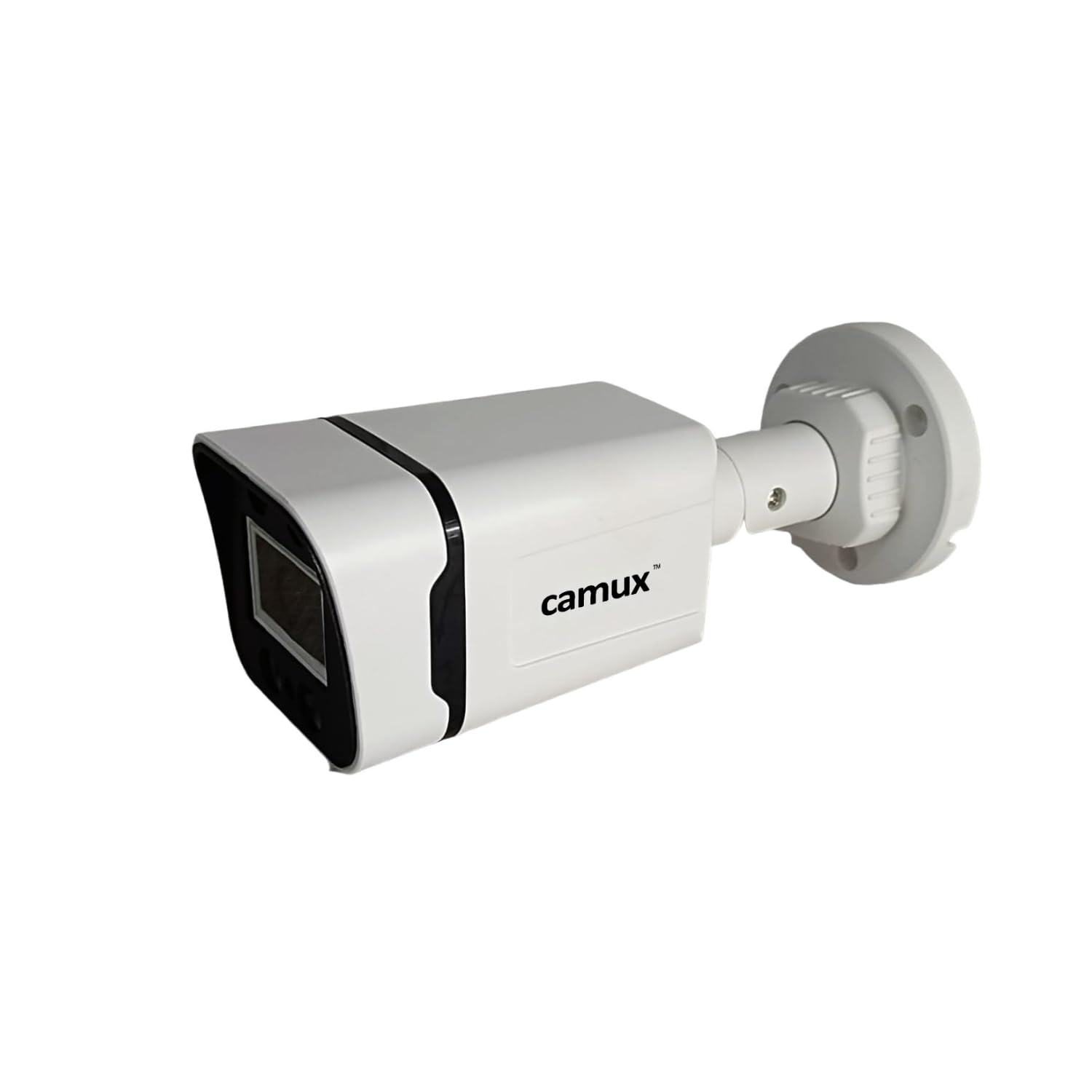
รูปที่ 1: Camux Bullet HD 2.5 MP CCTV Camera. This image displays a white bullet-style CCTV camera with a black front panel and the 'camux' logo on its side. It features an adjustable mounting bracket at the rear, designed for secure installation.
5. การตั้งค่าและการติดตั้ง
5.1 การติดตั้งกล้อง
- เลือกสถานที่: Choose an outdoor location that provides the desired viewing angle and is protected from direct heavy rain or water exposure, given the camera's 'Not Water Resistant' rating. Ensure the surface is strong enough to support the camera.
- ทำเครื่องหมายรูเจาะ: Use the camera's mounting bracket as a template to mark the positions for drilling.
- เจาะรู: เจาะรูนำตามตำแหน่งที่ทำเครื่องหมายไว้
- กล้องรักษาความปลอดภัย: Attach the camera's mounting bracket to the surface using the provided screws. Adjust the camera angle as needed.
5.2 การเชื่อมต่อสายไฟ
Connect the camera to a suitable Corded Electric power source. Ensure the power supply meets the camera's requirements.
5.3 การเชื่อมต่อเครือข่าย
This camera utilizes Wired Ethernet connectivity. Connect an Ethernet cable from the camera to your network router or switch. Ensure a stable network connection for optimal performance.
5.4 การตั้งค่าแอป
The camera is controlled via a mobile application (Controller Type: Android). Follow these general steps:
- ดาวน์โหลดแอพ: ค้นหา the official Camux surveillance app on the Google Play Store.
- Install and Register: ติดตั้งแอปพลิเคชันและทำตามคำแนะนำบนหน้าจอเพื่อสร้างบัญชีหรือเข้าสู่ระบบ
- เพิ่มอุปกรณ์: Within the app, select the option to add a new device. Follow the prompts to scan a QR code on the camera (if available) or manually enter the camera's ID.
- กำหนดค่าการตั้งค่า: Once connected, configure video quality, motion detection zones, and notification preferences within the app.
6. การใช้งานกล้อง
6.1 สด View และการบันทึก
Access the live video feed through the mobile application. You can typically initiate manual recordings or configure continuous recording settings within the app.
6.2 การตรวจจับการเคลื่อนไหว
The camera features Motion Only alert type. Configure motion detection sensitivity and areas of interest within the app. When motion is detected, the camera can trigger recordings and send notifications to your connected device.
6.3 การมองเห็นตอนกลางคืน
Equipped with Infrared (IR) light source technology and Night Color low light technology, the camera automatically switches to night vision mode in low-light conditions, providing clear surveillance footagแม้จะอยู่ในความมืดก็ตาม
6.4 การเข้าถึงระยะไกล
Through the mobile application, you can remotely view อยู่ footage, access recordings, and manage camera settings from anywhere with an internet connection.
7. การบำรุงรักษา
- การทำความสะอาดเลนส์: Gently wipe the camera lens with a soft, lint-free cloth to remove dust or smudges. Avoid touching the lens directly with fingers.
- การตรวจสอบการเชื่อมต่อ: Periodically inspect all power and network cable connections to ensure they are secure and free from damage.
- การอัปเดตซอฟต์แวร์: Check the mobile application regularly for any available firmware updates for the camera to ensure optimal performance and security.
8 การแก้ไขปัญหา
- ไม่มีไฟฟ้า: Ensure the power adapter is securely connected to both the camera and a working power outlet. Verify the power source is active.
- ไม่มีภาพวิดีโอ: Check the Ethernet cable connection between the camera and your network. Ensure your router is functioning correctly and the camera is properly added to the mobile app. Restart the camera and router if necessary.
- การตรวจจับความเคลื่อนไหวไม่ทำงาน: Verify that motion detection is enabled in the app settings. Adjust sensitivity levels and ensure the detection zones are correctly configured.
- คุณภาพของภาพต่ำ: ทำความสะอาดเลนส์กล้อง ตรวจสอบให้แน่ใจว่าไม่มีสิ่งกีดขวางใดๆ ในมุมมองของกล้อง viewตรวจสอบแบนด์วิดท์เครือข่ายหากคุณภาพการสตรีมต่ำ
- ปัญหาการเชื่อมต่อแอพ: Ensure your mobile device has a stable internet connection. Restart the app or reinstall it if problems persist.
9. ข้อมูลจำเพาะ
| หมายเลขรุ่น | 2.5MP.HD.B |
| ยี่ห้อ | ทั่วไป |
| ฟอร์มแฟกเตอร์ | กระสุน |
| ความละเอียดในการจับภาพวิดีโอ | 1080 เอชดี |
| เทคโนโลยีโฟโต้เซนเซอร์ | ซีมอส |
| เทคโนโลยีการเชื่อมต่อ | มีสาย |
| โปรโตคอลการเชื่อมต่อ | อีเธอร์เน็ต |
| แหล่งพลังงาน | สายไฟ |
| การใช้งานภายใน/ภายนอกอาคาร | Outdoor (Requires protection from direct water exposure) |
| ระดับความต้านทานต่อน้ำ | ไม่ทนน้ำ |
| เทคโนโลยีแสงน้อย | สีกลางคืน |
| ประเภทแหล่งกำเนิดแสง | อินฟราเรด |
| ประเภทการแจ้งเตือน | การเคลื่อนไหวเท่านั้น |
| วิธีการควบคุม | แอป |
| ประเภทตัวควบคุม | แอนดรอยด์ |
| ประเภทการติดตั้ง | ฝังตัว |
| ขนาดสินค้า (กว้าง x ยาว x สูง) | 5.8 x 6.1 x 16.3 เซนติเมตร |
| ส่วนประกอบที่รวมอยู่ | สกรู |
10. การรับประกันและการสนับสนุน
For warranty information and technical support, please refer to the documentation provided at the time of purchase or contact your retailer. The manufacturer, Tezus Securtech, can also be contacted for specific product inquiries.


