
Bmax B8 Pro
คู่มือผู้ใช้มินิพีซี Bmax B8 Pro
รุ่น : B8 Pro
1. สินค้าหมดview
The Bmax B8 Pro Mini PC is a compact desktop computer designed for various applications, from office work and web browsing to streaming video and home entertainment. It features an Intel 12th Generation i7-1255U Processor, providing efficient performance for demanding tasks. The system is equipped with 24GB LPDDR5 RAM and a 1TB NVMe SSD, ensuring fast boot times, rapid application loading, and smooth multitasking.

Figure 1.1: The Bmax B8 Pro Mini PC, showcasing การออกแบบที่กะทัดรัด
2. อะไรอยู่ในกล่อง
เมื่อเปิดบรรจุภัณฑ์ ตรวจสอบว่ามีส่วนประกอบทั้งหมดอยู่ครบ:
- 1 x B8 Pro MINI PC
- อะแดปเตอร์ไฟฟ้า 1 ตัว
- 1 x คู่มือผู้ใช้
- 1 x สาย HDMI
- 1 x Metal Bracket (for VESA mounting)

Figure 2.1: All items included in the Bmax B8 Pro Mini PC package.
3. คู่มือการติดตั้ง
3.1 การเชื่อมต่ออุปกรณ์ต่อพ่วง
Before powering on your Mini PC, connect your essential peripherals:
- แสดง: Connect your monitor, TV, or projector using the HDMI port or Type-C port. The device supports 4K/60Hz resolution and triple-display configurations.
- คีย์บอร์ดและเมาส์: เสียบคีย์บอร์ดและเมาส์ USB ของคุณเข้ากับพอร์ต USB 2.0 หรือ USB 3.0 ที่ว่างอยู่
- เสียง: Connect headphones or speakers to the 3.5mm headset jack on the front panel.
- เครือข่าย: For wired internet access, connect an Ethernet cable to the Gigabit Ethernet port.
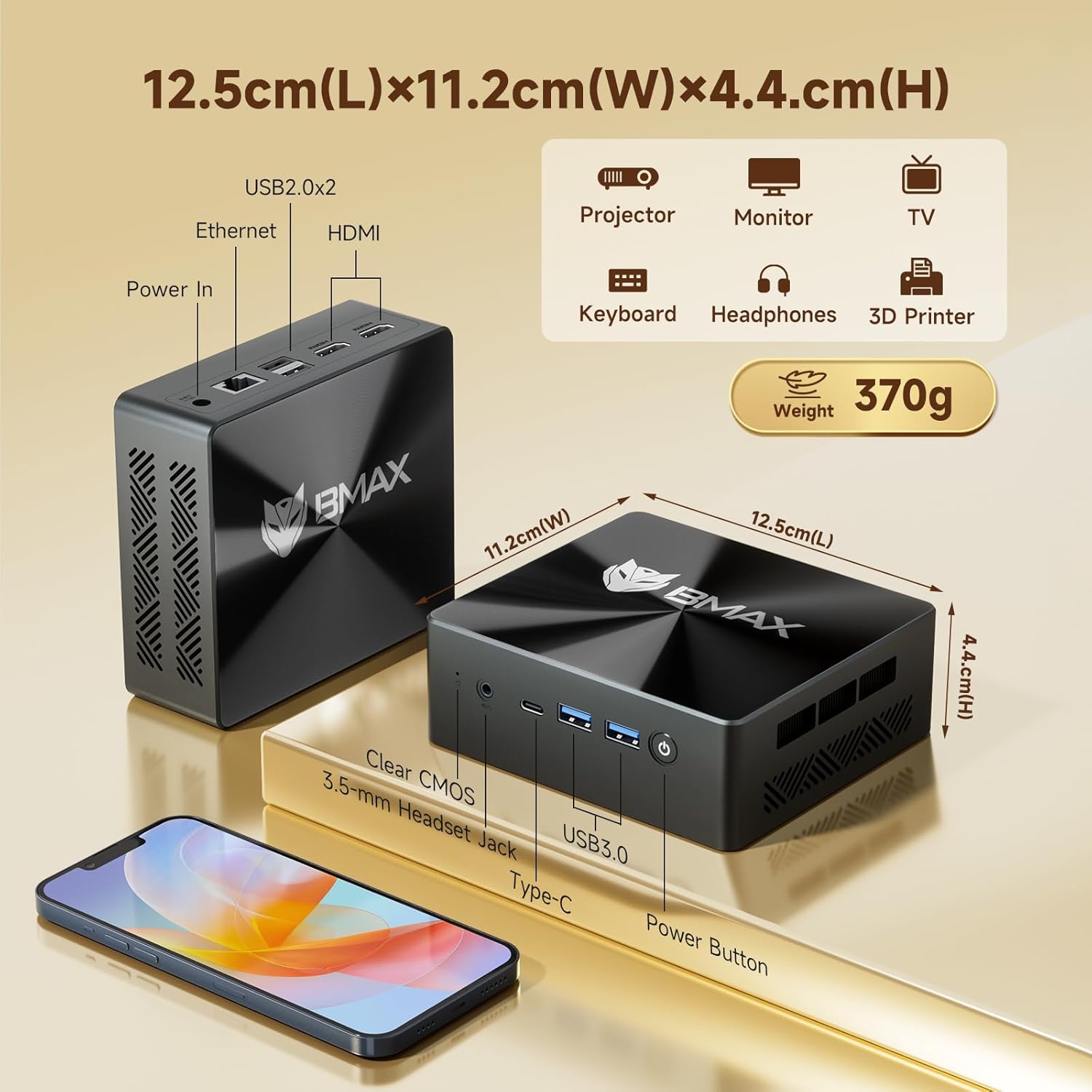
รูปที่ 3.1: ด้านหน้าและด้านหลัง views of the Bmax B8 Pro Mini PC, highlighting port locations and dimensions.
3.2 การเปิดเครื่อง
Once all peripherals are connected:
- Connect the power adapter to the DC-in port on the Mini PC.
- เสียบอะแดปเตอร์ไฟฟ้าเข้ากับเต้ารับไฟฟ้าที่ผนัง
- กดปุ่มเปิด/ปิดที่อยู่ด้านหน้าของมินิพีซี ไฟแสดงสถานะการทำงานจะสว่างขึ้น
- The system will boot up, and you will see the operating system (likely Windows 11 Pro) on your connected display. Follow any on-screen instructions for initial setup.
4. คู่มือการใช้งาน
ระบบปฏิบัติการ 4.1
The Bmax B8 Pro Mini PC typically comes pre-installed with Windows 11 Pro, providing a modern and secure user interface. Ensure your operating system is updated regularly for optimal performance and security.
4.2 คุณสมบัติด้านประสิทธิภาพ
The Mini PC is powered by an Intel 12th Generation i7-1255U Processor, featuring 10 cores and 12 threads with a max clock speed of 4.7 GHz. This processor delivers strong performance for various workloads, from everyday computing to more intensive applications.

Figure 4.1: Details of the Intel Core i7-1255U Processor, highlighting its core count, threads, and clock speed.
It includes 24GB of LPDDR5 RAM operating at 5200MHz and a 1TB NVMe SSD (M.2_NVMe 2280 x1). This high-speed memory and storage combination ensures quick data access and responsiveness, suitable for demanding software like Photoshop, Dreamweaver, Premiere, AI, and XD.

Figure 4.2: Illustration of the dual-channel high-speed 24GB LPDDR5 RAM and 1TB NVMe SSD configuration.
4.3 การเชื่อมต่อ
The B8 Pro Mini PC offers robust connectivity options:
- ไวไฟ 6: Supports faster wireless transmission speeds and improved network efficiency compared to older Wi-Fi standards.
- Bluetooth 5.2: Provides lower latency and more stable connections for wireless peripherals.
- กิกะบิตอีเธอร์เน็ต: For reliable high-speed wired network connections.
- พอร์ต USB: Includes multiple USB 2.0 and USB 3.0 ports for connecting various devices.
- HDMI & Type-C: For video output to displays.
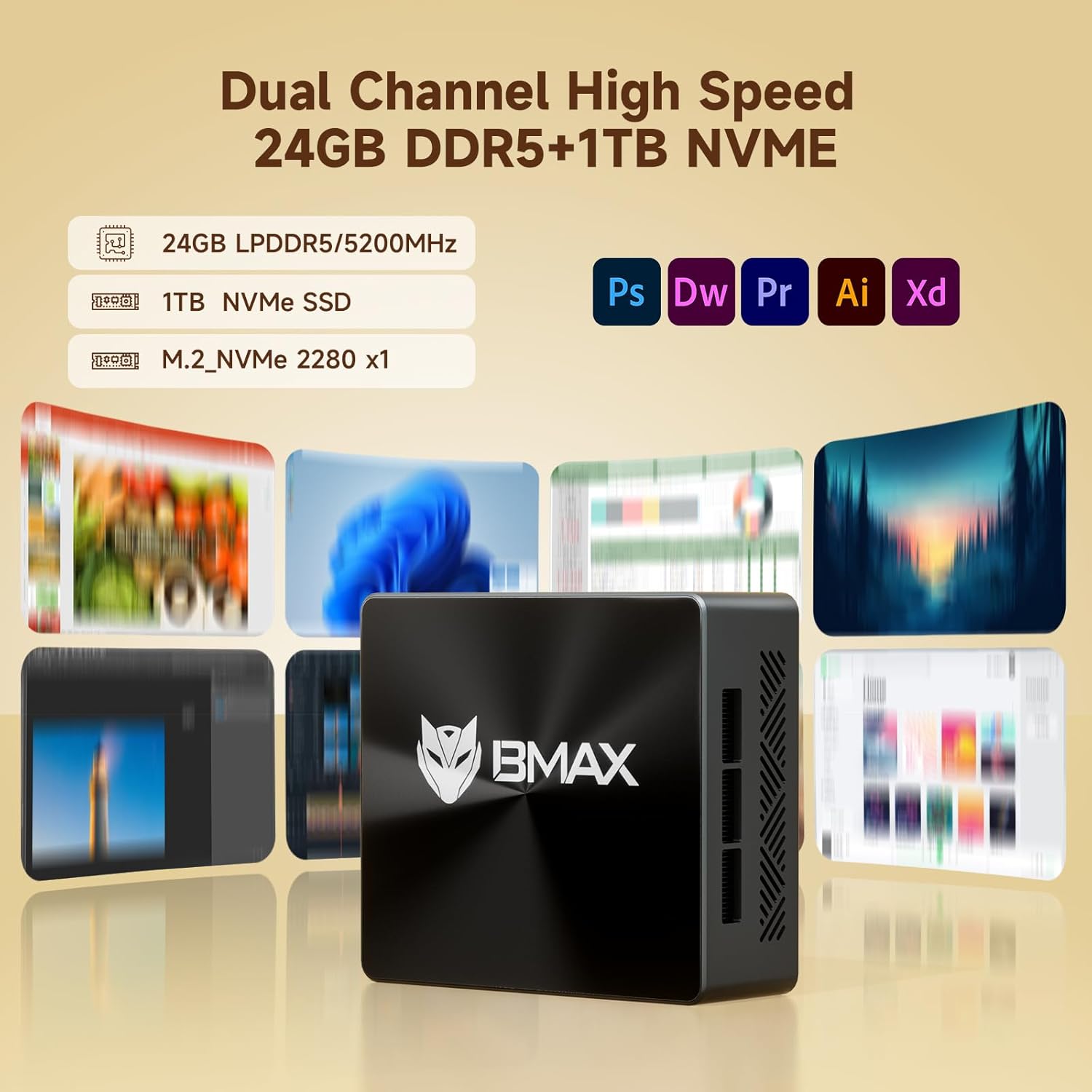
Figure 4.3: Visual representation of the Mini PC's support for WiFi 6 and Bluetooth 5.2, indicating faster transmission speeds.
5. การบำรุงรักษา
5.1 ระบบทำความเย็น
The B8 Pro Mini PC incorporates a smart fan and two copper heat pipes to ensure efficient heat dissipation and stable operation, even under load. Ensure proper airflow around the device by keeping vents clear.

Figure 5.1: Diagram illustrating the smart fan and dual copper heat pipe cooling solution within the Mini PC.
5.2 การทำความสะอาด
To maintain optimal performance and longevity, regularly clean the exterior of the Mini PC with a soft, dry cloth. Use compressed air to gently clear dust from the ventilation openings. Do not use liquid cleaners directly on the device.
6 การแก้ไขปัญหา
If you encounter issues with your Bmax B8 Pro Mini PC, refer to the following common troubleshooting steps:
- ไม่มีไฟฟ้า:
ตรวจสอบให้แน่ใจว่าได้เสียบอะแดปเตอร์แปลงไฟเข้ากับมินิพีซีและเต้ารับไฟฟ้าที่ใช้งานได้สนิทแล้ว หากจำเป็นให้ลองเสียบกับเต้ารับอื่นดู - ไม่มีจอแสดงผล:
Verify that the HDMI or Type-C cable is firmly connected to both the Mini PC and the monitor. Ensure the monitor is powered on and set to the correct input source. - ประสิทธิภาพการทำงานช้า:
Check for background applications consuming excessive resources. Ensure the operating system and drivers are up to date. Consider running a disk cleanup or defragmentation if using an HDD (though this model uses SSD). - ปัญหาการเชื่อมต่อเครือข่าย:
For Wi-Fi, ensure the Wi-Fi adapter is enabled and you are connected to the correct network. For wired Ethernet, check the cable connection and router status. - ระบบไม่ตอบสนอง:
If the system becomes unresponsive, press and hold the power button for 5-10 seconds to force a shutdown. Wait a few moments, then power it back on. If issues persist, locate the 'Clear CMOS' button (often a small pinhole) and follow instructions in the user guide for a CMOS reset.
7. ข้อมูลจำเพาะทางเทคนิค
| คุณสมบัติ | ข้อมูลจำเพาะ |
|---|---|
| ชื่อรุ่น | บีทูโปร |
| โปรเซสเซอร์ | Intel 12th Gen Core i7-1255U (4.7 GHz max) |
| แรม | แรม 24GB |
| พื้นที่จัดเก็บ | 1TB NVMe SSD |
| การ์ดจอ | บูรณาการ |
| ความละเอียดหน้าจอสูงสุด | 3840 x 2160 (4K) |
| ระบบปฏิบัติการ | OS (typically Windows 11 Pro) |
| พอร์ต USB 2.0 | 2 |
| พอร์ต USB 3.0 | 2 |
| การเชื่อมต่อ | WiFi 6, Bluetooth 5.2, กิกะบิตอีเทอร์เน็ต |
| น้ำหนักสินค้า | 1.87 ปอนด์ |
| ขนาด (กว้าง x ยาว x สูง) | 10.51 x 6.14 x 2.91 นิ้ว |
8. การรับประกันและการสนับสนุน
8.1 การรับประกันสินค้า
The Bmax B8 Pro Mini PC comes with a standard manufacturer's warranty. Please refer to the warranty card included in your package or visit the official Bmax webดูรายละเอียดข้อกำหนดและเงื่อนไขการรับประกันได้ที่เว็บไซต์ เก็บหลักฐานการซื้อไว้เพื่อใช้ในการเรียกร้องการรับประกัน
8.2 การสนับสนุนลูกค้า
For technical assistance, troubleshooting, or warranty inquiries, please contact Bmax customer support through their official channels. You can often find contact information on the manufacturer's website or in the included user guide.
Visit the official Bmax Store on Amazon for more information and products: Bmax Store
Ask a question about this manual
Ask about setup, troubleshooting, compatibility, parts, safety, or missing instructions. Manuals+ will review the question and use this page’s manual context to help answer it.