1. บทนำ
This manual provides comprehensive instructions for the safe and effective operation of your Generic SC02 4K Action Camera. Please read this manual thoroughly before using the device to ensure proper functionality and to prevent damage. Keep this manual for future reference.
2. สินค้าหมดview
2.1 คุณสมบัติหลัก
- ความละเอียดวิดีโอ: 4K ที่ 60 เฟรมต่อวินาที
- ความละเอียดภาพ: 20 ล้านพิกเซล
- กันน้ำ: IP68 rated, submersible up to 5 meters (without external case)
- เลนส์: เลนส์มุมกว้าง 170 องศา
- แสดง: หน้าจอ LCD ขนาด 2 นิ้ว
- การเชื่อมต่อ: 2.4G Wi-Fi for smartphone/tablet control
- ควบคุม: Integrated microphone and 2.4G wireless remote control
- โหมด: Single Photo, Burst Photo, Time Lapse, Loop Recording
- พื้นที่จัดเก็บ: Supports Micro SD cards up to 128GB (not included)
- อายุการใช้งานแบตเตอรี่: Approximately 1 hour and 30 minutes (4K recording)
- ระบบป้องกันภาพสั่นไหว: 6-axis multi-sensor lens to reduce shake
2.2 เนื้อหาบรรจุภัณฑ์
The following items are included with your Generic SC02 4K Action Camera:

Image: Generic SC02 4K Action Camera and various accessories, including mounting brackets, straps, a remote control, a cleaning cloth, and a USB cable.
- Generic SC02 4K Action Camera
- 2.4G รีโมทคอนโทรลแบบไร้สาย
- Various Mounting Accessories (e.g., helmet mounts, bike mounts, adhesive mounts)
- สายชาร์จ USB
- ผ้าเช็ดทำความสะอาด
- คู่มือการใช้งาน (เอกสารนี้)
2.3 ส่วนประกอบของกล้อง

ภาพ: ด้านหน้า view of the Generic SC02 4K Action Camera, showing the lens, power button, mode button, and SOS button.
- เลนส์: 170-degree wide-angle lens for capturing expansive views.
- ปุ่มเปิด/ปิด: Used to turn the camera on/off and switch modes.
- ปุ่มโหมด: Cycles through different camera modes (video, photo, etc.).
- ปุ่ม SOS: For emergency signaling or specific functions.
- ปุ่มขึ้น/ลง: For navigation in menus and zoom control.
- หน้าจอ LCD: จอแสดงผลขนาด 2 นิ้ว สำหรับรับชมภาพสด view, การเล่น และการนำทางเมนู
- ไมโครโฟน: ออกแบบมาเพื่อการบันทึกเสียงโดยเฉพาะ
- ผู้บรรยาย: สำหรับการเล่นเสียง
- พอร์ต USB: สำหรับการชาร์จและถ่ายโอนข้อมูล
- ช่องเสียบการ์ด Micro SD: สำหรับการใส่การ์ดหน่วยความจำ
3. การตั้งค่า
3.1 การชาร์จแบตเตอรี่
- เชื่อมต่อกล้องเข้ากับแหล่งจ่ายไฟ USB (เช่น คอมพิวเตอร์ อะแดปเตอร์ติดผนัง) โดยใช้สาย USB ที่ให้มา
- ไฟแสดงสถานะการชาร์จจะสว่างขึ้น
- Charging is complete when the indicator light turns off or changes color (refer to camera display for battery status).
3.2 การใส่การ์ด Micro SD
A Micro SD card (up to 128GB, Class 10 or higher recommended) is required for storing photos and videos. The card is not included.
- Locate the Micro SD card slot on the camera.
- ใส่การ์ด Micro SD โดยให้หน้าสัมผัสสีทองหันไปทางด้านหลังของกล้องจนกระทั่งล็อคเข้าที่
- To remove, gently push the card in until it clicks, then release, and it will eject.
3.3 การเปิด/ปิดเครื่อง
- การเปิดเครื่อง: Press and hold the Power button for a few seconds until the LCD screen illuminates.
- วิธีปิดเครื่อง: กดปุ่มเปิด/ปิดค้างไว้อีกครั้งจนกว่าหน้าจอจะดับลง
4. การใช้งานกล้อง
4.1 Navigating Modes
Press the Mode button repeatedly to cycle through the available modes: Video, Photo, Playback, and Settings.
4.2 การบันทึกวิดีโอ
- สลับไปที่โหมดวิดีโอ
- Press the Shutter/OK button to start recording. A red indicator light will flash, and a timer will appear on the screen.
- กดปุ่มชัตเตอร์/ตกลงอีกครั้งเพื่อหยุดบันทึก ไฟแสดงสถานะจะหยุดกะพริบ
4.3 การถ่ายภาพ
- สลับไปที่โหมดภาพถ่าย
- กดปุ่มชัตเตอร์/ตกลงเพื่อถ่ายภาพ หน้าจออาจกะพริบชั่วครู่
โหมดถ่ายภาพ:
- ภาพถ่ายเดี่ยว: Captures one image per press.
- ถ่ายภาพรัวๆ: Captures multiple images in quick succession.
- รูปภาพไทม์แล็ปส์: Captures photos at set intervals to create a time-lapse sequence.

Image: The Generic SC02 4K Action Camera with its flash feature highlighted, indicating its use for night photography.
4.4 Wi-Fi Connectivity and Remote Control
The camera features 2.4G Wi-Fi for connection to a smartphone or tablet, and a 2.4G wireless remote control.

Image: A visual representation of the Generic SC02 4K Action Camera being controlled by a wrist-worn remote and a smartphone application, with a person kitesurfing in the background.
- การเปิดใช้งาน Wi-Fi: In camera settings, enable Wi-Fi. The camera's Wi-Fi name and password will be displayed.
- การเชื่อมต่อสมาร์ทโฟน: Download the compatible app (available for Android and iOS). Connect your smartphone/tablet to the camera's Wi-Fi network.
- ฟังก์ชั่นแอพ: Use the app to control camera functions, view อยู่ footage, play back media, and share content.
- รีโมทคอนโทรล: The included 2.4G remote control allows activation of main camera functions from up to 10 meters away, ideal for capturing action shots or selfies.
4.5 Waterproof Operation
The SC02 camera is IP68 rated, allowing it to be submerged up to 5 meters without an additional waterproof case. Ensure all ports and covers are securely closed before exposing the camera to water.
4.6 ระบบป้องกันภาพสั่นไหว

Image: A side-by-side comparison demonstrating the effectiveness of the image stabilization feature. The 'OFF' side shows a blurry image of a person on a dirt bike, while the 'ON' side shows a clear, stable image of the same scene.
The camera features a 6-axis multi-sensor lens system designed to minimize camera shake, resulting in clearer and more stable photos and videos, especially during dynamic activities.
4.7 เลนส์มุมกว้าง
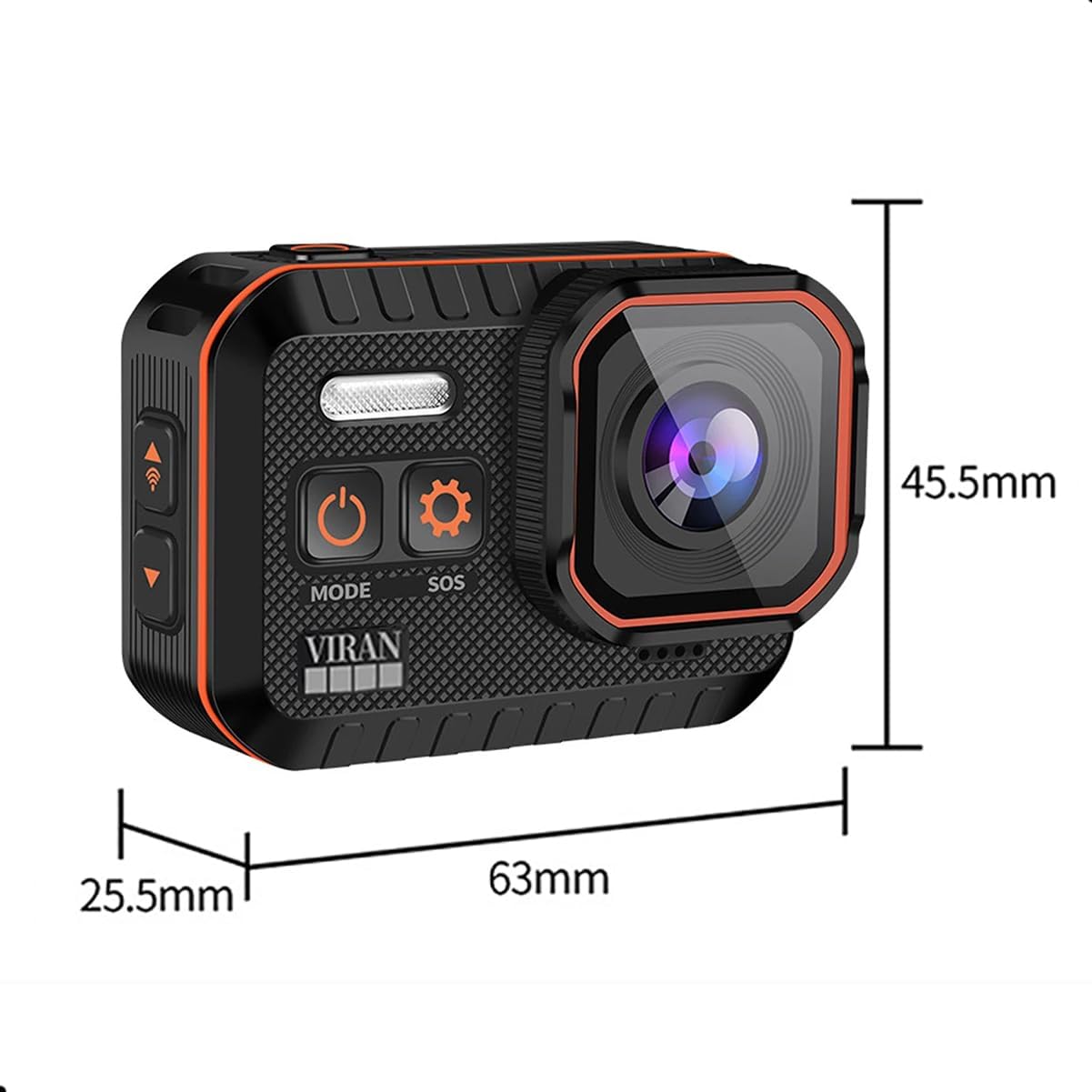
Image: The Generic SC02 4K Action Camera positioned above a scenic landscape, with an arc illustrating its 170-degree wide-angle field of view. Several optical lens elements are shown below.
The 170-degree wide-angle lens captures a broad field of view, ideal for action sports, landscapes, and immersive footage.
จอ LCD ขนาด 4.8 นิ้ว

Image: The Generic SC02 4K Action Camera showing a vibrant image on its 2-inch LCD screen, with a person skateboarding in the background.
The 2-inch LCD screen allows for real-time viewing of your shots, easy menu navigation, and instant playback of recorded content.
5. การบำรุงรักษา
5.1 การทำความสะอาดกล้อง
- ใช้ผ้านุ่มที่ไม่เป็นขุยในการทำความสะอาดตัวกล้อง
- สำหรับเลนส์ ให้ใช้ผ้าเช็ดเลนส์และน้ำยาทำความสะอาดเฉพาะทาง หลีกเลี่ยงการสัมผัสเลนส์ด้วยนิ้วมือ
- อย่าใช้สารเคมีที่รุนแรงหรือวัสดุที่มีฤทธิ์กัดกร่อน
5.2 Waterproof Seal Care
- Regularly inspect the rubber seals around ports and covers for any dirt, debris, or damage.
- Clean seals gently with a soft cloth. Do not use sharp objects.
- Ensure all covers are firmly closed before exposing the camera to water.
5.3 พื้นที่จัดเก็บ
- เก็บกล้องไว้ในที่แห้งและเย็น หลีกเลี่ยงแสงแดดโดยตรงและอุณหภูมิที่สูงหรือต่ำเกินไป
- ถอดแบตเตอรี่ออกหากจะไม่ได้ใช้งานกล้องเป็นเวลานาน
6 การแก้ไขปัญหา
| ปัญหา | สาเหตุที่เป็นไปได้ | สารละลาย |
|---|---|---|
| กล้องไม่เปิด | Low battery; Battery not inserted correctly; Camera malfunction | Charge the battery; Reinsert battery; Contact support |
| ไม่สามารถบันทึกวิดีโอ/ถ่ายภาพได้ | No Micro SD card; SD card full; SD card error; Incorrect mode | Insert SD card; Delete files or replace SD card; Format SD card (backup data first); Switch to correct mode |
| ปัญหาการเชื่อมต่อ Wi-Fi | Wi-Fi not enabled; Incorrect password; App not installed; Interference | Enable Wi-Fi in camera settings; Re-enter password; Install compatible app; Move closer to camera, avoid interference |
| รีโมตคอนโทรลไม่ทำงาน | Remote battery low; Not paired; Out of range | Replace remote battery; Refer to remote pairing instructions; Operate within 10 meters |
| คุณภาพรูปภาพ/วิดีโอไม่ดี | Dirty lens; Low light conditions; Incorrect settings; Lack of stabilization | Clean the lens; Use flash or better lighting; Adjust resolution/settings; Ensure stabilization is active |
7. ข้อมูลจำเพาะ

Image: The Generic SC02 4K Action Camera with dimensions indicated: 63mm length, 45.5mm height, and 25.5mm depth.
| คุณสมบัติ | ข้อมูลจำเพาะ |
|---|---|
| ยี่ห้อ | ทั่วไป |
| อ้างอิงโมเดล | SC02 |
| ประเภทสินค้า | Compact Action Camera |
| ความละเอียดวิดีโอ | 4K |
| ความละเอียดของภาพ | 20 ล้านพิกเซล |
| ระดับการกันน้ำ | มาตรฐาน IP68 (กันน้ำได้ลึกถึง 5 เมตรโดยไม่ใช้เคส) |
| ขนาดหน้าจอ | 2 นิ้ว (LCD) |
| เทคโนโลยีการเชื่อมต่อ | ไวไฟ (2.4G) |
| อุปกรณ์ที่รองรับ | สมาร์ทโฟน, แท็บเล็ต |
| ประเภทเลนส์ | Wide-angle (170 degrees) |
| เทคโนโลยีโฟโต้เซนเซอร์ | ซีมอส |
| ประเภทหน่วยความจำแฟลช | ไมโครเอสดี (สูงสุด 128GB) |
| รูปแบบการจับภาพวิดีโอ | เอ็มพี 4 |
| ระยะเวลาใช้งานแบตเตอรี่ | Approx. 1 hour 30 minutes (4K recording) |
| ส่วนประกอบที่รวมอยู่ | Remote control, integrated microphone, 2-inch LCD screen, waterproof up to 5 meters without case |
8. การรับประกันและการสนับสนุน
สำหรับข้อมูลการรับประกันและการสนับสนุนทางเทคนิค โปรดดูเอกสารประกอบที่ให้มา ณ เวลาที่ซื้อ หรือติดต่อตัวแทนจำหน่ายของคุณ โปรดเก็บหลักฐานการซื้อไว้เพื่อใช้ในกรณีที่ต้องการเคลมประกัน


