
1. บทนำ
This manual provides detailed instructions for the installation, operation, and maintenance of the DEWIN G2R 63A 2P Automatic Transfer Switch (ATS). This device is designed to automatically switch between two power sources, ensuring continuous power supply to your load.
The DEWIN G2R 63A 2P ATS features a compact structure, small size, and supports 35mm DIN rail installation, making it suitable for household distribution boxes. It offers extremely fast switching speed, resolving power outage issues efficiently.
2. ข้อมูลด้านความปลอดภัย
คำเตือน: อันตรายจากไฟฟ้าช็อต การติดตั้งและบำรุงรักษาควรดำเนินการโดยบุคลากรผู้เชี่ยวชาญเท่านั้น
- Always disconnect power before installing or servicing the ATS.
- ตรวจสอบให้แน่ใจว่าการเชื่อมต่อสายไฟทั้งหมดมีความปลอดภัยและเป็นไปตามกฎหมายไฟฟ้าในท้องถิ่น
- Do not operate the device if it is damaged or appears to be malfunctioning.
- The operating environment temperature range is -5°C to +40°C.
- The installation altitude must be below 2000 meters.
- The enclosure protection class of the ATS is IP30.
3. สินค้าหมดview
3.1 คุณสมบัติหลัก
- ประสิทธิภาพสูง: Electromagnetically driven for extremely fast switching, less than 50ms conversion time.
- คุณภาพสูง: Flame-retardant shell for resistance to extreme environments, strong adaptability, and reliable operation.
- โอนอัตโนมัติ: Designed with common power supply, backup power supply, load power-on indicator, and clear switch status.
- Arc Extinction System: Internal arc extinction system for rapid cooling and arc suppression.
- ง่ายต่อการใช้: Modular structure, same-side wire entry for convenient wiring, compact size, supports 35mm DIN rail installation.
3.2 Product Components and Dimensions
The DEWIN G2R 63A 2P ATS is a compact unit designed for efficient power management.

รูปที่ 1 : ด้านหน้า view of the DEWIN G2R 63A 2P Automatic Transfer Switch.

Figure 2: Dimensions of the DEWIN G2R 63A 2P Automatic Transfer Switch. The device measures approximately 45mm wide, 70mm high, and 105mm deep, with a 35mm DIN rail mounting width.
3.3 Panel Analysis
Understanding the control panel is crucial for proper operation.

Figure 3: Panel analysis showing common power supply indicator light (I), standby power indicator light (II), common power hand/automatic switch, commonly used power supply closing mechanical indication, operating handle, backup power closing mechanical indication, and load power indicator light.
3.4 ข้อมูลจำเพาะ
| ข้อมูลจำเพาะ | ค่า |
|---|---|
| โหมดการทำงาน | ออน-ออน |
| กระแสไฟฟ้าที่ได้รับการจัดอันดับ | 63 ก |
| ปฏิบัติการฉบับที่tage | 220 โวลต์ |
| ประเภทการติดต่อ | เปิดปกติ |
| ประเภทขั้วต่อ | การจีบ |
| ประเภทสวิตซ์ | สวิตช์ถ่ายโอนอัตโนมัติ |
| ประเภทเทอร์มินัล | สกรู |
| วัสดุ | Polycarbonate and Copper |
| ประเภทวงจร | 2-pole common circuit and auxiliary compatible |
| ประเภทการติดตั้ง | ราง DIN |
| ประเภทตัวกระตุ้น | แม่เหล็กไฟฟ้า |
| จำนวนตำแหน่ง | 2 |
| อุณหภูมิสูงสุดที่กำหนด | 40 องศาเซลเซียส |
| Control Device Type | ปุ่มกลไก |
| วิธีการควบคุม | สัมผัส |
| โปรโตคอลการเชื่อมต่อ | ดิน |
| พลัง | 13.86 วัตต์ |
| อุปกรณ์ที่รองรับ | Household electrical appliances, electronic equipment, 220V AC powered devices |
| การให้คะแนนการคุ้มครองระหว่างประเทศ | IP30 |
| Compliant Specification | CCC, IEC 60669-2-1:2002 |
| น้ำหนักสินค้า | 380 กรัม |
4. การตั้งค่าและการติดตั้ง
4.1 การติดตั้ง
The ATS is designed for 35mm DIN rail mounting. Ensure the DIN rail is securely fastened within your distribution box or electrical panel.

Figure 4: The image illustrates the 35mm DIN rail installation method and the robust terminals for wiring.
4.2 แผนผังการเดินสายไฟ
Proper wiring is essential for safe and correct operation. Refer to the diagram below for connecting the common power (I), backup power (II), and load output.
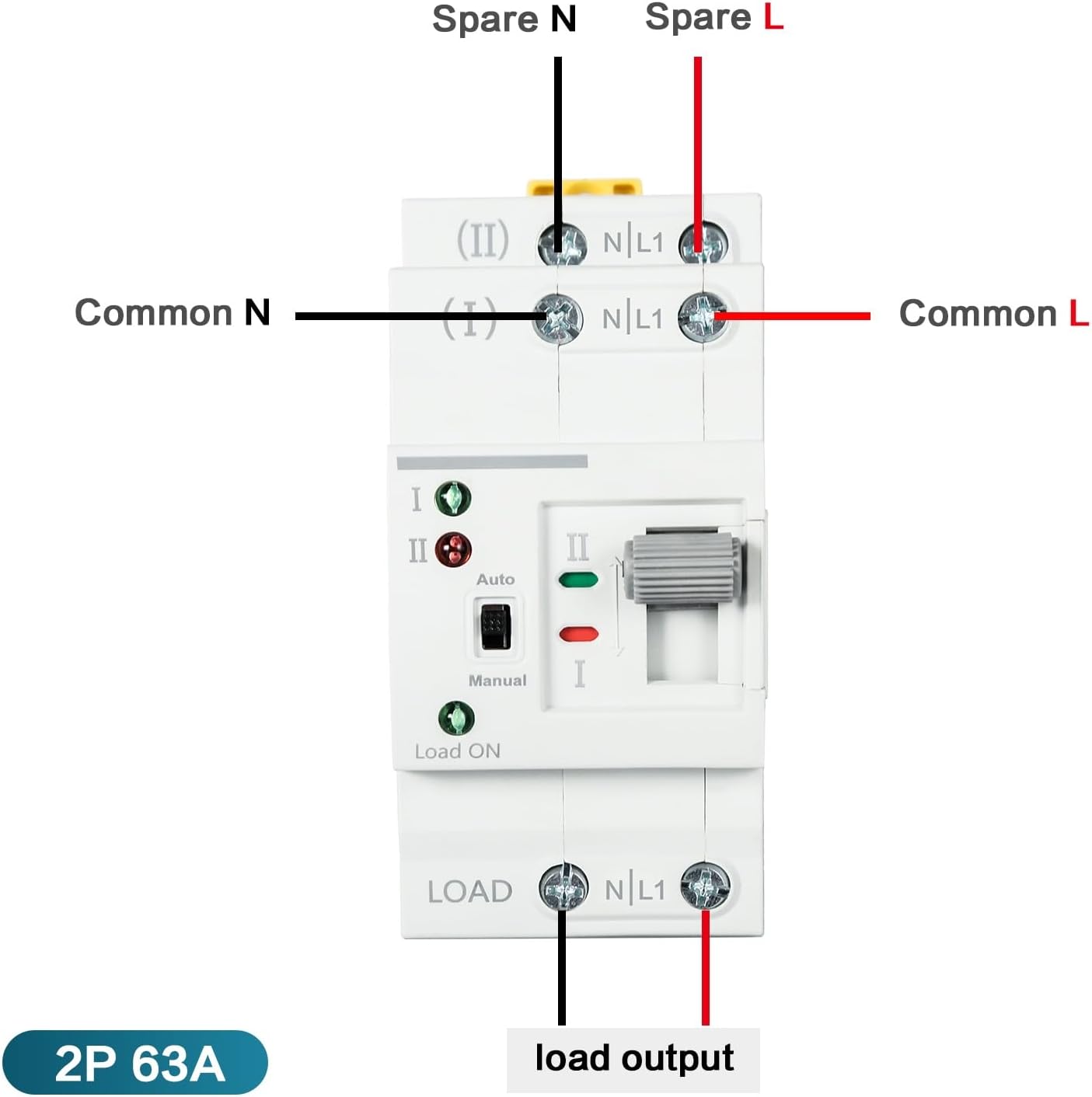
Figure 5: Wiring diagram showing connections for Common N, Common L, Spare N, Spare L, and Load Output. Ensure the input power supply is connected in the correct phase sequence.
5. คู่มือการใช้งาน
The DEWIN G2R 63A 2P ATS supports both automatic and manual operation modes.
5.1 โหมดอัตโนมัติ
In automatic mode, the switch will detect the presence of the common power supply (I) and the backup power supply (II). If the common power fails, the switch will automatically transfer the load to the backup power supply. When common power is restored, it will switch back.
- Set the 'Auto/Manual' switch to 'Auto'.
- The indicator lights (I and II) will show which power source is active.
- The 'Load ON' indicator will illuminate when power is supplied to the load.
5.2 โหมดแมนนวล
To manually switch between power sources:
- Set the 'Auto/Manual' switch to 'Manual'.
- Use the operating handle to physically switch between position I (Common Power) and position II (Backup Power).
- Ensure the desired power source is selected and the corresponding indicator light is on.
6. การบำรุงรักษา
The DEWIN G2R 63A 2P ATS is designed for reliable operation with minimal maintenance. However, periodic checks are recommended:
- การตรวจสอบภาพ: ตรวจสอบอุปกรณ์อย่างสม่ำเสมอเพื่อดูว่ามีร่องรอยความเสียหายทางกายภาพ การเชื่อมต่อหลวม หรือความร้อนสูงเกินไปหรือไม่
- การทำความสะอาด: รักษาอุปกรณ์ให้ปราศจากฝุ่นและสิ่งสกปรก ใช้ผ้าแห้งนุ่มในการทำความสะอาด ห้ามใช้ของเหลวหรือน้ำยาทำความสะอาดที่มีฤทธิ์กัดกร่อน
- การตรวจสอบเทอร์มินัล: Periodically verify that all terminal screws are tight to prevent arcing and ensure good electrical contact.
ควรตัดการเชื่อมต่อไฟฟ้าทุกครั้งก่อนดำเนินการบำรุงรักษาใดๆ
7 การแก้ไขปัญหา
If you encounter issues with your ATS, consider the following common problems and solutions:
- ไม่มีพลังงานในการโหลด:
- Check if both common and backup power sources are active.
- Verify the 'Load ON' indicator is illuminated.
- Ensure the ATS is in 'Auto' mode or manually switched to an active power source. - การโอนเงินไม่สำเร็จโดยอัตโนมัติ:
- Confirm the 'Auto/Manual' switch is set to 'Auto'.
- Check the status of both power sources using their respective indicator lights.
- If the issue persists, consult a qualified electrician. - Overheating or Unusual Noises:
- Immediately disconnect power.
- This could indicate a serious electrical fault. Do not attempt to repair it yourself. Contact a qualified electrician.
8. การรับประกันและการสนับสนุน
For warranty information and technical support, please refer to the product packaging or contact your retailer. Keep your purchase receipt as proof of purchase.