1. บทนำ
Welcome to the instruction manual for your Raymarine Axiom 2 Pro 12 S Chartplotter/Fishfinder. This guide provides essential information for the safe installation, effective operation, and proper maintenance of your marine electronics device. Please read this manual thoroughly before using the product to ensure optimal performance and longevity.
1.1 ข้อมูลด้านความปลอดภัย
- แหล่งจ่ายไฟ: ตรวจสอบให้แน่ใจว่าอุปกรณ์เชื่อมต่อกับแหล่งจ่ายไฟ DC 12V ที่เสถียร แรงดันไฟฟ้าไม่ถูกต้องtagอาจทำให้เครื่องเสียหายได้
- การสัมผัสน้ำ: While the unit is designed for marine environments, avoid direct high-pressure water jets. Ensure all connections are sealed to prevent water ingress.
- การติดตั้ง: Securely mount the device in a location that does not obstruct navigation or safety equipment. Verify the mounting surface can support the unit's weight.
- เครื่องช่วยนำทาง: This device is an aid to navigation. Always use official government charts and exercise caution.
2. เนื้อหาบรรจุภัณฑ์
Carefully unpack your Raymarine Axiom 2 Pro 12 S and verify that all items are present. If any items are missing or damaged, contact your dealer immediately.
- Raymarine Axiom 2 Pro 12 S Display Unit
- Mounting Hardware Kit (gasket, studs, thumb nuts, washers)
- Power/NMEA2000 Cable
- Documentation Pack (including this manual)
3. การตั้งค่าและการติดตั้ง
Proper installation is crucial for the performance of your Axiom 2 Pro 12 S. Refer to the detailed installation instructions provided in the separate installation guide for specific drilling templates and wiring diagrams.
3.1 การติดตั้งจอแสดงผล
The Axiom 2 Pro 12 S is designed for surface mounting. Choose a location that offers good visibility, is protected from excessive direct sunlight, and allows for adequate ventilation around the unit.
- ที่ตั้ง: Select a flat, rigid surface on your dashboard or console.
- เคลียร์สต๊อก : Ensure sufficient space behind the unit for cable connections and ventilation.
- การเจาะ: Use the provided template to mark and drill the necessary holes for mounting studs and cables.
- การปิดผนึก: Apply marine-grade sealant around drilled holes and the mounting gasket to prevent water intrusion.
3.2 การเชื่อมต่อพลังงานและเครือข่าย
Connect the power cable to a dedicated 12V DC circuit. The unit is battery-powered and requires a stable power supply.
- สายไฟ: Connect the red wire to the positive (+) terminal of your 12V DC power source and the black wire to the negative (-) terminal. Ensure an inline fuse (not supplied) is installed on the positive line, as specified in the installation guide.
- NMEA 2000: The supplied power cable also includes NMEA 2000 connections for integrating with other compatible marine electronics. Connect to your NMEA 2000 backbone for data sharing.
- Transducer/Chart (Optional): This model does not include a chart or transducer. If you are connecting an external, compatible transducer or chart card reader, refer to their respective manuals for connection details.
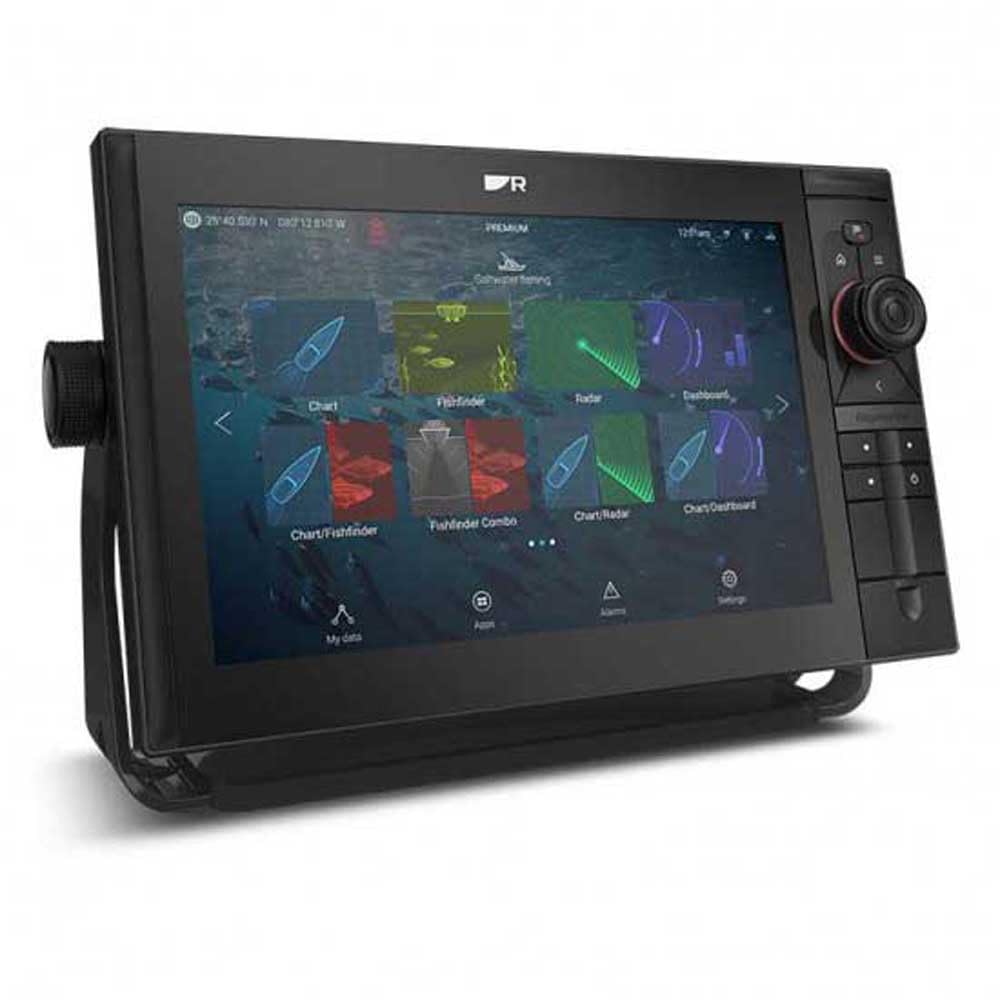
Image of the Raymarine Axiom 2 Pro 12 S display unit, showing its sleek design and large touchscreen.
4. คู่มือการใช้งาน
The Axiom 2 Pro 12 S features an intuitive touchscreen interface. Familiarize yourself with the basic operations to navigate and utilize its functions effectively.
4.1 เปิด/ปิดเครื่อง
- เปิดเครื่อง: Press and hold the power button located on the unit's side or front panel until the Raymarine logo appears.
- หมดแรง: Press and hold the power button until the power-off menu appears. Select 'Power Off' to shut down the system safely. A quick press will bring up the quick access menu.
อินเทอร์เฟซหน้าจอสัมผัส 4.2
- แตะ: เลือกรายการ เปิดเมนู หรือเปิดใช้งานฟังก์ชันต่างๆ
- ปัด: Scroll through lists or pan across charts.
- บีบเพื่อซูม: Use two fingers to zoom in or out on charts and sonar displays.
- กดแบบยาว: Access contextual menus or advanced options.
4.3 ฟังก์ชันของเครื่องพล็อตแผนที่เดินเรือ
- การนำทาง: Tap on the chart to set a waypoint or create a route. Follow the on-screen guidance.
- จุดอ้างอิง: Save specific locations of interest. Access the Waypoints menu to manage saved points.
- เส้นทาง: Plan multi-point journeys. Routes can be created, edited, and activated from the Routes menu.
- เส้นทาง: The unit automatically records your vessel's path. View and manage tracks from the Tracks menu.
4.4 Fishfinder Functions
Note: Fishfinder functionality requires a compatible transducer (not included with this model) to be connected.
- Sonar Display: Interpret the sonar returns to identify fish, bait, and bottom structure.
- ช่วงความลึก: Adjust the depth range to focus on specific water columns.
- การปรับค่าเกน: Increase or decrease the sensitivity (gain) to optimize the sonar image for different water conditions.
- ความถี่: If using a multi-frequency transducer, select the appropriate frequency for your fishing conditions.
4.5 การตั้งค่าระบบ
- แสดง: Adjust brightness, color palette, and backlight settings.
- หน่วย: Configure units of measurement for depth, speed, temperature, etc.
- ภาษา: เลือกภาษาที่คุณต้องการสำหรับอินเทอร์เฟซผู้ใช้
- เครือข่าย: Manage network connections and device settings for connected equipment.
5. การบำรุงรักษา
Regular maintenance ensures the longevity and reliable operation of your Axiom 2 Pro 12 S.
- การทำความสะอาด: เช็ดหน้าจอแสดงผลด้วยผ้าเนื้อนุ่มamp ผ้าและผงซักฟอกอ่อนๆ หลีกเลี่ยงน้ำยาทำความสะอาดหรือตัวทำละลายที่มีฤทธิ์กัดกร่อน
- การอัปเดตซอฟต์แวร์: Periodically check the Raymarine webเว็บไซต์สำหรับอัปเดตซอฟต์แวร์ การอัปเดตอุปกรณ์ของคุณอย่างสม่ำเสมอจะช่วยให้คุณเข้าถึงคุณสมบัติล่าสุดและการปรับปรุงประสิทธิภาพได้
- การตรวจสอบสายเคเบิล: Regularly inspect all cables and connections for signs of wear, corrosion, or damage. Ensure all connections remain watertight.
- พื้นที่จัดเก็บ: If storing the vessel for an extended period, ensure the unit is powered off correctly and consider covering it to protect from dust and UV exposure.
6 การแก้ไขปัญหา
This section addresses common issues you might encounter. For more complex problems, contact Raymarine customer support.
| ปัญหา | สาเหตุที่เป็นไปได้ | สารละลาย |
|---|---|---|
| เครื่องไม่เปิด | ไม่มีไฟ, ฟิวส์ขาด, การเชื่อมต่อหลวม | Check power cable connections, inspect fuse, verify battery voltage. |
| ไม่มีสัญญาณ GPS | ถูกขัดขวาง view of sky, internal GPS fault | มั่นใจชัดเจน view of the sky. If problem persists, contact support. |
| No sonar data | หัวแปลงสัญญาณไม่ได้เชื่อมต่อ หัวแปลงสัญญาณชำรุด มีฟองอากาศอยู่ใต้หัวแปลงสัญญาณ | Verify transducer connection. Check transducer for damage. Ensure transducer is properly submerged and free of obstructions. |
| จอภาพมืดหรืออ่านไม่ออก | ตั้งค่าความสว่างต่ำเกินไป แสงแดดส่องโดยตรง | Adjust display brightness in settings. Reposition unit or use a sun cover if direct sunlight is an issue. |
7. ข้อมูลจำเพาะ
Key technical specifications for the Raymarine Axiom 2 Pro 12 S (Model E70655).
- ยี่ห้อ: เรย์มารีน
- ชื่อรุ่น : Axiom 2 Pro 12 S (E70655)
- ขนาดหน้าจอ: 12 นิ้ว
- ประเภทจอภาพ: หน้าจอสัมผัส
- แหล่งพลังงาน: ใช้พลังงานจากแบตเตอรี่ (12V DC)
- ความลึกในการวัดสูงสุด: 274 Meters (with compatible transducer)
- ประเภทการติดตั้ง: การติดตั้งบนพื้นผิว
- ขนาดสินค้า : ขนาดประมาณ 1 x 1 x 1 นิ้ว (Note: This dimension may be generic. Refer to the installation guide for precise measurements.)
- ยูพีซี: 723193843536
8. การรับประกันและการสนับสนุน
Your Raymarine Axiom 2 Pro 12 S is covered by a manufacturer's warranty. For specific warranty terms and conditions, please refer to the warranty documentation included with your product or visit the official Raymarine webเว็บไซต์.
For technical support, service, or to find authorized service centers, please visit the official Raymarine support website or contact their customer service department directly. Providing your model number (E70655) and serial number will assist in faster service.
Official Raymarine Webเว็บไซต์: www.raymarine.com


