
1. บทนำ
Thank you for choosing the Merax 270 Degree Power Swivel Recliner. This manual provides essential information for the safe assembly, operation, and maintenance of your new recliner. Please read these instructions carefully before use and retain them for future reference.
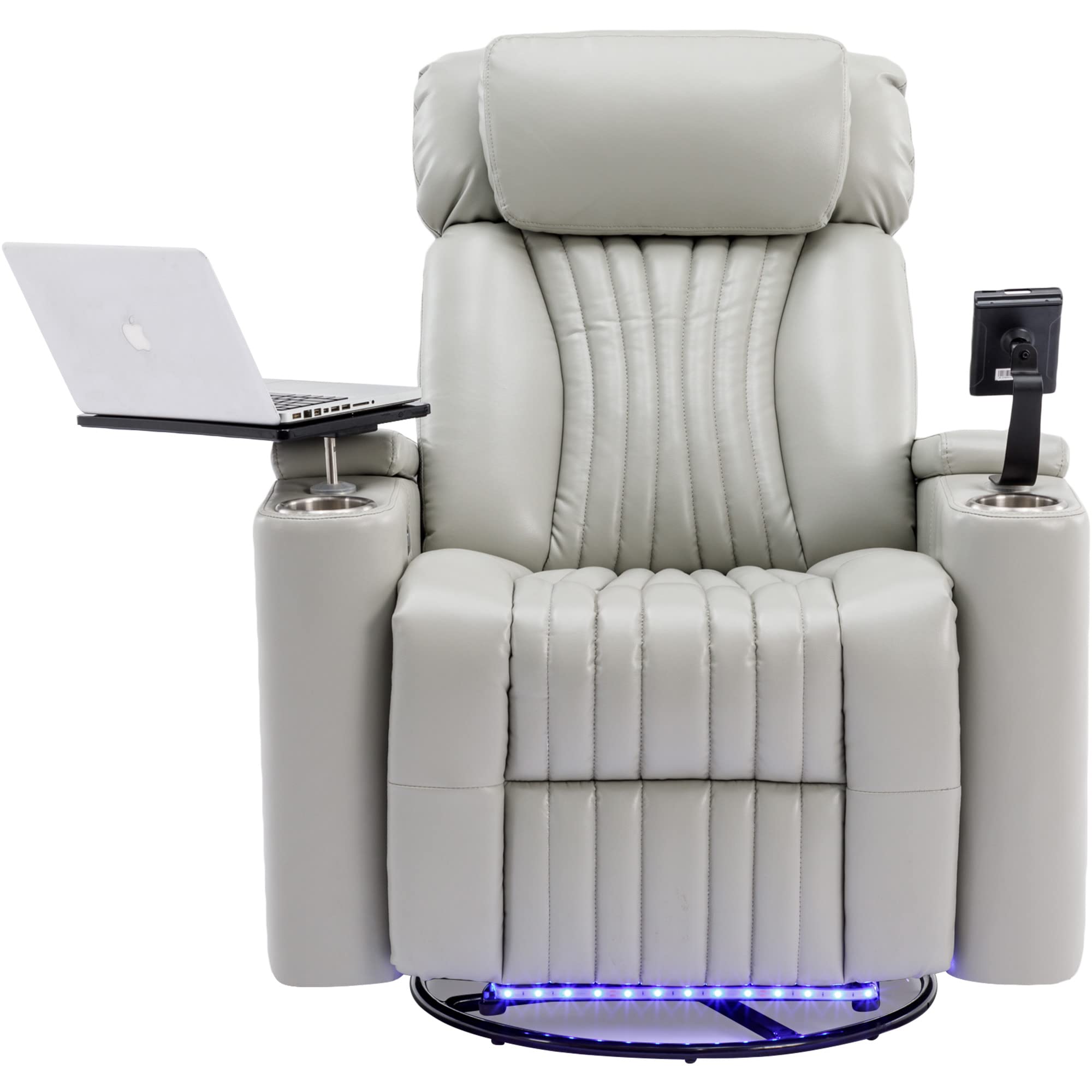
Image: The Merax 270 Degree Power Swivel Recliner in a living room, showcasing its reclined position and ambient LED lighting.
2. ข้อมูลด้านความปลอดภัย
WARNING: Improper use of electric or tilting functions may result in injury.
- เก้าอี้ปรับเอนตัวนี้รับน้ำหนักได้สูงสุด 330 ปอนด์ (149 กิโลกรัม) ห้ามใช้น้ำหนักเกินกว่านี้
- Keep children and pets away from the recliner's moving parts during operation.
- Ensure all connections are secure before operating the power functions.
- Do not place hands or feet near the reclining mechanism to prevent pinching.
- Avoid spilling liquids on electrical components.
- Unplug the recliner from the power outlet before cleaning or maintenance.
3. เนื้อหาบรรจุภัณฑ์
โปรดตรวจสอบให้แน่ใจว่ามีส่วนประกอบทั้งหมดอยู่ก่อนเริ่มประกอบ:
- Main Recliner Unit (Seat, Backrest, Armrests)
- อะแดปเตอร์แปลงไฟและสายเคเบิล
- Swivel Tray Table
- ที่วางโทรศัพท์มือถือ
- Cup Holders (pre-installed)
- คู่มือการใช้งาน
4. คำแนะนำในการประกอบ
Assembly of the Merax Power Swivel Recliner typically takes approximately 30 minutes. It is recommended to have two people for easier assembly.
- แกะชิ้นส่วนทั้งหมดออกจากบรรจุภัณฑ์อย่างระมัดระวัง และวางเรียงไว้บนพื้นผิวที่นุ่มและสะอาด เพื่อป้องกันรอยขีดข่วน
- Attach the backrest to the seat base by aligning the metal brackets and sliding them into place until they lock securely.
- Connect any electrical cables between the backrest and the seat base, ensuring a snug fit.
- Insert the swivel tray table and cell phone holder into their designated slots in the armrests.
- Connect the power adapter to the recliner's power input and then plug it into a wall outlet.
- Test all power functions (recline, footrest, LED lights) to ensure proper operation.

Image: The recliner in its upright position, ready for use.
5. คุณสมบัติของผลิตภัณฑ์
Your Merax Power Swivel Recliner is designed with several features for enhanced comfort and convenience:
- 270 Degree Power Swivel: Enjoy flexible positioning with a smooth swivel function.
- ระบบปรับเอนไฟฟ้า: Adjust your seating position from 90 to 160 degrees with easy-to-use electric buttons.
- Hidden Arm Storage: Convenient compartments within the armrests for storing remotes, books, or other small items.
- แถบไฟ LED: Ambient blue LED lighting located at the base of the recliner, providing a subtle glow and helping you locate your seat in low light.
- ที่วางแก้ว: Two integrated cup holders to keep your beverages secure.
- 360 Degree Swivel Tray Table: A versatile tray that can be used for laptops, tablets, or snacks, and swivels for easy access.
- ที่วางโทรศัพท์มือถือ: A dedicated holder to keep your phone secure and at an optimal viewมุมอิง
- พอร์ตชาร์จ USB: Integrated USB port for convenient charging of your electronic devices.

ภาพ: รายละเอียด view of the armrest features, including hidden storage, cup holders, and USB charging controls.

Image: The cell phone stand and the ambient blue LED lighting at the recliner's base.

Image: The recliner showcasing its 270-degree swivel function.
6. คู่มือการใช้งาน
6.1 Power Reclining
To recline the chair or raise the footrest, use the electric buttons located on the side of the armrest. Press the forward button to extend the footrest and recline the backrest. Press the backward button to return the chair to an upright position.
6.2 ฟังก์ชันหมุน
The recliner features a 270-degree swivel base. To swivel, simply apply gentle pressure with your feet or body to rotate the chair in the desired direction.
6.3 Swivel Tray Table and Cell Phone Holder
Insert the swivel tray table and cell phone holder into the designated ports on the armrests. Adjust their positions as needed for comfort and convenience. The tray table is ideal for holding laptops, tablets, or snacks.

Image: The recliner with a laptop placed on the swivel tray table, demonstrating its utility.
6.4 การชาร์จ USB
Locate the USB port on the control panel on the armrest. Plug your device's USB charging cable into the port to charge. Note that some rapid chargers may not be compatible with the recliner's USB port.
6.5 ไฟส่องสว่างภายในห้องแบบ LED
The blue LED light strip at the base of the recliner can be activated via a button on the armrest control panel. This provides subtle ambient lighting.
Video: Official product video demonstrating the features and operation of the Merax Power Swivel Recliner, including reclining, swivel, and accessory usage.
7. การบำรุงรักษา
7.1 การทำความสะอาด
The recliner's faux leather upholstery can be cleaned by wiping it with a clean, damp cloth. Avoid using harsh chemicals or abrasive cleaners, as these may damage the material. For spills, blot immediately with a dry cloth.
7.2 การดูแลทั่วไป
- ตรวจสอบน็อตและสกรูทั้งหมดเป็นประจำเพื่อให้แน่ใจว่าแน่นสนิท
- Keep the recliner away from direct sunlight and heat sources to prevent fading and material degradation.
- Avoid placing sharp objects on the upholstery to prevent punctures or tears.
8 การแก้ไขปัญหา
8.1 Recliner Not Operating
- Ensure the power cable is securely plugged into both the recliner and a working wall outlet.
- ตรวจสอบว่าปลั๊กไฟได้รับกระแสไฟฟ้าหรือไม่ โดยลองเสียบอุปกรณ์อื่นเข้าไป
- Verify that all internal electrical connections made during assembly are secure.
8.2 USB Port Not Charging
- Confirm the recliner is powered on.
- ลองใช้สาย USB หรืออุปกรณ์อื่นเพื่อตรวจสอบว่าปัญหาไม่ได้อยู่ที่สายหรืออุปกรณ์
- Some rapid charging cables or devices may not be compatible with the recliner's integrated USB port. Use a standard charging cable.
8.3 เสียงผิดปกติระหว่างการใช้งาน
- Check for any obstructions around the reclining mechanism or swivel base.
- ตรวจสอบให้แน่ใจว่าได้ขันน็อตประกอบทั้งหมดแน่นแล้ว
- หากยังมีเสียงรบกวนอยู่ ให้หยุดใช้งานและติดต่อฝ่ายบริการลูกค้า
9. ข้อมูลจำเพาะ
| คุณลักษณะ | รายละเอียด |
|---|---|
| ยี่ห้อ | เมอแรกซ์ |
| ชื่อรุ่น | SG000750AAE-MZJ |
| สี | Grey1 |
| วัสดุหุ้มเบาะ | หนังสังเคราะห์ (หนัง PU) |
| วัสดุกรอบ | Iron + MDF |
| ก่อสร้างที่นั่ง | Foam + MDF |
| วัสดุขา | โลหะ |
| ขนาดสินค้า (ลึก x กว้าง x สูง) | ลึก 31.6 นิ้ว x กว้าง 24.49 นิ้ว x สูง 20.9 นิ้ว |
| ความจุน้ำหนักสูงสุด | 330 ปอนด์ (149 กก.) |
| จำเป็นต้องประกอบ | ใช่ (ประมาณ 30 นาที) |
| ฐานเฟอร์นิเจอร์เคลื่อนที่ | Swivel (270 degrees) |
| จำนวนตำแหน่งการเอน | 3 (90 ถึง 160 องศา) |
| คุณสมบัติเพิ่มเติม | Swivel Tray, Electric Reclining, Cell Phone Holder, LED Light Strip, 2 Cup Holders, USB Charging |

Image: Detailed dimension diagram of the recliner for reference.
10. การรับประกันและการสนับสนุน
For warranty information, technical support, or to order replacement parts, please refer to the warranty card included with your purchase or visit the official Merax website. Please have your model number (SG000750AAE-MZJ) and purchase date ready when contacting support.