
การแนะนำ
This manual provides instructions for the eppfun AK3040 Pro USB-C Bluetooth 5.2 aptX-Adaptive Transmitter. This device enables wireless audio transmission from compatible USB-C hosts such as PS5, PC, Mac, and Nintendo Switch to Bluetooth headphones or speakers, supporting various audio codecs for optimal sound quality and low latency.
เนื้อหาในกล่อง
ตรวจสอบว่ามีรายการทั้งหมดอยู่ในแพ็คเกจ:
- eppfun AK3040 Pro USB-C Bluetooth Transmitter
- 3.5mm Analog Microphone
- คู่มือการใช้งาน
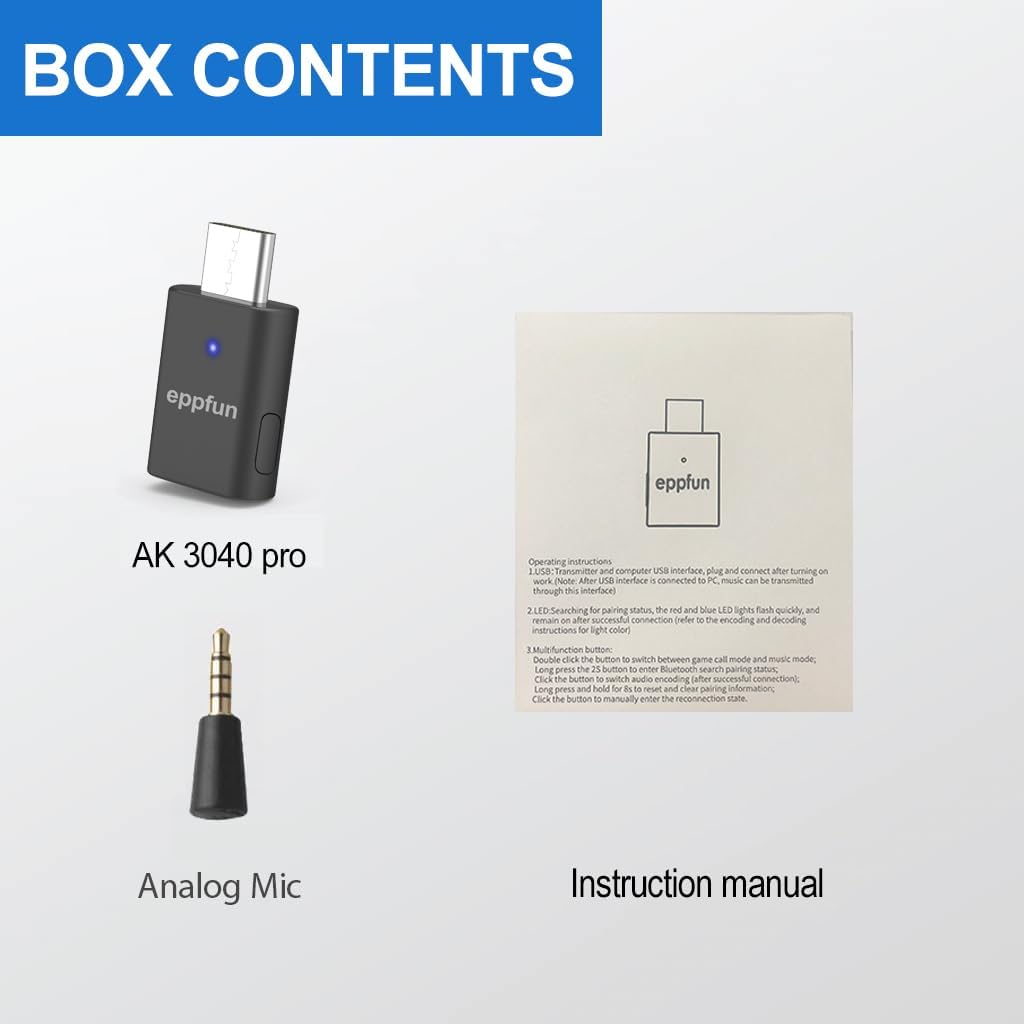
Image: The box contents include the eppfun AK3040 Pro transmitter, a 3.5mm analog microphone, and the instruction manual.
การตั้งค่า
The eppfun AK3040 Pro is designed for plug-and-play operation, requiring no driver installation on most compatible systems.
- เชื่อมต่อเครื่องส่งสัญญาณ: Insert the AK3040 Pro into an available USB-C port on your device (e.g., PS5, PC, Mac, Nintendo Switch). Ensure it is fully seated.
- เปิดเครื่อง: The transmitter will power on automatically when connected to a powered USB-C port.
- การเชื่อมต่อไมโครโฟน (ทางเลือก): If using voice chat, connect the 3.5mm analog microphone to the controller (e.g., PS5 controller) or the device's audio jack, if applicable. The AK3040 Pro facilitates audio transmission, and the microphone handles voice input separately.

Image: The eppfun AK3040 Pro transmitter connected to a laptop, demonstrating its driver-free plug-and-play functionality.

Image: The eppfun AK3040 Pro connected to a Nintendo Switch, illustrating its simple plug-and-play setup without requiring additional drivers.
คำแนะนำการใช้งาน
การจับคู่กับอุปกรณ์บลูทูธ
To connect your Bluetooth headphones or speakers to the AK3040 Pro:
- เข้าสู่โหมดจับคู่ (ตัวส่งสัญญาณ): Upon initial connection, the transmitter's LED indicator will flash red and blue, indicating it is in pairing mode. If it's not flashing, or if your audio device isn't connecting, press and hold the side button for a few seconds until the red and blue lights flash to re-initiate pairing.
- Enter Pairing Mode (Audio Device): Put your Bluetooth headphones or speakers into their pairing mode. Refer to your audio device's manual for specific instructions.
- เชื่อมต่อ: The transmitter will automatically search for and connect to nearby Bluetooth audio devices in pairing mode. Once connected, the LED indicator will change to a solid color, indicating the active audio codec.
Codec Selection and Indicator
The AK3040 Pro supports multiple audio codecs. You can switch between them by pressing the side button on the transmitter. The LED indicator color corresponds to the active codec:
- ส้ม: aptX ปรับตัวได้
- สีเขียว: aptX-HD ความละเอียดสูง
- สีขาว: aptX LL (Low Latency)
- สีฟ้า: เอพเท็กเอ็กซ์
- สีฟ้า: เอสบีซี
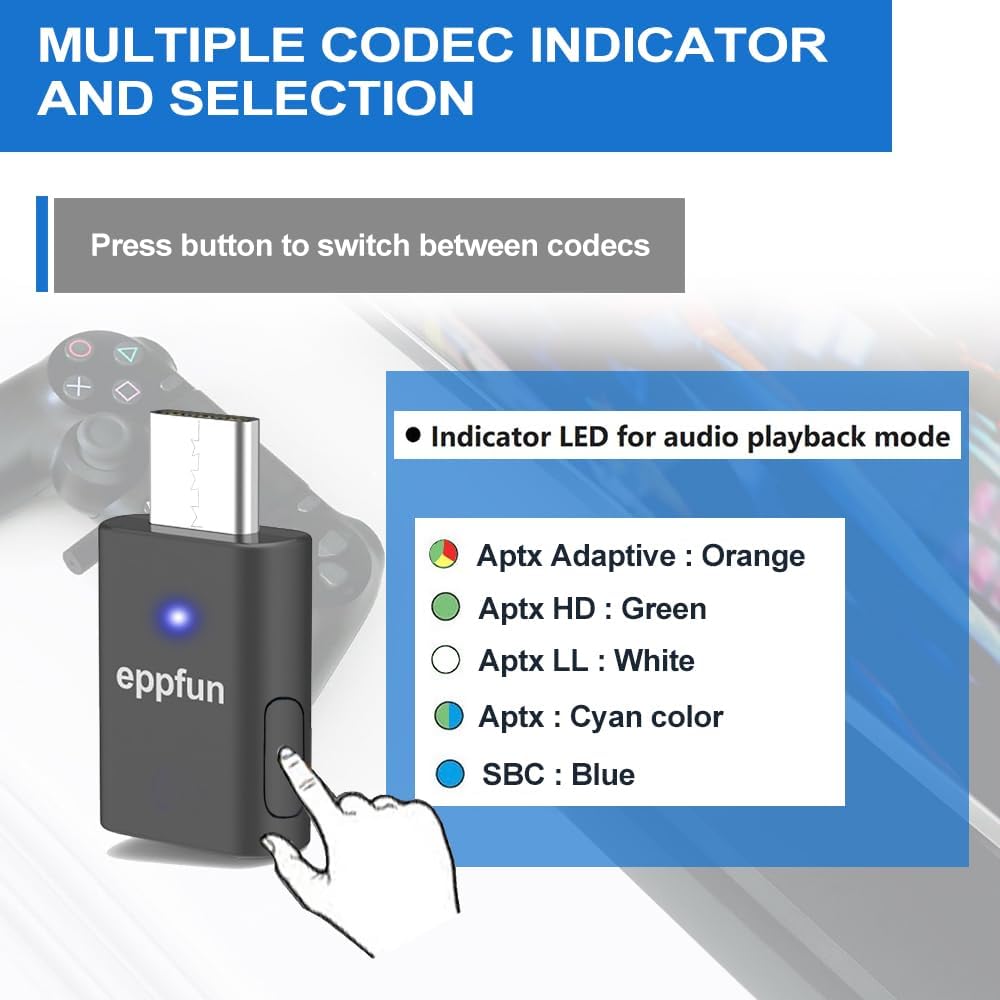
Image: The eppfun AK3040 Pro with its LED indicator displaying various colors to denote the active audio codec, such as Orange for aptX Adaptive and Green for aptX HD.
โหมดดูเพล็กซ์
The AK3040 Pro features a duplex mode, indicated by a slowly flashing blue light. This mode is typically used for specific scenarios, potentially involving simultaneous audio input and output. If you experience degraded audio quality (e.g., static, underwater sound) and the LED is slowly flashing blue, the device may be in duplex mode.
To exit or enter duplex mode, double-tap the side button on the transmitter. Exiting this mode should restore optimal audio quality for playback.
ความเข้ากันได้
The eppfun AK3040 Pro is compatible with a range of devices that have a USB-C port for audio output. It is designed to work with Bluetooth audio devices only.
- คอนโซลเกม: PlayStation 5 (PS5), Nintendo Switch
- คอมพิวเตอร์: PC (Windows, Linux), Mac (macOS)
- อุปกรณ์เสียง: Bluetooth Headphones, Bluetooth Earbuds, Bluetooth Speakers, Sound Bars (Bluetooth enabled)

Image: The eppfun AK3040 Pro connected to a PlayStation 5 console, highlighting its use as a gaming companion for wireless audio.

Image: An illustration demonstrating the eppfun AK3040 Pro's compatibility with multiple devices including PC, PS5, Nintendo Switch, and Mac, as well as various Bluetooth audio devices like headphones, earbuds, and speakers.
การแก้ไขปัญหา
หากคุณพบปัญหา โปรดดูวิธีแก้ไขทั่วไปต่อไปนี้:
- Cannot Pair or Connect:
- Ensure both the AK3040 Pro and your audio device are in pairing mode.
- If your headphones were previously connected to other Bluetooth devices, their internal connection information might interfere. Reset your headphones and clear their internal Bluetooth pairing information before attempting to pair with the AK3040 Pro. This is especially relevant for high-end Bluetooth earphones like Apple or Beats.
- Try pressing the side button on the AK3040 Pro for a few seconds to re-initiate pairing mode.
- Poor Sound Quality or Intermittent Audio:
- The AK3040 Pro supports APTX, APTX LL, SBC, APTX HD, and APTX Adaptive codecs. If sound quality is poor, try switching between codecs by pressing the side button on the transmitter. Observe the LED indicator to confirm the active codec.
- Check if the transmitter is in "duplex mode" (slowly flashing blue light). Double-tap the side button to exit this mode, which can significantly degrade audio quality for playback.
- Ensure there are no significant obstructions or sources of interference between the transmitter and your audio device.
- PS5 Connection Issues:
- Ensure the AK3040 Pro is fully inserted into the PS5's USB-C port. It may require firm insertion.
- If the PS5 is turned off or in rest mode, the transmitter might default to duplex mode upon reconnection, leading to poor audio. Always check the codec indicator and exit duplex mode by double-tapping the side button if necessary.
- If audio stops after exiting duplex mode, you may need to make the adapter forget all devices and re-pair your earbuds from scratch.
- ไม่มีเอาต์พุตเสียง:
- Verify that the AK3040 Pro is correctly connected and its LED is solid (not flashing), indicating a successful connection to an audio device.
- Check the audio output settings on your host device (PS5, PC, Mac) to ensure the AK3040 Pro is selected as the primary audio output device.
- Ensure the volume on both your host device and your Bluetooth audio device is turned up.

Image: Important notes for troubleshooting, advising users to reset headphones if pairing issues occur and to switch audio decoding if sound quality is poor.
ข้อมูลจำเพาะ
| ยี่ห้อ | เอ็ปฟัน |
| แบบอย่าง | AK3040 โปร |
| ฮาร์ดแวร์อินเตอร์เฟซ | บลูทูธ, USB-C |
| เวอร์ชันบลูทูธ | 5.2 |
| ตัวแปลงสัญญาณที่รองรับ | aptX Adaptive, aptX HD, aptX LL, aptX, SBC |
| อุปกรณ์ที่รองรับ | PS5, PC, Mac, Nintendo Switch, Bluetooth Headphones, Bluetooth Speakers |
| อัตราการถ่ายโอนข้อมูล | สูงสุด 5000 เมกะบิตต่อวินาที |
| ความเข้ากันได้ของระบบปฏิบัติการ | Linux (and implicitly Windows, macOS for PC/Mac compatibility) |
| สี | สีดำ |
| น้ำหนักสินค้า | 0.02 กิโลกรัม (18 กรัม) |
| ขนาดแพ็คเกจ | 11.99 x 9.09 x 1.9 ซม. |
การซ่อมบำรุง
The eppfun AK3040 Pro requires minimal maintenance. Keep the device clean and dry. Avoid exposing it to extreme temperatures or moisture. Do not attempt to disassemble the device, as this will void any warranty.
การรับประกันและการสนับสนุน
For warranty information or technical support, please contact eppfun customer service directly. If you encounter any issues that cannot be resolved using this manual, customer service can provide further assistance.
Contact information is typically found on the product packaging or the official eppfun webเว็บไซต์.