
1. บทนำ
Thank you for choosing the ARROWMAX SES PRO Electric Precision Screwdriver. This cordless tool is designed for precision tasks, featuring smart motion control and a comprehensive set of 34 magnetic bits. It is ideal for electronics, laptops, glasses, and other delicate applications. This manual provides essential information for safe operation, setup, maintenance, and troubleshooting to ensure optimal performance and longevity of your device.
2. ข้อมูลด้านความปลอดภัย
โปรดอ่านคำเตือนและคำแนะนำด้านความปลอดภัยทั้งหมดอย่างละเอียดก่อนใช้ผลิตภัณฑ์นี้ การไม่ปฏิบัติตามคำแนะนำเหล่านี้อาจส่งผลให้เกิดไฟฟ้าช็อต ไฟไหม้ และ/หรือการบาดเจ็บร้ายแรงได้
- รักษาพื้นที่ทำงานให้สะอาดและมีแสงสว่างเพียงพอ พื้นที่ที่รกหรือมืดอาจเกิดอุบัติเหตุได้
- ห้ามใช้เครื่องมือไฟฟ้าในบรรยากาศที่อาจเกิดการระเบิดได้ เช่น ในบริเวณที่มีของเหลวไวไฟ ก๊าซ หรือฝุ่น เครื่องมือไฟฟ้าอาจก่อให้เกิดประกายไฟซึ่งอาจทำให้ฝุ่นหรือไอระเหยติดไฟได้
- ระวังเด็กและผู้คนรอบข้างไม่ให้ใช้เครื่องมือไฟฟ้า เพราะสิ่งรบกวนอาจทำให้คุณควบคุมเครื่องไม่ได้
- หลีกเลี่ยงการสตาร์ทโดยไม่ได้ตั้งใจ ตรวจสอบให้แน่ใจว่าสวิตช์อยู่ในตำแหน่งปิดก่อนต่อเข้ากับชุดแบตเตอรี่ หยิบหรือพกพาเครื่องมือ
- อย่าเอื้อมเกินตัว ควรวางเท้าให้เหมาะสมและทรงตัวอยู่เสมอ วิธีนี้จะช่วยให้ควบคุมเครื่องมือไฟฟ้าได้ดีขึ้นในสถานการณ์ที่ไม่คาดคิด
- แต่งกายให้เหมาะสม ไม่ควรสวมเสื้อผ้าหรือเครื่องประดับที่หลวมๆ เก็บผมและเสื้อผ้าให้ห่างจากชิ้นส่วนที่เคลื่อนไหว เสื้อผ้าที่หลวมๆ เครื่องประดับ หรือผมยาวอาจไปติดอยู่ในชิ้นส่วนที่เคลื่อนไหวได้
- ใช้เครื่องมือป้องกันส่วนบุคคล สวมแว่นป้องกันดวงตาเสมอ อุปกรณ์ป้องกัน เช่น หน้ากากกันฝุ่น รองเท้าเซฟตี้กันลื่น หมวกนิรภัย หรืออุปกรณ์ป้องกันเสียงที่ใช้ตามสภาพที่เหมาะสมจะช่วยลดการบาดเจ็บส่วนบุคคลได้
- เก็บเครื่องมือไฟฟ้าที่ไม่ได้ใช้งานให้พ้นจากมือเด็ก และอย่าให้บุคคลที่ไม่คุ้นเคยกับเครื่องมือไฟฟ้าหรือคำแนะนำเหล่านี้ใช้งานเครื่องมือไฟฟ้า
- บำรุงรักษาเครื่องมือไฟฟ้า ตรวจสอบว่าชิ้นส่วนที่เคลื่อนไหวไม่ตรงแนวหรือติดขัดหรือไม่ ชิ้นส่วนแตกหักหรือไม่ และสภาพอื่นใดที่อาจส่งผลต่อการทำงานของเครื่องมือไฟฟ้า หากได้รับความเสียหาย ควรซ่อมแซมเครื่องมือไฟฟ้าก่อนใช้งาน
- ใช้เครื่องมือไฟฟ้า อุปกรณ์เสริม และหัวเครื่องมือ ฯลฯ ตามคำแนะนำเหล่านี้ โดยคำนึงถึงสภาพการทำงานและงานที่จะทำ การใช้เครื่องมือไฟฟ้าในการทำงานที่แตกต่างไปจากที่ตั้งใจไว้ อาจส่งผลให้เกิดสถานการณ์อันตรายได้
- ชาร์จใหม่ด้วยเครื่องชาร์จที่ผู้ผลิตกำหนดเท่านั้น เครื่องชาร์จที่เหมาะสำหรับแบตเตอรี่ประเภทหนึ่งอาจก่อให้เกิดความเสี่ยงต่อการเกิดไฟไหม้เมื่อใช้ร่วมกับแบตเตอรี่ประเภทอื่น
- อย่าใช้เครื่องมือหากสวิตช์ไม่เปิดและปิด เครื่องมือไฟฟ้าใด ๆ ที่ไม่สามารถควบคุมด้วยสวิตช์ได้เป็นอันตรายและต้องได้รับการซ่อมแซม
- ถอดแบตเตอรี่ออกจากเครื่องมือไฟฟ้าก่อนทำการปรับแต่ง เปลี่ยนอุปกรณ์เสริม หรือจัดเก็บเครื่องมือไฟฟ้า มาตรการป้องกันความปลอดภัยดังกล่าวช่วยลดความเสี่ยงในการสตาร์ทเครื่องมือไฟฟ้าโดยไม่ได้ตั้งใจ
3. เนื้อหาบรรจุภัณฑ์
The ARROWMAX SES PRO Electric Precision Screwdriver package typically includes the following items:
- 1 x ARROWMAX SES PRO Electric Precision Screwdriver
- 1 x Magnetic Storage Case
- 34 x Magnetic Precision Bits (S2 Steel, 4mm)
- 1 x สายเคเบิล USB-A ถึง USB-C สำหรับชาร์จ

Image: The ARROWMAX SES PRO Electric Precision Screwdriver, its magnetic bit case, and the included 34 precision bits.
4. สินค้าหมดview และส่วนประกอบ
Familiarize yourself with the main components of your ARROWMAX SES PRO screwdriver:

Image: Labeled diagram of the ARROWMAX SES PRO screwdriver's key components.
- พอร์ตชาร์จ Type-C: Located at the top for recharging the internal battery.
- จอแสดงผลสถานะ LED: An OLED screen showing battery level, torque setting, and operational status.
- ปุ่มเปิด/ปิด: Used to turn the device on/off and adjust torque settings.
- ตัวเรือนอลูมิเนียมอัลลอยด์: โครงสร้างทนทานและน้ำหนักเบา
- ไฟ LED: ส่องสว่างบริเวณการทำงานเพื่อการมองเห็นที่ดีขึ้น
- Bit Installation Port: Where precision bits are inserted.
5. การตั้งค่า
5.1 การชาร์จไขควง
- Locate the USB-C charging port at the top of the screwdriver.
- Connect the provided USB-A to USB-C charging cable to the screwdriver and a compatible USB-A power adapter (not included).
- The LED Status Display will indicate the charging progress. A full charge allows for tightening approximately 900 screws.
- หมายเหตุสำคัญ: This electric screwdriver only supports USB-A to USB-C charging and is not compatible with USB-C PD (Power Delivery) chargers.

ภาพ: เหนือview of charging port, battery, torque adjustment, and OLED display.
5.2 Installing Precision Bits
- Select the appropriate precision bit from the magnetic storage case. The case features a pop-up design for easy access.
- Insert the bit firmly into the Bit Installation Port at the tip of the screwdriver. The magnetic holder will secure the bit in place.
- หากต้องการถอดดอกสว่าน ให้ดึงออกได้เลย
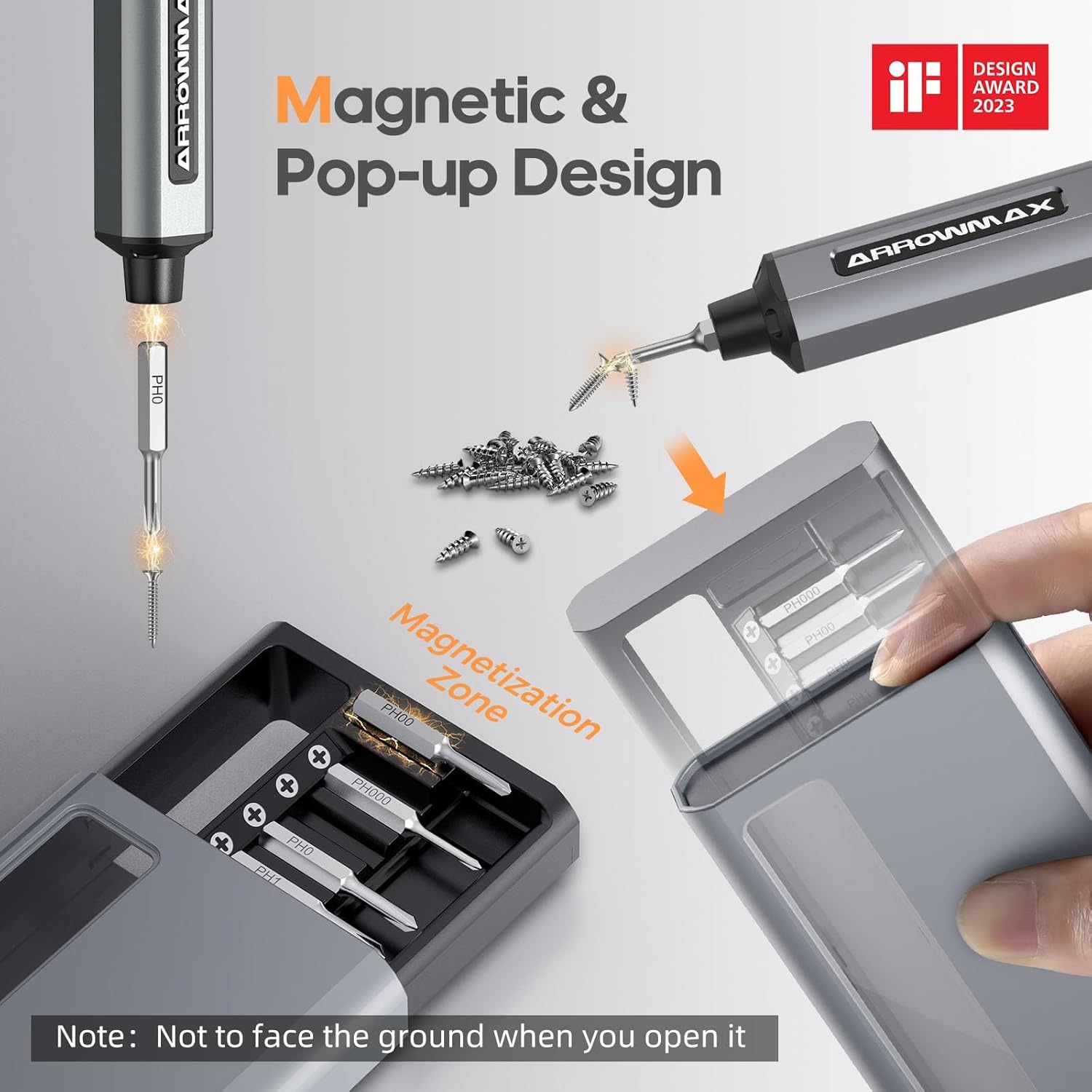
Image: Magnetic pop-up bit case design and bit magnetization zone.
6. คู่มือการใช้งาน
6.1 การเปิด/ปิดเครื่อง
Press and hold the Power Button for a few seconds to turn the screwdriver on or off. The OLED screen will illuminate upon activation.
6.2 การปรับการตั้งค่าแรงบิด
The SES PRO offers 5 adjustable torque levels, including an auto-sensing mode, to suit various tasks. The electric torque ranges from 0.049 N.m to 0.30-0.35 N.m, with a manual torque of 3 N.m.
- With the screwdriver powered on, press the Power Button three times continuously to cycle through the torque settings.
- The OLED screen will display the current torque level (e.g., 1, 2, 3, 4, A for Auto-Sensing).
- Select a lower torque for delicate items like glasses or small electronics, and higher torque for more robust applications.
- For screws that are too tight for the electric motor, the screwdriver can be used in manual mode by applying direct force.
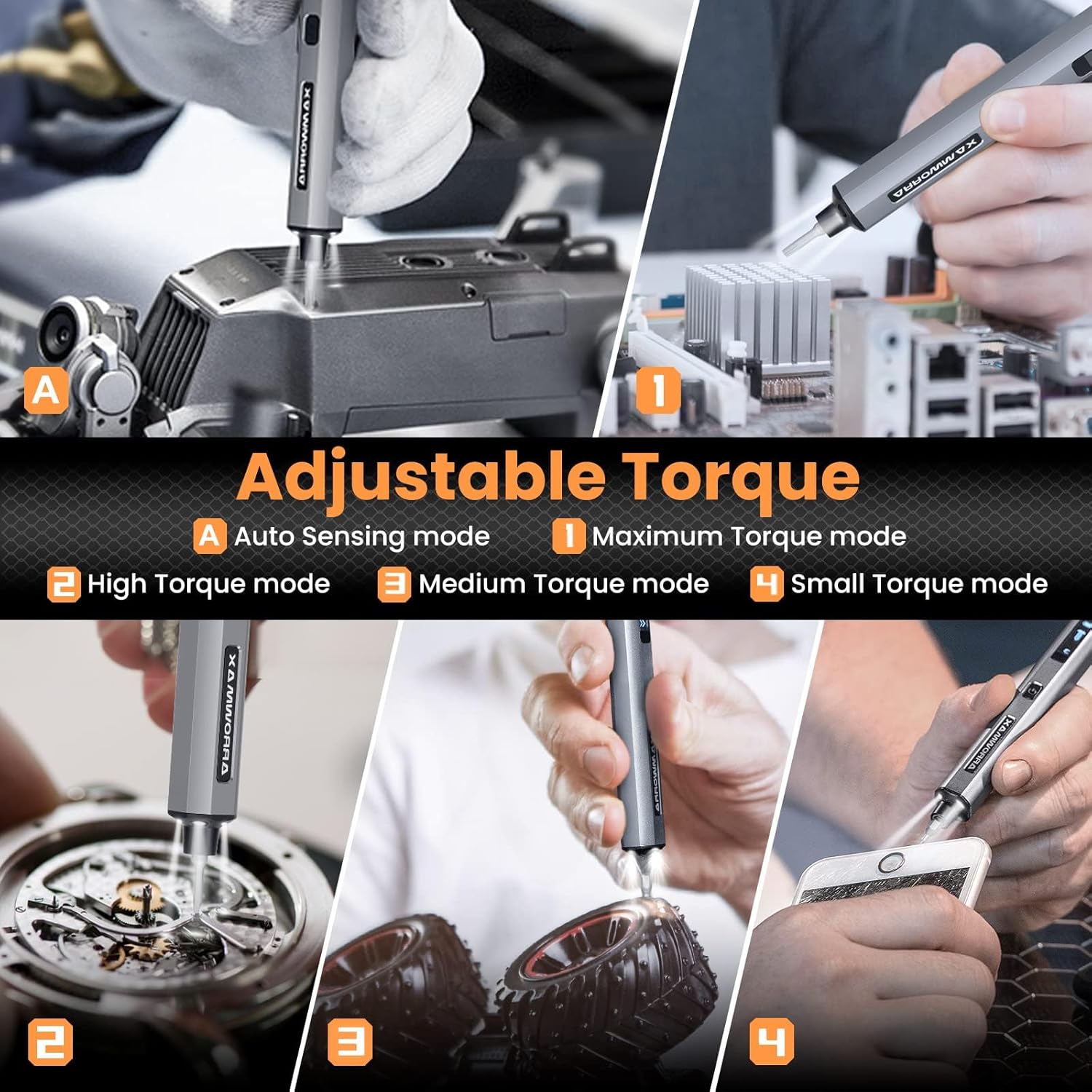
Image: Adjustable torque settings for various applications.
6.3 Body Sensory Dual-Mode (Forward/Reverse)
The SES PRO features a body sensory dual-mode for intuitive control of rotation direction.
- To drive a screw in (tighten), gently rotate your wrist in a clockwise direction while holding the screwdriver.
- To remove a screw (loosen), gently rotate your wrist in a counter-clockwise direction.
- The screwdriver's internal gyroscope detects your wrist movement and activates the motor accordingly.
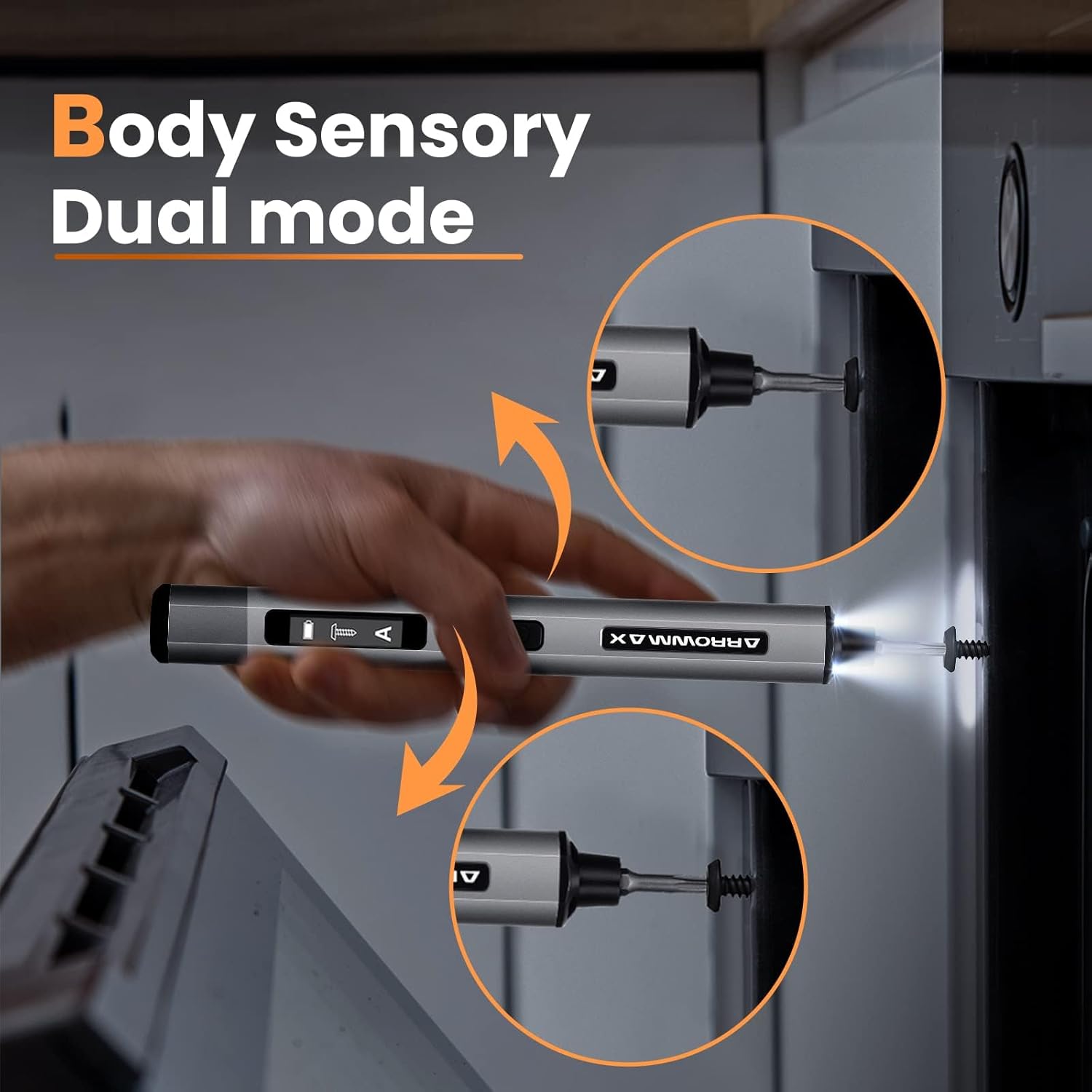
Image: Body sensory dual-mode in action for forward and reverse operation.
6.4 LED Work Lights
The integrated LED lights at the tip of the screwdriver automatically illuminate when the motor is active, providing clear visibility of your work area.
7. การบำรุงรักษา
7.1 การทำความสะอาด
- Wipe the screwdriver body with a soft, dry cloth. Do not use abrasive cleaners or solvents.
- Ensure the bit installation port is free of debris.
7.2 การดูแลแบตเตอรี่
- เพื่อยืดอายุการใช้งานแบตเตอรี่ ควรหลีกเลี่ยงการปล่อยแบตเตอรี่จนหมดบ่อยครั้ง
- Store the screwdriver in a cool, dry place when not in use.
- ควรชาร์จแบตเตอรี่เป็นระยะหากเก็บไว้นานเพื่อป้องกันการคายประจุจนหมด

Image: The SES PRO's long-lasting battery capacity.
7.3 Bit Care
- Keep the precision bits clean and free of rust.
- Store bits securely in the magnetic case to prevent loss and damage.
8 การแก้ไขปัญหา
If you encounter issues with your ARROWMAX SES PRO screwdriver, refer to the following common problems and solutions:
| ปัญหา | สาเหตุที่เป็นไปได้ | สารละลาย |
|---|---|---|
| Screwdriver does not turn on or respond. | แบตเตอรี่เหลือน้อย อุปกรณ์ปิดอยู่ | Charge the screwdriver using the provided USB-A to USB-C cable. Ensure the power button is pressed to turn it on. |
| Screwdriver does not charge. | Incorrect charger type; faulty cable/adapter. | Ensure you are using a USB-A to USB-C cable and a standard USB-A power adapter. USB-C PD chargers are not supported. Try a different cable or adapter. |
| Motor lacks power or cannot loosen/tighten screws. | Low battery; incorrect torque setting; screw is too tight for electric mode. | Charge the screwdriver. Increase the torque setting. For very tight screws, manually loosen or tighten them first, then use the electric mode. |
| Directional control (forward/reverse) is inconsistent. | Improper wrist movement; gyroscope calibration issue. | Ensure clear and deliberate wrist movements. If issues persist, try restarting the device. |
| Bits fall out or are not held securely. | Bit installation port is dirty; bit is not fully inserted. | Clean the bit installation port. Ensure the bit is pushed in firmly until it clicks or feels secure. |
9. ข้อมูลจำเพาะ
Key technical specifications for the ARROWMAX SES PRO Electric Precision Screwdriver:
| คุณสมบัติ | ข้อมูลจำเพาะ |
|---|---|
| ยี่ห้อ | แอร์โรว์แม็กซ์ |
| แบบอย่าง | SES PRO (AM-199913-G) |
| ความเร็ว | 200 รอบต่อนาที |
| แหล่งพลังงาน | ใช้พลังงานจากแบตเตอรี่ |
| เล่มที่tage | 3.7 โวลต์ (กระแสตรง) |
| แรงบิดไฟฟ้า | 0.049 N.m - 0.30-0.35 N.m (Adjustable) |
| แรงบิดแบบแมนนวล | 3 นิวตันเมตร |
| ประเภทแบตเตอรี่ | แบตเตอรี่ลิเธียมไอออน (500 mAh) |
| พอร์ตชาร์จ | USB-C (USB-A to USB-C charging only) |
| น้ำหนักสินค้า | 13.7 ออนซ์ |
| ขนาดแพ็คเกจ | 7.48 x 3.43 x 1.73 นิ้ว |
| คุณสมบัติพิเศษ | OLED Screen, Smart Motion Control, Ergonomic Design, LED Lights |
10. การรับประกันและการสนับสนุน
The manufacturer's warranty information for this product is not explicitly provided in the available data. For details regarding warranty coverage, duration, and terms, please refer to the documentation included with your purchase or contact the retailer where the product was acquired.
For technical support, product inquiries, or assistance with troubleshooting that is not covered in this manual, please visit the official ARROWMAX website or contact their customer service department. Contact information can typically be found on the product packaging or the manufacturer's official online channels.