
การแนะนำ
The Havit Gamenote KB885L mechanical keyboard is engineered for precision, durability, and customization. It features a gasket structure design, providing a soft and stable typing experience while minimizing noise. The full key rollover with multi-key response ensures fast and accurate input, crucial for gaming. With customizable RGB backlighting, you can personalize your keyboard with various lighting modes and effects. The detachable USB-C cable enhances portability and simplifies cable management. This keyboard is built with mechanical switches rated for 50 million key presses, making it suitable for gamers, typists, and professionals who require long-lasting performance.
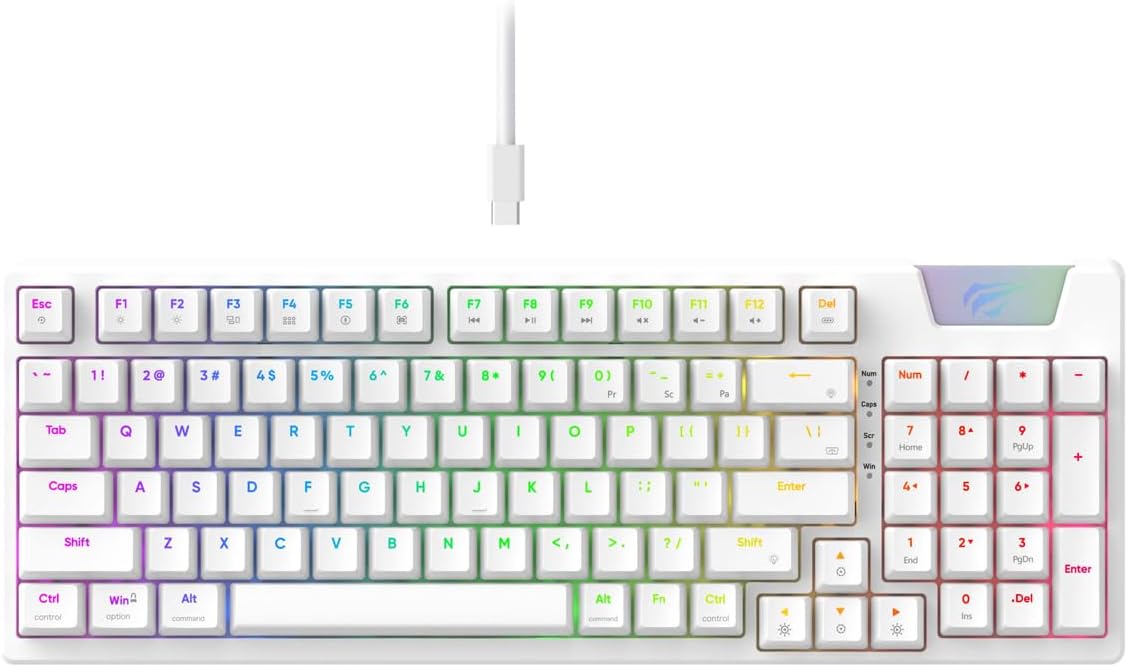
Image: The Havit Gamenote KB885L mechanical keyboard in white, showcasing its full layout and detachable USB-C cable.
คู่มือการติดตั้ง
Follow these steps to set up your Havit Gamenote KB885L mechanical keyboard:
- แกะคีย์บอร์ดออก: ถอดคีย์บอร์ดและอุปกรณ์เสริมออกจากบรรจุภัณฑ์อย่างระมัดระวัง
- เชื่อมต่อสาย USB-C: Insert the detachable USB Type-C cable into the port on the keyboard.
- เชื่อมต่อกับคอมพิวเตอร์: เสียบปลายอีกด้านของสาย USB เข้ากับพอร์ต USB ที่มีอยู่ในคอมพิวเตอร์ของคุณ
- การติดตั้งไดร์เวอร์: คีย์บอร์ดนี้เป็นแบบเสียบแล้วใช้งานได้ทันที และโดยทั่วไปไม่จำเป็นต้องติดตั้งไดรเวอร์เพิ่มเติม ระบบปฏิบัติการของคุณควรจะตรวจจับและติดตั้งไดรเวอร์ที่จำเป็นโดยอัตโนมัติ
- ทดสอบฟังก์ชันการทำงาน: Open a text editor or browser to test key presses and ensure all functions are working correctly.

Image: A close-up of the Havit Gamenote KB885L keyboard highlighting its portable design and detachable cable for easy setup and transport.
คำแนะนำการใช้งาน
The Havit Gamenote KB885L keyboard offers various features for an enhanced user experience:
การควบคุมไฟแบ็คไลท์ RGB
คีย์บอร์ดนี้มีไฟแบ็คไลท์ RGB ที่ปรับแต่งได้ ใช้การกดปุ่มต่อไปนี้เพื่อปรับเอฟเฟกต์แสง:
- Fn + [ปุ่ม]: Cycle through different RGB lighting modes. (Specific key combinations may vary, refer to on-keyboard legends if available).
- Fn + ปุ่มลูกศร: ปรับความสว่างและความเร็วของเอฟเฟกต์แสง

Image: The Havit Gamenote KB885L keyboard displaying its vibrant RGB backlighting, illustrating customizable lighting effects.
การรองรับคีย์เต็มรูปแบบ (NKRO)
This keyboard supports Full Key Rollover, meaning every key press is registered independently, regardless of how many keys are pressed simultaneously. This feature is essential for fast-paced gaming and typing, preventing ghosting or missed inputs.
การออกแบบตามหลักสรีรศาสตร์
The keyboard is designed with ergonomics in mind to provide comfort during extended use. Its layout and keycap profile aim to reduce strain on your wrists and fingers.

ภาพ: ก. view of the Havit Gamenote KB885L keyboard highlighting its ergonomic design for comfortable use.
การซ่อมบำรุง
การบำรุงรักษาอย่างถูกวิธีจะช่วยให้คีย์บอร์ดของคุณใช้งานได้ยาวนานและทำงานได้อย่างมีประสิทธิภาพสูงสุด:
- การทำความสะอาด: ควรทำความสะอาดแป้นพิมพ์เป็นประจำด้วยผ้าแห้งนุ่มๆ สำหรับการทำความสะอาดอย่างล้ำลึก ให้ใช้ลมเป่าเพื่อกำจัดฝุ่นและเศษสิ่งสกปรกที่อยู่ระหว่างปุ่มต่างๆ สำหรับคราบสกปรกที่ฝังแน่น ให้ใช้ผ้าชุบน้ำหมาดๆ เช็ดทำความสะอาดamp สามารถใช้ผ้าชุบน้ำสบู่ชนิดอ่อนๆ เช็ดได้ โดยให้แน่ใจว่าไม่มีของเหลวเข้าไปในแป้นพิมพ์
- หลีกเลี่ยงการหกเลอะ: Keep liquids away from the keyboard to prevent damage to the internal components. In case of a spill, immediately disconnect the keyboard and allow it to dry completely before reconnecting.
- การดูแลสายเคเบิล: Handle the detachable USB-C cable with care. Avoid sharp bends or excessive pulling to prevent damage to the cable or connectors.
- พื้นที่จัดเก็บ: เมื่อไม่ใช้งาน ควรเก็บแป้นพิมพ์ไว้ในที่สะอาดและแห้ง ห่างจากอุณหภูมิที่สูงหรือต่ำเกินไป
การแก้ไขปัญหา
If you encounter issues with your Havit Gamenote KB885L keyboard, try the following solutions:
- แป้นพิมพ์ไม่ตอบสนอง:
- ตรวจสอบให้แน่ใจว่าสาย USB-C เชื่อมต่อกับคีย์บอร์ดและคอมพิวเตอร์อย่างแน่นหนา
- ลองเสียบคีย์บอร์ดเข้ากับพอร์ต USB อื่นบนคอมพิวเตอร์ของคุณ
- ทดสอบแป้นพิมพ์บนคอมพิวเตอร์เครื่องอื่นเพื่อตรวจสอบว่าปัญหาอยู่ที่แป้นพิมพ์หรือระบบของคุณ
- ไฟ RGB ไม่ทำงาน:
- Check if the lighting is turned off using the Fn key combinations.
- ตรวจสอบให้แน่ใจว่าได้เสียบแป้นพิมพ์เข้ากับพอร์ต USB แล้วและจ่ายไฟอย่างถูกต้อง
- คีย์ไม่ลงทะเบียน / คีย์ค้าง:
- Due to full key rollover, this is unlikely. However, ensure no debris is lodged under the keycap.
- If a specific key is consistently failing, it might indicate a switch issue. Contact support if the problem persists.
ข้อมูลจำเพาะ
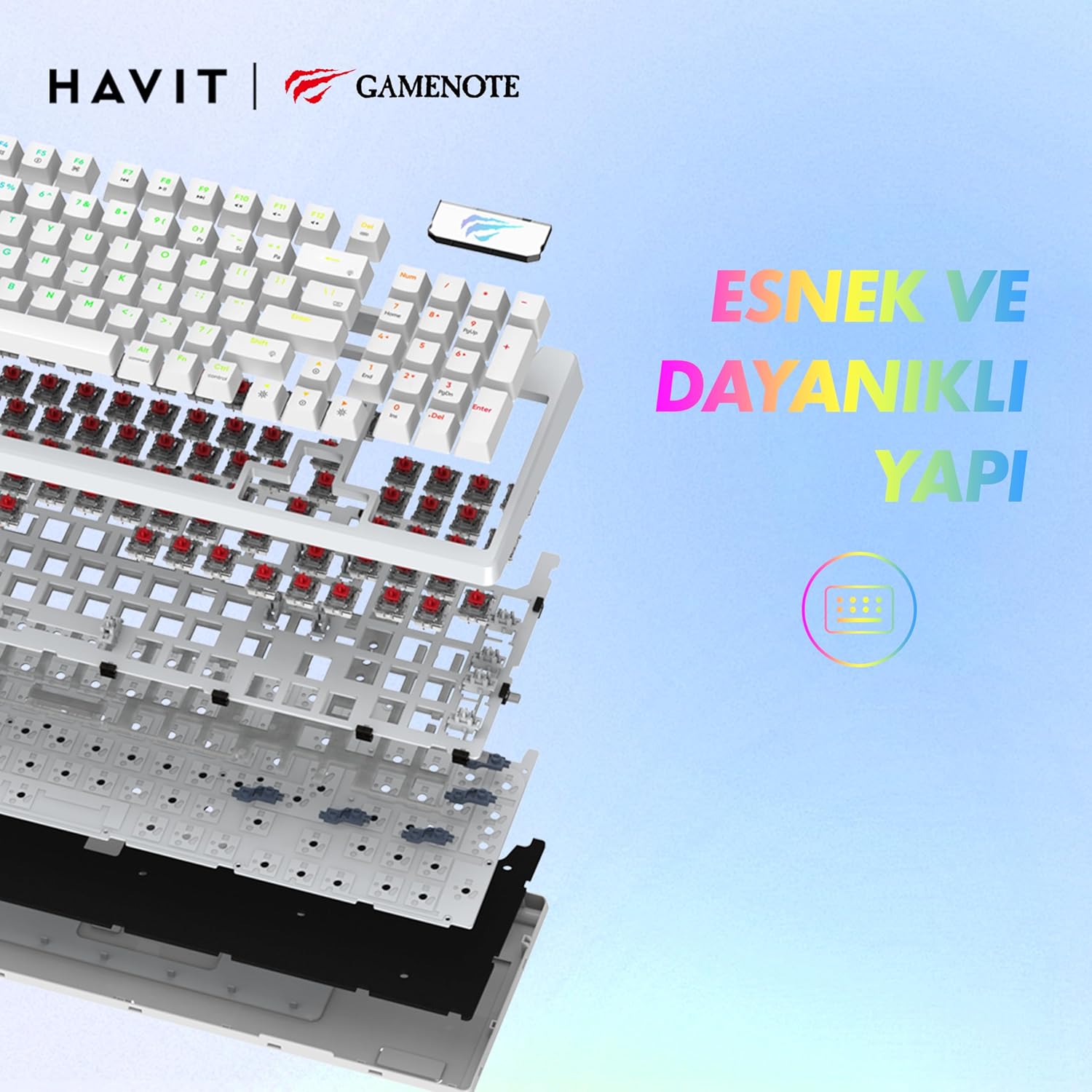
ภาพ: ระเบิด view of the Havit Gamenote KB885L keyboard, illustrating its internal gasket structure for enhanced stability and typing feel.
| คุณสมบัติ | รายละเอียด |
|---|---|
| ยี่ห้อ | ฮาวิท |
| หมายเลขรุ่น | เคบี885แอล |
| อุปกรณ์ที่รองรับ | คอมพิวเตอร์ |
| เทคโนโลยีการเชื่อมต่อ | ยูเอสบี |
| คำอธิบายแป้นพิมพ์ | การเล่นเกม |
| การใช้ที่แนะนำ | การเล่นเกม |
| คุณสมบัติพิเศษ | พกพาได้ |
| สี | สีขาว |
| รองรับสีแบ็คไลท์ | RGB (Red, Green, Blue model) |
| สไตล์ | ทันสมัย |
| ขนาดสินค้า (กว้าง x ยาว x สูง) | 38.7 x 14 x 4.5 ซม. |
| ภาษา | ภาษาอังกฤษ |
| แหล่งพลังงาน | พลังงาน USB |
| ประเภทสวิตซ์ | สัมผัสได้ |
| เค้าโครงแป้นพิมพ์ | คีย์บอร์ด QWERTY |
| การวางแนวมือ | ถนัดทั้งสองมือ |
| จำนวนคีย์ | 95 |
| จำนวนปุ่ม | 104 |
| ส่วนประกอบที่รวมอยู่ | สาย USB |
| วัสดุ | พลาสติก |
| Key Press Lifespan | 50 Million (from description) |

Image: An illustration highlighting the Havit Gamenote KB885L's durable mechanical switches, rated for a 50 million key press lifespan.
ข้อมูลการรับประกัน
คีย์บอร์ดเชิงกล Havit Gamenote KB885L มาพร้อมกับ... รับประกันหนึ่งปี from the date of purchase. This warranty covers manufacturing defects and issues arising from normal use. It does not cover damage caused by misuse, accidents, unauthorized modifications, or improper maintenance. Please retain your proof of purchase for warranty claims.
การสนับสนุนลูกค้า
For further assistance, technical support, or warranty inquiries, please contact Havit customer service through their official website or the retailer where you purchased the product. Have your model number (KB885L) and proof of purchase ready when contacting support.


