
1. บทนำและเรื่องอื่นๆview
The Popur X5 Automatic Cat Litter Box is a self-cleaning system designed to simplify pet waste management. It features smart app control, an integrated odor eliminator, and an open-top design for cat comfort. This manual provides essential information for the safe and efficient operation of your Popur X5.
Key features include a large capacity waste bin, suitable for multiple cats, and a patented cleaning mechanism that ensures thorough waste separation and disposal.

Image: The Popur X5 Automatic Cat Litter Box, showcasing its self-cleaning mechanism, a kitten, and a smartphone displaying the control app.
2. ข้อมูลด้านความปลอดภัย
Please read all safety instructions carefully before operating the Popur X5. Failure to follow these instructions may result in injury or damage to the product.
- ความปลอดภัยทางไฟฟ้า: Ensure the power cord is not damaged and is plugged into a grounded outlet. Do not operate with wet hands or near water. Unplug the unit before cleaning or performing maintenance.
- ความปลอดภัยของสัตว์เลี้ยง: The Popur X5 is designed with safety features, including an ActiveShield mechanism to prevent pinching. However, always supervise your pets during their initial interactions with the device. The maximum recommended weight for a cat using this litter box is 33 pounds.
- ความปลอดภัยของเด็ก: Keep children away from the litter box during operation. This appliance is not intended for use by persons with reduced physical, sensory, or mental capabilities unless supervised.
- การจัดวาง: Place the unit on a stable, level surface. Do not block ventilation openings.
- ชนิดของขยะ: Use only clumping cat litter. Other types of litter may interfere with the cleaning mechanism.
3. เนื้อหาบรรจุภัณฑ์
ตรวจสอบว่ามีรายการทั้งหมดอยู่ในแพ็คเกจ:
- Popur X5 Automatic Cat Litter Box Unit
- อะแดปเตอร์แปลงไฟ
- Waste Bin with Automatic Lid
- Trash Bags (initial supply)
- คู่มือการใช้งาน (เอกสารนี้)
4. การตั้งค่า
- การแกะกล่อง: นำส่วนประกอบทั้งหมดออกจากบรรจุภัณฑ์อย่างระมัดระวัง เก็บบรรจุภัณฑ์ไว้สำหรับการขนส่งหรือจัดเก็บในอนาคต
- การจัดวาง: Position the Popur X5 on a firm, level surface in a location accessible to your cat and near a power outlet. The unit features built-in casters for easy movement.
- ติดตั้งถังขยะ: Insert the dedicated trash box into its compartment. Ensure a trash bag is properly installed using the double-layered inside-out method to prevent odors and mess.
- ใส่ทรายแมว: Pour clumping cat litter into the main litter tray. The Popur X5 is compatible with various clumping litters and PrettyLitter crystals. Ensure the litter level is between the minimum and maximum fill lines.
- การเชื่อมต่อไฟฟ้า: Connect the power adapter to the unit and then to a wall outlet. The unit will power on and perform an initial calibration cycle.
- การตั้งค่าแอป (ทางเลือกแต่แนะนำ): Download the Popur app from your device's app store. Follow the in-app instructions to connect your Popur X5 to your home Wi-Fi network. The app allows for remote control, monitoring, and customized settings.

Image: Demonstrates the installation of a trash bag into the Popur X5's dedicated waste bin, highlighting the dual-box system.
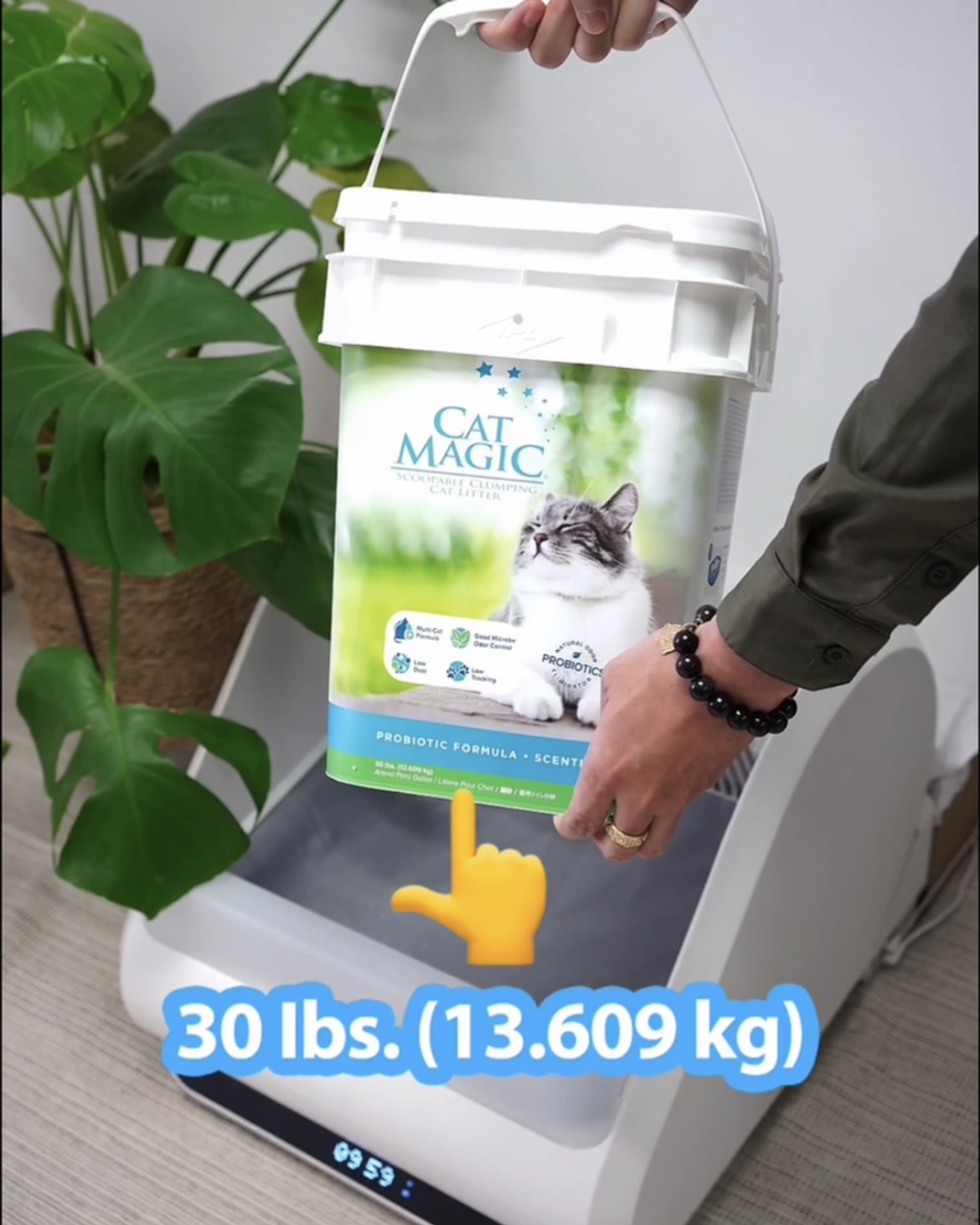
Image: A person pouring cat litter into the Popur X5, demonstrating its capacity for various litter types.
5. คู่มือการใช้งาน
The Popur X5 operates automatically, but can also be controlled manually via the app.
- รอบการทำความสะอาดอัตโนมัติ: After your cat uses the litter box and exits, the unit will automatically initiate a cleaning cycle after a preset delay (customizable via app). The patented DuoTilt CleanTech mechanism sifts the litter and deposits waste into the enclosed bin.
- การกำจัดกลิ่น: The enclosed waste bin and the Dual-Box System are designed to trap odors effectively, ensuring a fresh environment.
- การทำความสะอาดด้วยตนเอง: You can initiate a cleaning cycle manually through the Popur app at any time.
- ความจุถังขยะ: The large waste bin can hold up to 30 days of waste for a single cat, reducing the frequency of bag changes.
Video: Demonstrates the Popur X5's self-cleaning process, showing how the DuoTilt CleanTech sifts litter and disposes of waste.

Image: Illustrates the odor-trapping capabilities of the Popur X5's enclosed waste bin, contributing to a 99% odorless environment.

Image: The Popur X5's waste bin, highlighting its large storage capacity of up to 30 days.
6. การบำรุงรักษา
Regular maintenance ensures optimal performance and longevity of your Popur X5.
- การเปลี่ยนถุงขยะ: When the app indicates the waste bin is full, or as needed, remove the full trash bag. The design allows for removal without direct contact with waste or odors. Replace with a new elastic band trash bag.
- การทำความสะอาดหน่วย: The open design and accessible components make the Popur X5 easy to sanitize. Wipe down surfaces with a damp cloth and mild detergent as needed. Do not submerge any part of the unit in water.
- Litter Level: Periodically check the litter level and add fresh clumping litter to maintain the recommended fill.

Image: A person cleaning the interior of the Popur X5, demonstrating the ease of sanitization due to its open design.
7 การแก้ไขปัญหา
If you encounter issues with your Popur X5, refer to the following common problems and solutions:
| ปัญหา | สาเหตุที่เป็นไปได้ | สารละลาย |
|---|---|---|
| เครื่องไม่ทำความสะอาดอัตโนมัติ | Sensor obstruction, litter level too high/low, unit offline. | Check for obstructions around sensors. Adjust litter level. Ensure unit is connected to Wi-Fi and online via the app. Perform a manual cycle via the app. |
| ปัญหาการเชื่อมต่อแอป | Weak Wi-Fi signal, incorrect network credentials, app glitch. | Ensure unit is within Wi-Fi range. Re-enter Wi-Fi credentials in the app. Restart the app or the unit (unplug and plug back in). |
| Odor is present. | Waste bin full, improper trash bag installation, litter not clumping effectively. | Change the trash bag. Ensure the trash bag is properly sealed and installed. Use high-quality clumping litter. Clean the unit regularly. |
| Waste not dumping correctly. | Litter too wet/sticky, mechanism obstruction, litter type issue. | Ensure litter is dry and clumping properly. Clean the sifting mechanism. Consider trying a different brand of clumping litter. |
| เครื่องมีเสียงผิดปกติ | Obstruction in mechanism, motor issue. | Unplug the unit and check for any foreign objects or litter clumps obstructing the moving parts. If the noise persists, contact customer support. |
If the problem persists after attempting these solutions, please contact Popur customer support for further assistance.
8. ข้อมูลจำเพาะ
| คุณสมบัติ | รายละเอียด |
|---|---|
| แบบอย่าง | X5 |
| พิมพ์ | กล่องทรายแมวแบบทำความสะอาดตัวเองอัตโนมัติ |
| ขนาด (กว้าง x ยาว x สูง) | 24" x 21.2" x 18.2" |
| น้ำหนักสินค้า | 35 ปอนด์ |
| วัสดุ | พลาสติก |
| Max. Cat Weight | 33 ปอนด์ |
| ความจุของขยะ | Up to 30 days (for one cat) |
| การเชื่อมต่อ | Smart App Control (Wi-Fi) |
9. การรับประกันและการสนับสนุน
Popur provides a limited warranty for the X5 Automatic Cat Litter Box. For detailed warranty information, please refer to the official Popur webเว็บไซต์หรือบัตรรับประกันที่รวมอยู่ในผลิตภัณฑ์ของคุณ
For technical support, troubleshooting assistance, or to inquire about replacement parts, please contact Popur Customer Service:
- การสนับสนุนทางออนไลน์: Visit the official Popur webไซต์สำหรับคำถามที่พบบ่อยและทรัพยากรสนับสนุน
- การสนับสนุนทางอีเมล์: Refer to your product packaging or the Popur webเว็บไซต์สำหรับติดต่ออีเมล์
- คู่มือผู้ใช้ (PDF): A digital version of the user guide is available ที่นี่.