
การแนะนำ
This manual provides essential information for setting up, operating, maintaining, and troubleshooting your Lenovo IdeaPad Slim 5 laptop, model 82XD005RIN. This device features a 13th Gen Intel Core i5-13420H processor, a 14-inch WUXGA OLED display, 16GB of LPDDR5 RAM, and a 512GB SSD, running on Windows 11 Home.
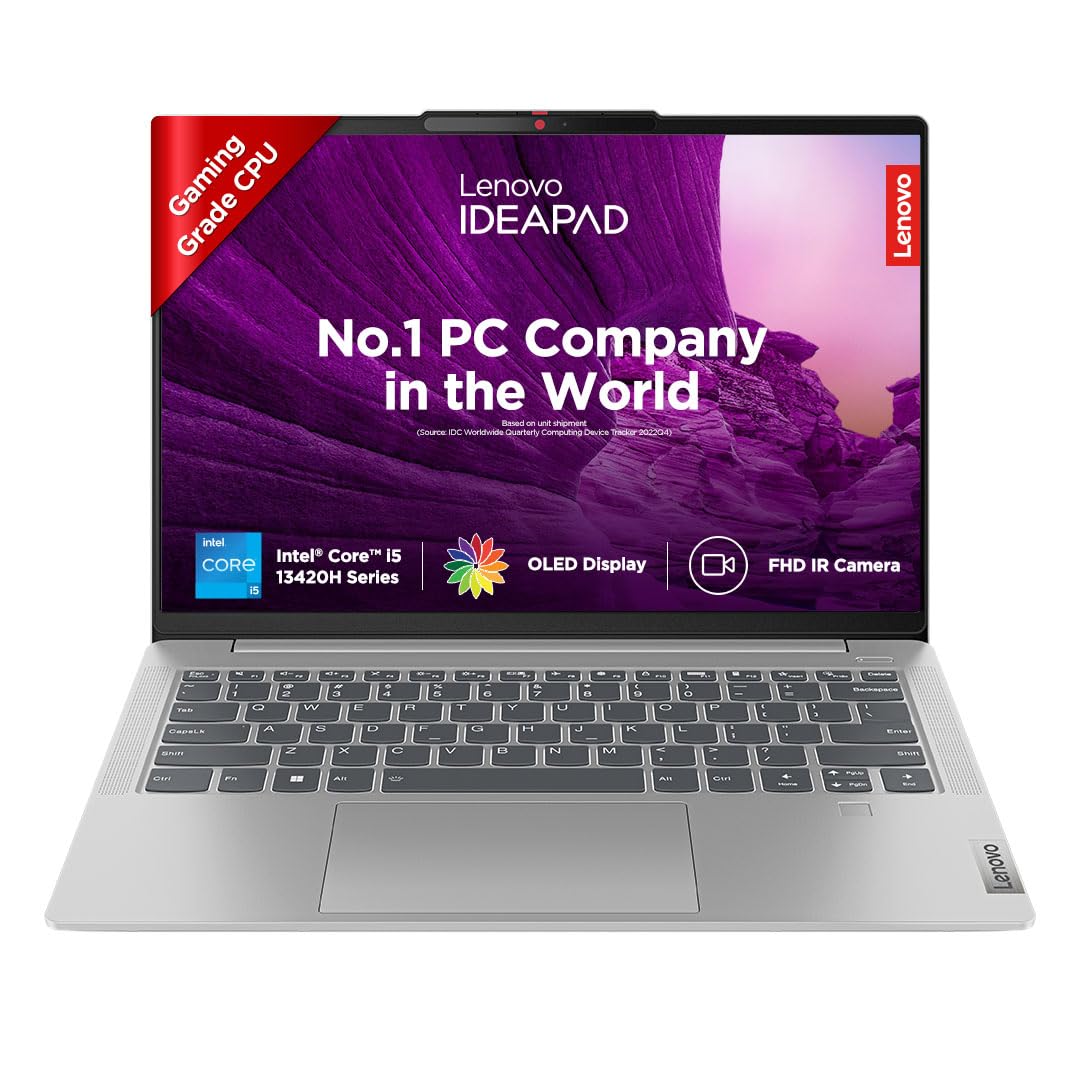
Image: The Lenovo IdeaPad Slim 5 laptop, showcasinด้วยการออกแบบและการแสดงผลที่เพรียวบาง
การตั้งค่า
1. การแกะกล่องและการตรวจสอบเบื้องต้น
Carefully remove all components from the packaging. Verify that all items listed in the box contents are present. Inspect the laptop for any physical damage.
2. กำลังเชื่อมต่อกับพลังงาน
Connect the power adapter to the laptop's USB-C port (which supports Power Delivery 3.0) and then to a power outlet. It is recommended to fully charge the battery before initial use.
3. การเปิดเครื่องครั้งแรกและการตั้งค่า Windows
Open the laptop lid. The laptop may automatically power on (Flip-to-Start feature). If not, press the power button. Follow the on-screen instructions to complete the Windows 11 Home setup, including language, region, network connection, and user account creation.
4. การเชื่อมต่ออุปกรณ์ต่อพ่วง
ใช้พอร์ตที่มีอยู่เพื่อเชื่อมต่ออุปกรณ์ภายนอก:
- USB-C 3.2 Gen 1 (x2): For data transfer, power delivery, and DisplayPort 1.2 video output.
- USB-A 3.2 เจนเนอเรชั่น 1 (x2): For connecting USB devices, one port is Always On for charging.
- HDMI1.4b-ช่องต่อ: For connecting to external displays.
- เครื่องอ่านการ์ดไมโคร SD: For reading microSD cards.
- Headphone/Microphone Combo Jack (3.5mm): For audio input/output.

ภาพ: ด้านข้าง view of the Lenovo IdeaPad Slim 5 laptop showing the HDMI port, two USB-C ports, and a headphone/microphone combo jack on one side, and a microSD card reader and a USB-A port on the other side.
การใช้งานแล็ปท็อปของคุณ
คุณสมบัติการแสดงผล
The laptop features a 14-inch WUXGA (1920x1200) OLED IPS Display with 400 nits brightness. It includes Anti-Glare coating, Intelligent Sens-Super Resolution, and TUV Low Blue Light Protection for enhanced viewing comfort and reduced eye strain.

ภาพ: จอแสดงผลแล็ปท็อปแสดงasing its key features: 14" WUXGA OLED Display, 16:10 Aspect Ratio, 100% DCI-P3 color gamut, 400 Nits Brightness, and TUV Low Blue Light certification.
คีย์บอร์ดและทัชแพด
The laptop is equipped with a backlit keyboard for comfortable typing in various lighting conditions. The integrated touchpad supports multi-touch gestures for navigation.
กล้องและระบบเสียง
The integrated FHD 1080p camera includes an IR Privacy Shutter and ToF Sensor, enabling Smart Login with facial recognition. Audio is provided by front-facing 2x 2W HD Stereo Speakers optimized with Dolby Audio.

Image: Close-up of the laptop's top bezel showing the FHD IR Camera with ToF Sensor and Privacy Shutter, along with an illustration of the 2Wx2 User-Facing Speakers optimized with Dolby Audio.
Smart Features (Lenovo AI Chip)
- Smart Login: Seamless and secure face recognition for instant access.
- พลังอัจฉริยะ: Adaptive performance and extended battery life up to 20%.
- สมาร์ทตัดเสียงรบกวน: Reduces distractions during calls and classes, providing 20dB amplified speech clarity and isolated voices.
- Lenovo Eye Care: Certified TÜV low blue light screen for accurate colors and reduced eye strain.
- Background Blur: Intuitive background blur with A.I. for privacy during video calls.
- Flip-to-Start: The laptop starts immediately upon lifting the lid.

Image: The laptop displaying various smart features such as Smart Login, Smart Power, Smart Noise Cancelling, Lenovo Eye Care, Background Blur, and Flip-to-Start, all powered by the Lenovo AI chip.
การจัดการแบตเตอรี่
The laptop is equipped with a 56.6Wh battery, providing up to 11 hours of battery life. It supports Rapid Charge technology, offering 2 hours of runtime with a 15-minute charge. Intelligent Power and Cooling with Smart Power enhance thermal performance and battery efficiency.

Image: The laptop screen displaying a charging icon, illustrating the 56.6Wh battery, up to 11 hours battery life, and Rapid Charge feature (2 hours playback in 15 minutes).
การซ่อมบำรุง
การทำความสะอาดแล็ปท็อป
- ใช้ผ้านุ่มไม่เป็นขุยเช็ดเล็กน้อยampชุบน้ำหรือน้ำยาทำความสะอาดหน้าจอเพื่อทำความสะอาดจอแสดงผล
- สำหรับแป้นพิมพ์และตัวเครื่อง ให้ใช้ผ้านุ่มๆ หลีกเลี่ยงสารเคมีรุนแรงหรือวัสดุที่มีฤทธิ์กัดกร่อน
- ตรวจสอบให้แน่ใจว่าแล็ปท็อปปิดอยู่และถอดปลั๊กออกก่อนทำความสะอาด
การอัพเดตซอฟต์แวร์
ตรวจสอบและติดตั้งการอัปเดตระบบปฏิบัติการ (Windows Update) และการอัปเดตไดรเวอร์จากฝ่ายสนับสนุนของ Lenovo เป็นประจำ webไซต์เพื่อให้มั่นใจถึงประสิทธิภาพและความปลอดภัยที่เหมาะสมที่สุด
การจัดการการจัดเก็บข้อมูล
Periodically manage your 512GB SSD storage to maintain performance. Delete unnecessary fileควรถอนการติดตั้งแอปพลิเคชันที่ไม่ได้ใช้งาน และพิจารณาใช้พื้นที่จัดเก็บข้อมูลบนคลาวด์สำหรับไฟล์ขนาดใหญ่ files.
การแก้ไขปัญหา
| ปัญหา | สาเหตุที่เป็นไปได้ | สารละลาย |
|---|---|---|
| โน๊ตบุ๊คไม่สามารถเปิดเครื่องได้ | ปัญหาแบตเตอรี่อ่อนหรืออะแดปเตอร์ไฟ | Ensure the power adapter is securely connected and the outlet is functional. Allow the laptop to charge for at least 30 minutes before attempting to power on again. |
| หน้าจอว่างเปล่าหรือกะพริบ | Display driver issue, external display conflict, or hardware problem. | Try connecting to an external monitor via HDMI to check if the issue is with the laptop's display. Update graphics drivers. Restart the laptop. |
| ประสิทธิภาพการทำงานช้า | มีแอปพลิเคชันทำงานอยู่มากเกินไป พื้นที่จัดเก็บข้อมูลเหลือน้อย หรือไดรเวอร์ล้าสมัย | Close unnecessary applications. Free up disk space. Update Windows and drivers. Check for malware. |
| แบตเตอรี่หมดเร็วมาก | High screen brightness, power-intensive applications, or background processes. | Adjust power settings to a balanced mode. Reduce screen brightness. Close background applications. Ensure Smart Power is enabled. |
| ปัญหาเกี่ยวกับการเชื่อมต่อ Wi-Fi หรือ Bluetooth | Driver issues, interference, or incorrect settings. | Restart the laptop and router. Update wireless drivers. Check network settings. Ensure no physical obstructions are blocking signals. |
ข้อมูลจำเพาะ
| คุณสมบัติ | รายละเอียด |
|---|---|
| ชื่อรุ่น | ไอเดียแพด สลิม 5 14IRL8 |
| หมายเลขรุ่น | 82XD005RIN |
| โปรเซสเซอร์ | Intel Core i5-13420H (13th Gen), 2.1 GHz (Base) - 4.6 GHz (Max), 8 Cores, 12 Threads, 12MB Cache |
| ระบบปฏิบัติการ | Windows 11 Home (Pre-Loaded with Lifetime Validity) |
| ซอฟต์แวร์ที่ติดตั้งไว้ล่วงหน้า | MS Office Home and Student 2021, Xbox GamePass Ultimate (3-month subscription) |
| หน่วยความจำ (RAM) | 16GB LPDDR5-5200 (Soldered) |
| พื้นที่จัดเก็บ | 512GB SSD (Expandable up to 1TB) |
| กราฟฟิก | กราฟิก Intel UHD แบบรวม |
| แสดง | 14" WUXGA (1920x1200) OLED IPS Display, 400 nits Brightness, Anti-Glare, Intelligent Sens-Super Resolution, TUV Low Blue Light Protection |
| ออกแบบ | All Metal Body, 1.69 cm Thin, 1.46 Kg Light |
| แป้นพิมพ์ | แป้นพิมพ์มีไฟแบ็คไลท์ |
| แบตเตอรี่ | 56.6Wh, up to 11 Hours Battery Life, Rapid Charge (2 hours runtime with 15-minute charge) |
| กล้อง | FHD 1080p with IR Privacy Shutter, Smart Login (Facial Recognition), Fixed Focus, ToF Sensor |
| เสียง | Front Facing 2x 2W HD Stereo Speakers, Dolby Audio |
| พอร์ต | 2x USB-C 3.2 Gen 1 (Data transfer, Power Delivery 3.0 & DisplayPort 1.2), 2x USB-A 3.2 Gen 1 (1 Always On), 1x Headphone/microphone combo jack (3.5mm), 1x HDMI 1.4b, 1x micro SD card Reader |
| การเชื่อมต่อแบบไร้สาย | Wi-Fi (802.11bgn), บลูทูธ |
| ขนาด (ยาว x กว้าง x หนา) | 31.2L x 22.1W x 1.7Th Centimeters |
| น้ำหนัก | 1.46 กก. |
| Military Standards | MIL-STD-810H Qualified (Vibration, Low & High Temp, Temp Shock, Drop & Shock Tests) |

Image: Illustration of the laptop's MIL-STD-810H qualification, showing icons for Vibration Test, Low & High Temperature Test, Temperature Shock Test, and Drop & Shock Test.
การรับประกันและการสนับสนุน
ข้อมูลการรับประกัน
Your Lenovo IdeaPad Slim 5 (82XD005RIN) comes with the following warranty:
- 1 Year Onsite Warranty
- 1 Year Premium Care
- การคุ้มครองความเสียหายจากอุบัติเหตุ 1 ปี
The default warranty begins from the unit shipped date. To activate your warranty or check its status, visit: http://tiny.cc/LenovoWarranty

Image: A visual representation of the pre-bundled warranty (1 Year Onsite Warranty, 1 Year Premium Care) and options to upgrade for Base Warranty Extension, Premium Care, Smart Performance, and Accidental Damage Protection. Includes warranty activation link and contact numbers.
ติดต่อฝ่ายสนับสนุน
For warranty-related queries or technical support, please contact Lenovo:
- โทรศัพท์: 1800-419-7555
- วอทส์แอป: +91 8067916666
- Importer Contact Information: Lenovo (India) Private Limited, RBD Icon, Level 2, Doddenakundi Village, Marathahalli Outer Ring Road, K. R. Puram Hobli, Bangalore 560037, Karnataka, India