
NXGKET ZX-808
User Manual for NXGKET Walkie Talkies
Model: ZX-808 | Brand: NXGKET
1. บทนำ
Thank you for choosing NXGKET Walkie Talkies. This 4-pack of rechargeable two-way radios is designed for reliable long-range communication, featuring 22 FRS channels, 121 privacy codes, and NOAA weather alerts. With a built-in 1800mAh Li-ion battery and USB-C charging, these walkie talkies are ideal for various outdoor activities such as camping, hiking, road trips, and cruises, as well as commercial and job site use. This manual provides essential information for setting up, operating, and maintaining your devices.
2. เนื้อหาบรรจุภัณฑ์
- Walkie Talkies x 4
- 1800mAh Li-ion Battery x 4 (pre-installed)
- 2-in-1 USB-C Cable x 2
- เครื่องชาร์จ x 1
- คู่มือผู้ใช้ x 1

Figure 2.1: Included components of the NXGKET Walkie Talkie 4-pack.
3. สินค้าหมดview
Familiarize yourself with the main parts of your NXGKET Walkie Talkie:

รูปที่ 3.1: ด้านหน้าและด้านข้าง view of the walkie talkie with labeled components.
- เสาอากาศ: สำหรับการส่งและรับสัญญาณ
- ไฟฉาย LED: ไฟส่องสว่างในตัว
- Volume / Power Knob: Rotate to turn the unit on/off and adjust volume.
- จอแสดงผล LCD: Shows channel, privacy code, battery level, and other indicators.
- Earpiece Port: For connecting compatible audio accessories.
- Lock / NOAA Button: Press to lock/unlock keypad or access NOAA weather channels.
- Scan / Monitor Button: Initiates channel scanning or monitors current channel activity.
- พอร์ตชาร์จ USB-C: สำหรับเชื่อมต่อสายชาร์จ USB-C
- ผู้บรรยาย: สำหรับเอาต์พุตเสียง
- ไมโครโฟน: สำหรับการป้อนข้อมูลด้วยเสียง
- ปุ่มเสียงเรียกเข้า: Sends an audible call alert to other radios.
- ปุ่มไฟฉาย: เปิดใช้งานไฟฉาย LED
- ปุ่มเมนู: เข้าถึงการตั้งค่าและตัวเลือก
- ปุ่มขึ้น/ลง: Navigate menus and adjust settings (e.g., channel, volume).
- ปุ่ม PTT (Push-to-Talk): กดค้างเพื่อส่งเสียงของคุณ
4. การตั้งค่า
4.1. การชาร์จแบตเตอรี่
Your NXGKET Walkie Talkies come with built-in 1800mAh Li-ion batteries. These batteries are not removable and do not require installation. Before first use, fully charge all walkie talkies.
- Connect one end of the 2-in-1 USB-C cable to the USB-C charging port on the side of the walkie talkie.
- Connect the other end of the USB-C cable to the charger. The charger can accommodate two USB-C cables simultaneously, allowing you to charge two walkie talkies at once.
- เสียบที่ชาร์จเข้ากับเต้ารับไฟมาตรฐาน
- The battery indicator on the LCD display will show charging status. Once fully charged, the indicator will typically show a full battery icon.
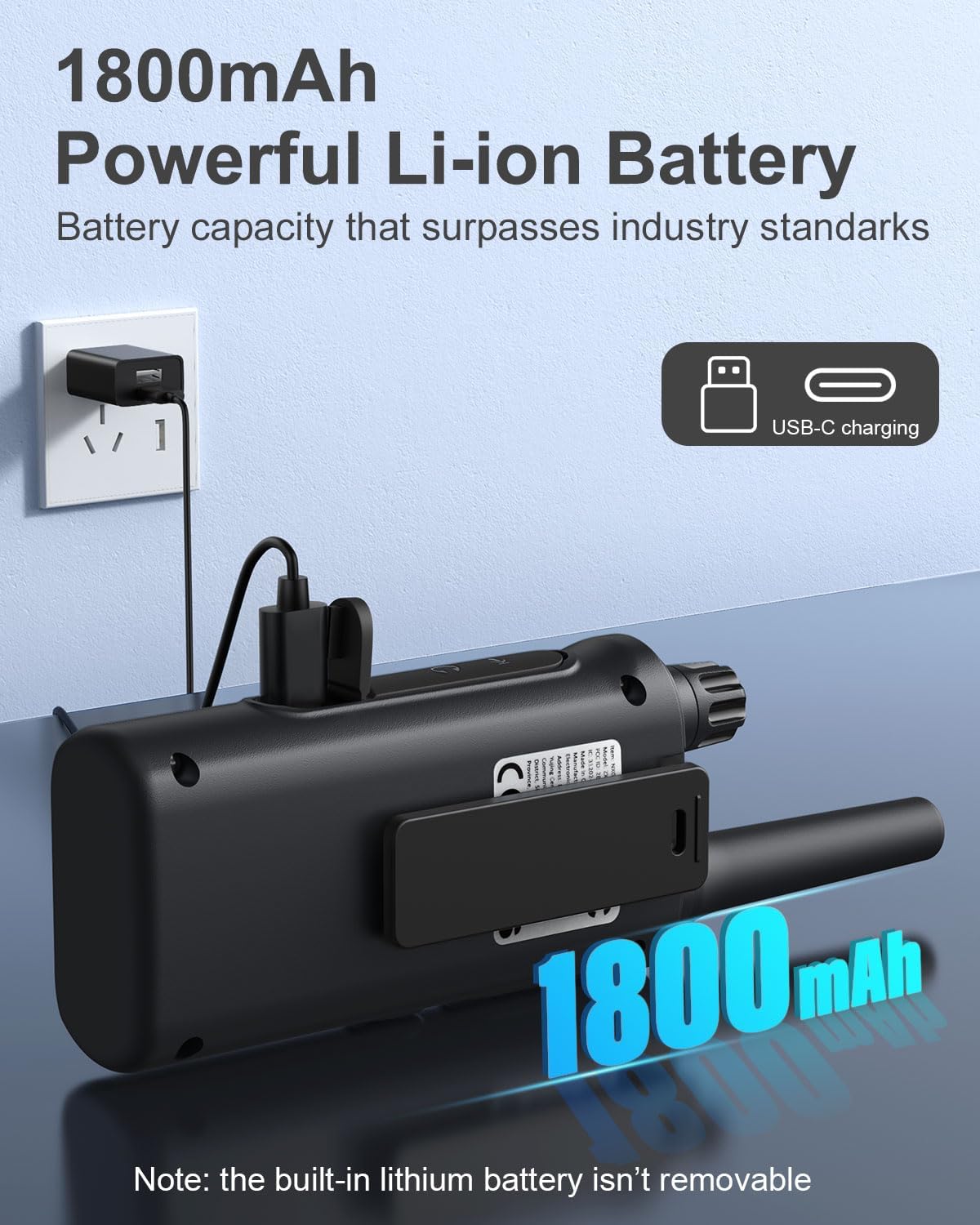
Figure 4.1: Walkie talkie connected to the charger via USB-C.
4.2. การเปิด/ปิดเครื่อง
To power on or off your walkie talkie, rotate the ปุ่มปรับระดับเสียง / เพาเวอร์ clockwise to turn on and counter-clockwise until it clicks to turn off.
5. คู่มือการใช้งาน
5.1. การเลือกช่อง
Your walkie talkies operate on 22 FRS channels. To communicate with another walkie talkie, both units must be set to the same channel and privacy code.
- With the walkie talkie powered on, press the เมนู button. The channel number on the LCD display will begin to flash.
- ใช้ Up or ลง ปุ่มเพื่อเลือกช่องที่ต้องการ (1-22)
- กดปุ่ม เมนู button again to confirm the channel selection or wait a few seconds for it to automatically set.
5.2. รหัสความเป็นส่วนตัว (CTCSS/DCS)
Privacy codes (CTCSS/DCS) help reduce interference from other users on the same channel by filtering out transmissions that do not use the same code. Your walkie talkies support 121 privacy codes.
- กดปุ่ม เมนู button twice. The privacy code number will begin to flash.
- ใช้ Up or ลง buttons to select your desired privacy code (0-121). Code 0 means no privacy code is active.
- กดปุ่ม เมนู button again to confirm, or wait for automatic setting.
5.3. การส่งและการรับ
หากต้องการส่งเสียงของคุณ ให้กดปุ่มค้างไว้ ปตท. (กดเพื่อพูด) button located on the side of the walkie talkie. Speak clearly into the microphone. Release the PTT button to listen for a response.
5.4. การปรับระดับเสียง
หมุน ปุ่มปรับระดับเสียง / เพาเวอร์ to adjust the listening volume. Clockwise increases volume, counter-clockwise decreases volume.
5.5. VOX/iVOX Function (Voice-Activated Transmission)
The VOX (Voice Operated eXchange) or iVOX function allows for hands-free communication. When activated, the radio transmits automatically when it detects your voice, without needing to press the PTT button. There are 9 levels of VOX sensitivity.

Figure 5.1: Illustration of walkie talkie use, including hands-free operation.
5.6. การแจ้งเตือนสภาพอากาศจาก NOAA
Your walkie talkie supports NOAA's National Weather Service, allowing it to scan 10 NOAA radio channels for weather alerts in your area. This feature is crucial for staying informed about severe weather conditions.

Figure 5.2: Walkie talkies providing NOAA weather alerts for various conditions.
5.7. ปุ่มกดล็อค
To prevent accidental changes to your settings, you can lock the keypad. Press and hold the Lock / NOAA button until a key icon appears on the LCD display. Repeat the process to unlock the keypad.
5.8. ไฟฉายในตัว
หากต้องการเปิดใช้งานไฟฉาย LED ในตัว ให้กดปุ่ม ปุ่มไฟฉาย. Press it again to turn off the flashlight.

Figure 5.3: Walkie talkie with its LED flashlight activated.
5.9. สแกนฟังก์ชั่น
The auto scan feature allows you to quickly find active channels. Press the Scan / Monitor button to initiate scanning. The radio will cycle through channels and stop on an active one. Press the button again to stop scanning.
5.10. เสียงเรียกเข้า
You can send an audible call alert to other radios on the same channel. Press the ปุ่มเสียงเรียกเข้า to transmit a distinct tone, signaling to others that you wish to communicate.
5.11. สถานการณ์การใช้งาน
These walkie talkies are versatile and suitable for a variety of environments:

Figure 5.4: Diverse applications for NXGKET Walkie Talkies.
For a visual demonstration of the walkie talkies in use, please refer to the following official product videos:
NXGKET walkie talkies, Perfect way to keep connection
This video demonstrates the effective communication range and clarity of the NXGKET walkie talkies, showcasing their ability to maintain connection in various environments.
NXGKET Walkie Talkies, Easy to Use
This video highlights the user-friendly interface and straightforward operation of the NXGKET walkie talkies, making them accessible for all ages.
6. การบำรุงรักษา
- การทำความสะอาด: ใช้แบบนุ่มๆamp ผ้าเช็ดทำความสะอาดภายนอกเครื่องวอล์คกี้ทอล์คกี้ ห้ามใช้สารเคมีรุนแรงหรือน้ำยาทำความสะอาดที่มีฤทธิ์กัดกร่อน
- พื้นที่จัดเก็บ: Store the walkie talkies in a cool, dry place when not in use. Avoid extreme temperatures and direct sunlight.
- การดูแลแบตเตอรี่ Although the batteries are built-in, it is recommended to fully charge them before long periods of storage and to recharge them every few months to maintain battery health. Avoid completely draining the battery frequently.
- ความต้านทานน้ำ: The product is noted as waterproof. However, avoid prolonged submersion or exposure to high-pressure water jets to ensure longevity.
7 การแก้ไขปัญหา
| ปัญหา | สาเหตุที่เป็นไปได้ | สารละลาย |
|---|---|---|
| ไม่มีไฟฟ้า | แบตเตอรี่หมด | ชาร์จวิทยุสื่อสารให้เต็ม |
| ไม่สามารถส่งหรือรับได้ | Different channel/privacy code; Out of range; Obstructions. | Ensure both radios are on the same channel and privacy code. Move closer to the other radio. Avoid large obstructions like buildings or dense foliage. |
| คุณภาพเสียงไม่ดีหรือมีสัญญาณรบกวน | Weak signal; Interference; Volume too low. | Move to an open area. Adjust volume. Check for sources of electrical interference. |
| ปุ่มกดไม่ตอบสนอง | ปุ่มกดถูกล็อค | Press and hold the Lock / NOAA button to unlock the keypad. |
| NOAA weather alert not working | Not in an area with NOAA broadcast; Feature not activated. | Ensure you are within range of a NOAA broadcast. Activate the NOAA scan feature. |
8. ข้อมูลจำเพาะ
| คุณสมบัติ | รายละเอียด |
|---|---|
| หมายเลขรุ่น | ZX-808 |
| น้ำหนักสินค้า | 4.2 ออนซ์ |
| ขนาดสินค้า | 0.9 x 2 x 7.6 นิ้ว |
| แบตเตอรี่ | 4 Lithium Ion batteries (included, built-in) |
| ประเภทจอภาพ | จอแอลซีดี |
| จำนวนช่องสัญญาณ | 22 ช่อง FRS |
| รหัสความเป็นส่วนตัว | 121 (CTCSS/DCS) |
| ช่วงความถี่ | 462.5625-462.7125 MHz, 467.5625-467.7125MHz, 462.5500-462.7250MHz |
| ระยะการสนทนาสูงสุด | Up to 5 Miles (terrain and conditions dependent) |
| คุณสมบัติพิเศษ | Digital Display, Voice Operated Transmission (VOX/iVOX), Adjustable Receiver Sensitivity, Rechargeable, NOAA Weather Scan and Alert, Auto Squelch, Auto Memory, Auto Scan, Low Battery Alert, Keypad Lock, Adjustable Power, Drop-protection, Built-in Flashlight |
| ระดับความต้านทานต่อน้ำ | กันน้ำ |
| ประเทศต้นกำเนิด | จีน |
9. การรับประกันและการสนับสนุน
NXGKET provides a รับประกัน 1 ปี for this product. Additionally, life-time reliable technical support is available to assist you with any questions or issues you may encounter. For support, please refer to the contact information provided with your purchase or visit the official NXGKET webเว็บไซต์.
Ask a question about this manual
Ask about setup, troubleshooting, compatibility, parts, safety, or missing instructions. Manuals+ will review the question and use this page’s manual context to help answer it.