
1. บทนำ
This manual provides detailed instructions for the setup, operation, and maintenance of your MAXDONE WiFi Bluetooth Trail Camera (Model PH820W). This advanced camera is designed for outdoor wildlife monitoring, hunting, and home/garden security, featuring high-resolution imaging, motion-activated recording, and convenient app control.
คุณสมบัติที่สำคัญ ได้แก่:
- 32 MP Photo Resolution and 1440p Video Resolution
- WiFi and Bluetooth Connectivity with 'TrailCam GO' App Control
- 0.2s Ultra-Fast Trigger Speed
- 940nm No-Glow Infrared Night Vision (up to 20 meters)
- IP66 Waterproof Rating for All-Weather Use
- Wide 100° Detection Angle
2. การตั้งค่า
2.1 เนื้อหาบรรจุภัณฑ์
ก่อนเริ่มต้น โปรดตรวจสอบให้แน่ใจว่ามีส่วนประกอบครบถ้วน:
- MAXDONE PH820W Trail Camera
- สายรัดสำหรับติดตั้ง
- สาย USB
- คู่มือการใช้งาน
- การ์ด SD ขนาด 32GB (อาจแตกต่างกันไปตามบรรจุภัณฑ์)
2.2 การติดตั้งแบตเตอรี่
The camera requires 4 or 8 AA batteries (not included). For optimal performance and extended battery life, it is recommended to use 8 high-quality alkaline or rechargeable AA batteries.
- Open the camera's latch and swing open the front cover.
- หาช่องใส่แบตเตอรี่ที่อยู่ด้านล่างของกล้อง
- Insert the AA batteries according to the polarity indicators (+/-) inside the compartment.
- ปิดฝาช่องใส่แบตเตอรี่ให้แน่น
การติดตั้งการ์ด SD 2.3 ตัว
The camera supports a Micro SD card up to 256GB. A 32GB SD card is often included.
- เมื่อเปิดกล้องแล้ว ให้หาช่องเสียบการ์ด SD ที่ด้านข้าง
- Insert the Micro SD card with the metal contacts facing down until it clicks into place.
- To remove, push the card in again until it clicks, then release.

Image: The MAXDONE PH820W Trail Camera, demonstrating its compact design, the included 32GB SD card, and a smartphone displaying the companion app for remote control and viewการไอเอ็นจี
2.4 การติดตั้งกล้อง
The camera can be mounted using the provided strap or a standard tripod thread.
- การติดตั้งสายรัด: Thread the strap through the slots on the back of the camera and secure it around a tree or pole. Adjust the strap to ensure the camera is stable and pointed towards the desired detection area.
- การติดตั้งขาตั้งกล้อง: Use the 1/4-inch tripod thread located at the bottom of the camera to attach it to a tripod or other compatible mounting accessory.
2.5 การติดตั้งและการเชื่อมต่อแอป
The 'TrailCam GO' app allows for remote control and media management.
- Download the 'TrailCam GO' app from your smartphone's app store (iOS or Android).
- เปิดใช้งาน Bluetooth และ Wi-Fi บนสมาร์ทโฟนของคุณ
- เปิดกล้อง
- Open the 'TrailCam GO' app and follow the on-screen instructions to connect to your camera via Bluetooth, then switch to Wi-Fi for faster data transfer.
- Note: The Wi-Fi connection range is approximately 14 meters (45 feet) and can be affected by obstructions.

Image: The MAXDONE Trail Camera securely mounted on a tree, illustrating its WiFi and Bluetooth connectivity for remote control and live viewใช้งานผ่านแอปพลิเคชันบนสมาร์ทโฟน
3. การใช้งานกล้อง
3.1 การเปิด/ปิดเครื่อง
To power on the camera, slide the mode switch to the 'ON' position. To power off, slide it to 'OFF'.
การเลือกโหมด 3.2
The camera offers three capture modes, configurable via the app:
- โหมดภาพถ่าย: บันทึกภาพนิ่งเมื่อตรวจจับการเคลื่อนไหว
- โหมดวิดีโอ: บันทึกวิดีโอเมื่อตรวจจับการเคลื่อนไหว
- โหมดภาพถ่าย + วิดีโอ: เมื่อตรวจจับการเคลื่อนไหวได้ จะบันทึกภาพนิ่งตามด้วยคลิปวิดีโอ
3.3 Adjusting Settings via App
The 'TrailCam GO' app allows you to customize various camera settings:
- ความละเอียดภาพ: Select from various resolutions up to 32 MP for detailed images.
- ความละเอียดวิดีโอ: Choose resolutions up to 1440p for clear and smooth video.
- ความเร็วทริกเกอร์: Set the ultra-fast 0.2s trigger speed to capture quick movements.
- ความไว PIR: Adjust the Passive Infrared (PIR) sensor sensitivity to control motion detection range and reduce false triggers.
- พื้นที่การตรวจจับ: Configure the 100° wide-angle detection area.
- ไทม์แลปส์: Set intervals for capturing images over time.
- การป้องกันด้วยรหัสผ่าน: Enable a password to protect camera settings.
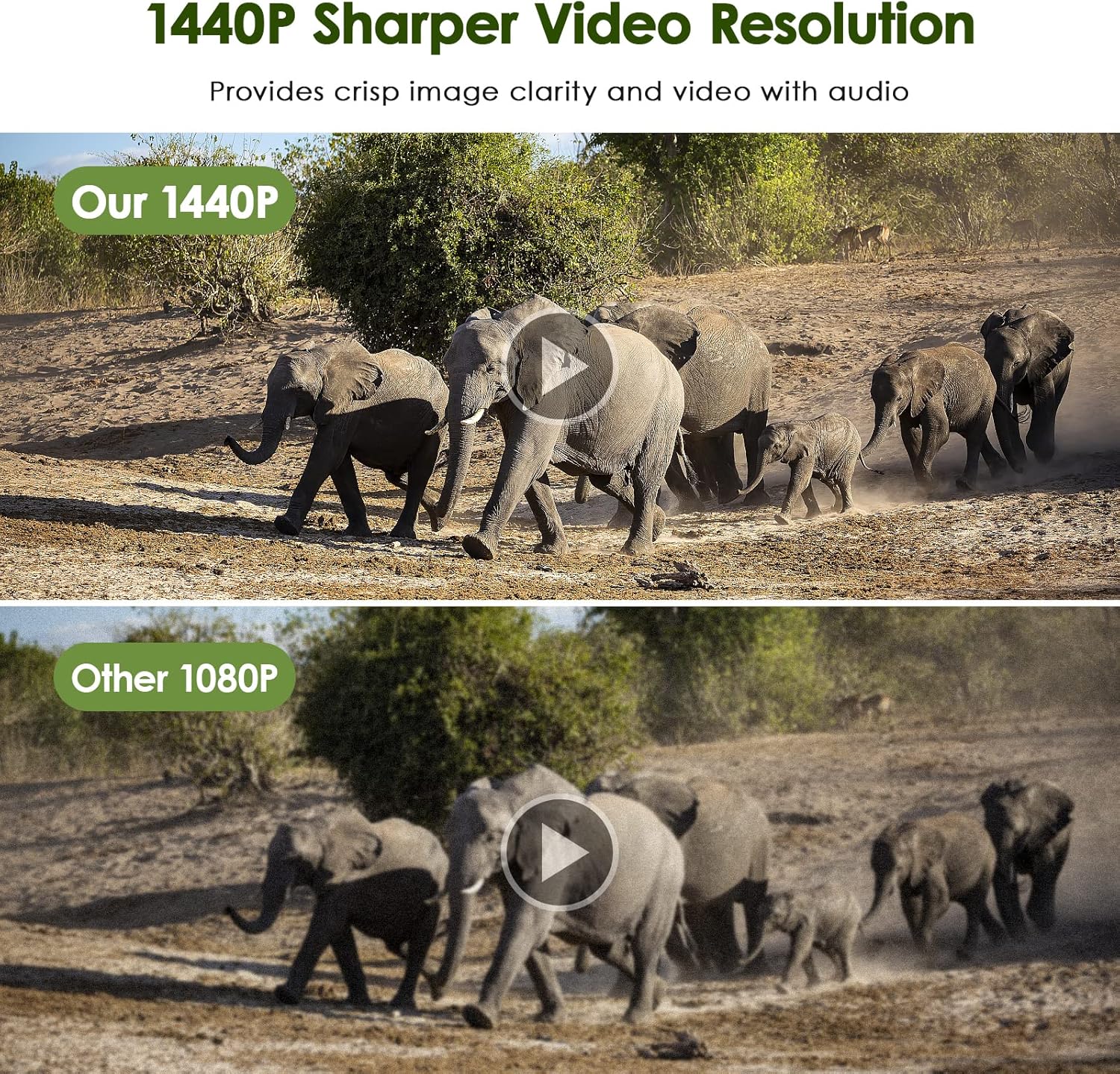
Image: The MAXDONE Trail Camera's rapid 0.2-second trigger speed is demonstrated by its ability to capture fast-moving subjects, such as a cheetah and a gazelle in motion, within its 100-degree wide-angle detection area.
3.4 ความสามารถในการมองเห็นในเวลากลางคืน
The camera is equipped with 26 pieces of 940nm infrared LEDs, providing clear black-and-white night vision without disturbing animals. The effective night vision range is up to 20 meters (65 feet).

Image: A visual comparison illustrating the MAXDONE Trail Camera's excellent night shooting capabilities, showing a ram in full color during the day and a clear black-and-white image at night, enabled by its 26-piece 940nm infrared LEDs and 0.2s trigger speed.
3.5 Viewing and Downloading Media
คุณสามารถทำได้ view and download captured photos and videos in two ways:
- Via 'TrailCam GO' App: Connect your smartphone to the camera via Wi-Fi using the app. You can browse, view, and download media directly to your phone without physically accessing the camera or SD card.
- ผ่านการ์ด SD: Remove the SD card from the camera and insert it into a computer or compatible card reader to access the files.

Image: A comparison demonstrating the superior clarity and detail of the MAXDONE Trail Camera's 32MP photo resolution compared to a 20MP camera, showcasing a field with cows.

Image: A comparison illustrating the enhanced sharpness and clarity of the MAXDONE Trail Camera's 1440p video resolution versus 1080p, featuring a herd of elephants.
4. การบำรุงรักษา
4.1 การทำความสะอาด
- Gently wipe the camera lens and PIR sensor window with a soft, lint-free cloth to remove dirt or smudges.
- ทำความสะอาดตัวกล้องด้วยสารกันบูดamp ผ้า. อย่าใช้สารเคมีที่รุนแรงหรือน้ำยาทำความสะอาดที่มีฤทธิ์กัดกร่อน
4.2 การเปลี่ยนแบตเตอรี่
Replace batteries when the low battery indicator appears on the camera's screen or in the app. Always replace all batteries at once with new ones of the same type and brand.
4.3 การจัดการการ์ด SD
- Regularly format the SD card using the camera's internal formatting function (accessible via the app) to ensure optimal performance and prevent data corruption.
- สำรองข้อมูลที่สำคัญ files from the SD card to a computer or cloud storage before formatting.
4.4 ระดับการกันน้ำ
The camera has an IP66 waterproof rating, making it resistant to dust and strong jets of water. While it is designed for outdoor use in various weather conditions, avoid submerging the camera in water.
5 การแก้ไขปัญหา
5.1 กล้องไม่เปิด
- ตรวจสอบให้แน่ใจว่าใส่แบตเตอรี่ถูกต้องและขั้วถูกด้าน
- Check battery charge level; replace with fresh batteries if low.
- Verify the mode switch is in the 'ON' position.
5.2 No Recordings Captured
- Check if the SD card is properly inserted and not full. Format the SD card if necessary.
- Adjust PIR sensitivity settings; increase if no motion is detected.
- ตรวจสอบให้แน่ใจว่ากล้องอยู่ในตำแหน่งที่ถูกต้องภายในระยะการตรวจจับ (สูงสุด 20 เมตร)
- Verify the camera is in the correct capture mode (Photo, Video, or Photo+Video).
5.3 คุณภาพของภาพ/วิดีโอไม่ดี
- Clean the camera lens and PIR sensor window.
- Ensure sufficient lighting during daytime recordings.
- สำหรับการใช้งานในเวลากลางคืน โปรดตรวจสอบให้แน่ใจว่าไม่มีสิ่งกีดขวางใดๆ บังแสง LED อินฟราเรด
- Check resolution settings in the app; set to higher values (32MP photo, 1440p video) for better quality.
5.4 ปัญหาการเชื่อมต่อแอป
- ตรวจสอบให้แน่ใจว่าเปิดใช้งาน Bluetooth และ Wi-Fi บนสมาร์ทโฟนของคุณแล้ว
- Make sure the camera is powered on and within the 14-meter Wi-Fi connection range.
- รีสตาร์ททั้งกล้องและสมาร์ทโฟนของคุณ
- Update the 'TrailCam GO' app to the latest version.
6. ข้อมูลจำเพาะ
| คุณสมบัติ | ข้อมูลจำเพาะ |
|---|---|
| หมายเลขรุ่น | PH820W |
| ความละเอียดของภาพ | สูงสุด 32 MP |
| ความละเอียดวิดีโอ | Up to 1440p (30 fps) |
| ความเร็วในการเรียก | 0.2 วินาที |
| มุมการตรวจจับ | 100 องศา |
| ช่วงการมองเห็นตอนกลางคืน | สูงถึง 20 เมตร (65 ฟุต) |
| ไฟ LED IR | LED อินฟราเรดแบบไม่เปล่งแสง 940 นาโนเมตร จำนวน 26 ชิ้น |
| ระดับการกันน้ำ | IP66 |
| การเชื่อมต่อ | ไวไฟ, บลูทูธ |
| อุปกรณ์ที่รองรับ | Smartphone (via 'TrailCam GO' app) |
| พื้นที่จัดเก็บ | การ์ด Micro SD (สูงสุด 256GB) |
| แหล่งพลังงาน | ใช้แบตเตอรี่ AA 4 หรือ 8 ก้อน (ไม่รวมอยู่ในชุด) |
| ขนาด (กว้าง x ยาว x สูง) | 18 x 11 x 12 ซม. |
| น้ำหนัก | 570 กรัม |
7. การรับประกันและการสนับสนุน
For warranty information and customer support, please refer to the documentation included with your product package or visit the official MAXDONE website. If you encounter any issues not covered in this manual, please contact MAXDONE customer service for assistance.