
1. สินค้าหมดview
The EsaSam M150s is an advanced Android 12 car stereo system featuring a 9-inch capacitive multi-touch screen. It integrates GPS navigation, Bluetooth 4.0, FM/AM radio, and multimedia playback capabilities. Designed specifically for Fiat Bravo models from 2007 to 2012, this unit enhances your vehicle's infotainment system with modern connectivity and features like Carplay, Android Auto, and Mirror Link.
Key features include HD 1080P video support, a 1024x600 resolution display, dual-zone function, and support for external devices such as a backup camera and USB storage.
2. เนื้อหาบรรจุภัณฑ์
ตรวจสอบว่าสินค้าทั้งหมดที่ระบุไว้ด้านล่างนี้รวมอยู่ในแพ็คเกจของคุณแล้ว หากมีสินค้าใดสูญหายหรือเสียหาย โปรดติดต่อฝ่ายสนับสนุนลูกค้า
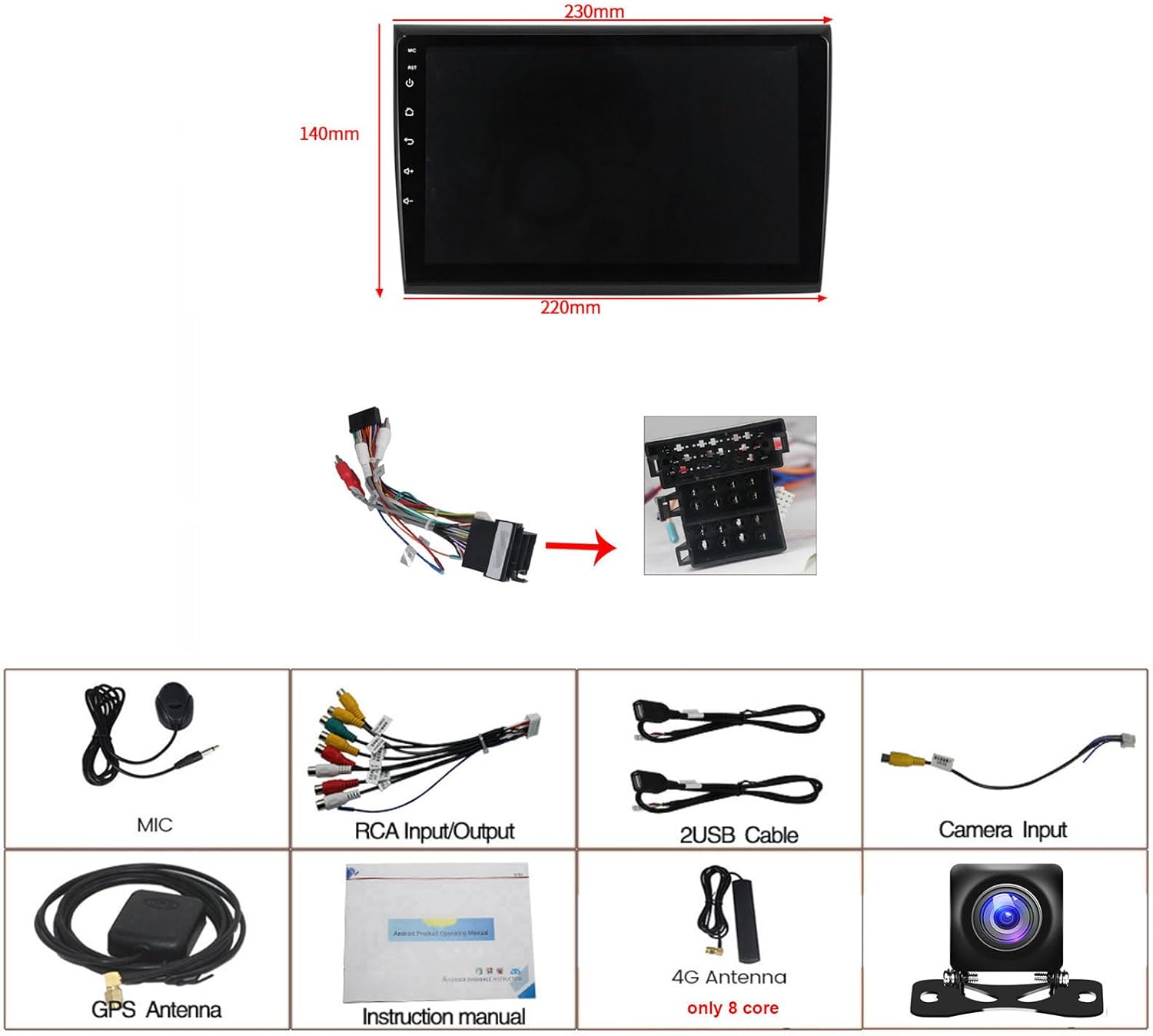
Image: Dimensions of the 9-inch car stereo unit (230mm top width, 220mm bottom width, 140mm height) and a visual representation of all included accessories.
- EsaSam M150s Car Stereo Unit
- Power Harness (specific for Fiat Bravo 2007-2012)
- ไมโครโฟนภายนอก
- AHD ด้านหลัง View กล้อง
- เสาอากาศ GPS
- สายอินพุต/เอาต์พุต RCA
- สายเคเบิล 2 x USB
- คู่มือการใช้งาน
- 4G Antenna (for 8-core models only, M150s is 4-core)
3. ความเข้ากันได้
This car stereo is designed for direct fitment in the following vehicle models:
- Fiat Bravo: 2007, 2008, 2009, 2010, 2011, 2012
Before installation, ensure your vehicle's dashboard opening matches the dimensions of the stereo unit. If unsure, consult a professional installer or contact customer support with a picture of your car's center console.
4. การตั้งค่าและการติดตั้ง
Professional installation is recommended. Disconnect the vehicle's battery before beginning installation to prevent electrical damage.
4.1 การตรวจสอบก่อนการติดตั้ง
Compare your original car stereo setup with the new unit. The image below illustrates a typical before and after installation scenario.

Image: Left panel shows the original Fiat Bravo dashboard with the factory radio. Right panel shows the same dashboard with the EsaSam 9-inch Android stereo installed, displaying its interface.
4.2 การเชื่อมต่อสายไฟ
Connect the provided power harness to the car stereo and the vehicle's wiring loom. Ensure all connections are secure. Refer to the wiring diagram in the included instruction manual for detailed pin assignments.
- สายรัดไฟฟ้า: Connects to vehicle's power, ground, and speaker wires.
- เสาอากาศ GPS: Connect to the GPS port on the back of the unit and mount in a location with a clear view ของท้องฟ้า (เช่น แผงหน้าปัด)
- สาย USB: Connect to the USB ports on the unit and route to a convenient location for external storage or device charging.
- AHD ด้านหลัง View กล้อง: Connect the camera's video output to the 'CAM IN' RCA port and its power to the vehicle's reverse light circuit.
- ไมโครโฟนภายนอก: Connect to the dedicated microphone input for improved call quality.
4.3 การตั้งค่าการควบคุมพวงมาลัย
To enable steering wheel controls, navigate to the system settings on the stereo. Locate the 'Steering Wheel Control' or 'Canbus Protocol' learning function. Follow the on-screen prompts to assign functions to your vehicle's steering wheel buttons.
4.4 Factory Password
For accessing certain advanced settings or factory reset options, the factory password for M150s models is 8888.
5. คู่มือการใช้งาน
5.1 ส่วนติดต่อผู้ใช้และการนำทางพื้นฐาน
Upon startup, the unit displays the main Android interface. Navigate through applications by touching the icons. Swipe gestures can be used for additional screens or menus.

Image: A collage demonstrating the Android operating system, Bluetooth connectivity, FM/AM radio interface, 1080P video playback, GPS navigation, Mirror Link functionality, and the reverse camera view.
5.2 วิทยุเอฟเอ็ม/เอเอ็ม
Access the 'Radio' application from the main menu. You can scan for stations, save presets, and switch between FM and AM bands. The radio supports frequencies: AM: 520-1700 Hz, FM: 87.5-108.5MHz.
5.3 การเชื่อมต่อบลูทูธ
Pair your smartphone via Bluetooth 4.0 for hands-free calling and audio streaming. Go to 'Settings' > 'Bluetooth', enable Bluetooth on your phone, search for the stereo's device name, and pair. You can synchronize your phone's contact list for easy dialing.
5.4 ระบบนำทาง GPS
The unit has a built-in GPS module. It supports both online navigation apps (e.g., Google Maps, Waze) and offline maps. For offline maps, connect to Wi-Fi to download map data for your region. The dual-zone function allows you to listen to music while navigation instructions are active.
5.5 การเล่นสื่อ USB/SD
Connect USB drives or SD cards (via adapter, if applicable) to play audio and video files. The unit supports various formats and allows you to manage files through the built-in file ผู้จัดการ.
5.6 การเชื่อมโยงมิเรอร์
The Mirror Link function allows you to display your smartphone's screen on the car stereo. This feature supports both Android and iOS devices. Follow the instructions within the 'Mirror Link' app on the stereo to establish a connection.
6. คุณสมบัติขั้นสูง
6.1 CarPlay และ Android Auto
The M150s supports both Wireless CarPlay and Wired Android Auto. Connect your iPhone via Bluetooth/Wi-Fi for CarPlay or your Android phone via USB for Android Auto to access compatible apps, navigation, and voice assistants directly from the stereo's screen.

Image: A collage illustrating the split-screen function, steering wheel control integration, the optional cooling fan (for M200s-M700s models), and the interfaces for Wireless CarPlay and USB Cable for Android Auto.
6.2 ฟังก์ชันแบ่งหน้าจอ
Utilize the split-screen feature to run two applications simultaneously, such as navigation and music playback. This improves multitasking and convenience while driving.
6.3 Reverse Camera Input
When the vehicle is shifted into reverse, the stereo automatically displays the feed from the connected AHD rear view กล้องถ่ายภาพให้ภาพที่ชัดเจน view ของพื้นที่ด้านหลังรถของคุณ เพื่อการจอดรถและการขับขี่ที่ปลอดภัยยิ่งขึ้น
6.4 ADAS DVR Support (Optional)
The unit supports an optional ADAS (Advanced Driver-Assistance Systems) DVR. When connected, this system can provide features like front vehicle distance prediction, anti-collision warnings, and lane departure warnings, enhancing driving safety.

Image: A collage displaying different UI interfaces (UI05, UI13, UI17, UI22), the ADAS DVR system with front collision and lane departure warnings, the DSP sound equalizer settings, and the 4G LTE connection with a SIM card slot.
6.5 DSP Processor (Digital Sound Processor)
The built-in DSP allows for advanced audio tuning, including equalizer settings, sound effects, and music styles (pop, rock, jazz, etc.), to optimize your in-car audio experience.
6.6 4G LTE Connectivity (Optional)
For models M200s, M300s, M400s, M500s, M600s, M700s, 4G LTE connectivity is supported via a SIM card. This enables online music streaming, video playback, and internet access directly from the stereo. The M150s model does not support 4G LTE.
6.7 5GHz WiFi Support
The unit supports 5GHz WiFi (802.11 b/g/n) for faster and more stable wireless connections, particularly beneficial for online navigation and app downloads.

Image: A collage illustrating the optional 360 panoramic camera system, 5GHz WiFi support, a comparison between 960x540 and 1280x720 resolutions, and a screenshot of the Android 11 system information.
6.8 360 Panoramic Camera (Optional)
The stereo supports an optional 360-degree panoramic camera system (requires additional purchase and installation of four cameras). This system provides a comprehensive view around the vehicle, significantly improving driving and parking safety.
7 การแก้ไขปัญหา
- ไม่มีไฟฟ้า: ตรวจสอบการเชื่อมต่อสายไฟและฟิวส์รถยนต์ทั้งหมด ตรวจสอบให้แน่ใจว่าสวิตช์กุญแจเปิดอยู่
- ไม่มีเสียง: ตรวจสอบการเชื่อมต่อลำโพง ตรวจสอบระดับเสียงและการตั้งค่าเอาต์พุตเสียง
- สัญญาณ GPS สูญหาย: ตรวจสอบให้แน่ใจว่าเสาอากาศ GPS เชื่อมต่ออย่างถูกต้องและติดตั้งในตำแหน่งที่มองเห็นได้ชัดเจน view ของท้องฟ้า
- ปัญหาการเชื่อมต่อบลูทูธ: ตรวจสอบให้แน่ใจว่าได้เปิดใช้งานบลูทูธทั้งบนเครื่องเสียงและโทรศัพท์ของคุณแล้ว ลองยกเลิกการจับคู่และจับคู่ใหม่อีกครั้ง
- การควบคุมพวงมาลัยไม่ทำงาน: Re-enter the steering wheel control learning menu in settings and re-assign functions. Check CANbus connections if applicable.
- ระบบทำงานช้าหรือไม่ตอบสนอง: Try restarting the unit. If issues persist, a factory reset may be necessary (Factory Password: 8888). Note that a factory reset will erase all user data and settings.
- กล้องสำรองไม่แสดง: Check the camera's power and video connections. Ensure the camera is properly wired to the reverse light trigger.
8. ข้อมูลจำเพาะ
| คุณสมบัติ | ข้อมูลจำเพาะ |
|---|---|
| แบบอย่าง | เอ็ม150 |
| ระบบปฏิบัติการ | แอนดรอยด์ 12 |
| ขนาดหน้าจอ | 9 นิ้ว |
| ความละเอียดหน้าจอ | 1024 x 600 (supports 1920x1080 video playback) |
| ประเภทหน้าจอสัมผัส | มัลติทัชแบบ Capacitive |
| โปรเซสเซอร์ | ควอดคอร์ |
| แรม | 1GB / 2GB (depending on specific M150s variant) |
| รอม | 16GB / 32GB (depending on specific M150s variant) |
| เวอร์ชันบลูทูธ | 4.0 |
| ไวไฟ | Built-in (supports 5GHz 802.11 b/g/n) |
| จีพีเอส | Built-in GPS module, supports online/offline maps |
| เครื่องรับวิทยุ | FM/AM (FM: 87.5-108.5MHz, AM: 520-1700 Hz) |
| เอาท์พุตวิดีโอ | Full RCA Output |
| เอาท์พุตเสียง | Subwoofer audio output, various sound effects |
| การเชื่อมต่อ | USB, AUX-IN, Camera Input, DVR Input |
| ส่วนประกอบที่รวมอยู่ | External Microphone, AHD Rear View Camera, GPS Navigation System |
9. การรับประกันและการสนับสนุน
For warranty information, technical support, or service inquiries, please refer to the contact details provided with your purchase documentation or visit the official EsaSam webไซต์นี้ โปรดเก็บหลักฐานการซื้อไว้เพื่อใช้ยืนยันการรับประกัน