
การแนะนำ
The BoxWave AquaProof USB Keyboard is designed for environments where hygiene and durability are paramount. This keyboard features a waterproof design, allowing for easy cleaning and disinfection, ensuring a healthy and functional workspace. Its robust construction includes rubberized gaskets and UV coating to protect internal electronics, and high-quality mechanical switches built for longevity.

Image: The BoxWave AquaProof USB Keyboard, a full-sized black keyboard, is shown alongside a silver laptop, illustrating its intended use as an external peripheral.
การตั้งค่า
- แกะคีย์บอร์ดออก: Carefully remove the AquaProof USB Keyboard from its packaging.
- เชื่อมต่อกับอุปกรณ์: Locate an available USB port on your computer or device. The keyboard features a 6-foot long USB cable. Insert the USB-A connector into the USB port.
- ปลั๊กแอนด์เพลย์: The keyboard utilizes a universal Plug-and-Play USB protocol, meaning no additional drivers are typically required. Your operating system should automatically detect and configure the keyboard.
- Utilize Extension Ports (Optional): The keyboard includes two extra USB extension ports. These can be used to connect additional USB devices, such as a mouse or a USB flash drive, directly through the keyboard.

Image: A detailed diagram of the BoxWave AquaProof USB Keyboard highlighting various features including its 1.8M USB cable, plug-and-play capability, and full-size layout, demonstrating its ease of setup.
การดำเนินการ
The AquaProof USB Keyboard functions as a standard full-size keyboard, compatible with Windows 7/8, Windows 9/10, and Mac operating systems. It features a 104/105 key layout, including a numeric keypad and function keys.
- การพิมพ์: The keyboard is equipped with silent keycaps and high-quality mechanical switches designed for a comfortable and durable typing experience, rated for over 8 million clicks.
- ขาปรับเอียงได้: For ergonomic comfort, the keyboard features adjustable tilt legs on its underside. Extend these legs to raise the back of the keyboard to your preferred typing angle.
- เท้ากันลื่น: Rubberized feet ensure the keyboard remains stable and does not move during use.
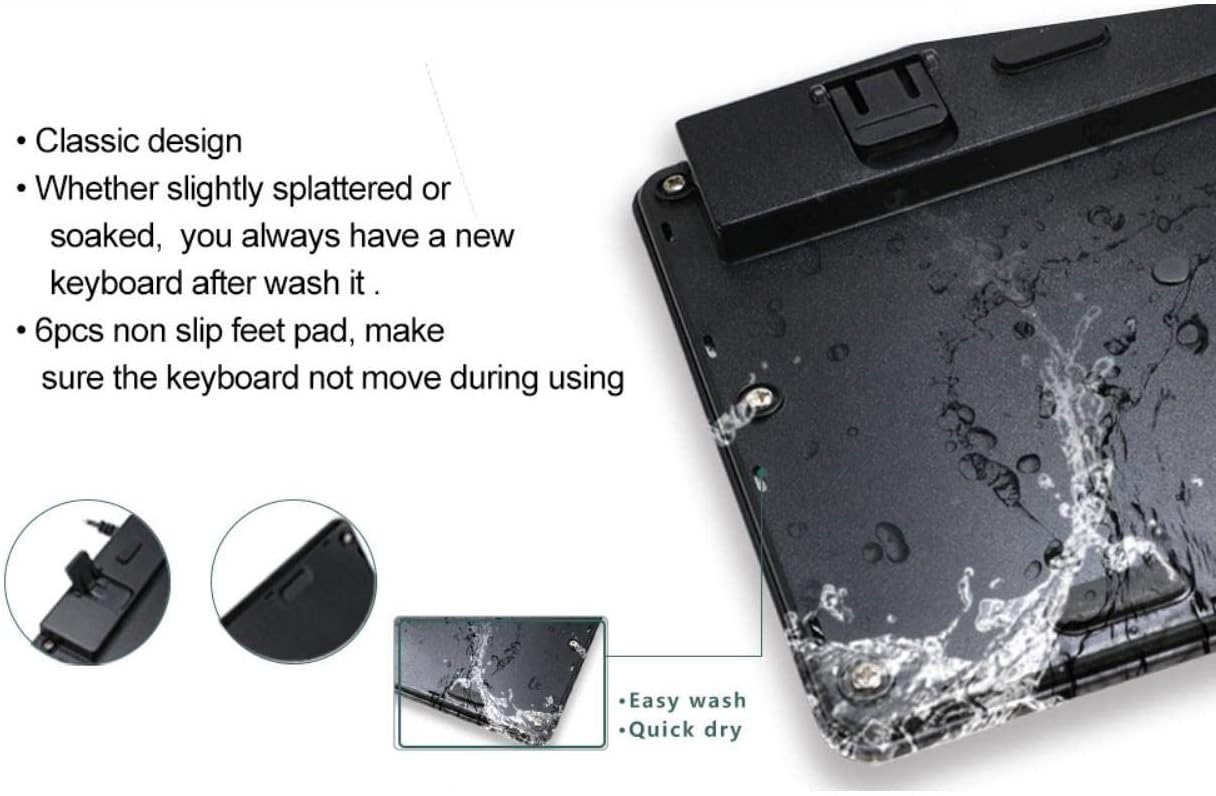
Image: The underside of the BoxWave AquaProof USB Keyboard, illustrating the adjustable tilt legs and non-slip feet, which contribute to a stable and customizable typing experience.
การซ่อมบำรุง
One of the key features of the BoxWave AquaProof USB Keyboard is its ability to be easily cleaned, promoting a hygienic workspace. The keyboard is designed to be washable and waterproof.
- ขั้นตอนการทำความสะอาด: You can spray the keyboard with disinfectant, wipe it down, or even wash it with soap and water. The rubberized gaskets and UV coating protect the internal electronics from water damage.
- การอบแห้ง: After washing, ensure the keyboard is thoroughly dried before prolonged use. Its design facilitates quick drying.
- หลีกเลี่ยงสารเคมีที่รุนแรง: While resistant to water and common disinfectants, avoid using abrasive cleaners or strong solvents that could damage the keycap legends or the UV coating.
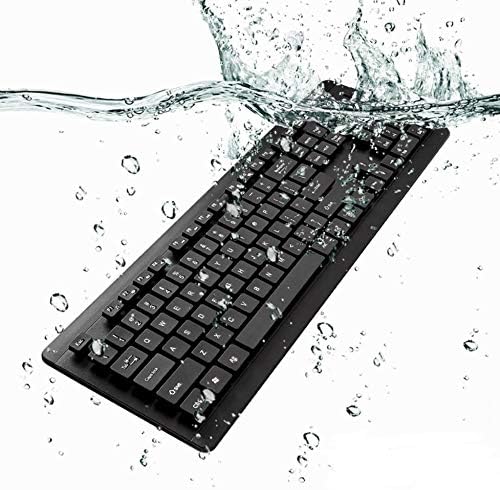
Image: The BoxWave AquaProof USB Keyboard is shown partially submerged in water, with splashes, demonstrating its waterproof capability for easy cleaning.

Image: A hand is shown holding the BoxWave AquaProof USB Keyboard under a running water faucet in a sink, illustrating the practical application of its washable feature.
การแก้ไขปัญหา
If you encounter any issues with your BoxWave AquaProof USB Keyboard, please consider the following common troubleshooting steps:
- แป้นพิมพ์ไม่ตอบสนอง:
- Ensure the USB cable is securely plugged into a functioning USB port on your device.
- ลองเสียบคีย์บอร์ดเข้ากับพอร์ต USB อื่น
- รีสตาร์ทเครื่องคอมพิวเตอร์หรืออุปกรณ์ของคุณ
- หากใช้ฮับ USB ให้ลองเชื่อมต่อคีย์บอร์ดเข้ากับคอมพิวเตอร์โดยตรง
- ปุ่มกดใช้งานไม่ได้ตามปกติ:
- Ensure the keyboard is clean and free of debris. If recently washed, ensure it is completely dry.
- Test the keyboard on another computer to determine if the issue is with the keyboard or the original device.
If problems persist after attempting these steps, please refer to the "Warranty & Support" section for further assistance.
ข้อมูลจำเพาะ
| คุณสมบัติ | รายละเอียด |
|---|---|
| ชื่อรุ่น | AquaProof USB Keyboard |
| ยี่ห้อ | บ็อกซ์เวฟ |
| สี | สีดำเจ็ทแบล็ค |
| เทคโนโลยีการเชื่อมต่อ | ยูเอสบี-เอ |
| อินพุตอินเทอร์เฟซมนุษย์ | แป้นพิมพ์ |
| ขนาด (กว้าง x ยาว x สูง) | 450 x 144 x 27 มม. (17.7 x 5.7 x 1.1 นิ้ว) |
| น้ำหนักสินค้า | 1.12 ปอนด์ (ประมาณ 508 กรัม) |
| ความยาวสายเคเบิล | 6 ฟุต (ประมาณ 1.8 เมตร) |
| Key Switch Durability | ยอดคลิกมากกว่า 8 ล้านครั้ง |
| คุณสมบัติพิเศษ | Washable, Waterproof, UV Coated, Adjustable Tilt Legs, Non-slip Feet, 2 Extra USB Extension Ports |
| ความเข้ากันได้ | Windows 7/8, Windows 9/10, Mac (Compatible with AGB Orion RA-0301) |

Image: The BoxWave AquaProof USB Keyboard is displayed with its key dimensions (length 450mm, width 144mm) and weight (620g) clearly indicated, providing a visual reference for its size.
การรับประกันและการสนับสนุน
BoxWave stands behind the quality of its products. For support regarding your AquaProof USB Keyboard, please contact BoxWave Corporation directly.
- การสนับสนุนด้านเทคนิค: Limited third-party technical support is included for compatibility with devices like the AGB Orion RA-0301 (up to 3 inquiries via electronic messaging). Please note, BoxWave is not affiliated with or endorsed by AGB.
- ข้อมูลติดต่อ: For general product inquiries, warranty claims, or further technical assistance, please visit the official BoxWave website or contact their customer service department. Refer to your product packaging or the BoxWave webเว็บไซต์สำหรับรายละเอียดการติดต่อล่าสุด