
การแนะนำ
This manual provides essential information for the proper use and maintenance of your realme 11 5G smartphone. Please read this guide thoroughly before using your device to ensure optimal performance and longevity. Keep this manual for future reference.
เนื้อหาแพ็คเกจ
ตรวจสอบว่าแพ็คเกจของคุณมีรายการต่อไปนี้:
- สมาร์ทโฟน realme 11 5G
- เครื่องชาร์จ
- USB Type-C Cable (typically included with charger)
- เครื่องมือถอดซิม (โดยทั่วไปมีมาให้)
- Quick Start Guide (typically included)
- Safety Information and Warranty Card (typically included)
If any items are missing or damaged, please contact your retailer or realme customer support.
การจัดวางอุปกรณ์
Familiarize yourself with the physical components of your realme 11 5G.
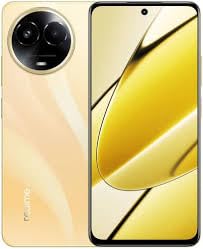
ภาพ: เหนือview of the realme 11 5G smartphone. This image displays the general form factor of the device, highlighting its sleek design. Note that this is a general representation; specific button and port placements are detailed below.
- กล้องหน้า: ตั้งอยู่บริเวณตรงกลางด้านบนของจอแสดงผล
- หูฟัง: Positioned above the front camera.
- ปุ่มปรับระดับเสียง: Typically on the left side of the device.
- ปุ่มเปิด/ปิด: โดยทั่วไปจะอยู่ทางด้านขวา และมักจะรวมอยู่กับเซ็นเซอร์สแกนลายนิ้วมือ
- ถาดใส่การ์ด SIM/microSD: Located on the side, accessible with the SIM ejector tool.
- พอร์ต USB Type-C: ด้านล่างสำหรับชาร์จไฟและโอนข้อมูล
- ผู้บรรยาย: ตั้งอยู่บริเวณด้านล่าง
- โมดูลกล้องหลัก: On the rear, housing the 108MP primary and 2MP secondary cameras.
การตั้งค่า
1. Insert SIM and microSD Card
- ค้นหาถาดใส่การ์ด SIM ที่ด้านข้างอุปกรณ์ของคุณ
- ใส่เครื่องมือถอดซิมเข้าไปในรูเล็ก ๆ ข้างถาดและกดเบา ๆ จนถาดหลุดออกมา
- ใส่การ์ด Nano-SIM และ/หรือการ์ด microSD ลงในช่องที่กำหนดบนถาด ตรวจสอบให้แน่ใจว่าหน้าสัมผัสสีทองคว่ำลง
- ใส่ถาดกลับเข้าไปในโทรศัพท์อย่างระมัดระวัง
2. เปิดเครื่องครั้งแรก
- กดปุ่มเปิด/ปิดค้างไว้จนกว่าโลโก้ realme จะปรากฏขึ้น
- ปฏิบัติตามคำแนะนำบนหน้าจอเพื่อทำการตั้งค่าเบื้องต้นให้เสร็จสมบูรณ์ รวมถึงการเลือกภาษา การเชื่อมต่อ Wi-Fi การตั้งค่าบัญชี Google และการตั้งค่าความปลอดภัย
3. การชาร์จแบตเตอรี่
- Connect the USB Type-C cable to the phone's charging port and the other end to the provided charger.
- เสียบที่ชาร์จเข้ากับเต้ารับไฟฟ้า
- ไฟแสดงสถานะการชาร์จจะปรากฏบนหน้าจอ
คำแนะนำการใช้งาน
Power On/Off/Restart
- เปิดเครื่อง: กดปุ่มเปิด/ปิดค้างไว้จนกระทั่งอุปกรณ์สั่นและโลโก้ realme ปรากฏขึ้น
- หมดแรง: กดปุ่มเปิด/ปิดค้างไว้สองสามวินาที จากนั้นแตะ "ปิดเครื่อง" บนหน้าจอ
- เริ่มต้นใหม่อีกครั้ง: กดปุ่มเปิด/ปิดค้างไว้สักสองสามวินาที จากนั้นแตะ "รีสตาร์ท" บนหน้าจอ
การจดจำลายนิ้วมือ
- To set up fingerprint unlock, go to Settings > Password & Security > Fingerprint.
- ปฏิบัติตามคำแนะนำบนหน้าจอเพื่อลงทะเบียนลายนิ้วมือของคุณ
- To unlock, place your registered finger on the fingerprint sensor (integrated with the Power button or in-display).
การใช้กล้อง
- เปิดแอปกล้องจากหน้าจอหลักหรือลิ้นชักแอปของคุณ
- เลือกโหมดที่คุณต้องการ (ภาพถ่าย, วิดีโอ, ภาพบุคคล, กลางคืน ฯลฯ)
- แตะปุ่มชัตเตอร์เพื่อถ่ายภาพหรือเริ่ม/หยุดการบันทึกวิดีโอ
- Use pinch-to-zoom gestures to adjust zoom levels.
- Tap the switch icon to toggle between front and rear cameras.
การเชื่อมต่อ
- ไวไฟ : ไปที่ การตั้งค่า > Wi-Fi, turn on Wi-Fi, and select your network. Enter the password if required.
- บลูทูธ: ไปที่ การตั้งค่า > บลูทูธ, turn on Bluetooth, and pair with available devices.
- NFC: For contactless payments and data transfer, enable NFC in Settings > Connection & Sharing > NFC.
- ข้อมูลมือถือ (5G/4G/3G): ตรวจสอบให้แน่ใจว่าซิมการ์ดของคุณเปิดใช้งานอยู่และเปิดใช้งานข้อมูลมือถือแล้ว การตั้งค่า > เครือข่ายมือถือ.
การซ่อมบำรุง
การอัพเดตซอฟต์แวร์
- ตรวจสอบการอัปเดตซอฟต์แวร์เป็นประจำเพื่อให้แน่ใจว่าอุปกรณ์ของคุณมีฟีเจอร์และแพตช์ความปลอดภัยล่าสุด ไปที่ การตั้งค่า > เกี่ยวกับอุปกรณ์ > อัปเดต.
- Connect to a stable Wi-Fi network and ensure sufficient battery charge before performing updates.
ทำความสะอาดอุปกรณ์ของคุณ
- ใช้ผ้านุ่มที่ไม่เป็นขุยในการทำความสะอาดหน้าจอและตัวเครื่องโทรศัพท์
- หลีกเลี่ยงการใช้สารเคมีรุนแรง วัสดุที่มีฤทธิ์กัดกร่อน หรือสเปรย์แอโรซอล
- สำหรับรอยเปื้อนฝังแน่น ให้เช็ดออกเล็กน้อยampเทน้ำลงบนผ้า
การดูแลแบตเตอรี่
- หลีกเลี่ยงการให้อุปกรณ์สัมผัสกับอุณหภูมิที่สูงเกินไป
- ใช้เฉพาะที่ชาร์จและสายเคเบิลดั้งเดิมที่ให้มาพร้อมกับอุปกรณ์ของคุณเท่านั้น
- อย่าปล่อยให้แบตเตอรี่หมดเกลี้ยงบ่อยๆ การชาร์จเพียงบางส่วนโดยทั่วไปแล้วจะดีกว่าสำหรับแบตเตอรี่ลิเธียมไอออน
การแก้ไขปัญหา
| ปัญหา | สารละลาย |
|---|---|
| อุปกรณ์ไม่เปิดเครื่อง | Ensure the battery is charged. Connect the charger and wait a few minutes before attempting to power on again. If unresponsive, try a forced restart (usually by holding Power and Volume Down buttons simultaneously for 10-15 seconds). |
| แอปขัดข้องหรือค้าง | ปิดแอปที่มีปัญหาแล้วเปิดใหม่อีกครั้ง ล้างแคชของแอป (การตั้งค่า > แอป > [ชื่อแอป] > ที่เก็บข้อมูล > ล้างแคช). If the issue persists, restart the device. |
| Poor network signal or no connectivity. | Check if Airplane Mode is off. Ensure your SIM card is properly inserted. Try restarting the device. If the issue persists, contact your network provider. |
| เซ็นเซอร์ลายนิ้วมือไม่ทำงาน | Ensure your finger and the sensor are clean and dry. Re-register your fingerprint in settings. If the issue continues, try restarting the device. |
หากต้องการความช่วยเหลือเพิ่มเติม โปรดติดต่อฝ่ายสนับสนุนอย่างเป็นทางการของ realme webเว็บไซต์หรือติดต่อฝ่ายบริการลูกค้า
ข้อมูลจำเพาะ
| คุณสมบัติ | รายละเอียด |
|---|---|
| แบบอย่าง | เรียลเม 11 5G |
| โปรเซสเซอร์ | Octa-core MediaTek Dimensity 6100+ |
| แรม | 8GB |
| การจัดเก็บข้อมูลภายใน | 128GB (expandable via microSD with dedicated slot) |
| แสดง | 6.72-inch FHD+ (2400x1080) Touchscreen, 120 Hz Refresh Rate |
| กล้องหลัง | 108-megapixel (f/1.75) primary + 2-megapixel (f/2.4) depth sensor |
| กล้องหน้า | 16-megapixel (f/2.45) |
| ระบบปฏิบัติการ | Android 13 with Realme UI 4.0 |
| แบตเตอรี่ | ลิเธียมไอออน 5000 mAh |
| การรองรับซิม | นาโนซิมคู่ |
| การเชื่อมต่อ | Wi-Fi, GPS, Bluetooth v5.20, NFC, USB Type-C, 3G, 4G, 5G |
| เซ็นเซอร์ | Accelerometer, Ambient Light, Compass/Magnetometer, Gyroscope, Proximity, In-display Fingerprint |
| Dimensions (HxWxT) | 165.70 x 76.00 x 8.05 มม. |
| น้ำหนัก | 190 กรัม |
| ความต้านทานต่อน้ำ | ทนน้ำ |
ข้อมูลด้านความปลอดภัย
โปรดปฏิบัติตามคำแนะนำด้านความปลอดภัยต่อไปนี้ เพื่อป้องกันความเสียหายต่ออุปกรณ์ของคุณหรือการบาดเจ็บต่อตัวคุณเอง:
- ห้ามถอดประกอบ ซ่อมแซม หรือดัดแปลงอุปกรณ์
- ใช้เฉพาะเครื่องชาร์จและอุปกรณ์เสริมที่ได้รับการรับรองจาก realme เท่านั้น
- หลีกเลี่ยงการสัมผัสอุปกรณ์ในอุณหภูมิที่สูงหรือต่ำเกินไป แสงแดดโดยตรง หรือไฟไหม้
- อย่าวางเครื่องไว้ใกล้สนามแม่เหล็กแรงสูง
- เก็บอุปกรณ์และอุปกรณ์เสริมให้พ้นมือเด็ก
- ทิ้งอุปกรณ์และแบตเตอรี่อย่างถูกวิธีตามระเบียบข้อบังคับท้องถิ่น
การรับประกันและการสนับสนุน
Your realme 11 5G device comes with a limited warranty. Please refer to the warranty card included in your package for detailed terms and conditions. You can also visit the official realme webเว็บไซต์สำหรับข้อมูลการรับประกันและลงทะเบียนผลิตภัณฑ์ของคุณ
For technical support, troubleshooting, or service inquiries, please contact realme customer service through their official channels. You may need your device's serial number or proof of purchase.
Official realme Support: https://www.realme.com/in/support


