
1. บทนำ
The DATOUBOSS 12V 2000W Pure Sine Wave Power Inverter is designed to convert 12V DC battery power into stable 220V/230V AC household power. This device is ideal for powering various electronic appliances and tools in off-grid settings, such as RVs, camping, trucks, and remote homes. Its pure sine wave output ensures compatibility with sensitive electronics, providing clean and reliable power.
This manual provides essential information for the safe installation, operation, and maintenance of your inverter. Please read it thoroughly before use.

Image: Illustration of pure sine wave benefits, highlighting clean power supply and reduced interference.
2. คำแนะนำด้านความปลอดภัย
โปรดปฏิบัติตามข้อควรระวังด้านความปลอดภัยต่อไปนี้เสมอ เพื่อป้องกันการบาดเจ็บหรือความเสียหายต่ออินเวอร์เตอร์และอุปกรณ์ที่เชื่อมต่อ:
- การระบายอากาศ : ตรวจสอบให้แน่ใจว่ามีการระบายอากาศที่เพียงพอรอบๆ อินเวอร์เตอร์ อย่าปิดกั้นช่องระบายความร้อน
- สิ่งแวดล้อม: Install the inverter in a dry, cool, and dust-free environment. Avoid direct sunlight, heat sources, and flammable materials.
- การสัมผัสน้ำ: Do not expose the inverter to water, rain, or moisture.
- การเชื่อมต่อ: Always connect the inverter to a 12V DC battery system. Ensure correct polarity (red to positive, black to negative) to prevent damage.
- การต่อลงดิน: Properly ground the inverter chassis to a suitable earth ground.
- ความจุในการรับน้ำหนัก: ห้ามใช้กำลังไฟเกินพิกัดของอินเวอร์เตอร์ (2000 วัตต์ต่อเนื่อง, 4000 วัตต์สูงสุด) การใช้งานเกินกำลังอาจทำให้เกิดความเสียหายหรือไฟไหม้ได้
- เด็ก: เก็บอินเวอร์เตอร์ให้พ้นมือเด็ก
- การซ่อมบำรุง: เฉพาะบุคลากรที่มีคุณสมบัติเหมาะสมเท่านั้นที่ควรดำเนินการบำรุงรักษาหรือซ่อมแซม
3. เนื้อหาบรรจุภัณฑ์
ตรวจสอบว่ามีรายการทั้งหมดอยู่ในแพ็คเกจของคุณ:
- DATOUBOSS 12V 2000W Pure Sine Wave Power Inverter
- Pair of DC Battery Cables (Red for Positive, Black for Negative)
- Remote Control with Connection Cable
- สกรูยึดและพุกยึดผนัง
- คู่มือการใช้งาน (เอกสารนี้)

Image: The DATOUBOSS 12V 2000W Pure Sine Wave Power Inverter shown with its included battery cables and remote control unit.
4. สินค้าหมดview
Familiarize yourself with the inverter's components and interfaces:
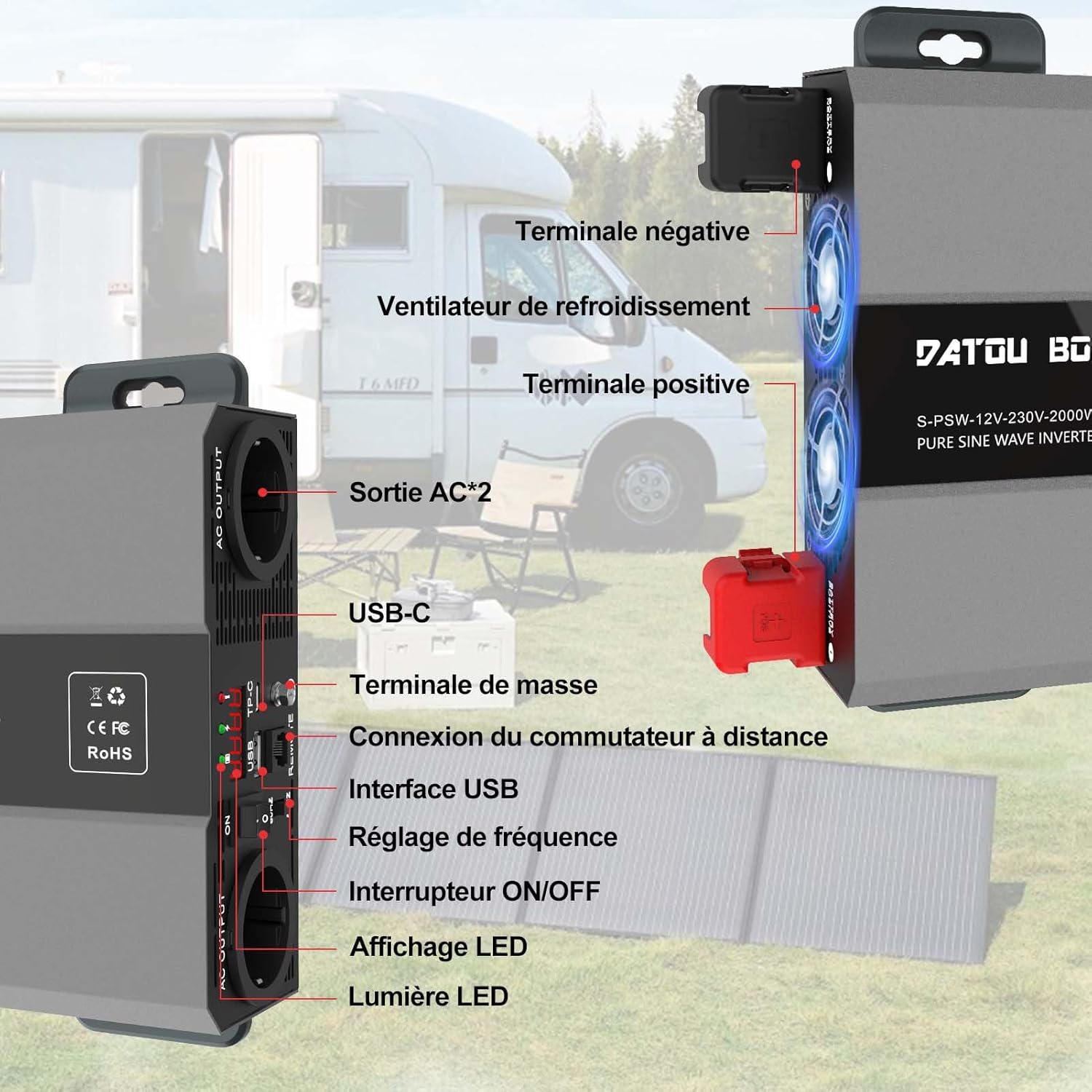
ภาพ: รายละเอียด view of the inverter's front and side panels, indicating the location of AC outputs, USB ports, remote connection, ON/OFF switch, LED display, positive and negative terminals, and cooling fans.
- AC Output Sockets (x2): Standard AC outlets for connecting 220V/230V appliances.
- อินเทอร์เฟซ USB: USB-A port (5V 3A) for charging compatible devices.
- พอร์ต USB-C: สำหรับชาร์จอุปกรณ์ที่รองรับ
- Remote Switch Connection: Port for connecting the wired remote control.
- สวิตช์เปิด/ปิด: สวิตซ์ไฟหลักสำหรับอินเวอร์เตอร์
- จอแสดงผล LED: Shows real-time operational status, input voltage, output power, and error codes.
- ไฟ LED แสดงสถานะ: Lights for power status and fault warnings.
- การปรับความถี่: (If applicable, refer to specific model for details)
- ขั้วบวก (+): ขั้วสีแดงสำหรับเชื่อมต่อสายไฟบวกของแบตเตอรี่
- ขั้วลบ (-): ขั้วสีดำสำหรับเชื่อมต่อสายไฟขั้วลบของแบตเตอรี่
- พัดลมระบายความร้อน: Intelligent fans for thermal dissipation.
- ขั้วกราวด์: สำหรับการต่อสายดินตัวถังรถ
5. การตั้งค่า
ปฏิบัติตามขั้นตอนเหล่านี้เพื่อการติดตั้งและการเชื่อมต่อที่ถูกต้อง:
- การติดตั้ง: Choose a secure, well-ventilated location for the inverter. Use the provided mounting screws and anchors to fix the inverter firmly. Ensure there is sufficient space around the unit for airflow.
- การเชื่อมต่อแบตเตอรี่:
- ตรวจสอบให้แน่ใจว่าสวิตช์เปิด/ปิดของอินเวอร์เตอร์อยู่ในตำแหน่งปิด
- เชื่อมต่อ สีแดง สายแบตเตอรี่ไปยังอินเวอร์เตอร์ บวก (+) terminal and then to the battery's บวก (+) เทอร์มินัล.
- เชื่อมต่อ สีดำ สายแบตเตอรี่ไปยังอินเวอร์เตอร์ ลบ (-) terminal and then to the battery's ลบ (-) เทอร์มินัล.
- ตรวจสอบให้แน่ใจว่าการเชื่อมต่อทั้งหมดแน่นหนาและปลอดภัย เพื่อป้องกันการหลวมและการเกิดประกายไฟ
- การต่อลงดิน: Connect a grounding wire (not included) from the inverter's ground terminal to a reliable earth ground point.
- รีโมทคอนโทรล (ตัวเลือก): If using the remote control, plug its cable into the designated remote connection port on the inverter.
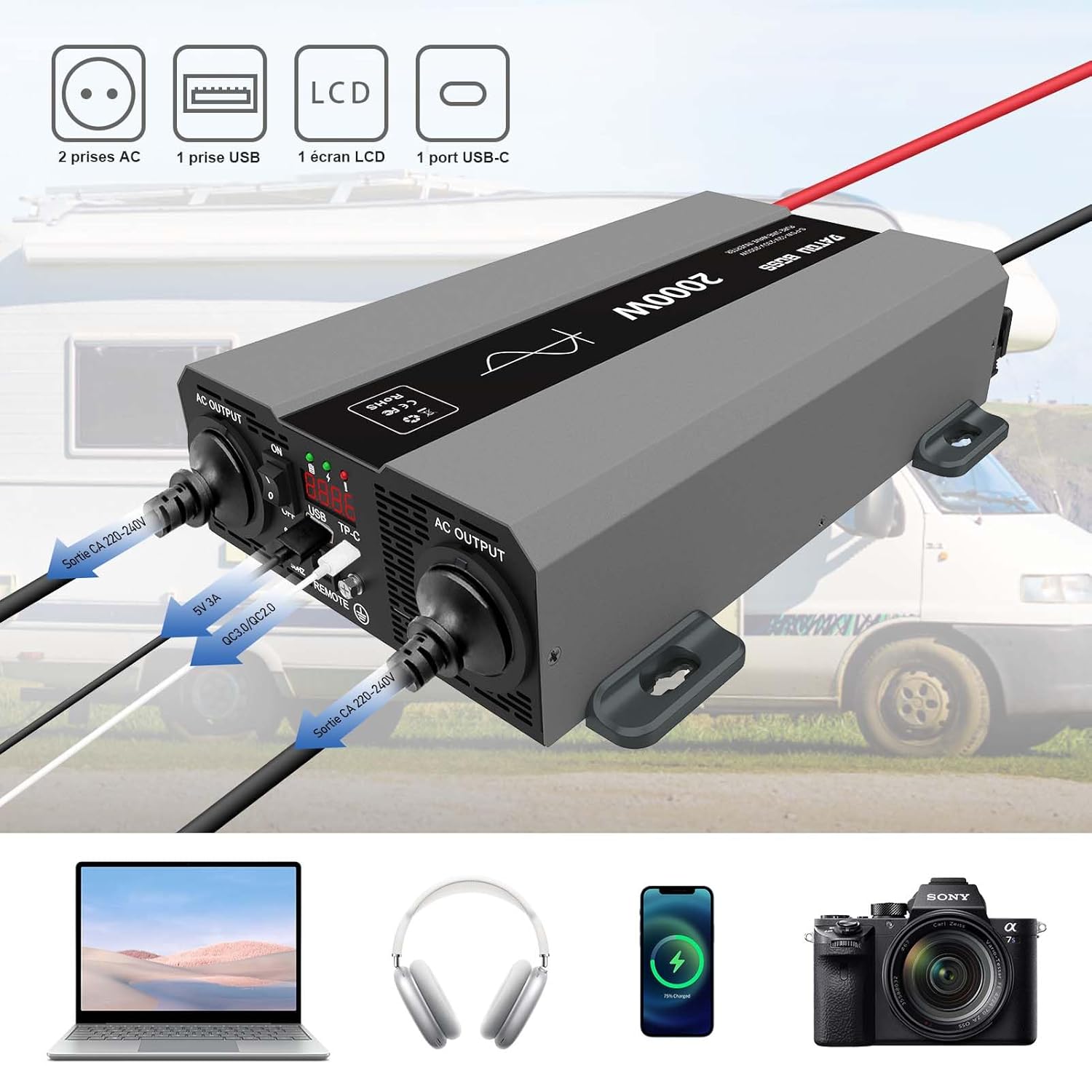
Image: The inverter connected to a 12V battery, with various devices like a laptop, headphones, smartphone, and camera connected to its AC and USB outputs, demonstrating typical usage.

Image: A circuit diagram illustrating how the inverter can be integrated into a solar power system, showing connections between photovoltaic modules, batteries, an MPPT charge controller, and the inverter.
6. คู่มือการใช้งาน
To operate your DATOUBOSS inverter:
- เปิดเครื่อง: After ensuring all connections are secure, switch the inverter's ON/OFF button to the 'ON' position. The LED display will illuminate, showing the input voltage and other operational parameters.
- เชื่อมต่ออุปกรณ์: Plug your AC appliances into the AC output sockets and USB devices into the USB ports. Ensure the total power consumption does not exceed 2000W.
- จอภาพแสดงผล: The LCD screen provides real-time information such as input DC voltage, output AC voltage, output power, and any fault codes. Monitor this display to ensure stable operation.
- ระบบระบายความร้อนอัจฉริยะ: The inverter features intelligent cooling fans that activate automatically when the internal temperature exceeds 45°C or when the load is above 40% of the rated capacity. This helps maintain optimal operating temperature and extends product life.
- รีโมทคอนโทรล: If connected, the remote control allows you to switch the inverter ON/OFF from a distance, providing convenience in various setups.
- หมดแรง: Before disconnecting any appliances or the battery, switch the inverter's ON/OFF button to the 'OFF' position.

Image: A close-up of the remote control unit, showing the ON/OFF switch and indicators for normal operation and fault conditions.
7. การสมัคร
The DATOUBOSS 12V 2000W Pure Sine Wave Power Inverter is versatile and suitable for a wide range of applications:
- รถบ้าน (RV) และ Campเอ่อ: Powering lights, small kitchen appliances, entertainment systems, and charging devices while on the go.
- Campการลง: Providing electricity for outdoor lighting, portable refrigerators, and charging phones or laptops in remote areas.
- รถบรรทุก: Operating various electronics and small appliances for long-haul drivers.
- ระบบนอกโครงข่ายไฟฟ้า: As part of a solar power setup for cabins or backup power.
- การสำรองข้อมูลหน้าแรก: Powering essential devices during power outagใช่
Examples of compatible devices include laptops (120W), phones (80W), electric kettles (800W), water pumps (300W), drones (150W), and mixers (500W).

Image: Collage showing various applications of the inverter, including use in an RV, during camping, with power tools, and for powering a laptop outdoors.

Image: An outdoor scene depicting the inverter powering various devices like a laptop, phone, electric kettle, water pump, drone, and mixer, with their typical wattages ระบุไว้
8. คุณสมบัติการป้องกัน
The DATOUBOSS inverter incorporates multiple protection mechanisms to ensure safe and reliable operation:
- เกินปริมาณtagการป้องกันอี: Safeguards against excessively high input voltage.
- ภายใต้ฉบับtagการป้องกันอี: Prevents battery over-discharge by shutting down when input voltagอีต่ำเกินไป
- ระบบป้องกันการโอเวอร์โหลด: Shuts down the inverter if the connected load exceeds its rated capacity.
- การป้องกันการลัดวงจร: Protects against damage from short circuits in the output.
- การป้องกันความร้อนสูงเกินไป: Activates cooling fans and shuts down the unit if internal temperatures become too high.
- การป้องกันขั้วย้อนกลับ: (Via external fuses, ensure correct connection)
- Isolated Input and Output Structure: Enhances safety by electrically separating the DC input from the AC output.

ภาพ: ระเบิด view of the inverter, highlighting internal components and icons representing various protection features such as overheating, short-circuit, over-voltage, overload, and high input voltage protection. It also shows the intelligent cooling fans.
9. การบำรุงรักษา
การบำรุงรักษาตามปกติจะช่วยให้อินเวอร์เตอร์ของคุณทำงานได้อย่างเหมาะสมและมีอายุการใช้งานยาวนาน:
- การทำความสะอาด: รักษาอินเวอร์เตอร์ให้สะอาด ปราศจากฝุ่นและสิ่งสกปรก ใช้ผ้าแห้งเช็ดทำความสะอาดภายนอก ห้ามใช้น้ำยาทำความสะอาด
- การระบายอากาศ : Periodically check that the cooling vents are not obstructed.
- การเชื่อมต่อ: Inspect battery cable connections regularly to ensure they are tight and free from corrosion. Clean terminals if necessary.
- พื้นที่จัดเก็บ: หากต้องเก็บรักษาอินเวอร์เตอร์เป็นเวลานาน ควรตัดการเชื่อมต่อจากแบตเตอรี่และเก็บไว้ในที่แห้งและเย็น
10 การแก้ไขปัญหา
โปรดดูส่วนนี้เพื่อดูปัญหาทั่วไปและวิธีแก้ไข:
| ปัญหา | สาเหตุที่เป็นไปได้ | สารละลาย |
|---|---|---|
| ไม่มีไฟ AC ออก / เครื่องแปลงไฟไม่ทำงาน | ปริมาณแบตเตอรี่ต่ำtage, loose connections, inverter switch off, internal fuse blown. | ตรวจสอบปริมาณแบตเตอรี่tage (must be 12V-15V). Tighten all DC connections. Ensure inverter switch is ON. Check external/internal fuses (if accessible and safe). |
| Low Output Power / Inverter Shuts Down | Overload, overheating, low battery voltage. | Reduce connected load. Allow inverter to cool down. Recharge or replace battery. |
| พัดลมไม่ทำงาน | Normal operation (fan activates only when needed), fan malfunction. | The fan is intelligent and only runs when the temperature exceeds 45°C or load is high. If inverter is hot and fan is still off, contact support. |
| Error Code on LCD | Indicates a specific fault (e.g., over-voltage, ต่ำกว่า voltage, overload, short-circuit, overheating). | Consult the inverter's specific error code list (if provided in a separate document) or contact customer support with the displayed code. Address the underlying issue (e.g., reduce load for overload, check battery for voltage issues). |
11. ข้อมูลจำเพาะ
Technical specifications for the DATOUBOSS 12V 2000W Pure Sine Wave Power Inverter:
| คุณสมบัติ | ข้อมูลจำเพาะ |
|---|---|
| หมายเลขรุ่น | 12V 2000W (SAK-12V2000W) |
| กำลังไฟที่กำหนด | 2000 วัตต์ |
| พลังสูงสุด | 4000 วัตต์ |
| อินพุต Voltage | กระแสตรง 12 โวลต์ |
| ปริมาณการส่งออกtage | กระแสไฟสลับ 220V/230V |
| รูปคลื่นเอาท์พุต | เพียวไซน์เวฟ |
| ประสิทธิภาพ | มากกว่า 90% |
| เอาท์พุต USB | 5V 3A (USB-A and USB-C ports) |
| ขนาด (กว้าง x ยาว x สูง) | 32.6 x 20 x 7 ซม. (12.8 x 7.9 x 2.8 นิ้ว) |
| น้ำหนัก | 4.62 กก. (10.19 ปอนด์) |
| ความจุแบตเตอรี่ที่แนะนำ | 100 Amp-hours (minimum for sustained use) |
| ต้นทาง | จีน |

Image: Diagram showing the physical dimensions of the DATOUBOSS 12V 2000W inverter, including length (425mm), width (262mm), and height (165mm).
12. การรับประกันและการสนับสนุน
DATOUBOSS is committed to providing quality products and customer satisfaction.
- การรับประกัน: ผลิตภัณฑ์นี้มาพร้อมกับ รับประกัน 24 เดือน ตั้งแต่วันที่ซื้อ ครอบคลุมถึงข้อบกพร่องในการผลิต
- นโยบายการคืนสินค้า: เพลิดเพลินไปกับ 30-day unconditional return guarantee.
- การสนับสนุนลูกค้า: เรานำเสนอ 7x24 customer support. For any questions, technical assistance, or warranty claims, please contact our support team through the retailer's platform or our official webเว็บไซต์.

Image: Icons and text indicating 24-hour customer support, a 30-day unconditional return guarantee, and a 24-month warranty.