
การแนะนำ
This instruction manual provides comprehensive guidance for the installation, operation, and maintenance of your Vrabocry 5V 5050 RGB LED Strip Light. Please read this manual thoroughly before use to ensure proper functionality and safety.
เนื้อหาแพ็คเกจ
ตรวจสอบว่ารายการทั้งหมดที่ระบุไว้ด้านล่างนี้รวมอยู่ในแพ็คเกจของคุณ:
- 4 x LED Strip Lights (each 1.64ft / 50cm)
- 1 x 44-Key IR Remote Control (battery not included)
- 1 x USB Controller Cable
- 3 x Strip Connector Cables

Image: All components included in the Vrabocry LED Strip Light package.
ข้อมูลจำเพาะ
| คุณสมบัติ | ข้อมูลจำเพาะ |
|---|---|
| ประเภท LED | เอสเอ็มดี 5050 RGB |
| ความยาวแถบ | 4 x 1.64ft (50cm) sections |
| ความกว้างของแผงวงจรพิมพ์ | 10มม. |
| ปริมาณไฟ LED | 30 LEDs per 50cm section |
| สี LED | RGB (หลายสี) |
| วิธีการควบคุม | รีโมทคอนโทรลอินฟราเรด 44 ปุ่ม |
| ฉบับทำงานtage | ช่องเสียบ USB DC5V |
| อัตราการกันน้ำ | IP30 (Non-Waterproof) |
| กาว | Double-sided tape on back |
| การใช้งานภายใน/ภายนอกอาคาร | ใช้ภายในอาคารเท่านั้น |
ข้อมูลด้านความปลอดภัย
- This LED strip light is designed for ใช้ภายในอาคารเท่านั้น. It is not waterproof (IP30 rated). Avoid exposure to water or high humidity.
- Ensure the power source is 5V DC USB. Using an incorrect voltage อาจทำให้ผลิตภัณฑ์เสียหายได้
- ห้ามคลุมแถบไฟ LED ด้วยวัสดุที่ติดไฟได้ง่ายขณะใช้งาน
- เก็บให้พ้นจากมือเด็ก
การติดตั้งและการตั้งค่า
Follow these steps to install your LED strip lights:
- เตรียมพื้นผิว: Clean the surface where the LED strips will be installed. Ensure it is dry and free of dust or grease for optimal adhesive performance.
- ติดตั้งแบตเตอรี่ระยะไกล: Open the battery compartment on the back of the 44-key IR remote control and insert a CR2025 button cell battery (not included), ensuring correct polarity.
- Connect the Strips: Connect the individual LED strip sections using the provided strip connector cables. Ensure the arrows on the connectors align with the '+' markings on the LED strips for proper electrical connection.
- Connect to USB Controller: Attach the assembled LED strip to the USB controller cable.
- Adhere the Strips: Peel off the protective backing from the double-sided tape on the back of the LED strips. Firmly press the strips onto the cleaned surface. For long-term use, consider reinforcing the adhesive with additional glue or by gently heating the tape with a hairdryer before application to improve adhesion.
- Cutting the Strips (Optional): The LED strips can be cut at designated marks (usually indicated by a scissor icon or copper pads) to fit specific lengths. Cut only along these marks to avoid damaging the circuit.
- เปิดเครื่อง: Plug the USB controller into a 5V USB power source (e.g., TV USB port, USB wall adapter, power bank).
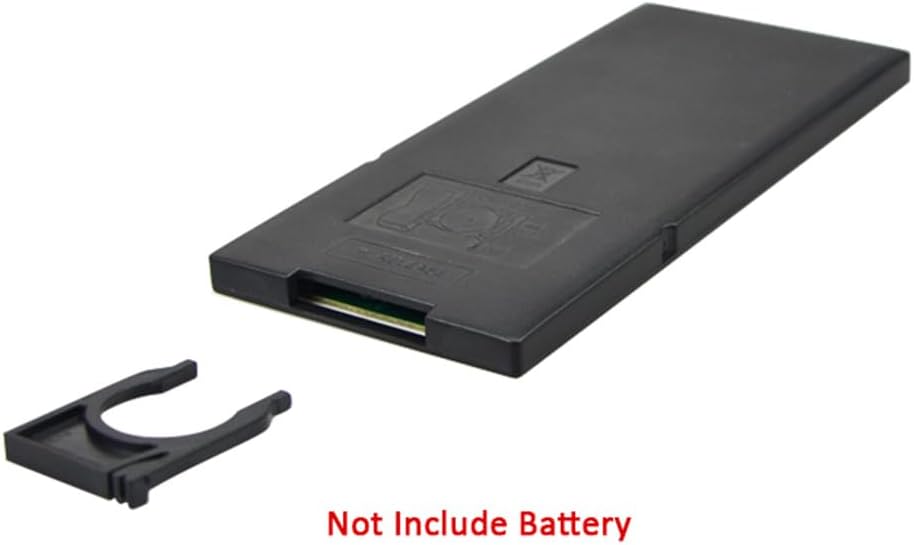
Image: Remote control battery compartment. Battery is not included.

Image: Visual guide for surface preparation, strip connection, and cutting points.
คำแนะนำการใช้งาน
Use the 44-key IR remote control to manage your LED strip lights:

Image: 44-Key IR Remote Control layout and functions.
- เปิด/ปิดเครื่อง: กดปุ่ม เปิด/ปิด ปุ่ม.
- การปรับความสว่าง: ใช้ ความสว่าง+ และ ความสว่าง - arrows to increase or decrease light intensity.
- สีคงที่: Select from 20 preset static colors, including Red, Green, Blue, and White, by pressing the corresponding color buttons.
- DIY Color Setting:
- กดหนึ่งใน of DIY1 ถึง DIY6 ปุ่ม
- ใช้ แดง, เขียว, น้ำเงิน arrow buttons (e.g., Red+, Red-) to adjust the intensity of each primary color.
- กดเหมือนเดิม ทำเอง button again to save your custom color.
- โหมดไดนามิก:
- อัตโนมัติ: Cycles through various dynamic modes automatically.
- เร็ว/ช้า: ปรับความเร็วของโหมดไดนามิก
- กระโดด3/กระโดด7: Jumps between 3 or 7 different colors.
- เฟด3/เฟด7: Fades between 3 or 7 different colors.
- แฟลช: Flashes through different colors.
การซ่อมบำรุง
- การทำความสะอาด: Gently wipe the LED strips with a dry, soft cloth to remove dust. Do not use liquid cleaners or immerse in water.
- กาว: If the adhesive tape loses its stickiness over time, you may reinforce it with additional double-sided tape or a suitable adhesive.
- พื้นที่จัดเก็บ: When not in use for extended periods, store the LED strips in a cool, dry place away from direct sunlight.
การแก้ไขปัญหา
| ปัญหา | สาเหตุที่เป็นไปได้ | สารละลาย |
|---|---|---|
| LED strips do not light up. | No power, incorrect connection, remote battery depleted. | Ensure USB power source is active. Check all connections, especially arrow alignments. Replace remote battery. |
| รีโมทคอนโทรลไม่ทำงาน | Battery depleted, IR receiver blocked, remote too far. | Replace remote battery. Ensure clear line of sight between remote and IR receiver on the USB controller. Operate within 5-8 meters. |
| สีไม่ถูกต้องหรือไม่สม่ำเสมอ | Incorrect connection, faulty strip section. | Verify all strip connector cables are correctly aligned (arrow to '+'). If one section is consistently problematic, it may be faulty. |
| Adhesive tape not sticking well. | Surface not clean, cold temperature. | Clean surface thoroughly. Gently heat the adhesive tape with a hairdryer before application to improve stickiness. Consider additional adhesive. |
การรับประกันและการสนับสนุน
Specific warranty information for this product is not provided in the available documentation. For warranty inquiries or technical support, please contact Vrabocry customer service through your purchase platform or the manufacturer's official contact channels.