การแนะนำ
Thank you for choosing the KZ AZ20 2pin Ear Hook True Wireless Bluetooth Adapter. This manual provides detailed instructions for the proper use, setup, and maintenance of your device. Please read this manual thoroughly before using the product to ensure optimal performance and longevity.
สินค้าเกินview
The KZ AZ20 transforms your wired in-ear monitor earphones into a true wireless experience. Featuring the Qualcomm QCC5171 chipset, it offers high-definition audio transmission, low latency, and extended battery life. It supports aptX Adaptive and aptX Lossless technologies for superior sound quality.

Figure 1: KZ AZ20 Ear Hooks in their charging case, showing indicator lights.
คุณสมบัติหลัก:
- ชิปเซ็ต Qualcomm QCC5171: Supports aptX Adaptive and aptX Lossless for high-fidelity audio.
- True Wireless Transformation: Converts 2-pin wired earphones into wireless.
- โหมดเสียงหลายแบบ: Includes Gaming Mode, Balanced Mode, and Bass Boost Mode.
- อายุการใช้งานแบตเตอรี่ที่ยาวนานขึ้น: Up to 6 hours on a single charge, 54 hours total with charging case.
- ความหน่วงต่ำ: Gaming mode offers audio latency as low as 68ms.
- Superior Signal-to-Noise Ratio: Designed to minimize bottom and current noise.

Figure 2: Close-up of the Qualcomm QCC5171 chipset, highlighting its advanced capabilities.
The QCC5171 chipset enables 24-bit 48kHz and 24-bit 96kHz audio transmission, and CD-quality 16-bit 44.1kHz lossless audio with aptX Lossless. It also supports aptX Voice for high-quality voice calls.

Figure 3: Comparison of signal-to-noise ratios, demonstrating the superior performance of QCC5171.
The ultra-high signal-to-noise ratio of the QCC5171 chipset ensures a clean background sound, minimizing bottom and current noise for an enhanced listening experience.
การตั้งค่า
1. การชาร์จอุปกรณ์:
Before first use, fully charge the KZ AZ20 ear hooks and their charging case. Place the ear hooks into the charging case. The indicator lights on the ear hooks and case will show charging status. A full charge provides approximately 6 hours of playback for the ear hooks, with the case extending total battery life to about 54 hours.
2. Attaching to Earphones:
The KZ AZ20 ear hooks are designed for 2-pin in-ear monitor earphones. Carefully align the 2-pin connectors on your earphones with the receptacles on the ear hooks and push them firmly until they are securely connected. Ensure the correct orientation (left ear hook for left earphone, right for right).

Figure 4: Illustration of transforming wired earphones into wireless using the KZ AZ20 ear hooks.
3. การจับคู่กับอุปกรณ์บลูทูธ:
- Ensure the ear hooks are charged and powered on.
- Open the charging case. The ear hooks will automatically enter pairing mode (indicator lights may flash).
- บนสมาร์ทโฟนหรืออุปกรณ์ที่รองรับบลูทูธ ให้ไปที่การตั้งค่าบลูทูธ
- ค้นหา available devices and select "KZ AZ20" from the list.
- Once connected, the indicator lights on the ear hooks will change, typically to a solid blue or off, indicating successful pairing.
The device supports Bluetooth 5.3 for stable and efficient wireless communication.
คำแนะนำการใช้งาน
Wearing the Ear Hooks:
Gently place the ear hooks over your ears, ensuring the attached earphones are comfortably seated in your ear canals. Adjust the ear hooks for a secure and comfortable fit. The design is optimized for comfort and stability.

Figure 5: Comparison of KZ AZ20 ear hook dimensions with other models, highlighting its compact and lightweight design.
การควบคุมการเล่นและการโทร:
The KZ AZ20 features touch controls on the ear hooks for media playback and call management. Specific gestures and functions may vary slightly, but common controls include:
- เล่น/หยุดชั่วคราว: Single tap on either ear hook.
- เพลงถัดไป: Double tap on the right ear hook.
- แทร็กก่อนหน้า: Double tap on the left ear hook.
- รับ/วางสาย: แตะเพียงครั้งเดียวในระหว่างที่มีสายเรียกเข้า
- ปฏิเสธสาย: กดค้างไว้ 2 วินาทีขณะมีสายเรียกเข้า
- เปิดใช้งาน Voice Assistant: Triple tap on either ear hook.
การสลับโหมดเสียง:
The KZ AZ20 offers three distinct audio modes to optimize your listening experience:

รูปที่ 6: เกินview of the three available audio modes: Bass Boost, Gaming, and Balanced.
- โหมดเพิ่มเบส: Enhances low frequencies for a more powerful and impactful sound, ideal for bass-heavy music.
- โหมดเกม: Optimizes for low audio latency (as low as 68ms), providing a responsive audio experience crucial for gaming.
- โหมดสมดุล: Offers a well-rounded and neutral audio output, suitable for various content including music, videos, and general daily use.
To switch between modes, refer to the specific instructions in your included user manual or experiment with pressing and holding certain touch areas for a few seconds until you hear an audio prompt indicating the mode change.
อายุการใช้งานแบตเตอรี่และการชาร์จ
The KZ AZ20 is designed for extended use with its efficient power management.

Figure 7: Detailed breakdown of battery life: 6 hours on a single charge, 54 hours total with the charging case, and 800mAh charging case capacity.
- Ear Hook Playback Time: ใช้งานได้ประมาณ 6 ชั่วโมงต่อการชาร์จเต็มหนึ่งครั้ง
- ระยะเวลาการใช้งานแบตเตอรี่ทั้งหมด (เมื่อใช้ร่วมกับเคสชาร์จ): ประมาณ 54 ชั่วโมง.
- ความจุเคสชาร์จ: 800mAh.
- Charging Time (Ear Hooks): ประมาณ 6 ชั่วโมง.
To charge the ear hooks, simply place them back into the charging case. To charge the case itself, connect it to a power source using a compatible USB cable. The indicator lights on the case will show charging status.

Figure 8: Comparison of power consumption and battery life across different chipsets, showing the efficiency of QCC5171.
การซ่อมบำรุง
- การทำความสะอาด: Use a soft, dry cloth to clean the ear hooks and charging case. Do not use abrasive cleaners or immerse the device in water.
- พื้นที่จัดเก็บ: When not in use, store the ear hooks in their charging case to protect them and keep them charged. Store in a cool, dry place away from direct sunlight and extreme temperatures.
- ความต้านทานน้ำ: The device is water resistant. Avoid prolonged exposure to water or submersion.
- การดูแลแบตเตอรี่ เพื่อยืดอายุการใช้งานแบตเตอรี่ ควรหลีกเลี่ยงการปล่อยให้แบตเตอรี่หมดจนเกลี้ยงบ่อยๆ ควรชาร์จแบตเตอรี่เป็นประจำ แม้ว่าจะไม่ได้ใช้งานตลอดเวลาก็ตาม
การแก้ไขปัญหา
| ปัญหา | สาเหตุที่เป็นไปได้ | สารละลาย |
|---|---|---|
| ไม่มีเสียง / การเชื่อมต่อขาดหาย | Low battery, out of range, not paired, earphones not properly connected. | Charge the device. Move closer to the paired device. Re-pair the ear hooks. Ensure earphones are securely attached to the 2-pin connectors. |
| ไม่สามารถจับคู่ได้ | Device not in pairing mode, Bluetooth off on source device, interference. | Ensure ear hooks are in pairing mode (open case). Turn Bluetooth off and on again on your device. Move away from other wireless devices. |
| ปัญหาการชาร์จไฟ | Poor contact, faulty cable/charger, ear hooks not seated correctly in case. | Ensure ear hooks are properly seated in the charging case. Check charging cable and adapter. Clean charging contacts if necessary. |
| Unintended Connection to Device | Ear hooks not properly seated in charging case, preventing disconnection. | Ensure ear hooks are fully seated in the charging case and the case lid is closed. This should disconnect them from your device and initiate charging. |
ข้อมูลจำเพาะ
- ชื่อรุ่น : อาซ-20
- เทคโนโลยีการเชื่อมต่อ: ไร้สาย (บลูทูธ 5.3)
- เทคโนโลยีการสื่อสารไร้สาย: ทรูไวร์เลส
- ชิปเซ็ต: Qualcomm QCC5171 (supports aptX Adaptive, aptX Lossless, aptX Voice)
- อุปกรณ์ที่รองรับ: Android phones (and other Bluetooth-enabled devices)
- ประเภทการควบคุม: การควบคุมสื่อ (สัมผัส)
- ระดับการต้านทานน้ำ: ทนน้ำ
- ช่วงความถี่: >= 44.1 KHz
- Ear Hook Battery Life: ประมาณ 6 ชั่วโมง (ชาร์จครั้งเดียว)
- ระยะเวลาการใช้งานแบตเตอรี่ทั้งหมด (เมื่อใส่เคส): ประมาณ 54 ชั่วโมง
- ความจุแบตเตอรี่กรณีชาร์จ: 800mAh
- วัสดุ: ซิลิโคน, พลาสติก
- สี: สีดำ
- น้ำหนักสินค้า: 4.2 ออนซ์
- ผู้ผลิต: Alpha & Delta
- หมายเลขรุ่นสินค้า: TRN BT350
การรับประกันและการสนับสนุน
This product comes with a user manual. For specific warranty information and customer support, please refer to the documentation included in your product packaging or contact the manufacturer directly. Keep your purchase receipt for warranty claims.
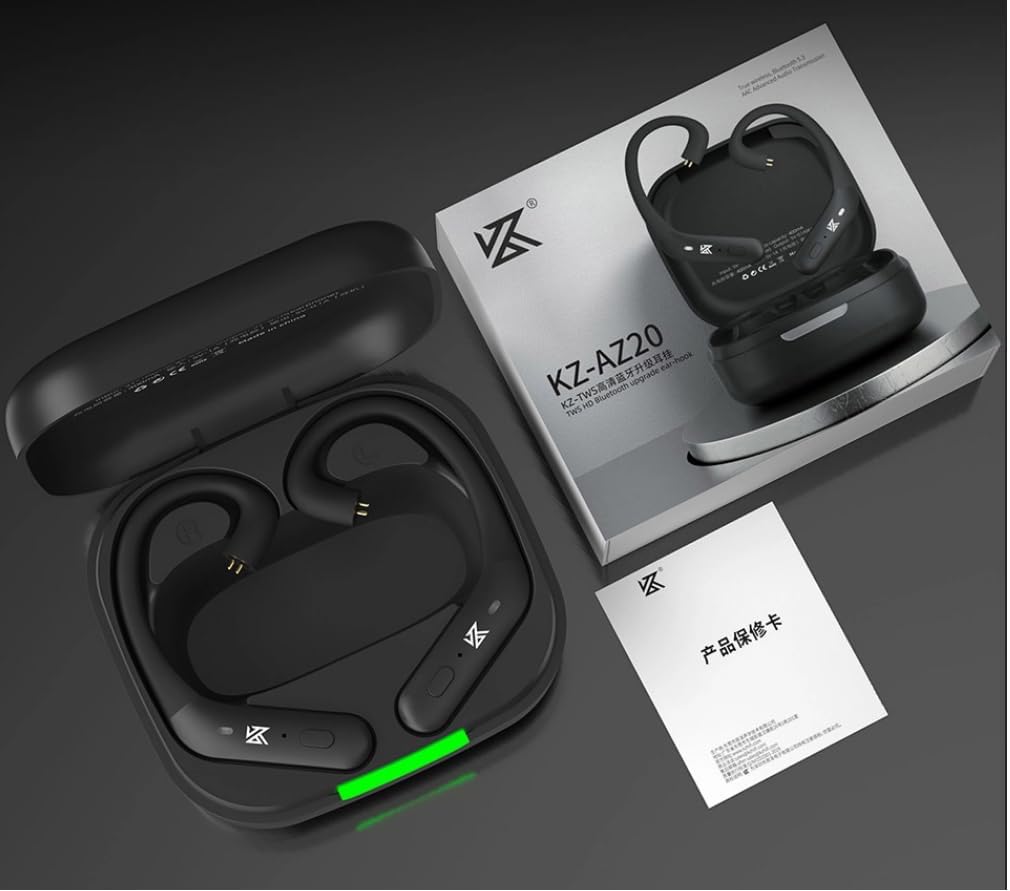
Figure 9: The KZ AZ20 product packaging, showing the ear hooks, charging case, and included user manual.


