
1. บทนำ
This manual provides essential information for the safe and effective operation of your HTVRONT Auto Tumbler Heat Press Machine. Designed for sublimation printing, this machine automatically applies ideal pressure for various drinkware, ensuring efficient and high-quality results. Please read these instructions thoroughly before use.

Image: HTVRONT Auto Tumbler Heat Press Machine, showcasinด้วยดีไซน์ที่กะทัดรัดและอุปกรณ์เสริมที่ให้มาด้วย
2. ข้อมูลด้านความปลอดภัย
- ปิดเครื่องอัตโนมัติ: The machine powers down after 15 minutes of inactivity to prevent overheating and conserve energy.
- หยุดฉุกเฉิน: Press the 'R' button to instantly halt heating and release the heat pad, ensuring user safety and preventing burns.
- ถุงมือกันความร้อน: Always use the provided heat-resistant gloves when handling hot items or the heat press components.
- การระบายอากาศ : ใช้งานเครื่องจักรในบริเวณที่มีการระบายอากาศที่ดี
- พื้นผิว: Place the heat press on a stable, heat-resistant surface.
- ห้ามสัมผัสพื้นผิวที่ร้อน: Avoid direct contact with the heating element during and immediately after operation.
- เล่มที่tage: Ensure the machine is connected to a 120V power outlet.
3. สิ่งที่รวมอยู่
- Auto Tumbler Heat Press x1
- Heat-resistant Gloves x1 pair
- Heat-resistant Tape x1 roll
- คู่มือการใช้งาน x1
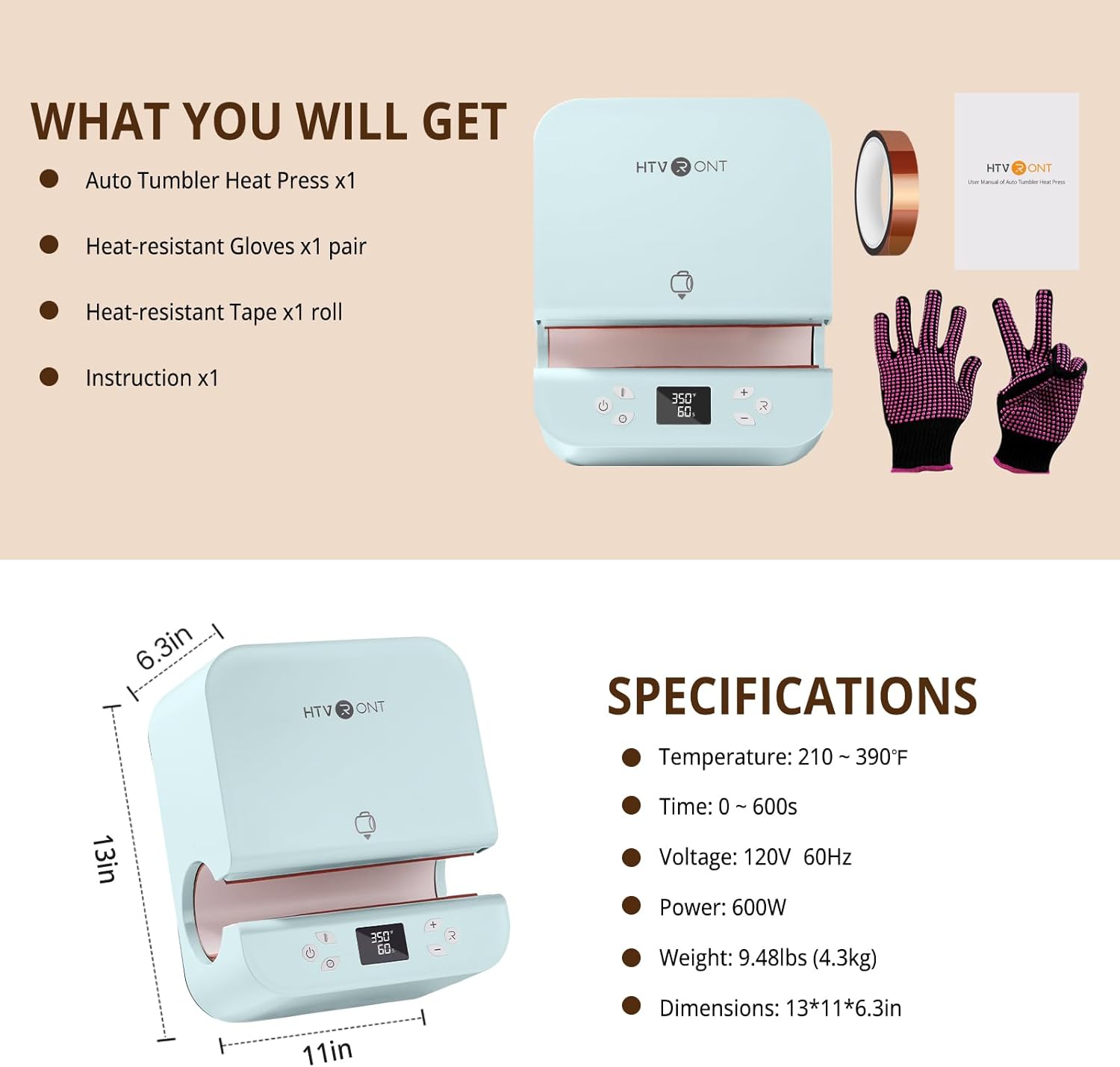
Image: The complete package contents of the HTVRONT Auto Tumbler Heat Press Machine.
4. ข้อมูลจำเพาะ
| คุณสมบัติ | ค่า |
|---|---|
| การใช้ที่แนะนำ | Sublimation printing on drinkware (tumblers, mugs, water bottles, sippy cups) |
| คะแนนอุณหภูมิบน | 390°ฟาเรนไฮต์ (200°เซลเซียส) |
| เล่มที่tage | 120 โวลต์ |
| วัดtage | 600 วัตต์ |
| ขนาดสินค้า | ขนาด 12.9 นิ้ว (ยาว) x 10.9 นิ้ว (กว้าง) x 6.3 นิ้ว (สูง) (32.7 ซม. x 27.7 ซม. x 16 ซม.) |
| น้ำหนักสินค้า | 10.65 ปอนด์ (4.84 กก.) |
| Compatible Tumbler Diameter | 2.95 นิ้ว (7.5 ซม.) ถึง 3.18 นิ้ว (8.1 ซม.) |
| Compatible Tumbler Volume | 280ml - 850ml (11-30oz) |
| วัสดุ | ABS เปลือก |

Image: Visual guide for compatible tumbler dimensions and sizes.
5. การตั้งค่า
- แกะ: นำส่วนประกอบทั้งหมดออกจากบรรจุภัณฑ์อย่างระมัดระวัง เก็บบรรจุภัณฑ์ไว้เพื่อการจัดเก็บหรือขนส่งในอนาคต
- การจัดวาง: Position the heat press on a flat, stable, and heat-resistant surface in a well-ventilated area.
- การเชื่อมต่อไฟฟ้า: Connect the power cord to the machine's inlet and then to a standard 120V, 60Hz electrical outlet.
- เปิดเครื่องครั้งแรก: Flip the power switch located at the back of the machine to the 'ON' position. The digital display will illuminate.
6. คู่มือการใช้งาน
6.1. Preparing Your Item
- Ensure your tumbler's diameter is between 2.95 and 3.18 inches.
- Wrap your sublimation design tightly around the tumbler and secure it with heat-resistant tape.
6.2. การตั้งค่าอุณหภูมิและเวลา
- Use the 'Mode' button to cycle through preset temperature and time settings, or manually adjust using the '+' and '-' buttons for temperature and time.
- Refer to the Quick Reference Chart below for recommended settings based on material.
6.3. Pressing Cycle
- Once settings are confirmed, carefully slide the prepared tumbler into the heating chamber. The machine will automatically detect the tumbler and apply appropriate pressure.
- Press the 'Enter' button to begin the heating cycle. The machine will automatically heat and press the design.
- The digital display will show the countdown.
6.4. Removing the Tumbler
- Upon completion of the cycle, the machine will automatically release the pressure and open.
- Wearing heat-resistant gloves, carefully remove the hot tumbler from the machine.
- Allow the tumbler to cool completely before removing the sublimation paper and tape.

Image: Control panel showing temperature and time settings.
6.5. Quick Reference Chart
| วัสดุฐาน | เวลา | อุณหภูมิ |
|---|---|---|
| แก้วน้ำสแตนเลส | 130±20วินาที | 370°F±10°F |
| แก้วเซรามิค | 400±20วินาที | 385°F±10°F |
| แก้วน้ำทรงทัมเบลอร์ | 300±20วินาที | 370°F±10°F |
Note: These are general guidelines. Optimal settings may vary based on specific materials and sublimation paper.
7. การบำรุงรักษา
- การทำความสะอาด: Always unplug the machine and allow it to cool completely before cleaning. Wipe the exterior with a soft, damp ผ้า ห้ามใช้น้ำยาทำความสะอาดที่มีฤทธิ์กัดกร่อนหรือจุ่มเครื่องลงในน้ำ
- พื้นที่จัดเก็บ: ควรเก็บเครื่องรีดความร้อนไว้ในที่แห้งและปราศจากฝุ่นเมื่อไม่ใช้งาน
8 การแก้ไขปัญหา
- Uneven Heating/Ghosting: Ensure the sublimation paper is tightly wrapped around the tumbler with no gaps or wrinkles. Verify the tumbler diameter is within the recommended range (2.95-3.18 inches) for optimal pressure application.
- Tumbler Difficult to Remove: This may occur with mugs slightly larger than the recommended diameter. Ensure you are using heat-resistant gloves and carefully extract the item. Avoid forcing the tumbler.
- เครื่องไม่เปิดเครื่อง: Check that the power cord is securely plugged into both the machine and a functioning 120V outlet. Ensure the power switch is in the 'ON' position.
- คุณสมบัติปิดอัตโนมัติ: If the machine powers off unexpectedly, it may be due to 15 minutes of inactivity. Simply turn it back on.
9. การรับประกันและการสนับสนุน
HTVRONT is committed to providing excellent customer service. Should any issues arise with your Auto Tumbler Heat Press Machine, please contact HTVRONT customer support for assistance. They will work to provide a solution to ensure your satisfaction.
For support, please refer to the contact information provided in your product packaging or visit the official HTVRONT webเว็บไซต์.