
PTHTECHUS A22
PTHTECHUS Children's Smartwatch User Manual
รุ่น : A22
แบรนด์: PTHTECHUS
1. บทนำ
This manual provides comprehensive instructions for the PTHTECHUS Children's Smartwatch, Model A22. This device is designed for children aged 4-12 and features a 1.68-inch HD touchscreen, a variety of educational and entertainment functions, and robust construction.
Key features include 22 pre-installed games, an HD camera for photos and videos, an MP3 player, a pedometer, an alarm clock, a timer, a child lock, an audio book function, a flashlight, and a calculator. It also incorporates learning tools such as flashcards and a habit tracking system to support children's development.

Figure 1.1: PTHTECHUS Children's Smartwatch (Model A22)
2. ข้อมูลด้านความปลอดภัย
Please read the following safety guidelines carefully before using the smartwatch to ensure safe operation and prevent damage.
- อันตรายจากการสำลัก: This device contains small parts and is not suitable for children under 3 years of age.
- ความปลอดภัยของแบตเตอรี่: Do not attempt to disassemble, strike, or throw the device into fire. The battery is not replaceable. Only use the provided charging cable and a power source in 5V/1A while charging.
- ความต้านทานน้ำ: The smartwatch is designed to withstand splashes but is not fully waterproof. Avoid submerging the watch in water or exposing it to heavy rain.
- อุณหภูมิ: Do not expose the device to extreme temperatures (hot or cold) or direct sunlight for extended periods.
- การทำความสะอาด: ใช้ผ้าแห้งนุ่มๆ เช็ดทำความสะอาด หลีกเลี่ยงการใช้สารเคมีรุนแรงหรือวัสดุที่มีฤทธิ์กัดกร่อน

Figure 2.1: Safety warnings and product details on packaging.
3. เนื้อหาบรรจุภัณฑ์
Upon opening the gift box, please verify that all the following items are included:
- PTHTECHUS Children's Smartwatch (Model A22)
- สายชาร์จ USB
- คู่มือการใช้งาน (เอกสารนี้)

Figure 3.1: Smartwatch packaging box.
4. การตั้งค่า
4.1 การชาร์จสมาร์ทวอทช์
Before first use, fully charge the smartwatch. The watch has a 500 mAh Lithium Ion battery.
- Connect the small end of the USB charging cable to the charging port on the smartwatch.
- Connect the larger end of the USB cable to a 5V/1A USB power adapter (not included) or a computer's USB port.
- The charging indicator will appear on the screen. A full charge typically takes 3-4 hours.
- เมื่อชาร์จเต็มแล้ว ให้ถอดสายเคเบิลออก
4.2 การเปิด/ปิดเครื่อง
- การเปิดเครื่อง: กดปุ่มเปิด/ปิด (โดยปกติจะอยู่ด้านข้างของนาฬิกา) ค้างไว้สองสามวินาทีจนกว่าหน้าจอจะสว่างขึ้น
- วิธีปิดเครื่อง: Press and hold the power button until a power-off option appears on the screen. Tap to confirm.
4.3 Initial Settings (Time, Date, Language)
Upon first power-on or after a factory reset, you may need to set the time, date, and language.
- From the main watch face, swipe to access the app menu.
- Tap the "Settings" icon.
- Navigate to "Time & Date" to adjust.
- Navigate to "Language" to select from the 8 available languages.
5. คู่มือการใช้งาน
The smartwatch features a 1.68-inch HD touchscreen for easy navigation. Swipe left/right or up/down to browse through applications and menus.
5.1 ส่วนติดต่อผู้ใช้หลักและการนำทาง
- ดูใบหน้า: The default screen displays the time and date. Swipe left or right to change watch faces.
- เมนูแอพ: Swipe up or down from the watch face to access the main application menu.
- ปุ่มย้อนกลับ: Use the physical button on the side or an on-screen arrow to go back to the previous screen.
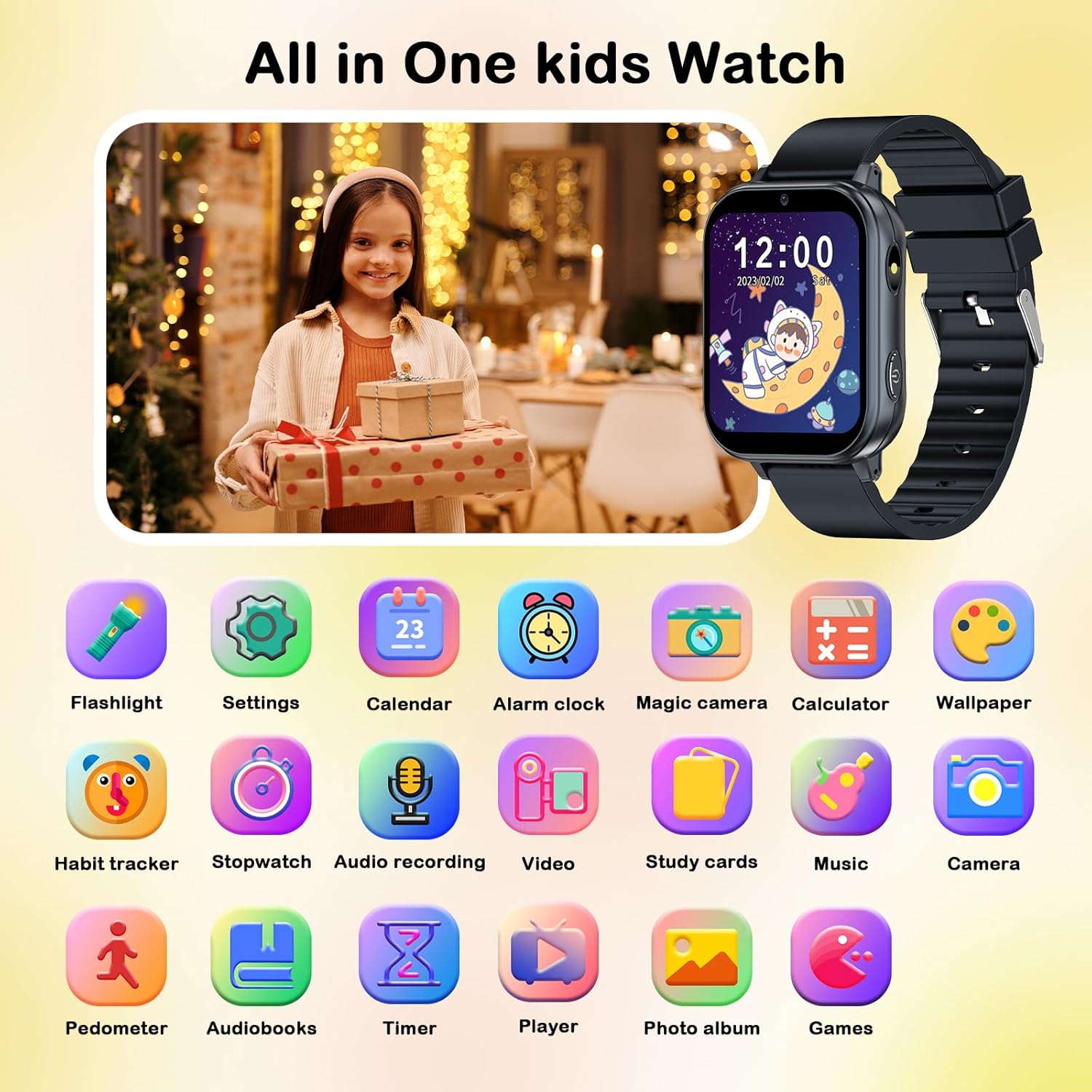
รูปที่ 5.1: เกินview of smartwatch applications.
5.2 คุณสมบัติหลัก
5.2.1 Games (22 Educational Games)
The smartwatch includes 22 pre-installed educational games designed to enhance logical thinking, responsiveness, and hand-eye coordination. Access them via the "Games" icon in the app menu.

Figure 5.2: Games and Parental Control feature.
การควบคุมโดยผู้ปกครอง: The watch includes a child lock feature to manage game access. Refer to the "Child Lock" section for details.
5.2.2 HD Camera and Video Recorder
Capture photos and videos with the built-in HD camera. The watch supports pop-up head shots and includes 10 fun stickers for creative expression.
- Tap the "Camera" icon to open the camera app.
- กดปุ่มชัตเตอร์เพื่อถ่ายภาพ หรือเปลี่ยนเป็นโหมดวิดีโอเพื่อบันทึก
- Access saved photos and videos in the "Photo Album" or "Video Player" apps.

Figure 5.3: Camera and fun stickers.
5.2.3 MP3 Player and Audio Recorder
The smartwatch functions as an MP3 player. Music files can be transferred to the watch's storage (via USB connection to a computer). It also has an audio recorder.
- Tap the "Music" icon to play MP3 files.
- Tap the "Audio Recording" icon to record voice notes.

Figure 5.4: MP3 Player, Audio Books, and Learning Cards.
5.2.4 เครื่องนับก้าว
Track daily steps with the built-in pedometer. Access it via the "Pedometer" icon to view ข้อมูลกิจกรรม
5.2.5 Alarm Clock, Timer, and Calculator
These utility functions are accessible from the app menu:
- นาฬิกาปลุก: ตั้งนาฬิกาปลุกเตือนความจำได้หลายรายการ
- ตัวจับเวลา: Use for timed activities.
- เครื่องคิดเลข: ดำเนินการคำนวณทางคณิตศาสตร์พื้นฐาน

Figure 5.5: Timer, Alarm Clock, Calculator, and Pedometer functions.
5.2.6 Habit Tracking and Flashcards
The watch includes educational tools to help children develop good habits and learn new concepts.
- Habit Tracking: Set reminders for daily activities like "Get Up," "Brush Your Teeth," "Breakfast," "Homework," etc.
- Flashcards: Learn about different vegetables, fruits, animals, and colors.

Figure 5.6: Habit Tracking feature.
5.2.7 Audio Books and Torch
- Audio Books: Access pre-loaded audio stories for listening.
- คบเพลิง: Activate the built-in flashlight for illumination.
5.2.8 ล็อคป้องกันเด็ก
The child lock feature allows parents to control access to certain functions, such as games, to manage screen time. This setting can be found within the "Settings" menu.
6. การบำรุงรักษา
6.1 การทำความสะอาด
To keep your smartwatch clean and in good condition:
- เช็ดหน้าจอและตัวเรือนนาฬิกาด้วยผ้าเนื้อนุ่มที่ไม่เป็นขุย
- สำหรับรอยฝังแน่น ให้ลบออกเล็กน้อยampen the cloth with water. Do not use harsh cleaning agents, solvents, or abrasive materials.
- ตรวจสอบให้แน่ใจว่าพอร์ตการชาร์จปราศจากฝุ่นและเศษขยะ
6.2 การดูแลแบตเตอรี่
- หลีกเลี่ยงการระบายแบตเตอรี่จนหมดบ่อยครั้ง
- ควรชาร์จนาฬิกาเป็นประจำ แม้ว่าจะไม่ได้ใช้งาน เพื่อรักษาอายุการใช้งานของแบตเตอรี่
- Do not leave the watch charging for excessively long periods after it is fully charged.
7 การแก้ไขปัญหา
หากคุณพบปัญหาเกี่ยวกับสมาร์ทวอทช์ โปรดดูวิธีแก้ไขปัญหาทั่วไปต่อไปนี้:
| ปัญหา | วิธีแก้ปัญหาที่เป็นไปได้ |
|---|---|
| นาฬิกาไม่เปิด | Ensure the watch is fully charged. Connect it to the charger for at least 30 minutes. If it still doesn't turn on, try holding the power button for 10-15 seconds for a forced restart. |
| หน้าจอไม่ตอบสนอง | Restart the watch by holding the power button. If the issue persists, ensure the screen is clean and dry. |
| แบตเตอรี่หมดเร็วมาก | Reduce screen brightness. Close unused applications. Limit continuous game playing or video playback. Ensure the watch is fully charged before use. |
| ไม่สามารถโอนได้ files (music/photos). | Ensure the watch is properly connected to the computer via the USB cable. Check if the watch is in data transfer mode (if prompted). Try a different USB port or cable. |
| Games are locked or inaccessible. | Check the Parental Control settings. Ensure the child lock feature is not enabled or is configured correctly. |
หากปัญหายังคงมีอยู่หลังจากลองวิธีแก้ไขเหล่านี้แล้ว โปรดติดต่อฝ่ายสนับสนุนลูกค้า
8. ข้อมูลจำเพาะ
| คุณสมบัติ | รายละเอียด |
|---|---|
| หมายเลขรุ่น | เอ22 |
| แสดง | 1.68 Inches HD Touchscreen (LCD) |
| ประเภทแบตเตอรี่ | ลิเธียมไอออน |
| ความจุของแบตเตอรี่ | 500 มิลลิวินาทีamp ชั่วโมง |
| การเชื่อมต่อ | USB (for charging and data transfer), Bluetooth |
| วัสดุ | ซิลิโคน (สายรัด) |
| อินพุตอินเทอร์เฟซมนุษย์ | หน้าจอสัมผัส |
| ขนาด (แพ็คเกจ) | 12.8 x 7.7 x 2.9 ซม.; 90 กรัม |
| ผู้ผลิต | พีทีเอชเทคทัส |
9. การรับประกันและการสนับสนุน
The PTHTECHUS Children's Smartwatch comes with a รับประกัน 1 ปี ตั้งแต่วันที่ซื้อสินค้า
For any questions, technical support, or warranty claims, please contact PTHTECHUS customer service. Contact information can typically be found on the product packaging or the official PTHTECHUS webเว็บไซต์.
Based on the packaging, you may contact:
- ผู้แทนสหภาพยุโรป: APEX CE SPECIALISTS GmbH, Langenhorner Chaussee 277, 22419 Hamburg, Germany. Email: ติดต่อ: info@apex-ce.de
- ตัวแทนจากสหราชอาณาจักร: APEX CE SPECIALISTS LIMITED, 89 Princess Street, Manchester, M1 4HT, United Kingdom. Email: ติดต่อ: info@apex-ce.de